Is there a way to see another subnet?

ezhik

New member
Local time
9:37 PM
Messages
19
I'm away from home for a few months and Internet access is provied by a router in the 192.168.x.x range, so my pc has an address on this subnet. But, I have a device with an address in the 10.0.0.x range that I need occasional access to, and the only way I know how to do that is to keep changing my IP address around from one subnet to the other.

Is there an easier way to 'see' the 10.0.0.x device when my IP address is on the 192.168.x.x subnet?
 

My Computer My Computer

At a glance

W7
OS
W7
I'm away from home for a few months and Internet access is provied by a router in the 192.168.x.x range, so my pc has an address on this subnet. But, I have a device with an address in the 10.0.0.x range that I need occasional access to, and the only way I know how to do that is to keep changing my IP address around from one subnet to the other.

Is there an easier way to 'see' the 10.0.0.x device when my IP address is on the 192.168.x.x subnet?


You would need a router that could route traffic between the 2 subnets. If this is simply a SOHO style router, you won't have the functionality.
 

My Computer My Computer

At a glance

Windows 7 Ultimate x64Intel Q9550 2.83Ghz OC'd to 3.40Ghz8GB G.Skill PI DDR2-800, 4-4-4-12 timingsEVGA 1280MB Nvidia GeForce GTX570
Computer Manufacturer/Model Number
Self-Built in July 2009
OS
Windows 7 Ultimate x64
CPU
Intel Q9550 2.83Ghz OC'd to 3.40Ghz
Motherboard
Gigabyte GA-EP45-UD3R rev. 1.1, F12 BIOS
Memory
8GB G.Skill PI DDR2-800, 4-4-4-12 timings
Graphics Card(s)
EVGA 1280MB Nvidia GeForce GTX570
Sound Card
Realtek ALC899A 8 channel onboard audio
Monitor(s) Displays
23" Acer x233H
Screen Resolution
1920x1080
Hard Drives
Intel X25-M 80GB Gen 2 SSD
Western Digital 1TB Caviar Black, 32MB cache. WD1001FALS
PSU
Corsair 620HX modular
Case
Antec P182
Cooling
stock
Keyboard
ABS M1 Mechanical
Mouse
Logitech G9 Laser Mouse
Internet Speed
15/2 cable modem
Other Info
Windows and Linux enthusiast. Logitech G35 Headset.
OK, thank you. I suspected something more than normal home kit would be needed.
 

My Computer My Computer

At a glance

W7
OS
W7
@ezhik;

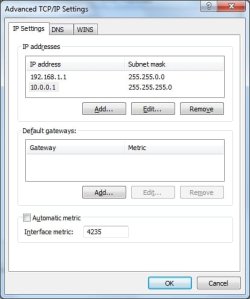
You can bind two IP addresses to your NIC if you can do without DHCP. Turn off DHCP and go to Advanced TCP/IP Setting in IPv4. In there you can put a 192.168.0.0/16 address and the gateway address (Subnet Mask). Then add another address 10.0.0.0/24 and no gateway address (Subnet Mask). This way you can be on both networks at the same time.
 

Attachments

  • AdvancedTCPIPSettings.jpg
    AdvancedTCPIPSettings.jpg
    24.8 KB · Views: 65
Last edited:

My Computer My Computer

At a glance

Windows 7 Enterprise (x64); Windows Server 20...16GB
Computer type
PC/Desktop
Computer Manufacturer/Model Number
Dell OP7010
OS
Windows 7 Enterprise (x64); Windows Server 2008 R2 (x64)
Memory
16GB
Monitor(s) Displays
4 Dell 24" LCD
Screen Resolution
1280x1024
Keyboard
Dell
Mouse
Dell Optical
Internet Speed
40meg
Aarrghhh... I'm 16 minutes too late...

Yeah, bind a second IP address (meaning you'd have to use manual IP address).
Or you can buy a "real" router to "simplify" things... I personally use Mikrotik RB450G routerboard, it's the cheapest closest thing to my old Cisco 2000 series router...

zzz2496

Ps. here's the site for Mikrotik hardware - buy a board, and a case, and you have your self a super flexible router...
 

My Computer My Computer

At a glance

Windows7 Ultimate 64bitIntel Core 2 Quad Q6600DDR2 Adata 4GBNvidia GeForce GTX 285 1024 and Nvidia GeForc...
Computer Manufacturer/Model Number
Self Built
OS
Windows7 Ultimate 64bit
CPU
Intel Core 2 Quad Q6600
Motherboard
Abit IN9-32X-MMAX
Memory
DDR2 Adata 4GB
Graphics Card(s)
Nvidia GeForce GTX 285 1024 and Nvidia GeForce 8800GT 512
Sound Card
Asus Xonar HDAV 1.3
Monitor(s) Displays
Dell 2407WFP and BenQ 2400v and Philips 150v3
Screen Resolution
3840x1200 and 1024x768
Hard Drives
2 WDC 1TB
1 WDC 1.5TB
1 WDC 640GB
1 WDC 320GB
1 Seagate 200GB
PSU
Corsair TX 850W
Case
Cooler Master HAF932
Cooling
Arctic Cooling Freezer Extreme and plenty of fans...
Keyboard
MicrosoftNaturalKeyboard 4000/Apple Alu keyboard/Dinovo mini
Mouse
Logitech G5/MarbleMouseTrackball/PerformanceMX/SpacePilotPRO
Internet Speed
1.5Mbps down/384Kbps up
Other Info
APC SURT 1000XL
Logitech Z-560
Wiimote
Mikrotik Router
Linksys (now Cisco) SD2008 8 port Gigabit switch
Linksys WRT54G (acting as AP)
Apple wireless Aluminium keyboard
Apple Magic Mouse
Xbox360 wired controller
@ezhik;

You can bind two IP addresses to your NIC if you can do without DHCP. Turn off DHCP and go to Advanced TCP/IP Setting in IPv4. In there you can put a 192.168.0.0/16 address and the gateway address (Subnet Mask). Then add another address 10.0.0.0/24 and no gateway address (Subnet Mask). This way you can be on both networks at the same time.

Fantastic. Thank you, it works, and I'm really pleased to have got this going. Added some rep. Many thanks.
 

My Computer My Computer

At a glance

W7
OS
W7
Glad that worked and we could help.
 

My Computer My Computer

At a glance

Windows 7 Enterprise (x64); Windows Server 20...16GB
Computer type
PC/Desktop
Computer Manufacturer/Model Number
Dell OP7010
OS
Windows 7 Enterprise (x64); Windows Server 2008 R2 (x64)
Memory
16GB
Monitor(s) Displays
4 Dell 24" LCD
Screen Resolution
1280x1024
Keyboard
Dell
Mouse
Dell Optical
Internet Speed
40meg
Aarrghhh... I'm 16 minutes too late...

Yeah, bind a second IP address (meaning you'd have to use manual IP address).
Or you can buy a "real" router to "simplify" things... I personally use Mikrotik RB450G routerboard, it's the cheapest closest thing to my old Cisco 2000 series router...

zzz2496

Ps. here's the site for Mikrotik hardware - buy a board, and a case, and you have your self a super flexible router...

Thak you for the advice too. I'm away from home for a few months and having to use a set-up that is already in place, and not for me to tinker with too much, and not for me to begin replacing equipment, however nice and flexible it would be.

The work around works spot on, the two subnets are 'binded', and I don't need to keep messing around changing ip address's anymore.

Tips much appreciated.
 

My Computer My Computer

At a glance

W7
OS
W7
Back
Top