
is there any way to free up used space in Page File (Virtual Memory)?

tridentcore

New member
Local time
3:16 PM
Messages
8
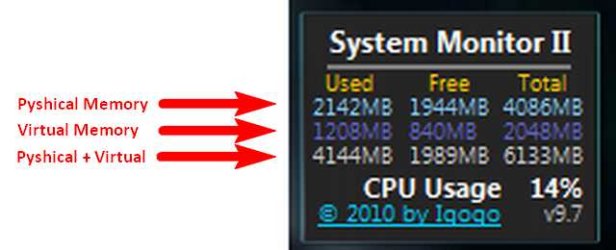
Hello guys, I wanna ask something about Windows 7 memory consumption.. We know that Windows provide a feature called Virtual Memory which is a expansion from the Main Memory (physical), and with Task Manager we can see all process within it's memory consumption. And I've found a program called CleanMem from Raymond.cc here.

Is there any program that look a like CleanMem but especially made to free up Virtual Memory? As we know, Virtual Memory always eaten up if we don't close running program for a long time and we can't bring back the used space just like before.

sorry if my English bad...
 

Attachments
  • 2011-04-01_173856.jpg
    2011-04-01_173856.jpg
    18.1 KB · Views: 4

My Computer My Computer

At a glance

Windows 7 Home Premium 64bitIntel Core i7 720QMVenomRX 2x 4GB DDR3NVIDIA GeForce GT240M-N11
Computer Manufacturer/Model Number
Lenovo IdeaPad Y550P
OS
Windows 7 Home Premium 64bit
CPU
Intel Core i7 720QM
Motherboard
Lenovo PM55 Intel chipset
Memory
VenomRX 2x 4GB DDR3
Graphics Card(s)
NVIDIA GeForce GT240M-N11
Sound Card
Realtek ALC272
Monitor(s) Displays
Lenovo Widescreen Monitor
Screen Resolution
1280x768
Hard Drives
Hitachi 500GB
Case
default from Lenovo
Cooling
default from Lenovo
Keyboard
default from Lenovo
Mouse
Logitech A100
Internet Speed
CDMA-EVDO by Smart ISP (Indonesian)
Windows 7 organises memory itself. No other programs are required or desirable.

Regards....Mike Connor
 

My Computer My Computer

At a glance

Several, including Windows 7 x64 Ultimate
OS
Several, including Windows 7 x64 Ultimate
Hello,I think that Ram Map should helps you if you want to free used memory...
 

My Computer My Computer

At a glance

Windows 10 Pro x64Intel Core i5 4440 @Stock4 x 4GB HyperX Fury DDR3Gigabyte GTX 1050Ti O4G
Computer type
PC/Desktop
Computer Manufacturer/Model Number
Custom Build
OS
Windows 10 Pro x64
CPU
Intel Core i5 4440 @Stock
Motherboard
Gigabyte Z97 D3H
Memory
4 x 4GB HyperX Fury DDR3
Graphics Card(s)
Gigabyte GTX 1050Ti O4G
Sound Card
Integrated
Monitor(s) Displays
Dell P2417H
Screen Resolution
1920 x 1080
Hard Drives
Samsung EVO 850 120GB / Toshiba DT01ACA050 1TB 7200prm 32MB
PSU
Riotoro Onyx 750W
Case
NZXT H500 Black-Red
Cooling
Stock CPU + NZXT 120mm + 2x120mm red fans
Keyboard
Modecom Volcano Lanparty
Mouse
Asus ROG Gladius / DeepCool E-Pad Plus
Internet Speed
DOCSIS 50/3 Mbit
Browser
Google Chrome
Other Info
Asus K55VJ(i5 3210M, GT635M / 2GB, 8GB DDR3, 500GB HDD)
There is no reason to try and free up virtual memory. It is virtual. It is only used when physical memory get short and or to place parts of running program there that are not normally used.
If you have 3-30 programs open at the same time the OS loads what it, the OS, and the program needs for the current active (focused) running program into physical memory. Paging out other programs that are not active into virtual memory (If there is not enough room in physical memory).

Best think you can do is let Windows manage the Page File ans ADD MORE RAM to the system.

These mem freeing programs simple do nothing that the OS isn't doing already.
 

My Computer My Computer

At a glance

Windows 7 Pro x64i5 76016GBNvidia GTS450
Computer Manufacturer/Model Number
Built be Me
OS
Windows 7 Pro x64
CPU
i5 760
Motherboard
Asus P7P55D-E Pro
Memory
16GB
Graphics Card(s)
Nvidia GTS450
Sound Card
On board
Monitor(s) Displays
Dell 2007WFP Dell 1800FP
Screen Resolution
1680x1050 1280x1024
Hard Drives
Seagate 250GB & 750GB
WD 1TB
PSU
Antec 750
Case
In Win
Cooling
Cooler Master Hyper 212+
Keyboard
IBM
Mouse
MS
Back
Top