Is there any way to select/force a sample rate under 44100Hz?

BazookaSteve

New member
Local time
5:19 PM
Messages
3
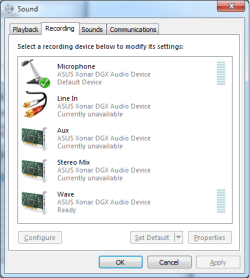
Hello. I am running Windows 7 Professional 64-bit and seem to have problems with my microphone volume. Despite trying most everything, it is still very quiet despite trying both my motherboard and sound card ports, and this problem persists across microphones. To the best of my knowledge it appears to be an operating system problem. I came across one solution in which the problem might be fixed if the sample rate of the microphone is lowered to somewhere around 16000Hz. The person proposing the solution attached this image, which shows options below 44100Hz, the lowest option I can select:

2347708953_00291a6f68_o.jpg


I am currently using an ASUS Xonar DG sound card, but I still have the same problem and options with the motherboard ports. Any advice?
 

My Computer My Computer

At a glance

Windows 7 Professional 64biti5 2500K @ 3.7GHz16GB DDR3 RAMATI 6950x2
Computer type
PC/Desktop
Computer Manufacturer/Model Number
Custom Build
OS
Windows 7 Professional 64bit
CPU
i5 2500K @ 3.7GHz
Motherboard
ASUS P8P67
Memory
16GB DDR3 RAM
Graphics Card(s)
ATI 6950x2
I have a recording studio. I do not use anything lower than 16 bit 44.1Khz for audio.

There are many theories (unproven) to do or correct things floating around the internet. This is one that I would be leery of. Setting a different sample rate or frequency will not change the volume level.

First question. Since you have a separate sound card, do you have the on-board (integrated) audio disabled in the BIOS? If not, that is a first step. Having both enabled can cause conflicts and problems. Same way if you try the on-board with the ASUS (or whatever) sound card still installed.

The example you show (pictures) shows the user only having the generic basic function Windows "High Definition Audio" instead of the correct sound card drivers. This can present its own set of problems.
 

My Computer My Computer

At a glance

Windows 10 64 bitIntel i7 6700K16GB Corsair DominatorIntel CPU Graphics
Computer type
PC/Desktop
Computer Manufacturer/Model Number
My Own Build
OS
Windows 10 64 bit
CPU
Intel i7 6700K
Motherboard
ASUS ROG Maximus VIII Hero
Memory
16GB Corsair Dominator
Graphics Card(s)
Intel CPU Graphics
Sound Card
RealTek
Monitor(s) Displays
27" Dell S2719dgf
Screen Resolution
2560X1440
Hard Drives
1 TB Samsung 850 EVO SSD for Win 10 Pro
500GB Samsung 850 EVO SSD for Win 10 Insider
2 TB drive for backup
PSU
EVGA Supernova 750G2
Case
BeQuiet Silent Base 600
Cooling
Deepcool Captain 120EX
Keyboard
Microsoft Wireless 2000
Mouse
Microsoft wireless
Internet Speed
100 MB/sec (Cable)
Antivirus
Microsoft Defender and Malwarebytes
Browser
Edge/Firefox
Other Info
Cakewalk (Sonar) by BandLab and Studio One 4.1 Pro recording studio software. MOTU 896Mk3 Hybrid recording interface, Frontier Tranzport wireless control unit, Behringer X-Touch Control Surface.
Five USB connected optical drives for CD Audio production using Nero BurningROM
I disabled on-board audio in the BIOS to no avail. I am also using the correct drivers for my soundcard, which is an ASUS Xonar DG (version PCI-DG-111007-7.12.8.1794, which is dated late 2011 and is the most recent driver to the best of my knowledge.)
 

My Computer My Computer

At a glance

Windows 7 Professional 64biti5 2500K @ 3.7GHz16GB DDR3 RAMATI 6950x2
Computer type
PC/Desktop
Computer Manufacturer/Model Number
Custom Build
OS
Windows 7 Professional 64bit
CPU
i5 2500K @ 3.7GHz
Motherboard
ASUS P8P67
Memory
16GB DDR3 RAM
Graphics Card(s)
ATI 6950x2
What programs have you tried the mic with? Also, since you have the separate sound card, do you have the front panel headphone/jack connection to the ASUS card or is it still connected to the motherboard? If the front panel is connected to the ASUS, have you tried the mic connection on the rear ASUS I/O?
 

My Computer My Computer

At a glance

Windows 10 64 bitIntel i7 6700K16GB Corsair DominatorIntel CPU Graphics
Computer type
PC/Desktop
Computer Manufacturer/Model Number
My Own Build
OS
Windows 10 64 bit
CPU
Intel i7 6700K
Motherboard
ASUS ROG Maximus VIII Hero
Memory
16GB Corsair Dominator
Graphics Card(s)
Intel CPU Graphics
Sound Card
RealTek
Monitor(s) Displays
27" Dell S2719dgf
Screen Resolution
2560X1440
Hard Drives
1 TB Samsung 850 EVO SSD for Win 10 Pro
500GB Samsung 850 EVO SSD for Win 10 Insider
2 TB drive for backup
PSU
EVGA Supernova 750G2
Case
BeQuiet Silent Base 600
Cooling
Deepcool Captain 120EX
Keyboard
Microsoft Wireless 2000
Mouse
Microsoft wireless
Internet Speed
100 MB/sec (Cable)
Antivirus
Microsoft Defender and Malwarebytes
Browser
Edge/Firefox
Other Info
Cakewalk (Sonar) by BandLab and Studio One 4.1 Pro recording studio software. MOTU 896Mk3 Hybrid recording interface, Frontier Tranzport wireless control unit, Behringer X-Touch Control Surface.
Five USB connected optical drives for CD Audio production using Nero BurningROM
One small problem. If that screen shot is yours, you don't actually have the driver for the card installed. It is showing 3 microphones and all of them are showing as "high definition audio device", which indicates that it is using the default Windows audio driver. This is what you should be seeing if you have the proper driver installed,

dgx.png

As far as what driver to use for it, I have used nothing but this set on my DGX (PCI-E version of your card),

UNi Xonar Drivers official page

with zero issues.
 

My Computer My Computer

At a glance

Win 7 Ultimate x64FX-8350 @ 4.6 GHz so farADATA XPG V1 Series Black 8GB DDR3 1600Sapphire R9 270x Dual-X
Computer type
PC/Desktop
Computer Manufacturer/Model Number
Me
OS
Win 7 Ultimate x64
CPU
FX-8350 @ 4.6 GHz so far
Motherboard
Asus M5A97 EVO
Memory
ADATA XPG V1 Series Black 8GB DDR3 1600
Graphics Card(s)
Sapphire R9 270x Dual-X
Sound Card
Xonar DGX w/ Corsair Vengence 1300
Monitor(s) Displays
Acer S232HL Abid
Screen Resolution
1920x1080
Hard Drives
120 GB OCZ Vertex 3
500 GB Seagate 7200.12
PSU
Antec Earthwatts 650W Green
Case
Antec Three Hundred
Cooling
Cooler Master 212 EVO
Keyboard
Logitech G510
Mouse
Logitech G500s
Internet Speed
35000/3000
What programs have you tried the mic with? Also, since you have the separate sound card, do you have the front panel headphone/jack connection to the ASUS card or is it still connected to the motherboard? If the front panel is connected to the ASUS, have you tried the mic connection on the rear ASUS I/O?

I believe that the front jack also goes to the sound card, although my front microphone jack is not working.

@stormy13, I do have my drivers installed and they show up properly on my sound devices, that original picture is not mine.
 

My Computer My Computer

At a glance

Windows 7 Professional 64biti5 2500K @ 3.7GHz16GB DDR3 RAMATI 6950x2
Computer type
PC/Desktop
Computer Manufacturer/Model Number
Custom Build
OS
Windows 7 Professional 64bit
CPU
i5 2500K @ 3.7GHz
Motherboard
ASUS P8P67
Memory
16GB DDR3 RAM
Graphics Card(s)
ATI 6950x2
Did the mic ever work correctly?

Will the mic work OK on a different PC?
 

My Computer My Computer

At a glance

Windows 10 64 bitIntel i7 6700K16GB Corsair DominatorIntel CPU Graphics
Computer type
PC/Desktop
Computer Manufacturer/Model Number
My Own Build
OS
Windows 10 64 bit
CPU
Intel i7 6700K
Motherboard
ASUS ROG Maximus VIII Hero
Memory
16GB Corsair Dominator
Graphics Card(s)
Intel CPU Graphics
Sound Card
RealTek
Monitor(s) Displays
27" Dell S2719dgf
Screen Resolution
2560X1440
Hard Drives
1 TB Samsung 850 EVO SSD for Win 10 Pro
500GB Samsung 850 EVO SSD for Win 10 Insider
2 TB drive for backup
PSU
EVGA Supernova 750G2
Case
BeQuiet Silent Base 600
Cooling
Deepcool Captain 120EX
Keyboard
Microsoft Wireless 2000
Mouse
Microsoft wireless
Internet Speed
100 MB/sec (Cable)
Antivirus
Microsoft Defender and Malwarebytes
Browser
Edge/Firefox
Other Info
Cakewalk (Sonar) by BandLab and Studio One 4.1 Pro recording studio software. MOTU 896Mk3 Hybrid recording interface, Frontier Tranzport wireless control unit, Behringer X-Touch Control Surface.
Five USB connected optical drives for CD Audio production using Nero BurningROM
Back
Top