Is there any way to tell who is accessing the registry?

When did you first see the yellow exclamations?

Hmmm, I don't remember...I had two originally, but got rid of one after deactivating Windows Defender.

I could go back to the 1st Ghost image, which was created immediately after the clean installation and not yet connected online.

I'm printing out the clean boot (Vista) and will post back....
 

My Computer My Computer

At a glance

Windows 7 Pro x64 RTMIntel
OS
Windows 7 Pro x64 RTM
CPU
Intel
Hmmm, I don't remember...I had two originally, but got rid of one after deactivating Windows Defender.

I could go back to the 1st Ghost image, which was created immediately after the clean installation and not yet connected online.

I'm printing out the clean boot (Vista) and will post back....

Well, my first suggestion would be to take the disk that holds XP out of your computer and see what that brings.
 

My Computer My Computer

At a glance

Win7 Build 7600 x86Pentium II 300MHz32mb EDO RAMDiamond Viper
OS
Win7 Build 7600 x86
CPU
Pentium II 300MHz
Motherboard
Asus
Memory
32mb EDO RAM
Graphics Card(s)
Diamond Viper
Sound Card
Soundblaster 16
Monitor(s) Displays
14" AOC CRT 16K color
Screen Resolution
800x600
Hard Drives
300mb Quantum fireball
PSU
110 Watts
Cooling
Passive
Keyboard
Trust Ergonomic
Mouse
Generic
Internet Speed
256K u 128K d
Thanks for the suggestion, but it won't help since the problem is in windows itself, and a clean boot only excludes non OS services.

I think in this case it's leftovers from a user account that used to exist but no longer does. hence the S-1-5-21-783115880-3742272611-1246857717-1000 user.

Thanks

The problem is not with the leftovers from a user account.

S-1-5-21-783115880-3742272611-1246857717-1000 is not a leftover user id it the sid for his user id.

You cannot see user names in registry, it will only display the sid of the user name.

again the problem is not with the windows itself, it is caused by some other service or process which included itself into svchost process. :p

Its better to perform a clean boot ;)
 

My Computer My Computer

At a glance

windows 7wipro8 gb
Computer Manufacturer/Model Number
wipro
OS
windows 7
CPU
wipro
Motherboard
intel
Memory
8 gb
Hard Drives
580 gb
It's me again - the guy that thinks you are chasing gossamer.

On my system, the error only presents itself on system shutdown. To date, this memory leak has created no undue harm to my unpowered machine.

Check it.
 
@Antman

there is no assure that yours and his case are similar.

:thumbsup:
 

My Computer My Computer

At a glance

windows 7wipro8 gb
Computer Manufacturer/Model Number
wipro
OS
windows 7
CPU
wipro
Motherboard
intel
Memory
8 gb
Hard Drives
580 gb
The problem is not with the leftovers from a user account.

S-1-5-21-783115880-3742272611-1246857717-1000 is not a leftover user id it the sid for his user id.

You cannot see user names in registry, it will only display the sid of the user name.

again the problem is not with the windows itself, it is caused by some other service or process which included itself into svchost process. :p

Its better to perform a clean boot ;)

Well, I'm open to suggestions, so it's worth giving clean boot a shot.

In the beginning of this thread I posted this:

Nothing fishy about this.
S-1-5-21-783115880-3742272611-1246857717-1000 is a username used by svchost.exe

So I knew from the start it must have something to do with a service or process that is invoked by a process masked by svchost.exe.

The Sid doesn't necessarily have to be his user account.
It could well have been a left over of useraccount from previous installs.

That's why I asked him for the install history.

With the new info he provided, It seems indeed unlikely to be a left over.
But the thing I am puzzled about is that in the log the problem points to a system32 folder on the 7th volume.
That's not his Win7 partition, since he clean installed on 1 disk before adding the others.

If you ask me, it's pointing at the XP disks system32, but beats me why.


Your suggestions are very welcome.
The more brainpower the better.

Thanks.

Greetz
 

My Computer My Computer

At a glance

Win7 Build 7600 x86Pentium II 300MHz32mb EDO RAMDiamond Viper
OS
Win7 Build 7600 x86
CPU
Pentium II 300MHz
Motherboard
Asus
Memory
32mb EDO RAM
Graphics Card(s)
Diamond Viper
Sound Card
Soundblaster 16
Monitor(s) Displays
14" AOC CRT 16K color
Screen Resolution
800x600
Hard Drives
300mb Quantum fireball
PSU
110 Watts
Cooling
Passive
Keyboard
Trust Ergonomic
Mouse
Generic
Internet Speed
256K u 128K d
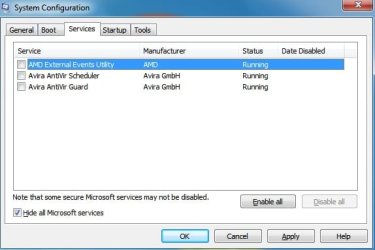
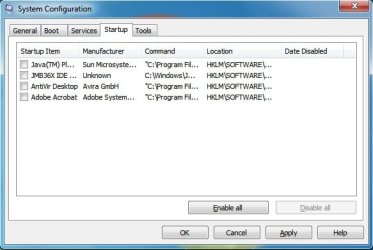
OK, the clean boot is telling me neither the "startup items" nor "non- Microsoft services) is causing this, cause after performing step 4 and step 5, the yellow warning still returns and still pointing to the same user S-1-5-21-783115880-3742272611-1246857717-1000. To isolate which MS services is causing this will take a long...time, cause I need to deselect MS services one by one in step 6, which I think I might as well put back the 1st image, 2nd image, 3rd image...., but before I do that, let me remove the XP drive 1st!
 

Attachments

  • 11.jpg
    11.jpg
    25.2 KB · Views: 34
  • 12.jpg
    12.jpg
    30 KB · Views: 25

My Computer My Computer

At a glance

Windows 7 Pro x64 RTMIntel
OS
Windows 7 Pro x64 RTM
CPU
Intel
OK, the clean boot is telling me neither the "startup items" nor "non- Microsoft services) is causing this, cause after performing step 4 and step 5, the yellow warning still returns and still pointing to the same user S-1-5-21-783115880-3742272611-1246857717-1000. To isolate which MS services is causing this will take a long...time, cause I need to deselect MS services one by one in step 6, which I think I might as well put back the 1st image, 2nd image, 3rd image...., but before I do that, let me remove the XP drive 1st!

Good thinking.

And by the way, disabling services is not without danger, it might lead to non bootable system when you disable the wrong one(s).

Hope you have a ghost cd in case you can't boot.
 

My Computer My Computer

At a glance

Win7 Build 7600 x86Pentium II 300MHz32mb EDO RAMDiamond Viper
OS
Win7 Build 7600 x86
CPU
Pentium II 300MHz
Motherboard
Asus
Memory
32mb EDO RAM
Graphics Card(s)
Diamond Viper
Sound Card
Soundblaster 16
Monitor(s) Displays
14" AOC CRT 16K color
Screen Resolution
800x600
Hard Drives
300mb Quantum fireball
PSU
110 Watts
Cooling
Passive
Keyboard
Trust Ergonomic
Mouse
Generic
Internet Speed
256K u 128K d
It's not the XP partition/drive....

Could it be Windows 7 is constantly trying to connect the HP printer which couldn't be connected/shared by the other XP PC on the same router? I've these Errors since day 1, but I know what's causing them, so I let them be:

Log Name: Microsoft-Windows-PrintService/Admin
Source: Microsoft-Windows-PrintService
Date: 8/27/2009 6:53:49 AM
Event ID: 315
Task Category: Sharing a printer
Level: Error
Keywords: Classic Spooler Event,Printer
User: SYSTEM
Computer: C2Q-01
Description:
The print spooler failed to share printer HP LaserJet 6L with shared resource name HP LaserJet 6L. Error 2114. The printer cannot be used by others on the network.
Event Xml:
<Event xmlns="http://schemas.microsoft.com/win/2004/08/events/event">
<System>
<Provider Name="Microsoft-Windows-PrintService" Guid="{747EF6FD-E535-4D16-B510-42C90F6873A1}" />
<EventID>315</EventID>
<Version>0</Version>
<Level>2</Level>
<Task>30</Task>
<Opcode>12</Opcode>
<Keywords>0x8000000000000820</Keywords>
<TimeCreated SystemTime="2009-08-27T13:53:49.263636500Z" />
<EventRecordID>7</EventRecordID>
<Correlation />
<Execution ProcessID="1204" ThreadID="932" />
<Channel>Microsoft-Windows-PrintService/Admin</Channel>
<Computer>C2Q-01</Computer>
<Security UserID="S-1-5-18" />
</System>
<UserData>
<ShareFailed xmlns:auto-ns3="http://schemas.microsoft.com/win/2004/08/events" xmlns="http://manifests.microsoft.com/win/2005/08/windows/printing/spooler/core/events">
<Param1>2114</Param1>
<Param2>HP LaserJet 6L</Param2>
<Param3>HP LaserJet 6L</Param3>
</ShareFailed>
</UserData>
</Event>


Log Name: Microsoft-Windows-PrintService/Admin
Source: Microsoft-Windows-PrintService
Date: 8/23/2009 2:13:21 AM
Event ID: 512
Task Category: Initializing a print provider
Level: Error
Keywords: Router,Classic Spooler Event
User: SYSTEM
Computer: 37L4247E29-32
Description:
InitializePrintProvider failed for provider inetpp.dll. This can occur because of system instability or a lack of system resources.
Event Xml:
<Event xmlns="http://schemas.microsoft.com/win/2004/08/events/event">
<System>
<Provider Name="Microsoft-Windows-PrintService" Guid="{747EF6FD-E535-4D16-B510-42C90F6873A1}" />
<EventID>512</EventID>
<Version>0</Version>
<Level>2</Level>
<Task>1</Task>
<Opcode>12</Opcode>
<Keywords>0x8000000000002800</Keywords>
<TimeCreated SystemTime="2009-08-23T09:13:21.751090300Z" />
<EventRecordID>1</EventRecordID>
<Correlation />
<Execution ProcessID="328" ThreadID="1048" />
<Channel>Microsoft-Windows-PrintService/Admin</Channel>
<Computer>37L4247E29-32</Computer>
<Security UserID="S-1-5-18" />
</System>
<UserData>
<RouterError xmlns:auto-ns3="http://schemas.microsoft.com/win/2004/08/events" xmlns="http://manifests.microsoft.com/win/2005/08/windows/printing/spooler/core/events">
<Name>inetpp.dll</Name>
<Error>0x0</Error>
</RouterError>
</UserData>
</Event>

I will remove/disconnect my printer.
 

My Computer My Computer

At a glance

Windows 7 Pro x64 RTMIntel
OS
Windows 7 Pro x64 RTM
CPU
Intel
It's not the XP partition/drive....

Could it be Windows 7 is constantly trying to connect the HP printer which couldn't be connected/shared by the other XP PC on the same router? I've these Errors since day 1, but I know what's causing them, so I let them be:

Log Name: Microsoft-Windows-PrintService/Admin
Source: Microsoft-Windows-PrintService
Date: 8/27/2009 6:53:49 AM
Event ID: 315
Task Category: Sharing a printer
Level: Error
Keywords: Classic Spooler Event,Printer
User: SYSTEM
Computer: C2Q-01
Description:
The print spooler failed to share printer HP LaserJet 6L with shared resource name HP LaserJet 6L. Error 2114. The printer cannot be used by others on the network.
Event Xml:
<Event xmlns="http://schemas.microsoft.com/win/2004/08/events/event">
<System>
<Provider Name="Microsoft-Windows-PrintService" Guid="{747EF6FD-E535-4D16-B510-42C90F6873A1}" />
<EventID>315</EventID>
<Version>0</Version>
<Level>2</Level>
<Task>30</Task>
<Opcode>12</Opcode>
<Keywords>0x8000000000000820</Keywords>
<TimeCreated SystemTime="2009-08-27T13:53:49.263636500Z" />
<EventRecordID>7</EventRecordID>
<Correlation />
<Execution ProcessID="1204" ThreadID="932" />
<Channel>Microsoft-Windows-PrintService/Admin</Channel>
<Computer>C2Q-01</Computer>
<Security UserID="S-1-5-18" />
</System>
<UserData>
<ShareFailed xmlns:auto-ns3="http://schemas.microsoft.com/win/2004/08/events" xmlns="http://manifests.microsoft.com/win/2005/08/windows/printing/spooler/core/events">
<Param1>2114</Param1>
<Param2>HP LaserJet 6L</Param2>
<Param3>HP LaserJet 6L</Param3>
</ShareFailed>
</UserData>
</Event>


Log Name: Microsoft-Windows-PrintService/Admin
Source: Microsoft-Windows-PrintService
Date: 8/23/2009 2:13:21 AM
Event ID: 512
Task Category: Initializing a print provider
Level: Error
Keywords: Router,Classic Spooler Event
User: SYSTEM
Computer: 37L4247E29-32
Description:
InitializePrintProvider failed for provider inetpp.dll. This can occur because of system instability or a lack of system resources.
Event Xml:
<Event xmlns="http://schemas.microsoft.com/win/2004/08/events/event">
<System>
<Provider Name="Microsoft-Windows-PrintService" Guid="{747EF6FD-E535-4D16-B510-42C90F6873A1}" />
<EventID>512</EventID>
<Version>0</Version>
<Level>2</Level>
<Task>1</Task>
<Opcode>12</Opcode>
<Keywords>0x8000000000002800</Keywords>
<TimeCreated SystemTime="2009-08-23T09:13:21.751090300Z" />
<EventRecordID>1</EventRecordID>
<Correlation />
<Execution ProcessID="328" ThreadID="1048" />
<Channel>Microsoft-Windows-PrintService/Admin</Channel>
<Computer>37L4247E29-32</Computer>
<Security UserID="S-1-5-18" />
</System>
<UserData>
<RouterError xmlns:auto-ns3="http://schemas.microsoft.com/win/2004/08/events" xmlns="http://manifests.microsoft.com/win/2005/08/windows/printing/spooler/core/events">
<Name>inetpp.dll</Name>
<Error>0x0</Error>
</RouterError>
</UserData>
</Event>

I will remove/disconnect my printer.

Man, you're getting good at this. :D
 

My Computer My Computer

At a glance

Win7 Build 7600 x86Pentium II 300MHz32mb EDO RAMDiamond Viper
OS
Win7 Build 7600 x86
CPU
Pentium II 300MHz
Motherboard
Asus
Memory
32mb EDO RAM
Graphics Card(s)
Diamond Viper
Sound Card
Soundblaster 16
Monitor(s) Displays
14" AOC CRT 16K color
Screen Resolution
800x600
Hard Drives
300mb Quantum fireball
PSU
110 Watts
Cooling
Passive
Keyboard
Trust Ergonomic
Mouse
Generic
Internet Speed
256K u 128K d
This error is logging while you log off, right?

So you need to restart twice to check because , first time you restart you will be booting into windows with only Microsoft services. Since that warning is happening at your log off, the message will be there by previous log off with all the service enabled.

so you have to restart again with other services disabled, and check. time relating to the second restart.

Post back the results :)
 

My Computer My Computer

At a glance

windows 7wipro8 gb
Computer Manufacturer/Model Number
wipro
OS
windows 7
CPU
wipro
Motherboard
intel
Memory
8 gb
Hard Drives
580 gb
Man, you're getting good at this. :D

:o

It's not the printer either!

I will go back a few GHOST image and will post back...I need a break, lol!
 

My Computer My Computer

At a glance

Windows 7 Pro x64 RTMIntel
OS
Windows 7 Pro x64 RTM
CPU
Intel
:o

It's not the printer either!

I will go back a few GHOST image and will post back...I need a break, lol!

Me too. lol

You deserve some rep for your stamina and self initiative. so +1

I have to get some groceries, see you in about an hour.

Greetz
 

My Computer My Computer

At a glance

Win7 Build 7600 x86Pentium II 300MHz32mb EDO RAMDiamond Viper
OS
Win7 Build 7600 x86
CPU
Pentium II 300MHz
Motherboard
Asus
Memory
32mb EDO RAM
Graphics Card(s)
Diamond Viper
Sound Card
Soundblaster 16
Monitor(s) Displays
14" AOC CRT 16K color
Screen Resolution
800x600
Hard Drives
300mb Quantum fireball
PSU
110 Watts
Cooling
Passive
Keyboard
Trust Ergonomic
Mouse
Generic
Internet Speed
256K u 128K d
This error is logging while you log off, right?

So you need to restart twice to check because , first time you restart you will be booting into windows with only Microsoft services. Since that warning is happening at your log off, the message will be there by previous log off with all the service enabled.

so you have to restart again with other services disabled, and check. time relating to the second restart.

Post back the results :)

Hi Delphin,

Thanks for the help. Very much appreciated.
I repped you too.

We will take a short recess. :D

If you have more ideas on this issue, keep it coming.

Thanks
 

My Computer My Computer

At a glance

Win7 Build 7600 x86Pentium II 300MHz32mb EDO RAMDiamond Viper
OS
Win7 Build 7600 x86
CPU
Pentium II 300MHz
Motherboard
Asus
Memory
32mb EDO RAM
Graphics Card(s)
Diamond Viper
Sound Card
Soundblaster 16
Monitor(s) Displays
14" AOC CRT 16K color
Screen Resolution
800x600
Hard Drives
300mb Quantum fireball
PSU
110 Watts
Cooling
Passive
Keyboard
Trust Ergonomic
Mouse
Generic
Internet Speed
256K u 128K d
This error is logging while you log off, right?

So you need to restart twice to check because , first time you restart you will be booting into windows with only Microsoft services. Since that warning is happening at your log off, the message will be there by previous log off with all the service enabled.

so you have to restart again with other services disabled, and check. time relating to the second restart.

Post back the results :)

Son of *&*^%$%#@, I must be retarded:o:o:o....yeah Delphin "Guru":p, NO more yellow warnings:D:D:D.

I'm sure now it must be one of four NON MS startup or one of the three NON MS services. I deselected all seven at once (2 steps in one)...

1st reboot - still there
2nd reboot - no more
3rd reboot - no more
4th reboot - no more

Now it's easy to isolate, cause it's only 7 items...I mentioned earlier could be the ATI/AMD driver, cause it's the only thing new in Windows 7 and never existed in my the other two XP SP3.

Thank you for all your help/feedback and I will sure to post back the culprit:mad:.

squonksc will be happy to read this when he returns from his grocery shopping, lol!

Thanks again Guru Delphin:thumbsup::thumbsup::thumbsup:
 

Attachments

  • 11.jpg
    11.jpg
    25.2 KB · Views: 49
  • 12.jpg
    12.jpg
    30 KB · Views: 45

My Computer My Computer

At a glance

Windows 7 Pro x64 RTMIntel
OS
Windows 7 Pro x64 RTM
CPU
Intel
Good to hear this lol.

Let me know the culprit. :devil2:

good luck :thumbsup:
 

My Computer My Computer

At a glance

windows 7wipro8 gb
Computer Manufacturer/Model Number
wipro
OS
windows 7
CPU
wipro
Motherboard
intel
Memory
8 gb
Hard Drives
580 gb
Hi Delphin, it's 100% AMD External Events Utility at C:\Windows\System32\atiesrxx.exe:mad:, dunno what this thing does, but I changed it to "Disabled" from "Automatic" in Services and nada yellow warning anymore, tested 3 times.

Thanks again guys, we all need a rest, lol.
 

My Computer My Computer

At a glance

Windows 7 Pro x64 RTMIntel
OS
Windows 7 Pro x64 RTM
CPU
Intel
Glad you fixed it :)

I'm going to bed now. Its 9 pm here:sleep:
 

My Computer My Computer

At a glance

windows 7wipro8 gb
Computer Manufacturer/Model Number
wipro
OS
windows 7
CPU
wipro
Motherboard
intel
Memory
8 gb
Hard Drives
580 gb
Hi Ben,

Really glad it's fixed. :D

Thank you Delphin, for pushing us in the right direction. :thumbsup:
(and sleep tight you early bird. lol)

One is never too old to learn. :D

And Ben, stick around this forum, you have what it takes to be of help here.

You handled this very well, and made it easy for us to help you. :thumbsup:

Some final info on the culprit service, found this:

atievxx.exe description
Descriptionatievxx.exe is installed alongside some ATI graphics hardware products and assists with graphics handling. "This program is a non-essential system process, but should not be terminated unless suspected to be causing problems."
 

My Computer My Computer

At a glance

Win7 Build 7600 x86Pentium II 300MHz32mb EDO RAMDiamond Viper
OS
Win7 Build 7600 x86
CPU
Pentium II 300MHz
Motherboard
Asus
Memory
32mb EDO RAM
Graphics Card(s)
Diamond Viper
Sound Card
Soundblaster 16
Monitor(s) Displays
14" AOC CRT 16K color
Screen Resolution
800x600
Hard Drives
300mb Quantum fireball
PSU
110 Watts
Cooling
Passive
Keyboard
Trust Ergonomic
Mouse
Generic
Internet Speed
256K u 128K d
Back
Top