is there anyone who might know how to determine what update.....

When you burn an audio CD, Windows will create a CDA file which is on the disc. The CDA includes the location and other text information which Windows Explorer can read.
 

My Computer My Computer

At a glance

Windows 7 Pro SP1 64 bit8 GB
Computer type
Laptop
Computer Manufacturer/Model Number
Dell M6500 Precision Work Station
OS
Windows 7 Pro SP1 64 bit
Memory
8 GB
Screen Resolution
1920x
Internet Speed
30 Mbps
Antivirus
Norton Security
Browser
IE 11
.....can it be determined precisely which Windows Update would contain the necessary operation for correction - if it's still available?
 

My Computer My Computer

At a glance

7 Pro 64-bit
Computer type
PC/Desktop
Computer Manufacturer/Model Number
Dell
OS
7 Pro 64-bit
I have no idea. If you have a restore point before this happened, you could run it.

Perhaps you would give me a step by step procedure that you use to create a burn your discs in Infrarecorder.
 

My Computer My Computer

At a glance

Windows 7 Pro SP1 64 bit8 GB
Computer type
Laptop
Computer Manufacturer/Model Number
Dell M6500 Precision Work Station
OS
Windows 7 Pro SP1 64 bit
Memory
8 GB
Screen Resolution
1920x
Internet Speed
30 Mbps
Antivirus
Norton Security
Browser
IE 11
Probably no longer exists, unfortunately - and, am wondering if there's a checkbox which inadvertently got UNchecked but, once the songs have been suitably formatted, they're copied & pasted to the proper field, certain settings determined.....
 

My Computer My Computer

At a glance

7 Pro 64-bit
Computer type
PC/Desktop
Computer Manufacturer/Model Number
Dell
OS
7 Pro 64-bit
The only thing I can do is to try it myself. That's why I asked for a step by step procedure. Needs to be very detailed.
 

My Computer My Computer

At a glance

Windows 7 Pro SP1 64 bit8 GB
Computer type
Laptop
Computer Manufacturer/Model Number
Dell M6500 Precision Work Station
OS
Windows 7 Pro SP1 64 bit
Memory
8 GB
Screen Resolution
1920x
Internet Speed
30 Mbps
Antivirus
Norton Security
Browser
IE 11
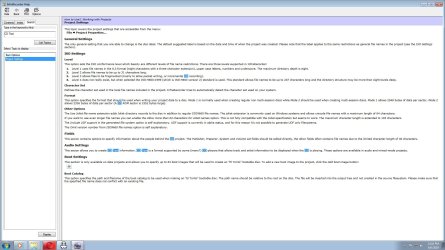
.....here's a ScreenCapture of what I believe relates to this problem - just have no idea exactly how; can't recognize the connection.....
 

Attachments

  • Infrarecorder Project Settings Overview ScreenCapture.jpg
    Infrarecorder Project Settings Overview ScreenCapture.jpg
    183.5 KB · Views: 1

My Computer My Computer

At a glance

7 Pro 64-bit
Computer type
PC/Desktop
Computer Manufacturer/Model Number
Dell
OS
7 Pro 64-bit
I need to know exactly what you do as soon as you open the software and all the individual steps up to burning.
 

My Computer My Computer

At a glance

Windows 7 Pro SP1 64 bit8 GB
Computer type
Laptop
Computer Manufacturer/Model Number
Dell M6500 Precision Work Station
OS
Windows 7 Pro SP1 64 bit
Memory
8 GB
Screen Resolution
1920x
Internet Speed
30 Mbps
Antivirus
Norton Security
Browser
IE 11
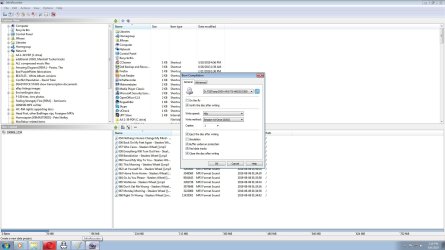
After copying & pasting tracks to field, would click on 3rd icon from the left (see next, related ScreenCapture for what that looks like when opened)
 

Attachments

  • Data Disk burning ScreenCapture as previously appearing.jpg
    Data Disk burning ScreenCapture as previously appearing.jpg
    171.5 KB · Views: 3

My Computer My Computer

At a glance

7 Pro 64-bit
Computer type
PC/Desktop
Computer Manufacturer/Model Number
Dell
OS
7 Pro 64-bit
I added files to a data disc compilation and clicked on Actions, Burn Compilation and then, to a Compact Disc. I played it in my car player and it played and displayed the artist, title, album. I didn't know it would read a data disc. Not all players will do that. Sometimes one needs to burn an ISO for a car player.

However, I did the burn in Vista. I'll have to try it in Win 7.

One thing I noticed is that your write speed is 48x. That's normally a read speed. You might try 10x. I don't know what speed my write speed is. It gave me either Maximum or 10x. I used Maximum. There's supposed to be a burn log but I don't know where it is.
 

My Computer My Computer

At a glance

Windows 7 Pro SP1 64 bit8 GB
Computer type
Laptop
Computer Manufacturer/Model Number
Dell M6500 Precision Work Station
OS
Windows 7 Pro SP1 64 bit
Memory
8 GB
Screen Resolution
1920x
Internet Speed
30 Mbps
Antivirus
Norton Security
Browser
IE 11
Thanks for that, Wither - at some place in instructions during earliest usage, it advised against burning at the Maximum setting - hence, my moving one down to 48X; some sort of problems could result and, what with all the other ones I've had using Windows Media Player, figured it was better to just err on the side of caution - not sure exactly what an 'ISO' is.....any notion how opting for '10X' might affect burns?
 

My Computer My Computer

At a glance

7 Pro 64-bit
Computer type
PC/Desktop
Computer Manufacturer/Model Number
Dell
OS
7 Pro 64-bit
Selecting a lower writing speed minimizes the chances of the drive not being able to do power calibrations during a burn. If those occur, the burn is most likely to fail or there may be a problem with the content. It wouldn't hurt to try one at 10x just to see if any issues occur.

I did a burn in Win 7. It worked out fine on my car player, just as it did when I burned one in Vista. Note that Win 7 didn't have the July and August updates. I had disabled Windows Update near the end of June when I installed an update using the Windows Standalone Updater..

An ISO is an image of a disc.
 
Last edited:

My Computer My Computer

At a glance

Windows 7 Pro SP1 64 bit8 GB
Computer type
Laptop
Computer Manufacturer/Model Number
Dell M6500 Precision Work Station
OS
Windows 7 Pro SP1 64 bit
Memory
8 GB
Screen Resolution
1920x
Internet Speed
30 Mbps
Antivirus
Norton Security
Browser
IE 11
Except - there hasn't been any problem previous to a month or so ago, with at least 2 dozen burnt at 48X since I was forced to switch over to Infrarecorder - but just for the sake of clarification, are you saying that 10X is somehow a higher setting than that, Wither? Can't for the life of me figure out why a car stereo would continue to recognize the vast majority of them, then suddenly display those following as having their format somehow corrupted - and I haven't heard back at all from the app's / platform's creator yet.....as for Windows updates, I haven't installed one in almost a year now - which is why I've been trying to figure out which might be related to this problem, separate from Media Player (rendered useless for data disk burns long ago.....)
 

My Computer My Computer

At a glance

7 Pro 64-bit
Computer type
PC/Desktop
Computer Manufacturer/Model Number
Dell
OS
7 Pro 64-bit
10x is a slower write speed than 48x.

As I understand it, the 2 dozen burns were made with Infrarecorder. Is that correct?

I don't know what you mean by this- "then suddenly display those following as having their format somehow corrupted." Specifically, what does "following" mean? Are these new burns after the 2 dozen? That's the premise I've been going on.


If you haven't updated Windows for over a year, I don't understand why you would think one of them had an effect on anything.

Honestly, I think you should update Windows. I'm did the burn with an "almost" updated system and don't have the problem.That may also fix WMP.
 

My Computer My Computer

At a glance

Windows 7 Pro SP1 64 bit8 GB
Computer type
Laptop
Computer Manufacturer/Model Number
Dell M6500 Precision Work Station
OS
Windows 7 Pro SP1 64 bit
Memory
8 GB
Screen Resolution
1920x
Internet Speed
30 Mbps
Antivirus
Norton Security
Browser
IE 11
Yes; after the ones whose display is completely correct; no missing assigned numbers or extra spacing between characters - and given how badly it's gone more than once when I did updates, that's why I won't attempt another again without knowing which specific updates are related to an acquired problem, or better yet, will fix it.....
 

My Computer My Computer

At a glance

7 Pro 64-bit
Computer type
PC/Desktop
Computer Manufacturer/Model Number
Dell
OS
7 Pro 64-bit
Sometimes extra spaces or extraneous text characters in a file name can cause that kind of behavior. In addition, you can have a problem if the file name is too long. In your screen shot above, the file names aren't completely shown. Would you expand the Name block?
 

My Computer My Computer

At a glance

Windows 7 Pro SP1 64 bit8 GB
Computer type
Laptop
Computer Manufacturer/Model Number
Dell M6500 Precision Work Station
OS
Windows 7 Pro SP1 64 bit
Memory
8 GB
Screen Resolution
1920x
Internet Speed
30 Mbps
Antivirus
Norton Security
Browser
IE 11
Yeah - but, won't alter my syntax for any reason - and again, NOT been a problem up until a month ago.....typically appears in specifically-formatted desktop files as '000 Song Title [OPTIONAL: original artist and whether LIVE, as applicable] - Artist Name [Date: 0/0-0/0-00]' and more or less, the same on car stereo LED.....
 

My Computer My Computer

At a glance

7 Pro 64-bit
Computer type
PC/Desktop
Computer Manufacturer/Model Number
Dell
OS
7 Pro 64-bit
What I'd like you to do is to take a couple of those files and shorten the names to 8 characters with the appropriate extension. Then , burn them.
 

My Computer My Computer

At a glance

Windows 7 Pro SP1 64 bit8 GB
Computer type
Laptop
Computer Manufacturer/Model Number
Dell M6500 Precision Work Station
OS
Windows 7 Pro SP1 64 bit
Memory
8 GB
Screen Resolution
1920x
Internet Speed
30 Mbps
Antivirus
Norton Security
Browser
IE 11
Was on with an MS tech - 2, actually, as we got disconnected when I tried to burn a sample data disk - and the 2nd, felt it was definitely NOT a Windows-based issue; want to test out one of the newer ones burned with this problem in another car stereo at Best Buy and see if the same issue appears.....
 

My Computer My Computer

At a glance

7 Pro 64-bit
Computer type
PC/Desktop
Computer Manufacturer/Model Number
Dell
OS
7 Pro 64-bit
Back
Top