
Is there anyway to increase the volume of video?

apple2005

New member
Local time
12:03 AM
Messages
49
How to increase the sound volume of video or audio?

Just want to know if there is any way to modify or increase the volume of video or audio as the volume of some videos are less? I mean to edit and increase the volume and add stereo affect.

Thanks.
 

My Computer My Computer

At a glance

windows sevenIntel Pentium Dual core T23903 GBIntel GM 965/GML 960
Computer Manufacturer/Model Number
Toshiba Satellite A205-S5880
OS
windows seven
CPU
Intel Pentium Dual core T2390
Motherboard
Intel GM 695
Memory
3 GB
Graphics Card(s)
Intel GM 965/GML 960
Sound Card
Intel 82801HB ICH8
Hard Drives
200 GB
PSU
Intel GM965/GML960 Chipset - Integrated Graphics 0 [C0] [Tos
Are you saying that some individual video files play back at a lower volume, and some playback at a higher volume?
 
Are you saying that some individual video files play back at a lower volume, and some playback at a higher volume?

Thats right..
 

My Computer My Computer

At a glance

windows sevenIntel Pentium Dual core T23903 GBIntel GM 965/GML 960
Computer Manufacturer/Model Number
Toshiba Satellite A205-S5880
OS
windows seven
CPU
Intel Pentium Dual core T2390
Motherboard
Intel GM 695
Memory
3 GB
Graphics Card(s)
Intel GM 965/GML 960
Sound Card
Intel 82801HB ICH8
Hard Drives
200 GB
PSU
Intel GM965/GML960 Chipset - Integrated Graphics 0 [C0] [Tos
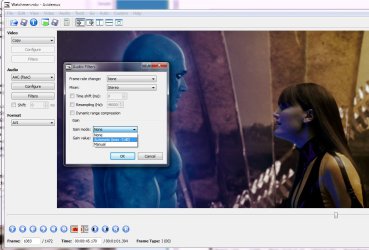
apple2005, you need to start playing around with some audio and video editors.

if you want to go fancy, you can use something like sony vegas, but that costs money.

or there are various free tools available, however these are pretty complicated and daunting to a beginner, but you do have to start somewhere.

one useful video tool that i like and use from time to time is avidemux - it's pretty simple and straightforward, and is able to make your video files sound louder, by adding gain to the audio track, and it can turn a mono sound track into fake stereo.

a very quick and dirty avidemux tutorial:

open your file

in the audio section on left-hand side, click where it says copy, and change it to aac.

click configure and chose a higher bit rate than the default, so you don't lose too much quality.

now the important part, click filters: in the mixer dropdown, you can chose stereo, and in gain mode, you can chose automatic - this will boost your audio.

finally, save your video, using the original format, ie if it was called foo.avi, save it as foo2.avi. avidemux seems to forget to add the .avi (or .mkv etc) file extension on, so make sure you add it when you save. don't mess with the video section, or else you will be in for a long save as the software has to reencode all the video, which is a far tougher job than just boosting the audio.

hope this helps, and good luck!
 

Attachments

  • watchmen.jpg
    watchmen.jpg
    86.7 KB · Views: 381

My Computer My Computer

At a glance

ultimate 64 sp1i5 2500K [email protected]8 gigs GSkill Ripjaws 1600amd hd6950
Computer Manufacturer/Model Number
mickey megabyte 1234
OS
ultimate 64 sp1
CPU
i5 2500K [email protected]
Motherboard
MSI P67A-GD53
Memory
8 gigs GSkill Ripjaws 1600
Graphics Card(s)
amd hd6950
Sound Card
creative x-fi gamer
Monitor(s) Displays
samsung 24"
Screen Resolution
1920x1080
Hard Drives
ocz vertex 2e 60 gig, samsung f3 1tb, buffalo 2tb ext
PSU
antec 550
Case
antec three hundred
Cooling
i'm a cooling fan
Keyboard
saitek eclipse ii
Mouse
logitech g3
Internet Speed
about 4 Mbps
Other Info
i love win7
Thank you very much micky megabyte for this excellent tutorial. I will give a try.
 

My Computer My Computer

At a glance

windows sevenIntel Pentium Dual core T23903 GBIntel GM 965/GML 960
Computer Manufacturer/Model Number
Toshiba Satellite A205-S5880
OS
windows seven
CPU
Intel Pentium Dual core T2390
Motherboard
Intel GM 695
Memory
3 GB
Graphics Card(s)
Intel GM 965/GML 960
Sound Card
Intel 82801HB ICH8
Hard Drives
200 GB
PSU
Intel GM965/GML960 Chipset - Integrated Graphics 0 [C0] [Tos
Thanks once again. But whatever video file I want to open, I get a message that no audio decoder found for this file.
May I have your cooperation please.
 

My Computer My Computer

At a glance

windows sevenIntel Pentium Dual core T23903 GBIntel GM 965/GML 960
Computer Manufacturer/Model Number
Toshiba Satellite A205-S5880
OS
windows seven
CPU
Intel Pentium Dual core T2390
Motherboard
Intel GM 695
Memory
3 GB
Graphics Card(s)
Intel GM 965/GML 960
Sound Card
Intel 82801HB ICH8
Hard Drives
200 GB
PSU
Intel GM965/GML960 Chipset - Integrated Graphics 0 [C0] [Tos
that is strange - you say this happens to any video file?

in avidemux, goto the tools menu >> preferences >> audio >> is local playback set to prologic and audiodevice set to win32?
 

My Computer My Computer

At a glance

ultimate 64 sp1i5 2500K [email protected]8 gigs GSkill Ripjaws 1600amd hd6950
Computer Manufacturer/Model Number
mickey megabyte 1234
OS
ultimate 64 sp1
CPU
i5 2500K [email protected]
Motherboard
MSI P67A-GD53
Memory
8 gigs GSkill Ripjaws 1600
Graphics Card(s)
amd hd6950
Sound Card
creative x-fi gamer
Monitor(s) Displays
samsung 24"
Screen Resolution
1920x1080
Hard Drives
ocz vertex 2e 60 gig, samsung f3 1tb, buffalo 2tb ext
PSU
antec 550
Case
antec three hundred
Cooling
i'm a cooling fan
Keyboard
saitek eclipse ii
Mouse
logitech g3
Internet Speed
about 4 Mbps
Other Info
i love win7
Thanks MickeyMegabytes. I did the same but of no use.
Edit: I found mate it is doing this behaviour for flv files. But I succeeded to convert wmv file. But no significant change in audio. It says not supporting flv.
 
Last edited:

My Computer My Computer

At a glance

windows sevenIntel Pentium Dual core T23903 GBIntel GM 965/GML 960
Computer Manufacturer/Model Number
Toshiba Satellite A205-S5880
OS
windows seven
CPU
Intel Pentium Dual core T2390
Motherboard
Intel GM 695
Memory
3 GB
Graphics Card(s)
Intel GM 965/GML 960
Sound Card
Intel 82801HB ICH8
Hard Drives
200 GB
PSU
Intel GM965/GML960 Chipset - Integrated Graphics 0 [C0] [Tos
i'm surprised, it's always worked fine for me - try some of the other audio settings and see if they work for you.

you'll probably have to restart the program again before any changes to settings take effect.

if it still doesn't work, maybe some other forum members can suggest alternative free tools.

good luck
 

My Computer My Computer

At a glance

ultimate 64 sp1i5 2500K [email protected]8 gigs GSkill Ripjaws 1600amd hd6950
Computer Manufacturer/Model Number
mickey megabyte 1234
OS
ultimate 64 sp1
CPU
i5 2500K [email protected]
Motherboard
MSI P67A-GD53
Memory
8 gigs GSkill Ripjaws 1600
Graphics Card(s)
amd hd6950
Sound Card
creative x-fi gamer
Monitor(s) Displays
samsung 24"
Screen Resolution
1920x1080
Hard Drives
ocz vertex 2e 60 gig, samsung f3 1tb, buffalo 2tb ext
PSU
antec 550
Case
antec three hundred
Cooling
i'm a cooling fan
Keyboard
saitek eclipse ii
Mouse
logitech g3
Internet Speed
about 4 Mbps
Other Info
i love win7
Just want to know if there is any way to modify or increase the volume of video or audio as the volume of some videos are less? I mean to edit and increase the volume and add stereo affect.

Thanks.
Well some media players allow you to boost volume beyond "normal" levels, at least for playing files in that particular player.

For example, the free Media Player Classic - Home Cinema player has a setting called "regain volume" that allows you to boost volume. To enable it, in the player, go to view, options, internal filters (audio switcher) and check the box for "enable built in audio switcher filter" and check "regain volume" and then slide the boost slider to add the amount of volume boost you want. It also happens to be a very good player for video, imo. But I'm sure there are many other players that have similar settings. MPC HC is the one I'm most familiar though.
 

My Computer My Computer

At a glance

Windows 7 Ultimate x64 (Retail)i7-Q 7206 GBnVidia GeForce GT 230M (1GB)
Computer Manufacturer/Model Number
HP DV8t quad
OS
Windows 7 Ultimate x64 (Retail)
CPU
i7-Q 720
Motherboard
Motherboard Chipset Intel Ibex Peak-M PM55, Intel Lynnfield
Memory
6 GB
Graphics Card(s)
nVidia GeForce GT 230M (1GB)
Sound Card
IDT High Definition Audio CODEC
Monitor(s) Displays
18.4 inch HP Infinity FHD (Samsung 184HT03-001)
Screen Resolution
1920 x 1080
Hard Drives
Hitachi 500GB 7200 rpm (x2)
Seagate FreeAgent 1.5 TB External USB (x2)
Thermaltake BlacX eSATA/USB 2.0 3.5/2.5 HD dock
Cooling
Zalman NC-2000 notebook cooling pad
Keyboard
laptop
Mouse
Logitech VX Revolution
Other Info
Backup Unit: Lenovo T61p
Thanks Harpua for your advice. Fortunately I am also using MPC home cinema.
 

My Computer My Computer

At a glance

windows sevenIntel Pentium Dual core T23903 GBIntel GM 965/GML 960
Computer Manufacturer/Model Number
Toshiba Satellite A205-S5880
OS
windows seven
CPU
Intel Pentium Dual core T2390
Motherboard
Intel GM 695
Memory
3 GB
Graphics Card(s)
Intel GM 965/GML 960
Sound Card
Intel 82801HB ICH8
Hard Drives
200 GB
PSU
Intel GM965/GML960 Chipset - Integrated Graphics 0 [C0] [Tos
Just want to know if there is any way to modify or increase the volume of video or audio as the volume of some videos are less? I mean to edit and increase the volume and add stereo affect.

Thanks.

If using the Win7codecs, go to the Audio TAB and select 'Normalize Audio'
That setting will correct your issue.
 
Last edited:

My Computer My Computer

At a glance

Windows 7 Ultimate 64biti7 2600k16GB (4x4) corsair vengeanceIntel HD3000 iGPU / AMD HD6870 1024MB
Computer Manufacturer/Model Number
Selfbuilt
OS
Windows 7 Ultimate 64bit
CPU
i7 2600k
Motherboard
asus P8Z68-V LE
Memory
16GB (4x4) corsair vengeance
Graphics Card(s)
Intel HD3000 iGPU / AMD HD6870 1024MB
Sound Card
bitstreamed to an Onkyo 609
Monitor(s) Displays
Asus VE278 27" LED / Bravia EX7 60" LED
Screen Resolution
native 1080p x2
Hard Drives
4x 2TB int. + 2x 2TB external and a SSD for the boot drive.
PSU
650w Antec
Case
NZXT tempest evo
Cooling
air/stock
Keyboard
Dell
Mouse
logitech m505
Internet Speed
dual: cable/blackberry tether for travel use
Other Info
BD re-writer //
asus notebook G73Jw
Thanks shark007 for your reply. I am sorry and sad about your illness, which I came to know. God bless. Members should donate to your work and you.
 
Last edited:

My Computer My Computer

At a glance

windows sevenIntel Pentium Dual core T23903 GBIntel GM 965/GML 960
Computer Manufacturer/Model Number
Toshiba Satellite A205-S5880
OS
windows seven
CPU
Intel Pentium Dual core T2390
Motherboard
Intel GM 695
Memory
3 GB
Graphics Card(s)
Intel GM 965/GML 960
Sound Card
Intel 82801HB ICH8
Hard Drives
200 GB
PSU
Intel GM965/GML960 Chipset - Integrated Graphics 0 [C0] [Tos
In no way, shape or form, do i wish to receive donations based on the status of my health. If you use my codec releases, and they perform satisfactorily for you, by all means consider donating to help support further development.

Because apple2005 put it out there, this is the 1st time I make a puplic statement on this topic.
To those concerned of my health status;
I spent the majority of my adult life raising 2 children as a single parent and building roads and bridges. While working on the road, eating fastfood was a convenience that at the time, I was unaware was going to kill me. 3.5 yrs ago i suffered a major heartattack as a direct result of my poor eating habits and the resulting surgery saved my life. Just 7 weeks ago I suffered another. At this time, further testing is needed to decide an appropriate path to recovery.
 
Last edited:

My Computer My Computer

At a glance

Windows 7 Ultimate 64biti7 2600k16GB (4x4) corsair vengeanceIntel HD3000 iGPU / AMD HD6870 1024MB
Computer Manufacturer/Model Number
Selfbuilt
OS
Windows 7 Ultimate 64bit
CPU
i7 2600k
Motherboard
asus P8Z68-V LE
Memory
16GB (4x4) corsair vengeance
Graphics Card(s)
Intel HD3000 iGPU / AMD HD6870 1024MB
Sound Card
bitstreamed to an Onkyo 609
Monitor(s) Displays
Asus VE278 27" LED / Bravia EX7 60" LED
Screen Resolution
native 1080p x2
Hard Drives
4x 2TB int. + 2x 2TB external and a SSD for the boot drive.
PSU
650w Antec
Case
NZXT tempest evo
Cooling
air/stock
Keyboard
Dell
Mouse
logitech m505
Internet Speed
dual: cable/blackberry tether for travel use
Other Info
BD re-writer //
asus notebook G73Jw
Shark's codecs are reason enough to donate. Best you'll ever use, and only ones you'll ever need.

Pay him for the excellent work he does, he isn't a charity case.
 

My Computer My Computer

At a glance

Windows 7 x64 HP, Windows 7 HP, Windows 7 UltIntel I3, Cerelon, Pentium 4 @ 3Ghz8G, 3G, 3GOn-board Intel, On-board nVidia, nVIDIA card
Computer Manufacturer/Model Number
Gateway, Toshiba Laptop, and Home Brew
OS
Windows 7 x64 HP, Windows 7 HP, Windows 7 Ult
CPU
Intel I3, Cerelon, Pentium 4 @ 3Ghz
Motherboard
Intel, Intel, Asus
Memory
8G, 3G, 3G
Graphics Card(s)
On-board Intel, On-board nVidia, nVIDIA card
Sound Card
on-board, on-board, SoundBlaster
Monitor(s) Displays
Hannspree HF237, Toshiba, SyncMaster 931B
Screen Resolution
default (all)
Hard Drives
1T internal, 320G internal, 160G internal, 1T networked
PSU
300w, unk, 650w
Case
black, black, grey
Cooling
air (all)
Keyboard
standard wired (all)
Mouse
standard wired (all)
Internet Speed
6M down, 768K up
Other Info
Home LAN through Linksys hub to 4 port and wireless switch/router. Networked HP 2600n. Wife's computer running Windows 7, and spare laptop running Ubuntu "Karmic Kola" (9.10).
I share my experience.
I use a ddvideo video to mp4gain tool to increase my volume for video and audio files.usually.I select 98db.very great.Now,never again worry about varying volume and manually adjust the Volume Level
 

My Computer My Computer

At a glance

win7
Computer type
PC/Desktop
OS
win7
Back
Top