
You are using an out of date browser. It may not display this or other websites correctly.
You should upgrade or use an alternative browser.
You should upgrade or use an alternative browser.
Is this a Legit Systems File?
- Thread starter Elixxir
- Start date

zigzag3143
New member
- Local time
- 1:50 PM
- Messages
- 27,140
MSE traced a Trojan to C:\windows\system32\dpnaathlp.dll
Is this a legit file, or should I go ahead and delete it?
Well after 10 global searches including google not one legit mention. I would at least rename it to dpnaathlp.bak so it cant load and see if anything complains.
My Computer
- Computer Manufacturer/Model Number
- HP Pavillion dv-7 1005 Tx
- OS
- Win 8 Release candidate 8400
- Memory
- 4 gigs
- Graphics Card(s)
- Nvidia 9600M
- Sound Card
- HD built-in
- Monitor(s) Displays
- 17" Wxga
- Screen Resolution
- 1440x900
- Cooling
- none
- Internet Speed
- 45Mb down 5Mb up
MSE traced a Trojan to C:\windows\system32\dpnaathlp.dll
Is this a legit file, or should I go ahead and delete it?
Well after 10 global searches including google not one legit mention. I would at least rename it to dpnaathlp.bak so it cant load and see if anything complains.
The problem is that dpnaathlp.dll is not showing up in System32
Instead I have dpnathlp.dll. But MSE has the Trojan listed at dpnaathlp.dll
The one visible in System32 has only 1 - a -
But the with Trojan has 2 - aa -. However, the one with the Trojan is not visible in System32
Can you guide me where to find it, or how to find it, so that I can rename it.
My Computer
- OS
- Windows 7 professional 32 bit

dpnathlp.dll is indeed a legit file, but dpnaathlp.dll is not, as stated. Did you enable hidden files and protected operating system files?
Open System32 folder> Organize> View tab> Tick Show hidden Files, Folders, and Drives> Untick Hide protected Operating System Files (Recommended) (It will ask if you are sure you want to do that, ok it).
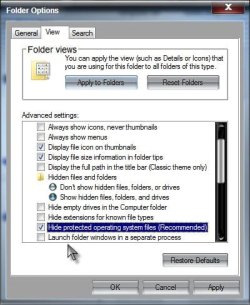
See if you can see the dpnaathlp.dll now. Then proceed as zigzag3143 said. This may just be one of several files. Suggest scanning in safe mode with MalwareBytes.
Remember to change the view settings back to where they were> Untick show hidden Files, Folders, and Drives, and Retick Hide protected Operating System Files (Recommended)
A Guy
Edit: See my reply in the other post
http://www.sevenforums.com/system-security/163468-deviiceeject-exe.html
Open System32 folder> Organize> View tab> Tick Show hidden Files, Folders, and Drives> Untick Hide protected Operating System Files (Recommended) (It will ask if you are sure you want to do that, ok it).
See if you can see the dpnaathlp.dll now. Then proceed as zigzag3143 said. This may just be one of several files. Suggest scanning in safe mode with MalwareBytes.
Remember to change the view settings back to where they were> Untick show hidden Files, Folders, and Drives, and Retick Hide protected Operating System Files (Recommended)
A Guy
Edit: See my reply in the other post
http://www.sevenforums.com/system-security/163468-deviiceeject-exe.html
Last edited:
My Computer
- Computer type
- PC/Desktop
- OS
- Windows 10 Home x64
- CPU
- INTEL Core i5-750 Quad-Core 3.37GHz
- Motherboard
- ASUS P7P55D
- Memory
- HyperX Fury Black Series 8GB (2 x 4GB) 1866Mhz
- Graphics Card(s)
- EVGA GeForce GTX 750 Superclocked 1GB 128-Bit GDDR5
- Monitor(s) Displays
- LG 32MA68HY 32" IPS
- Screen Resolution
- 1920 x 1080
- Hard Drives
- Samsung 840 Evo 120GB, SEAGATE 500GB Barracuda® 7200.12, SATA 3 Gb/s, 7200 RPM, 16MB cache
- PSU
- ANTEC TruePower New TP-550, 80 PLUS, 550W
- Case
- ANTEC Three Hundred Illusion
- Cooling
- COOLER MASTER Hyper 212 Plus, 4 x 120mm 1 x 140mm Noctua's
- Internet Speed
- 85 + Mbps
- Antivirus
- Avast
- Browser
- Vivaldi

- Local time
- 10:50 AM
- Messages
- 8,608
Malware can disguise itself ... in this case, it's very close to a legit file, but it's not legit!
My Computer
- Computer type
- PC/Desktop
- Computer Manufacturer/Model Number
- Bruce ... somewhere in his 40's
- OS
- Windows 7 Ultimate 32bit SP1
- CPU
- Intel(R) Core(TM)2 Quad CPU @ 2.40GHz, 2400 MHz
- Motherboard
- INTEL/D975XBX2
- Memory
- 4 GB
- Graphics Card(s)
- ATI Radeon HD 2600 Pro
- Monitor(s) Displays
- Samsung SyncMaster 914v
- Screen Resolution
- 1280 x 1024
- Hard Drives
- 2/500GB each ... ST3500630AS ATA Device.
One is not connected
- PSU
- Rocketfish 700 W
- Case
- G.Skill Gigabyte Chassis
- Keyboard
- Standard PS/2 Keyboard
- Mouse
- Microsoft PS/2 Mouse
- Internet Speed
- DSL
- Antivirus
- Avira Internet Security
- Browser
- IE 11
- Other Info
- ATI HDMI Audio

You could try the following:
Submit the file to VirusTotal and see what comes back.
VirusTotal - Free Online Virus, Malware and URL Scanner
D/L and run Process Explorer, this is something that will allow you to further investigate it.
Process Explorer
Submit the file to VirusTotal and see what comes back.
VirusTotal - Free Online Virus, Malware and URL Scanner
D/L and run Process Explorer, this is something that will allow you to further investigate it.
Process Explorer
Note: If this fails to yield anything as to the nature of this file, I would be very suspicious of it and investigate when this file appeared, and try to determine which program you may have D/L ed at that time.The Process Explorer display consists of two sub-windows. The top window always shows a list of the currently active processes, including the names of their owning accounts, whereas the information displayed in the bottom window depends on the mode that Process Explorer is in: if it is in handle mode you'll see the handles that the process selected in the top window has opened; if Process Explorer is in DLL mode you'll see the DLLs and memory-mapped files that the process has loaded. Process Explorer also has a powerful search capability that will quickly show you which processes have particular handles opened or DLLs loaded.
The unique capabilities of Process Explorer make it useful for tracking down DLL-version problems or handle leaks, and provide insight into the way Windows and applications work.
Last edited:
My Computer
- Computer type
- PC/Desktop
- Computer Manufacturer/Model Number
- Dell Hell oh Well
- OS
- Win 7 32 Home Premium, Win 7 64 Pro, Win 8.1, Win 10
- CPU
- Intel Core 2 Duo 2.93GHz
- Memory
- Not much with my ADHD
- Graphics Card(s)
- ATI Radeon HD 4350
- Monitor(s) Displays
- 24" HDTV/Monitor
- Screen Resolution
- Blurry after a Scotch or 2
- Hard Drives
- 1 HDD 250 GB, 1 HDD 1 TB, 3 - 1 TB Externals
- Case
- Don't get on my case...man :D
- Cooling
- I have an Air Conditioner & Diet Pepsi
- Keyboard
- Saitek Cyborg
- Mouse
- 10 yr old MS optical mouse that still works
- Internet Speed
- Never fast enough
- Antivirus
- Various
- Browser
- Various