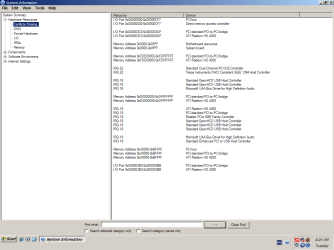
Is this a problem?

Local time
3:19 PM
Messages
173
sorry but i still use XP, but i am worrying about the conflicts
 

Attachments

  • conflict.PNG
    conflict.PNG
    26 KB · Views: 16
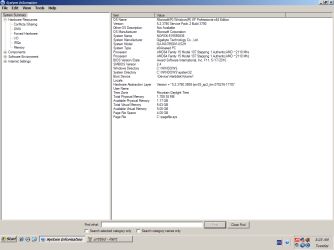
  • system.PNG
    system.PNG
    25.2 KB · Views: 13

My Computer

OS
XP
Perfectly normal, and no it won't be a problem. Looking at your specs, other than maybe more ram you're good to go with either 32 bit or 64 bit Windows 7.
 

My Computer

Computer type
PC/Desktop
Computer Manufacturer/Model Number
Me
OS
Win 7 Ultimate x64
CPU
FX-8350 @ 4.6 GHz so far
Motherboard
Asus M5A97 EVO
Memory
ADATA XPG V1 Series Black 8GB DDR3 1600
Graphics Card(s)
Sapphire R9 270x Dual-X
Sound Card
Xonar DGX w/ Corsair Vengence 1300
Monitor(s) Displays
Acer S232HL Abid
Screen Resolution
1920x1080
Hard Drives
120 GB OCZ Vertex 3
500 GB Seagate 7200.12
PSU
Antec Earthwatts 650W Green
Case
Antec Three Hundred
Cooling
Cooler Master 212 EVO
Keyboard
Logitech G510
Mouse
Logitech G500s
Internet Speed
35000/3000
Perfectly normal, and no it won't be a problem. Looking at your specs, other than maybe more ram you're good to go with either 32 bit or 64 bit Windows 7.

Agree with stormy13. If you can increase your RAM it certainly wouldn't hurt. Prices have dropped considerably. You can check your system at Crucial by using their memory tool, find out what your machine will accomodate, then shop for the lowest prices.
 

My Computer

Computer type
Laptop
Computer Manufacturer/Model Number
Sony Vaio VPCEB47GM Laptop
OS
Win 7 Pro 64-bit
CPU
Intel i5 2.4 Ghz
Memory
8GB DDR3
Graphics Card(s)
Intel HD 3000
Sound Card
IDT High Definition
Monitor(s) Displays
15.6 WGXA Anti-Glare LED
Screen Resolution
1280x800
Hard Drives
640Gb 7200rpm
Antivirus
MSE
Browser
Opera (primary) with IE9 backup
If your system isn't exhibiting any issues, why worry about it? Notice that the section you are viewing is labeled "Conflicts/Sharing", so those IRQs and memory locations are being shared and aren't necessarily a conflict.

This info is provided so that if you are experiencing a problem you could see if their are conflicts that possibly be causing it.
 

My Computer

Computer type
PC/Desktop
Computer Manufacturer/Model Number
Home Built desktop, Dell G15 5511 Gaming laptop,MS Surface Pro 7 tablet
OS
W10 Pro desktop, W11 laptop, W11 Pro tablet (all 64-bit)
CPU
3.7Ghz 8700K i7, i7-11800H, i7-1065G7
Motherboard
ASUS TUF Z370-Pro Gaming in desktop
Memory
16G desktop, 16G laptop, 4G tablet
Graphics Card(s)
AMD Radeon RX580, RTX 3060, Intel Iris Plus
Sound Card
High Definition Audio (Built-in to mobo)
Monitor(s) Displays
Samsung U32J59 32" (2x), 15.6", 12"
Screen Resolution
3840x2160, 3840x2160, 1920x1080, 2160x1440
Hard Drives
500G SSD for OS; 2T, 10T & 15T HDDs for Data on Desktop, 1TB SSD laptop, 128G SSD tablet.
PSU
Corsair CX 750M
Case
Antec 100
Cooling
CM 212+
Keyboard
IBM Model M - used continuously since 1986
Mouse
Microsoft Pro IntelliMouse
Internet Speed
400M down 8M up
Antivirus
Windows Defender
Browser
FireFox
Other Info
Built my first computer (8Mhz 8088cpu, 640K RAM, 20MB HDD, 2 360K floppy drives) in 1985 and have been building them for myself, relatives and friends ever since.
If your system isn't exhibiting any issues, why worry about it? Notice that the section you are viewing is labeled "Conflicts/Sharing", so those IRQs and memory locations are being shared and aren't necessarily a conflict.

This info is provided so that if you are experiencing a problem you could see if their are conflicts that possibly be causing it.

I have been having problems with folders not holding their size when i open them, i expand them, shut them, and when i open them some are not expanded,and when i play the game Diablo II on line the video sometimes does not work (it turns black and you can't turn the monitor off and on) between acts
you have to go to desktop and then click on the game i have a Microtek 815C monitor

remember use small words and BIG pictures

and thank you
 

My Computer

OS
XP
Back
Top