
so a couple of weeks ago i built a NEW desktop with the following specs:
intel core i5 2400 3.1 GHz (quad core)
asus p8h67-M LE B3 (LGA1155) H67
4gb ddr3-1333 G.skill ripjaws
hec 550watts psu cougar rs 80plus full range
and 1gb palit gts 450 sonic ddr5
320 + 250 gb HDD
i then instalalled windows 7 ultimate 64 bit
i noticed upon the startup during the blue "flowery" screen are "scratchy" squares (about 5mm x 5mm) scattered on the screen (about 4 squares). but it vanishes the moment it entered the desktop. so i didn't bother.
however, upon using the desktop, these "scratchy squares" pop up occasionally, sometimes no less than 3 squares and sometimes a lot. and sometimes they blink sometimes they dont(just staying on the screen). they vanishes the moment i move my mouse and click somewhere.
i started to believe that i have a faulty video card, however, the behavior of these squares put me in doubt.
to be able to have a replacement of video card from the manufacturer, i have to have a screen shot of the defect occurrence since i cannot control them to "show". but whenever i press the "print screen button" (during the occurrence of the squares) and paste it on paint,
the squares don't show up on paint when i'm sure the screen shot is taken with those squares showing. ---- this only happens when an application is open (maximized)
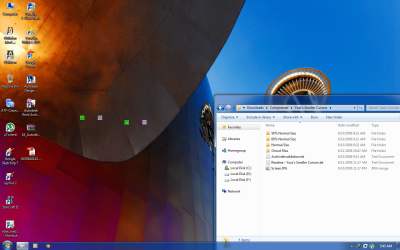
when i'm on desktop, the print screen was a success and i managed to paste it on paint (see attachment)
so what could be the problem? it's getting annoying, is it video card or what? but why they only "stick" at desktop.
please i help me.
(attachment note: for this shot, the desktop is active, not the open window)
intel core i5 2400 3.1 GHz (quad core)
asus p8h67-M LE B3 (LGA1155) H67
4gb ddr3-1333 G.skill ripjaws
hec 550watts psu cougar rs 80plus full range
and 1gb palit gts 450 sonic ddr5
320 + 250 gb HDD
i then instalalled windows 7 ultimate 64 bit
i noticed upon the startup during the blue "flowery" screen are "scratchy" squares (about 5mm x 5mm) scattered on the screen (about 4 squares). but it vanishes the moment it entered the desktop. so i didn't bother.
however, upon using the desktop, these "scratchy squares" pop up occasionally, sometimes no less than 3 squares and sometimes a lot. and sometimes they blink sometimes they dont(just staying on the screen). they vanishes the moment i move my mouse and click somewhere.
i started to believe that i have a faulty video card, however, the behavior of these squares put me in doubt.
to be able to have a replacement of video card from the manufacturer, i have to have a screen shot of the defect occurrence since i cannot control them to "show". but whenever i press the "print screen button" (during the occurrence of the squares) and paste it on paint,
the squares don't show up on paint when i'm sure the screen shot is taken with those squares showing. ---- this only happens when an application is open (maximized)
when i'm on desktop, the print screen was a success and i managed to paste it on paint (see attachment)
so what could be the problem? it's getting annoying, is it video card or what? but why they only "stick" at desktop.
please i help me.
(attachment note: for this shot, the desktop is active, not the open window)
Attachments
My Computer
- OS
- windows 7 64 bit

