
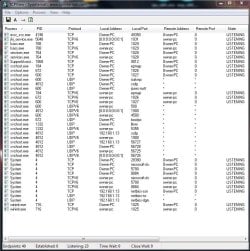
I was wondering if this is normal I have noticed over the past month a very large amount of data being sent via me when I use Yahoo Mail or Ebay , I am using TCPView , When I just turn the computer on with no internet connect I see : 20 Endpoints , Estabished 0 , Listening 15 , Time Wait 0 , Close Wait 0
When I connect to the internet I then see Endpoints 47 , Estabished 4 , Listening 15 , Time Wait 0 , Close wait 0 ,
I can connect to Google mail page or Facebook and there is very little change : Endpoints 54 , Estabished 10 , Listening 24 , Time Wait 1 , Close wait 0 .
All seems well untill I conect to Yahoo https://us-mg42.mail.yahoo.com/ or Ebay https://www.ebay.co.uk/
connected to any of the above I then get : Endpoints 442 , Estabished 144 , Listening 22 , Time Wait 225 , Close Wait 0 .
I have tried all 3 browsers and its the same on all 3 Firefox ,Chrome and Internet Explorer . I have also tried 4 other computers using OS 7 ,OS 8 and OS 10 all using TCPView v3.05 and its the same .
All computers are using Eset Ver 11.0.159.5 .
Have I caught some type of Malware if so do I have to a total install as I have ran all Malware tools but it still remains the same and only seems to when happen connected to Yahoo or Ebay ?
Many Thanks and hope someone knows if this is normal .
You may think the problem maybe in the router however I have tried a spare route and thats the same , Plus I did use neighbours wifi which is using virgin and its the same my ISP is BTinternet .
So if your living in the UK and your ISP is Btinternet please load a copy of TCPview and see if you have got the same : When your doing general browsing are you getting around 79 Endpoints , 28 Established , Listening 33 , Time Wait 1 , Close Wait 0 . If you connect to Yahoo or Ebay Endpoints go up to 400 - 700 , Established 180 , Listening 30 , Time Wait 220 , Close Wait 1
Any thoughts ?
When I connect to the internet I then see Endpoints 47 , Estabished 4 , Listening 15 , Time Wait 0 , Close wait 0 ,
I can connect to Google mail page or Facebook and there is very little change : Endpoints 54 , Estabished 10 , Listening 24 , Time Wait 1 , Close wait 0 .
All seems well untill I conect to Yahoo https://us-mg42.mail.yahoo.com/ or Ebay https://www.ebay.co.uk/
connected to any of the above I then get : Endpoints 442 , Estabished 144 , Listening 22 , Time Wait 225 , Close Wait 0 .
I have tried all 3 browsers and its the same on all 3 Firefox ,Chrome and Internet Explorer . I have also tried 4 other computers using OS 7 ,OS 8 and OS 10 all using TCPView v3.05 and its the same .
All computers are using Eset Ver 11.0.159.5 .
Have I caught some type of Malware if so do I have to a total install as I have ran all Malware tools but it still remains the same and only seems to when happen connected to Yahoo or Ebay ?
Many Thanks and hope someone knows if this is normal .
You may think the problem maybe in the router however I have tried a spare route and thats the same , Plus I did use neighbours wifi which is using virgin and its the same my ISP is BTinternet .
So if your living in the UK and your ISP is Btinternet please load a copy of TCPview and see if you have got the same : When your doing general browsing are you getting around 79 Endpoints , 28 Established , Listening 33 , Time Wait 1 , Close Wait 0 . If you connect to Yahoo or Ebay Endpoints go up to 400 - 700 , Established 180 , Listening 30 , Time Wait 220 , Close Wait 1
Any thoughts ?
Attachments

My Computer
At a glance
Windows Pro 7 . 64 bit2.90 Ghz32 GB
- Computer type
- Laptop
- Computer Manufacturer/Model Number
- Dell Alienware 17
- OS
- Windows Pro 7 . 64 bit
- CPU
- 2.90 Ghz
- Motherboard
- InterCore i7-4910MQ
- Memory
- 32 GB
- Hard Drives
- 1 Tb
- Antivirus
- Eset
- Browser
- FireFox , Chrome , IE

