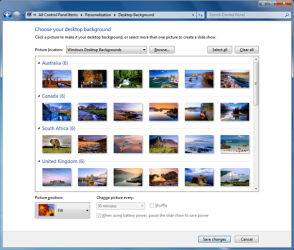
Is this normal? >personalization>wallpaper>names

sam2O1O

New member
Local time
3:26 PM
Messages
14
I followed this
HTML:
 http://www.neowin.net/news/main/09/07/28/creating-custom-wallpaper-collections-in-windows-7
It worked perfectly but wallpapers are showed with names.

Is there anyway I can remove their names & show only images like in other thumbnail?

PS - I deleted the reg key created during neowin.net tut.
 

Attachments

  • cropper_[1].jpg
    cropper_[1].jpg
    89.8 KB · Views: 38
  • original.png
    original.png
    57.1 KB · Views: 36

My Computer

Computer Manufacturer/Model Number
Custom
OS
Windows 7 Home Premium
CPU
E75OO OC ~ 3.7O GHz
Motherboard
Gigabyte P45
Memory
2 GB OC ~ 1066 MHz DualChannel
Graphics Card(s)
96OO GT OC
Sound Card
Onboard
Monitor(s) Displays
LG 22"
Screen Resolution
1920x1080
Hard Drives
Seagate 1000GB 7200.12
Seagate 500GB 7200.12
WDC 500GB 7200 RPM
PSU
Nameless 450W
Case
CiRCLE FullATX
Cooling
Stock
Keyboard
Logitech Combo
Mouse
-
Internet Speed
512 Kbps
Anyone ??
 

My Computer

Computer Manufacturer/Model Number
Custom
OS
Windows 7 Home Premium
CPU
E75OO OC ~ 3.7O GHz
Motherboard
Gigabyte P45
Memory
2 GB OC ~ 1066 MHz DualChannel
Graphics Card(s)
96OO GT OC
Sound Card
Onboard
Monitor(s) Displays
LG 22"
Screen Resolution
1920x1080
Hard Drives
Seagate 1000GB 7200.12
Seagate 500GB 7200.12
WDC 500GB 7200 RPM
PSU
Nameless 450W
Case
CiRCLE FullATX
Cooling
Stock
Keyboard
Logitech Combo
Mouse
-
Internet Speed
512 Kbps
Making your personal wallpapers is not such a difficult thing as described in the link. Place your wallpapers in a folder. Now, right click on the desktop, personalize, and select wallpapers. Beside the picture location, there is the browse button. Click on it to browse to the folder containing your walls. Now adjust the position and shuffle, and click on save changes.

In my computer, there is folder containing birds' pictures. I am setting this folder as the windows wallpaper collection now ... like this screenshot.

You may have a http://www.sevenforums.com/tutorials/700-system-restore.html to get rid of the registry edit , using a just previous restore point .
 

Attachments

  • sshot-1.png
    sshot-1.png
    90.4 KB · Views: 16

My Computer

Computer type
PC/Desktop
Computer Manufacturer/Model Number
Self Assembled
OS
Microsoft Windows 10 Pro Insider Preview 64-bit
CPU
Intel(R) Core(TM) i3-4130 CPU @ 3.40GHz
Motherboard
Gigabyte Technology Co., Ltd. B85M-D3H
Memory
Corsair Vengence 4GB x2 (8.00GB Dual-Channel DDR3 @ 798MHz)
Graphics Card(s)
2047MB GeForce GTS 450 (ZOTAC International)
Sound Card
Onboard (Realtek High Definition Audio)
Monitor(s) Displays
LG Flatron E2040T
Screen Resolution
1600x900
Hard Drives
Western Digital 1 TB
Seagate 500 GB
PSU
Corsair VS550
Case
Cooler Master K380
Cooling
Cooler Master Seidon 120V Plus
Keyboard
Logitech MK260r
Mouse
Logitech MK260r
Internet Speed
PMPL Broadband
Antivirus
Windows Defender + MBAM
Browser
Firefox
Other Info
Dell Studio 15" Laptop
Making your personal wallpapers is not such a difficult thing as described in the link. Place your wallpapers in a folder. Now, right click on the desktop, personalize, and select wallpapers. Beside the picture location, there is the browse button. Click on it to browse to the folder containing your walls. Now adjust the position and shuffle, and click on save changes.

In my computer, there is folder containing birds' pictures. I am setting this folder as the windows wallpaper collection now ... like this screenshot.

You may have a http://www.sevenforums.com/tutorials/700-system-restore.html to get rid of the registry edit , using a just previous restore point .

Thank for the reply. Sorry for not being clear. I know how to add wallpaper to the personalization. Acc. to the Noewin.net thing I jut created one reg key (and a sub key) which I later deleted. Thu leaving the registry to it pristine state.

The only thing is that I cannot remove the image names a shown in thumbnail above even with system restore :(
 

My Computer

Computer Manufacturer/Model Number
Custom
OS
Windows 7 Home Premium
CPU
E75OO OC ~ 3.7O GHz
Motherboard
Gigabyte P45
Memory
2 GB OC ~ 1066 MHz DualChannel
Graphics Card(s)
96OO GT OC
Sound Card
Onboard
Monitor(s) Displays
LG 22"
Screen Resolution
1920x1080
Hard Drives
Seagate 1000GB 7200.12
Seagate 500GB 7200.12
WDC 500GB 7200 RPM
PSU
Nameless 450W
Case
CiRCLE FullATX
Cooling
Stock
Keyboard
Logitech Combo
Mouse
-
Internet Speed
512 Kbps
bump :(

No image name @ preview of image thumbnails in Personalization.

The above thumbnails ~ one is mine & one is original i.e. without file names which I want.
 

My Computer

Computer Manufacturer/Model Number
Custom
OS
Windows 7 Home Premium
CPU
E75OO OC ~ 3.7O GHz
Motherboard
Gigabyte P45
Memory
2 GB OC ~ 1066 MHz DualChannel
Graphics Card(s)
96OO GT OC
Sound Card
Onboard
Monitor(s) Displays
LG 22"
Screen Resolution
1920x1080
Hard Drives
Seagate 1000GB 7200.12
Seagate 500GB 7200.12
WDC 500GB 7200 RPM
PSU
Nameless 450W
Case
CiRCLE FullATX
Cooling
Stock
Keyboard
Logitech Combo
Mouse
-
Internet Speed
512 Kbps
Someone must know how to remove those image name. Please help me out!!
 

My Computer

Computer Manufacturer/Model Number
Custom
OS
Windows 7 Home Premium
CPU
E75OO OC ~ 3.7O GHz
Motherboard
Gigabyte P45
Memory
2 GB OC ~ 1066 MHz DualChannel
Graphics Card(s)
96OO GT OC
Sound Card
Onboard
Monitor(s) Displays
LG 22"
Screen Resolution
1920x1080
Hard Drives
Seagate 1000GB 7200.12
Seagate 500GB 7200.12
WDC 500GB 7200 RPM
PSU
Nameless 450W
Case
CiRCLE FullATX
Cooling
Stock
Keyboard
Logitech Combo
Mouse
-
Internet Speed
512 Kbps
Back
Top