Is this something Windows7 causes

rundwald

New member
Member
VIP
Local time
2:52 AM
Messages
394
Location
UK, Hampshire
I use Routerstats and recently have begun to notice in the Routers log
Code:
"UPnP action 'AddPortMapping' from ip=192.168.1.64 (Success)'
every few minutes.

What might have done lately to make them appear in the log?Are they caused by or related to the Windows system in anyway. Is their generation necessary at all or at the current intervals.
 

My Computer

Computer type
PC/Desktop
Computer Manufacturer/Model Number
Dell Inspiron 560MT
OS
Home Premium 64 bit
CPU
2.9 gigahertz Intel Core2 Duo 64 kilobyte primary memory cac
Motherboard
Board: Dell Inc. 0K83V0 A00 Serial Number: ..CN750939CP069B
Memory
4096 Megabytes Usable Installed Memory Slot 'DIMM0' has 102
Graphics Card(s)
ATI Radeon HD 4300/4500 Series
Sound Card
High Definition Audio Device NVIDIA High Definition Audio (
Monitor(s) Displays
DELL ST2210 [Monitor] (21.7"vis, s/n P479R01Q0VCU, January 2
Screen Resolution
1920x1080
Hard Drives
628.58 Gigabytes Usable Hard Drive Capacity
554.78 Gigabytes Hard Drive Free Space
Keyboard
Std Dell UK
Mouse
KEYBOARD, 105, UNITED KINGDOM, KWE9C0
Internet Speed
~8000 kbps
Antivirus
Avast Free
Browser
Chrome
Other Info
Office 2007: Photo Editing; Serif PhotoPlus X7
You can disable UPnP in your routers configuration. Why do you have that enabled? I would just manually add the ports you will need.
 

My Computer

Computer Manufacturer/Model Number
HP
OS
Windows 7 Ultimate 64-bit
CPU
Intel(R) Core(TM) i5-540M @ 2.53GHz
Motherboard
Hewlett-Packard 1522
Memory
4GB DDR3 System Memory
Graphics Card(s)
1GB ATI Mobility Radeon HD 5830 Graphics
Monitor(s) Displays
15.6" diagonal Full High Definition LED
Screen Resolution
1920x1080
Hard Drives
500GB 7200RPM SATA Hard Drive
PSU
6 Cell Lithium Ion Polymer Battery
Cooling
NZXT Aluminum Notebook Cooler With 3 120mm Adjustable Fans
Other Info
Envy 15
UPnP is useful if you need frequent ad hoc connections e.g. for a WiFi capable MP3 player, etc. But if you use the router only for the PC, it makes little sense. And if something goes on the blink, it will be a dog to debug.
 

My Computer

Computer Manufacturer/Model Number
HP, Dell, Gateway, Toshiba - 4 laptops and 2 desktops
OS
Vista, Windows7, Mint Mate, Zorin, Windows 8
CPU
from 1.6GHz Duo to i7
Monitor(s) Displays
2x HP w2207
Hard Drives
5x HDD, 7x SSD, 12x Externals
Keyboard
with trackball - no mices
Mouse
Trackball mice
Internet Speed
DSL 6000
Job tomorrow then! ;)
 

My Computer

Computer type
PC/Desktop
Computer Manufacturer/Model Number
Dell Inspiron 560MT
OS
Home Premium 64 bit
CPU
2.9 gigahertz Intel Core2 Duo 64 kilobyte primary memory cac
Motherboard
Board: Dell Inc. 0K83V0 A00 Serial Number: ..CN750939CP069B
Memory
4096 Megabytes Usable Installed Memory Slot 'DIMM0' has 102
Graphics Card(s)
ATI Radeon HD 4300/4500 Series
Sound Card
High Definition Audio Device NVIDIA High Definition Audio (
Monitor(s) Displays
DELL ST2210 [Monitor] (21.7"vis, s/n P479R01Q0VCU, January 2
Screen Resolution
1920x1080
Hard Drives
628.58 Gigabytes Usable Hard Drive Capacity
554.78 Gigabytes Hard Drive Free Space
Keyboard
Std Dell UK
Mouse
KEYBOARD, 105, UNITED KINGDOM, KWE9C0
Internet Speed
~8000 kbps
Antivirus
Avast Free
Browser
Chrome
Other Info
Office 2007: Photo Editing; Serif PhotoPlus X7
I'm struggling.:cry:
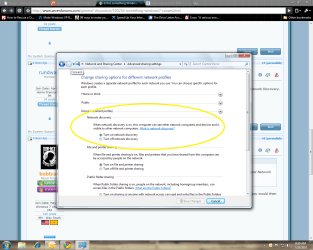
I found a link that said to turn it off through CP> Network and Sharing> Network Discovery. I haven't found Network Discovery.

Please, where is it, and once I arrive what should I do?
 

My Computer

Computer type
PC/Desktop
Computer Manufacturer/Model Number
Dell Inspiron 560MT
OS
Home Premium 64 bit
CPU
2.9 gigahertz Intel Core2 Duo 64 kilobyte primary memory cac
Motherboard
Board: Dell Inc. 0K83V0 A00 Serial Number: ..CN750939CP069B
Memory
4096 Megabytes Usable Installed Memory Slot 'DIMM0' has 102
Graphics Card(s)
ATI Radeon HD 4300/4500 Series
Sound Card
High Definition Audio Device NVIDIA High Definition Audio (
Monitor(s) Displays
DELL ST2210 [Monitor] (21.7"vis, s/n P479R01Q0VCU, January 2
Screen Resolution
1920x1080
Hard Drives
628.58 Gigabytes Usable Hard Drive Capacity
554.78 Gigabytes Hard Drive Free Space
Keyboard
Std Dell UK
Mouse
KEYBOARD, 105, UNITED KINGDOM, KWE9C0
Internet Speed
~8000 kbps
Antivirus
Avast Free
Browser
Chrome
Other Info
Office 2007: Photo Editing; Serif PhotoPlus X7
I'm struggling.:cry:
I found a link that said to turn it off through CP> Network and Sharing> Network Discovery. I haven't found Network Discovery.

Please, where is it, and once I arrive what should I do?

You will find it under Cntl-Panel> Network and Sharing>"advanced sharing settings" in the top left of window, you would then click "turn off network discovery".
 

My Computer

Computer Manufacturer/Model Number
Systemax N2000 Gaming PC
OS
Windows 7 Ultimate x64
CPU
Q6600 @2.4ghz (G0 stepping)
Motherboard
XFX nforce 680i LT
Memory
8 gb OCZ vista essential sli PC-6400
Graphics Card(s)
Dual 9800gt in SLI mode
Sound Card
Integrated 8.1 High Definition Audio
Monitor(s) Displays
Dual Sceptre x246w 24 inch monitors
Screen Resolution
1920 x 1200 each monitor
Hard Drives
500 GB SATA II / 7500 rpm
PSU
Cooler Master Real Power Pro 1250W
Case
N2000 server tower
Cooling
Thermaltake Bigwater 760 is
Keyboard
MS Intelitype 6000 v2.0
Mouse
MS Intelipoint 6000
Internet Speed
Wi-power 1.5GB up / 512k down
Other Info
Windows 7 Ultimate x64, Windows 7 Pro x64, Windows Home Premium X86, Windows XP pro, Windows Home Server x86, Ubuntu 10.4 x86 and x64, Ubuntu server 10.4, SQL Server 2005, MySQL 5.0
I'm struggling.:cry:
I found a link that said to turn it off through CP> Network and Sharing> Network Discovery. I haven't found Network Discovery.

Please, where is it, and once I arrive what should I do?

Like this...
 

Attachments

  • Advanced.png
    Advanced.png
    101.7 KB · Views: 27
  • Network.png
    Network.png
    85.6 KB · Views: 50

My Computer

Computer Manufacturer/Model Number
HP
OS
Windows 7 Ultimate 64-bit
CPU
Intel(R) Core(TM) i5-540M @ 2.53GHz
Motherboard
Hewlett-Packard 1522
Memory
4GB DDR3 System Memory
Graphics Card(s)
1GB ATI Mobility Radeon HD 5830 Graphics
Monitor(s) Displays
15.6" diagonal Full High Definition LED
Screen Resolution
1920x1080
Hard Drives
500GB 7200RPM SATA Hard Drive
PSU
6 Cell Lithium Ion Polymer Battery
Cooling
NZXT Aluminum Notebook Cooler With 3 120mm Adjustable Fans
Other Info
Envy 15
Back
Top