Is USB 3 a failure?

premier69

New member
Member
VIP
Local time
12:57 PM
Messages
139
I was just thinking,... my current PC doesn't have USB 3 but my new will (as soon as they release the P67 motherboards after the recall)

And i wanted to buy an external HDD docking station because i store a lot of tv and movies on drives and put them away until i want to watch something on them, this to limit wear and tear since data loss would mean re downloading a few terabytes.

I was thinking of buying this: https://oxyt.strefazysku.pl/index.p..._ST050#nclid=7263141d4139e5df10e4199ec35092c5

I have never used the eSATA would it be a good alternative to usb3?

It seems that no one has USB 3, it also seems very expensive and i'm reading from time to time about newer up and coming standards supposed to be better, so my question is: is usb 3 a failure as an standard? and if so why?
 

My Computer

Computer Manufacturer/Model Number
White Box
OS
Windows 7 RTM x64
CPU
Core 2 Quad 2.6GHz
Motherboard
Gigabyte Ga-x48-ds5
Memory
4GB Ram
Graphics Card(s)
Asus nvidia 260
Sound Card
Built in, Using Optical Out with Logitech Z-5500 5.1
Monitor(s) Displays
Acer T230H & Samsung LCD TV FULL HD "LE46B530"
Screen Resolution
1920x1080 + 1920x1080
Hard Drives
8 of them, about 6.5TB
PSU
750 watt
Case
Antec P180
Cooling
Default Intel stock
Keyboard
Logitech Dinovo edge
Mouse
wireless laser mouse
Internet Speed
15mbit Cable
Other Info
Primary monitor is multitouch (yay)
I have USb3, with a usb 3 hard drive. (the connectors in it are sata 2 tho, hard drive is sata 3)

and i get 130MB/s average with it
 

My Computer

Computer Manufacturer/Model Number
The Cloud Windfoot Omega Build. Codename: Outpost
OS
Windows 7 Pro 64bit
CPU
Amd 550BE unlocked to Quadcore 3.1GHZ
Motherboard
GA-770TA-UD3 Rev 1.0
Memory
4GB OCZ platinum 1333
Graphics Card(s)
ATI 3850 512MB Asus
Sound Card
creative Xfi music
Monitor(s) Displays
samsung syncmaster T220+ Dell P780
Screen Resolution
1680x1050, 1280x960
Hard Drives
WD 250GB
segate 500GB
PSU
Ultra 500 watt
Case
some random case
Cooling
Coolmaster TX3
Keyboard
Microsoft natural ergonomic 4000
Mouse
Logitech G9
Internet Speed
Teksavvy 5Mbps down 700Kbps up
Other Info
there is a 80mm(8cm) intake fan on the side of the case and a 120mm(12cm) fan as exaust
If you could actually find hardware that could operate at or near the speed of the USB 3 bus it might be worth having. As far as external storage goes, if it has a mechanical (platter and heads) hard drive in it, it won't come even remotely close. They don't even come close to USB 2 speeds at the moment. Even with a solid state drive I don't think you'll come close to maxing out the USB 2 bus speed. Personally if I had an eSATA port on my PC I'd use that before spending any money on adding USB 3 to my current PC. Also if I had to chose between adding a USB 3 card or an eSATA card, I'd go with eSATA. But I have hardware that could use eSATA and don't have anything with USB 3. I don't think its a failure yet, its too new and too early yet to pass judgment.
 

My Computer

Computer type
PC/Desktop
Computer Manufacturer/Model Number
Home Built
OS
Windows 10 Education 64 bit
CPU
AMD Phenom II X4 980 Black Edition Deneb 3.7GHz
Motherboard
Asus M4N68T-M V2 µATX Motherboard
Memory
8GB 4GBx2 Kingston PC10600 DDR3 1333 Memory
Graphics Card(s)
Zotac NVIDIA Geforce GT640 2 Gig DDR3 PCIe
Sound Card
VIA VT1708s High Definition Audio 8-channel Onboard
Monitor(s) Displays
22" LG E2242 1080p and 2 19" I-INC AG191D
Screen Resolution
1280x1024 - 1920x1080 - 1280x1024
Hard Drives
Crucial M100 256 GB SSD and 500 GB WD Blue SATA
PSU
Thermaltake TR 620
Case
Power Up Black ATX Mid-Tower Case
Cooling
Stock heatsink and fan
Keyboard
Logitech Wireless K350 Wave
Mouse
Logitech Wireless M570 Trackman Wheel
Internet Speed
80 Mbps Down 30 Mbps Up
Antivirus
Windows Defender
Browser
Internet Explorer 11
Other Info
HP DVD1040e Lightscribe - External USB2
If you could actually find hardware that could operate at or near the speed of the USB 3 bus it might be worth having. As far as external storage goes, if it has a mechanical (platter and heads) hard drive in it, it won't come even remotely close. They don't even come close to USB 2 speeds at the moment. Even with a solid state drive I don't think you'll come close to maxing out the USB 2 bus speed. Personally if I had an eSATA port on my PC I'd use that before spending any money on adding USB 3 to my current PC. Also if I had to chose between adding a USB 3 card or an eSATA card, I'd go with eSATA. But I have hardware that could use eSATA and don't have anything with USB 3. I don't think its a failure yet, its too new and too early yet to pass judgment.


+1:geek: Premiere, There are mobo's with USB 3.0 other than the P67's but get that you are waiting for the P67's to be re-released.
 

My Computer

Computer Manufacturer/Model Number
Home built
OS
Windows 7 Home Premium x64
CPU
AMD Phenom II X4 945
Motherboard
ASUS M4N98TD EVO AM3 NVIDIA nForce 980a SLI
Memory
8 GB G-Skill 1.5v DDR 3 1333Mhz
Graphics Card(s)
(2) MSI 512MB GTS 250 SLI
Sound Card
Soundblaster Audigy 2 platinum
Monitor(s) Displays
Samsung 2255BW 22"
Screen Resolution
1650 x 1050
Hard Drives
2 WD 250GB 7500RPM
PSU
Antec TP-750. The ultimate bang for the buck PSU
Case
Raidmax
Cooling
Sycthe Slipstream cooling fans(4)
Keyboard
Zboard Merc
Mouse
Logitech MX-518
Internet Speed
3MB
Other Info
LG Blu-Ray/DVD combo drive/LG DVD-RW w/ lightscribe
I currently use e-SATA and plan to stick with that for quite some time. It works just fine for me.
 

My Computer

Computer Manufacturer/Model Number
Self-Built in July 2009
OS
Windows 7 Ultimate x64
CPU
Intel Q9550 2.83Ghz OC'd to 3.40Ghz
Motherboard
Gigabyte GA-EP45-UD3R rev. 1.1, F12 BIOS
Memory
8GB G.Skill PI DDR2-800, 4-4-4-12 timings
Graphics Card(s)
EVGA 1280MB Nvidia GeForce GTX570
Sound Card
Realtek ALC899A 8 channel onboard audio
Monitor(s) Displays
23" Acer x233H
Screen Resolution
1920x1080
Hard Drives
Intel X25-M 80GB Gen 2 SSD
Western Digital 1TB Caviar Black, 32MB cache. WD1001FALS
PSU
Corsair 620HX modular
Case
Antec P182
Cooling
stock
Keyboard
ABS M1 Mechanical
Mouse
Logitech G9 Laser Mouse
Internet Speed
15/2 cable modem
Other Info
Windows and Linux enthusiast. Logitech G35 Headset.
Yeah isn't usb 2.0 at around 480 meg/sec cap?
Never seen anything near that on a hdd anyhow.
 

My Computer

Computer Manufacturer/Model Number
Insane hobo technologies. ;-)
OS
Windows 7 x64
CPU
Intel i7 2600k
Motherboard
Asrock z68 extreme 4 gen 3
Memory
G.skill Ripjaw 16gigs @ 1866
Graphics Card(s)
Nvidia gtx580 (evga)
Sound Card
Integrated HD audio + hdmi
Monitor(s) Displays
24" ASUS widescreen + 42" insignia
Screen Resolution
1080p (1920x1080)
Hard Drives
128 Samsung 830
256 Samsung 840
3 x 1tb storage drive (various)
1 western digital 1tb (eSATA)
1 Seagate 1tb (eSATA)
PSU
1 kilowatt SLI/Crossfire rated Silverstone modular
Case
NZXT Phantom + additional 220 fan
Cooling
Zalmann
Keyboard
Microsoft wireless 3000 (v2)
Mouse
MS - wireless 5000 (bluetrack)
Internet Speed
depends on if you ask me or my provider.
Other Info
The above information is provided as is, and the author assumes no responsibility for issues it may cause with your sanity or fanboyism.
If you could actually find hardware that could operate at or near the speed of the USB 3 bus it might be worth having
What kind of hardware would that be? Even a "normal" SSD cannot feed at 5Mb/sec.

As far as external storage goes, if it has a mechanical (platter and heads) hard drive in it, it won't come even remotely close. They don't even come close to USB 2 speeds at the moment. Even with a solid state drive I don't think you'll come close to maxing out the USB 2 bus speed
Spinning disks can feed up tp 100MB/sec. That is about 2x the speed of USB2. SSDs go up to 350MB/sec which is appr. 7xUSB2 speed. And USB3 is appr. 12xUSB2.

Yeah isn't usb 2.0 at around 480 meg/sec cap?
Never seen anything near that on a hdd anyhow.

That is 480 Mega Bits. The disk speeds are normally quoted in Mega Bytes which is appr. 10x the MegaBits. Any better spinning disk is faster than USB2.
 

My Computer

Computer Manufacturer/Model Number
HP, Dell, Gateway, Toshiba - 4 laptops and 2 desktops
OS
Vista, Windows7, Mint Mate, Zorin, Windows 8
CPU
from 1.6GHz Duo to i7
Monitor(s) Displays
2x HP w2207
Hard Drives
5x HDD, 7x SSD, 12x Externals
Keyboard
with trackball - no mices
Mouse
Trackball mice
Internet Speed
DSL 6000
That would be roughly a 60 megabyte/sec cap. That can't be accurate I've had sustained higher than that over 2.0.
 

My Computer

Computer Manufacturer/Model Number
Insane hobo technologies. ;-)
OS
Windows 7 x64
CPU
Intel i7 2600k
Motherboard
Asrock z68 extreme 4 gen 3
Memory
G.skill Ripjaw 16gigs @ 1866
Graphics Card(s)
Nvidia gtx580 (evga)
Sound Card
Integrated HD audio + hdmi
Monitor(s) Displays
24" ASUS widescreen + 42" insignia
Screen Resolution
1080p (1920x1080)
Hard Drives
128 Samsung 830
256 Samsung 840
3 x 1tb storage drive (various)
1 western digital 1tb (eSATA)
1 Seagate 1tb (eSATA)
PSU
1 kilowatt SLI/Crossfire rated Silverstone modular
Case
NZXT Phantom + additional 220 fan
Cooling
Zalmann
Keyboard
Microsoft wireless 3000 (v2)
Mouse
MS - wireless 5000 (bluetrack)
Internet Speed
depends on if you ask me or my provider.
Other Info
The above information is provided as is, and the author assumes no responsibility for issues it may cause with your sanity or fanboyism.
Hard disk drive - Wikipedia, the free encyclopedia
As of 2010, a typical 7200 rpm desktop hard drive has a sustained "disk-to-buffer" data transfer rate up to 1030 Mbits/sec. A current widely used standard for the "buffer-to-computer" interface is 3.0 Gbit/s SATA, which can send about 300 megabyte/s from the buffer to the computer, and thus is still comfortably ahead of today's disk-to-buffer transfer rates.
Universal Serial Bus - Wikipedia, the free encyclopedia
The USB 2.0 specification was released in April 2000 and was standardized by the USB-IF at the end of 2001. Hewlett-Packard, Intel, Lucent Technologies (now Alcatel-Lucent), NEC and Philips jointly led the initiative to develop a higher data transfer rate, with the resulting specification achieving 480 Mbit/s, a fortyfold increase over 12 Mbit/s for the original USB 1.0.

I got it wrong, what more can I say. :o
I still stick to my last statement though. I personally would still buy into eSATA before USB 3.
 

My Computer

Computer type
PC/Desktop
Computer Manufacturer/Model Number
Home Built
OS
Windows 10 Education 64 bit
CPU
AMD Phenom II X4 980 Black Edition Deneb 3.7GHz
Motherboard
Asus M4N68T-M V2 µATX Motherboard
Memory
8GB 4GBx2 Kingston PC10600 DDR3 1333 Memory
Graphics Card(s)
Zotac NVIDIA Geforce GT640 2 Gig DDR3 PCIe
Sound Card
VIA VT1708s High Definition Audio 8-channel Onboard
Monitor(s) Displays
22" LG E2242 1080p and 2 19" I-INC AG191D
Screen Resolution
1280x1024 - 1920x1080 - 1280x1024
Hard Drives
Crucial M100 256 GB SSD and 500 GB WD Blue SATA
PSU
Thermaltake TR 620
Case
Power Up Black ATX Mid-Tower Case
Cooling
Stock heatsink and fan
Keyboard
Logitech Wireless K350 Wave
Mouse
Logitech Wireless M570 Trackman Wheel
Internet Speed
80 Mbps Down 30 Mbps Up
Antivirus
Windows Defender
Browser
Internet Explorer 11
Other Info
HP DVD1040e Lightscribe - External USB2
i got som old 7200rpm drive in an old lacie usb2 external chassi and i get ALMOST 30mb/s.
 

My Computer

Computer Manufacturer/Model Number
White Box
OS
Windows 7 RTM x64
CPU
Core 2 Quad 2.6GHz
Motherboard
Gigabyte Ga-x48-ds5
Memory
4GB Ram
Graphics Card(s)
Asus nvidia 260
Sound Card
Built in, Using Optical Out with Logitech Z-5500 5.1
Monitor(s) Displays
Acer T230H & Samsung LCD TV FULL HD "LE46B530"
Screen Resolution
1920x1080 + 1920x1080
Hard Drives
8 of them, about 6.5TB
PSU
750 watt
Case
Antec P180
Cooling
Default Intel stock
Keyboard
Logitech Dinovo edge
Mouse
wireless laser mouse
Internet Speed
15mbit Cable
Other Info
Primary monitor is multitouch (yay)
eSATA is better, but I've had mixed experience with it's reliability.
 

My Computer

Computer Manufacturer/Model Number
Insane hobo technologies. ;-)
OS
Windows 7 x64
CPU
Intel i7 2600k
Motherboard
Asrock z68 extreme 4 gen 3
Memory
G.skill Ripjaw 16gigs @ 1866
Graphics Card(s)
Nvidia gtx580 (evga)
Sound Card
Integrated HD audio + hdmi
Monitor(s) Displays
24" ASUS widescreen + 42" insignia
Screen Resolution
1080p (1920x1080)
Hard Drives
128 Samsung 830
256 Samsung 840
3 x 1tb storage drive (various)
1 western digital 1tb (eSATA)
1 Seagate 1tb (eSATA)
PSU
1 kilowatt SLI/Crossfire rated Silverstone modular
Case
NZXT Phantom + additional 220 fan
Cooling
Zalmann
Keyboard
Microsoft wireless 3000 (v2)
Mouse
MS - wireless 5000 (bluetrack)
Internet Speed
depends on if you ask me or my provider.
Other Info
The above information is provided as is, and the author assumes no responsibility for issues it may cause with your sanity or fanboyism.
eSATA is better, but I've had mixed experience with it's reliability.

please explain, I am a collector and would absolutely hate to loose sveral hundreds of gigs of media stuff...

Also, how does SMART functions work with external drive? as normal?

Oh and another qustion. I have several drives and 2 of those are Seagate and Acronis disk management reports 30% SMART health status on those 2 but all others are in the green. But when testing the seagate drives using their diagnostic tools is says everything is fine... i doubt that because one of the drives seem to be having problems. Tho, my entire PC seems to suffer with I/O performance. mouse gets sluggish when transferring between drives sometimes.
 

My Computer

Computer Manufacturer/Model Number
White Box
OS
Windows 7 RTM x64
CPU
Core 2 Quad 2.6GHz
Motherboard
Gigabyte Ga-x48-ds5
Memory
4GB Ram
Graphics Card(s)
Asus nvidia 260
Sound Card
Built in, Using Optical Out with Logitech Z-5500 5.1
Monitor(s) Displays
Acer T230H & Samsung LCD TV FULL HD "LE46B530"
Screen Resolution
1920x1080 + 1920x1080
Hard Drives
8 of them, about 6.5TB
PSU
750 watt
Case
Antec P180
Cooling
Default Intel stock
Keyboard
Logitech Dinovo edge
Mouse
wireless laser mouse
Internet Speed
15mbit Cable
Other Info
Primary monitor is multitouch (yay)
That would be roughly a 60 megabyte/sec cap. That can't be accurate I've had sustained higher than that over 2.0.
I don't think that sounds right to me. 480megabits per second is correct...so 480,000,000 / 8 = 60,000,000 bytes per second / 1024 bytes = 58,593KB/sec. I've never seen a USB 2.0 device come close to 100% full saturation, about 70% with overhead is about as good as it will get. So, 60MB/sec x .70 = 42MB/sec is as fast as USB 2.0 is really going to go.

i got som old 7200rpm drive in an old lacie usb2 external chassi and i get ALMOST 30mb/s.
That sounds a whole lot closer. I usually get 25-28MB/sec sustained transfer to my USB 2.0 devices.
 

My Computer

Computer Manufacturer/Model Number
Self-Built in July 2009
OS
Windows 7 Ultimate x64
CPU
Intel Q9550 2.83Ghz OC'd to 3.40Ghz
Motherboard
Gigabyte GA-EP45-UD3R rev. 1.1, F12 BIOS
Memory
8GB G.Skill PI DDR2-800, 4-4-4-12 timings
Graphics Card(s)
EVGA 1280MB Nvidia GeForce GTX570
Sound Card
Realtek ALC899A 8 channel onboard audio
Monitor(s) Displays
23" Acer x233H
Screen Resolution
1920x1080
Hard Drives
Intel X25-M 80GB Gen 2 SSD
Western Digital 1TB Caviar Black, 32MB cache. WD1001FALS
PSU
Corsair 620HX modular
Case
Antec P182
Cooling
stock
Keyboard
ABS M1 Mechanical
Mouse
Logitech G9 Laser Mouse
Internet Speed
15/2 cable modem
Other Info
Windows and Linux enthusiast. Logitech G35 Headset.
...
so 480,000,000 / 8 = 60,000,000 bytes
That is not quite right. Although a byte has 8 data bits, there is also a 9th checkbit. Plus there is some checkdata that can be interleaved with the records. That's why I always quote a ratio 10:1 for bits:Bytes. That is not 100% right, but close enough and easy to convert.

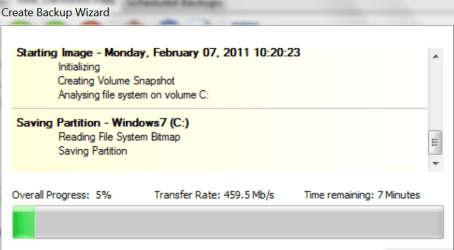
The last image I took to a USB3 drive (5400 RPM disk), I got about 460Mb/sec write.
 

Attachments

  • 2011-02-07_1021.png
    2011-02-07_1021.png
    27.1 KB · Views: 5

My Computer

Computer Manufacturer/Model Number
HP, Dell, Gateway, Toshiba - 4 laptops and 2 desktops
OS
Vista, Windows7, Mint Mate, Zorin, Windows 8
CPU
from 1.6GHz Duo to i7
Monitor(s) Displays
2x HP w2207
Hard Drives
5x HDD, 7x SSD, 12x Externals
Keyboard
with trackball - no mices
Mouse
Trackball mice
Internet Speed
DSL 6000
That would be roughly a 60 megabyte/sec cap. That can't be accurate I've had sustained higher than that over 2.0.

Yes it is accurate. It is 480 Mb/s, you must be mistaken. Because of protocol overheads the effective rate is more like 320 Mb/s, or 40 MBytes/s. I have never gotten sustained throughput of more than 35 MB/s. I doubt anybody else has either.
 

My Computer

Computer type
PC/Desktop
Computer Manufacturer/Model Number
Home built (GeneO industries)/Model 4
OS
Windows 10 Pro. EFI boot partition, full EFI boot
CPU
i7 4770k 4.4GHz (44-44-43-43 turbo) @ 1.248V
Motherboard
ASUS Maximus VI Hero
Memory
16GB (8GBx2) @2200 MHz G.skill Sniper 10-11-10-30-1, 1.6V
Graphics Card(s)
MSI GTX 970 Gaming 4G
Sound Card
Onboard SupremeFX Audio
Monitor(s) Displays
NEC Spectraview 2490WUXi-SV
Screen Resolution
1920 x 1200
Hard Drives
Samsung 850 Pro 256GB (OS), Samsung 2x 128GB 840 Pro SSD in RAID0, 3x WD Blue 6Gb/s 1TB RAID0, WD 2TB Black external USB 3.0, 2TB WD20EARS Green external USB 3.0, 2x 500GB Seagate and 1 750 GB external USB, 1x 350GB external USB3
PSU
Seasonic X-850 (2012 KM3 model)
Case
Fractal Design Define R4
Cooling
NH-D14, NF-F12, NF-A15; NF-P14, NF-P12,NF-A14, S12A PWM
Keyboard
Cooler Master Storm Quickfire Rapid - Brown
Mouse
Logitech G602
Internet Speed
126.4 Mb/s down, 24.3 Mb/s up
Other Info
USB 3.0 x8 , SATA III x8, eSATA, USB 2.0 x6. Samsung DVD R/W drive.

WEI: CPU 7.8, Memory 7.9, Graphics 7.9, Disk 7.9
The last image I took to a USB3 drive (5400 RPM disk), I got about 460Mb/sec write.

You got 460Mb/sec after the data was compressed and moved over to the external hard drive. Effectively, 460Mb of your system was backed up per second, but the actual throughput of the data to the device was slower. If you indeed got 460Mb/sec...you could have completed a 20GB image in just 40 seconds.

...
so 480,000,000 / 8 = 60,000,000 bytes
That is not quite right. Although a byte has 8 data bits, there is also a 9th checkbit. Plus there is some checkdata that can be interleaved with the records. That's why I always quote a ratio 10:1 for bits:Bytes. That is not 100% right, but close enough and easy to convert.
Generally speaking though, when converting data transfer rates, you use 8 bits per byte as the accepted standard. You can see this website gets the exact same results that I came up with;
http://www.sengpielaudio.com/calculator-transferrate.htm.

Either way, with 8 bits or 10x...you are roughly the same amount of data...58-62MB/sec.
 

My Computer

Computer Manufacturer/Model Number
Self-Built in July 2009
OS
Windows 7 Ultimate x64
CPU
Intel Q9550 2.83Ghz OC'd to 3.40Ghz
Motherboard
Gigabyte GA-EP45-UD3R rev. 1.1, F12 BIOS
Memory
8GB G.Skill PI DDR2-800, 4-4-4-12 timings
Graphics Card(s)
EVGA 1280MB Nvidia GeForce GTX570
Sound Card
Realtek ALC899A 8 channel onboard audio
Monitor(s) Displays
23" Acer x233H
Screen Resolution
1920x1080
Hard Drives
Intel X25-M 80GB Gen 2 SSD
Western Digital 1TB Caviar Black, 32MB cache. WD1001FALS
PSU
Corsair 620HX modular
Case
Antec P182
Cooling
stock
Keyboard
ABS M1 Mechanical
Mouse
Logitech G9 Laser Mouse
Internet Speed
15/2 cable modem
Other Info
Windows and Linux enthusiast. Logitech G35 Headset.
If you indeed got 460Mb/sec...you could have completed a 20GB image in just 40 seconds.
This you have to compute for me - but real slow please.

Here is my take:

460 Mb/sec is roughly 50MB/sec
20GB is 20,000 MB
20,000 divided by 50 is 400sec equal about 7 minutes

And that's about the time it took to take that image.

Btw: compressed or not compressed has nothing to do with it if the resulting image is 20GB - the amount of data in the partition was about 40GB.
 

My Computer

Computer Manufacturer/Model Number
HP, Dell, Gateway, Toshiba - 4 laptops and 2 desktops
OS
Vista, Windows7, Mint Mate, Zorin, Windows 8
CPU
from 1.6GHz Duo to i7
Monitor(s) Displays
2x HP w2207
Hard Drives
5x HDD, 7x SSD, 12x Externals
Keyboard
with trackball - no mices
Mouse
Trackball mice
Internet Speed
DSL 6000
sorry, I thought you were talking megabytes per second, but you indeed meant megabits per second. I screwed that one up. I usually try to refer to ###Mbps when I am talking megabits and ###MB/s when I mean megabytes. Totally my bad.
 

My Computer

Computer Manufacturer/Model Number
Self-Built in July 2009
OS
Windows 7 Ultimate x64
CPU
Intel Q9550 2.83Ghz OC'd to 3.40Ghz
Motherboard
Gigabyte GA-EP45-UD3R rev. 1.1, F12 BIOS
Memory
8GB G.Skill PI DDR2-800, 4-4-4-12 timings
Graphics Card(s)
EVGA 1280MB Nvidia GeForce GTX570
Sound Card
Realtek ALC899A 8 channel onboard audio
Monitor(s) Displays
23" Acer x233H
Screen Resolution
1920x1080
Hard Drives
Intel X25-M 80GB Gen 2 SSD
Western Digital 1TB Caviar Black, 32MB cache. WD1001FALS
PSU
Corsair 620HX modular
Case
Antec P182
Cooling
stock
Keyboard
ABS M1 Mechanical
Mouse
Logitech G9 Laser Mouse
Internet Speed
15/2 cable modem
Other Info
Windows and Linux enthusiast. Logitech G35 Headset.
sorry, I thought you were talking megabytes per second, but you indeed meant megabits per second. I screwed that one up. I usually try to refer to ###Mbps when I am talking megabits and ###MB/s when I mean megabytes. Totally my bad.
Thanks, now I got my bearings back. :D
 

My Computer

Computer Manufacturer/Model Number
HP, Dell, Gateway, Toshiba - 4 laptops and 2 desktops
OS
Vista, Windows7, Mint Mate, Zorin, Windows 8
CPU
from 1.6GHz Duo to i7
Monitor(s) Displays
2x HP w2207
Hard Drives
5x HDD, 7x SSD, 12x Externals
Keyboard
with trackball - no mices
Mouse
Trackball mice
Internet Speed
DSL 6000
There aren't that many eSATA devices around either - for as long as it has been around.
Because USB can do different kinds of devices other than SATA drives, and is backwards compatible with USB 2.0, it certainly won't be a failure, even though Intel would like it to be I think. THe fact that it can handle many different kinds of devices makes it better than eSATA for data storage.

eSATA is more suitable for system disks or SSDs where low latency is important. USB has too high a latency for these purposes.

It is just new, and slowed by Intel.
 

My Computer

Computer type
PC/Desktop
Computer Manufacturer/Model Number
Home built (GeneO industries)/Model 4
OS
Windows 10 Pro. EFI boot partition, full EFI boot
CPU
i7 4770k 4.4GHz (44-44-43-43 turbo) @ 1.248V
Motherboard
ASUS Maximus VI Hero
Memory
16GB (8GBx2) @2200 MHz G.skill Sniper 10-11-10-30-1, 1.6V
Graphics Card(s)
MSI GTX 970 Gaming 4G
Sound Card
Onboard SupremeFX Audio
Monitor(s) Displays
NEC Spectraview 2490WUXi-SV
Screen Resolution
1920 x 1200
Hard Drives
Samsung 850 Pro 256GB (OS), Samsung 2x 128GB 840 Pro SSD in RAID0, 3x WD Blue 6Gb/s 1TB RAID0, WD 2TB Black external USB 3.0, 2TB WD20EARS Green external USB 3.0, 2x 500GB Seagate and 1 750 GB external USB, 1x 350GB external USB3
PSU
Seasonic X-850 (2012 KM3 model)
Case
Fractal Design Define R4
Cooling
NH-D14, NF-F12, NF-A15; NF-P14, NF-P12,NF-A14, S12A PWM
Keyboard
Cooler Master Storm Quickfire Rapid - Brown
Mouse
Logitech G602
Internet Speed
126.4 Mb/s down, 24.3 Mb/s up
Other Info
USB 3.0 x8 , SATA III x8, eSATA, USB 2.0 x6. Samsung DVD R/W drive.

WEI: CPU 7.8, Memory 7.9, Graphics 7.9, Disk 7.9
Back
Top