is winzip useless for video files?

rossmodel

New member
Local time
6:56 PM
Messages
41
tried to convert a 910mb .mpg using winzip, I ended getting a 882 mb zip file, tried again this time using zipx and got 878mb this time.

is this normal or am I doing something wrong? How can I get a better ratio.
 

My Computer My Computer

OS
windows 7 professional 64
Zipping an .mpg is not usually recommended. There's not that much extra data that can be compressed.
If you want a smaller file, it's best to encode it to a lower size or transcode it to a different format.
 

My Computer My Computer

Computer type
PC/Desktop
Computer Manufacturer/Model Number
Custom Build
OS
Windows 7 Home Premium 64 bit
CPU
Intel Core i7-4790
Motherboard
GA-Z87X-D3H
Memory
G.SKILL 8GB (2 x 4GB) DDR3 F3-10666CL9D-8GBNT
Graphics Card(s)
AMD Radeon R7 250
Sound Card
Realtek ALC892
Monitor(s) Displays
Samsung UN32EH5000, Dell 1703FPT
Screen Resolution
1920 x 1080, 1280 x 1024
Hard Drives
WD5003AZEX
WD10EZEX
Samsung HD103SJ
Samsung 128 GB 840 PRO
PSU
SeaSonic M12II SS-500GM
Case
Fractal Design Define R4
Cooling
Zalman CNPS9900ALED
Keyboard
Logitech K800
Mouse
Logitech M705
Internet Speed
16 Mbps
Antivirus
Avast
Browser
Firefox
Other Info
Bose Companion 2 Multimedia Speakers
yeah, I think I need to convert it to another format, 900MB for a 13min low quality video is ridiculous wasteful.
 

My Computer My Computer

OS
windows 7 professional 64
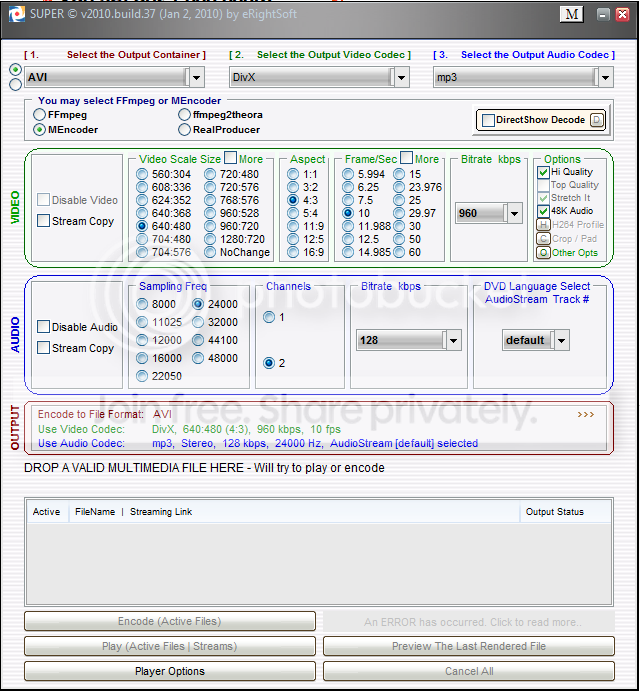
I use Super (c) to compress or convert some of my videos, works really well with the youtube tutorials I sometimes make, and the quality loss is minimal. Did one the other day 158mb came out 47mb. It's Free and supports loads of formats plus it's pretty easy to use but does have some advanced features that some may find usefull.

superc.png


Here's the link SUPER (C)

Soz it's a bit of a bugger to get to the actual download file but once you get there it's worth it. ;)
 

My Computer My Computer

Computer type
PC/Desktop
Computer Manufacturer/Model Number
Self Built
OS
Windows 7 Ultimate 64bit
CPU
AMD Phenom Quad core 9950 black edition
Motherboard
Gigabyte
Memory
16Gb
Graphics Card(s)
2x XFX Radeon 5850
Sound Card
PCI Express X-Fi Titanium / Logitech G35
Monitor(s) Displays
2x HP 2410i
Screen Resolution
1920x1080
Hard Drives
2x 500Gb Seagate
1x 300Gb Seagate
1x 1Tb Seagate
2x 1Tb Hitatchi
PSU
Jean Tech Storm 700W
Case
Cooler Master COSMOS S
Cooling
Akasa Evo Blue Pro
Keyboard
Logitech G15
Mouse
Mad Catz M.M.O. 7
Internet Speed
12mb
Super is hardly what I consider a beginner's tool!
You should try something simple at first, like this one:
Freemake - Best Freeware Alternatives To Paid Video Software
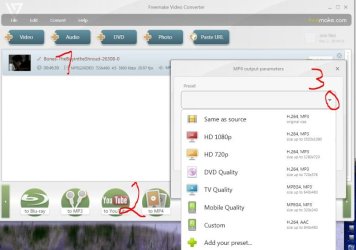
1)drag/drop your Mpeg clip into the window
2)pick a base format from the bottom and
3)fine tune it with the drop down arrow to fit your needs like this:
Capture.JPG
After you picked your preset you will see the estimated resulting size in the bottom right.

In this example I squeezed a 1.46GB MPEG-2 into a ~700MB MP4 with virtually no loss of quality that's a gain of more than 50 % space and it took all but 10 minutes :D

Just one more word to precautions: Try not to change the original encoding around too much to get decent results like change the screen resolution but leave the frame rate alone. Set the Bitrate to auto until you get a hang of it and at least in the beginning don't delete the original before you checked the results !!!

-DG
 

My Computer My Computer

Computer Manufacturer/Model Number
HP m8000n
OS
Windows 7 Ultimate x86
CPU
DualCore AMD Athlon 64 X2, 2600 MHz 5200+
Motherboard
Asus M2N68-LA (Narra)
Memory
Samsung 2GB DDR2
Graphics Card(s)
Onboard NVIDIA GeForce 6150SE nForce 430
Sound Card
Onboard nVIDIA nForce 6100-430 (MCP61P)
Monitor(s) Displays
Westinghouse 19" LED
Screen Resolution
1280x1024
Hard Drives
SATA II Seagate Barracuda 500GB
USB II WD Elements 500GB
USB II WD My Book 1TB
USB II WD My Book 2TB
PSU
Stock (HP)
Case
Stock (HP)
Cooling
Stock
Keyboard
Logitech Classic KB 200
Mouse
Standard HP opticle USB mouse
Back
Top