ISATAP Adapter #8 error code 31

oljayto

New member
Local time
2:36 AM
Messages
12
Hey guys!

I had my cpu fan changed about a week ago and since then I got 3 BSoD which after dumping the mem. the sys reset itself. In addition to these, 2 times out of four windows is unable to fully start and it almost freezes after windows logo, no log on screen only a black screen and cursor which moves. I have to reset the sys again to log on. With all these being mentioned I checked my DevMang and yes, ISATAP adapter #8 is having a problem (code 31). I own this pc for over 6 years and have changed its windows 3 times but never ever have faced with this problem.

Is there any solution for this?

Thnx a lot
 

Attachments

  • Capture1.JPG
    Capture1.JPG
    81 KB · Views: 0

My Computer

Computer type
PC/Desktop
OS
Windows 7 Ultimate x64
CPU
3770-K
Motherboard
P8ZZVE Asuse
Memory
16G
Graphics Card(s)
GTX 670
Hard Drives
1 External WD ( 4TB )
2 Internal HDD
1 SSD ( OS )
Antivirus
Kaspersky IS
Browser
Chrome
Last edited:

My Computer

Computer type
Laptop
Computer Manufacturer/Model Number
Dell M6500 Precision Work Station
OS
Windows 7 Pro SP1 64 bit
Memory
8 GB
Screen Resolution
1920x
Internet Speed
30 Mbps
Antivirus
Norton Security
Browser
IE 11
Dear wither 2,


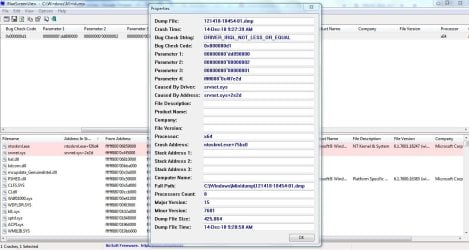
Thnx for your reply; honestly whenever I uninstall MS ISATAP adapter it doesnt go away, I mean when I uninstall it, after a quick refresh in my DevMang list I still see the problem. By the way here are the results of BlueSW:(please if you need further info on my sys. don't hesitate it and ask :-) )
 

Attachments

  • Capture3.JPG
    Capture3.JPG
    119.9 KB · Views: 3

My Computer

Computer type
PC/Desktop
OS
Windows 7 Ultimate x64
CPU
3770-K
Motherboard
P8ZZVE Asuse
Memory
16G
Graphics Card(s)
GTX 670
Hard Drives
1 External WD ( 4TB )
2 Internal HDD
1 SSD ( OS )
Antivirus
Kaspersky IS
Browser
Chrome
I suggest going to Accessories and right clicking on Command Prompt. Select "run as administrator." Type in sfc /scannow and let it run. Does it find any errors. If so, reboot and run it again.
 

My Computer

Computer type
Laptop
Computer Manufacturer/Model Number
Dell M6500 Precision Work Station
OS
Windows 7 Pro SP1 64 bit
Memory
8 GB
Screen Resolution
1920x
Internet Speed
30 Mbps
Antivirus
Norton Security
Browser
IE 11
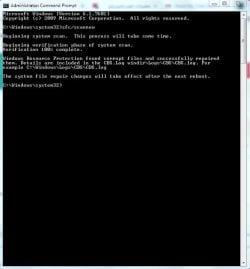
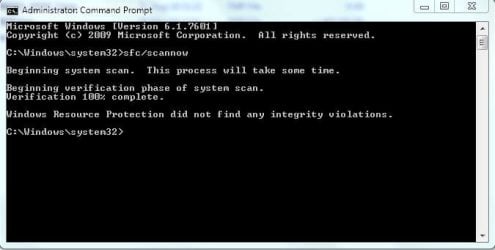
I did it. The first time I executed sfc/scannow, it gave a message about a corrupted file which was repaired (shown in picture below). then I rebooted my PC and ran it again, no errors. The MS ISATAP Adapter #8 is still displaying error 31 and I forget to mention that the second Adapter with the same name, is working properly. But I'm not sure about the boot problems. :huh:
 

Attachments

  • Capture4.JPG
    Capture4.JPG
    40.5 KB · Views: 19
  • Capture5.JPG
    Capture5.JPG
    28.9 KB · Views: 19

My Computer

Computer type
PC/Desktop
OS
Windows 7 Ultimate x64
CPU
3770-K
Motherboard
P8ZZVE Asuse
Memory
16G
Graphics Card(s)
GTX 670
Hard Drives
1 External WD ( 4TB )
2 Internal HDD
1 SSD ( OS )
Antivirus
Kaspersky IS
Browser
Chrome
I wouldn't worry about the isatap adapter error at this point since it's associated with the internet and that shouldn't be a factor during start up.

Note that the following procedure may disable your anti-virus. As a result, you might want to set a system restore point before performing it.

Run msconfig.exe. In the Services tab, check the box to "hide all.........." Then check the Disable All. Apply the change. In the Startup tab, check the Disable All and apply the change. Reboot. Do you get the BSODs or a startup problem?
 

My Computer

Computer type
Laptop
Computer Manufacturer/Model Number
Dell M6500 Precision Work Station
OS
Windows 7 Pro SP1 64 bit
Memory
8 GB
Screen Resolution
1920x
Internet Speed
30 Mbps
Antivirus
Norton Security
Browser
IE 11
I really appreciate your support and help wither 2, thnx. I havent got a BSoD since the last time (shown in former post) which is related to srvnet.sys (the driver was the cause of the issue) and I not certain how many BSoDs my system is gonna face. But I'm still struggling with boot problems tough; to be more specific, %70 of times my windows being started, it freezes after animated Windows logo disappears. I'm not that worry of ISATAP problem but I dont wanna reset my PC every other day. I will do the procedure and let you know very soon.
 

My Computer

Computer type
PC/Desktop
OS
Windows 7 Ultimate x64
CPU
3770-K
Motherboard
P8ZZVE Asuse
Memory
16G
Graphics Card(s)
GTX 670
Hard Drives
1 External WD ( 4TB )
2 Internal HDD
1 SSD ( OS )
Antivirus
Kaspersky IS
Browser
Chrome
One thing I failed to mention is that, after you run the process, you should go back and reset the configuration to normal and reboot. Depending on whether or not the process helps, we can procede from there.
 

My Computer

Computer type
Laptop
Computer Manufacturer/Model Number
Dell M6500 Precision Work Station
OS
Windows 7 Pro SP1 64 bit
Memory
8 GB
Screen Resolution
1920x
Internet Speed
30 Mbps
Antivirus
Norton Security
Browser
IE 11
Any news yet?
 

My Computer

Computer type
Laptop
Computer Manufacturer/Model Number
Dell M6500 Precision Work Station
OS
Windows 7 Pro SP1 64 bit
Memory
8 GB
Screen Resolution
1920x
Internet Speed
30 Mbps
Antivirus
Norton Security
Browser
IE 11
Dear wither 2 -

Sorry for the delayed response, I haven't done the procedure you mentioned yet since a series of events took place during last days:

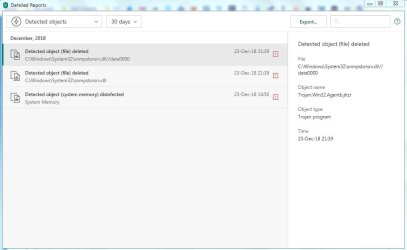
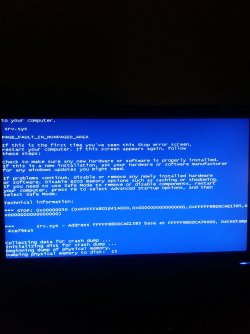
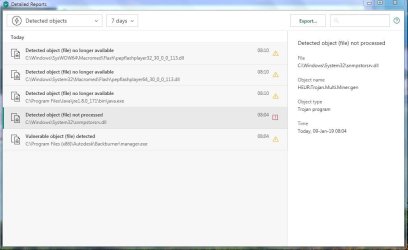
1) There was a trojan in my sys32 which my KasperTotalSec. had a problem disinfecting it (pic provided below) and after I set all securities to max my boot problem solved abruptly and the trojan was deleted.

2)However, during working with my pc during last couple of days, I got another BSoD which sadly the BlueScreenView failed to detect it. (see the details in picture below)

3)Due to some reasons I disabled my Kaspersky web protection for a span of two days and turned it back on after that, which consequently the setting was reseted to default value (normal protection) and I didn't noticed.

4) My boot problem has returned and I did set the protection level back to max because I reckon that must be the problem. (not sure yet)

Do you think we can figure out the issue or its still necessary to run the procedure you prescribed?

thank you so much in advance
 

Attachments

  • Capture6.JPG
    Capture6.JPG
    40.9 KB · Views: 1
  • 20181228_215708.jpg
    20181228_215708.jpg
    737.1 KB · Views: 0

My Computer

Computer type
PC/Desktop
OS
Windows 7 Ultimate x64
CPU
3770-K
Motherboard
P8ZZVE Asuse
Memory
16G
Graphics Card(s)
GTX 670
Hard Drives
1 External WD ( 4TB )
2 Internal HDD
1 SSD ( OS )
Antivirus
Kaspersky IS
Browser
Chrome
When exactly in the boot process does this occur? Are you hearing any beeps before Windows starts to load?

Is the new CPU fan working correctly?
 

My Computer

Computer type
Laptop
Computer Manufacturer/Model Number
Dell M6500 Precision Work Station
OS
Windows 7 Pro SP1 64 bit
Memory
8 GB
Screen Resolution
1920x
Internet Speed
30 Mbps
Antivirus
Norton Security
Browser
IE 11
one thing I'd like to add is that I just found windows has created pagefile.sys as large as 16 Gb in drive C:\ and drive F:\

Is there anything wrong with my RAM and System Memory? :shock:
 

My Computer

Computer type
PC/Desktop
OS
Windows 7 Ultimate x64
CPU
3770-K
Motherboard
P8ZZVE Asuse
Memory
16G
Graphics Card(s)
GTX 670
Hard Drives
1 External WD ( 4TB )
2 Internal HDD
1 SSD ( OS )
Antivirus
Kaspersky IS
Browser
Chrome
When exactly in the boot process does this occur? Are you hearing any beeps before Windows starts to load?

Is the new CPU fan working correctly?

after beeping and all the DOS stuff (sry for being a noob) and after the windows seven animated logo. Exactly before the log on screen. The fan is working properly tough.
 

My Computer

Computer type
PC/Desktop
OS
Windows 7 Ultimate x64
CPU
3770-K
Motherboard
P8ZZVE Asuse
Memory
16G
Graphics Card(s)
GTX 670
Hard Drives
1 External WD ( 4TB )
2 Internal HDD
1 SSD ( OS )
Antivirus
Kaspersky IS
Browser
Chrome
I asked because two beeps before Windows starts to load indicates a potential memory problem.

Best way to check is to use memtest86+. You can get it here-

Memtest86+ - Advanced Memory Diagnostic Tool

I grabbed some instructions on how to prep it for use on a USB flash drive from another website-

"Grab an unused USB flash drive and connect it to your PC.
Download the Windows MemTest86 USB image.
Right click on the image file, and select the "Extract to Here" option. Extract the file folder anywhere you can get to easily (eg. your Desktop).
Inside the extracted folder, run the included imageUSB tool, and choose your plugged in USB drive to turn into a bootable drive. CAUTION: this action will erase all data on the USB drive.
Memtest86 will now be installed on your USB and you are ready to test for the possible source of srvnet.sys errors.
Restart your PC with the USB drive installed.
Memtest86 will begin testing for memory corruption.
Follow the on-screen commands."

One thing not mentioned here is that you will need to ensure that a USB drive is set to boot before the hard drive in the BIOS.
 

My Computer

Computer type
Laptop
Computer Manufacturer/Model Number
Dell M6500 Precision Work Station
OS
Windows 7 Pro SP1 64 bit
Memory
8 GB
Screen Resolution
1920x
Internet Speed
30 Mbps
Antivirus
Norton Security
Browser
IE 11
I asked because two beeps before Windows starts to load indicates a potential memory problem.

Best way to check is to use memtest86+. You can get it here-

Memtest86+ - Advanced Memory Diagnostic Tool

I grabbed some instructions on how to prep it for use on a USB flash drive from another website-

"Grab an unused USB flash drive and connect it to your PC.
Download the Windows MemTest86 USB image.
Right click on the image file, and select the "Extract to Here" option. Extract the file folder anywhere you can get to easily (eg. your Desktop).
Inside the extracted folder, run the included imageUSB tool, and choose your plugged in USB drive to turn into a bootable drive. CAUTION: this action will erase all data on the USB drive.
Memtest86 will now be installed on your USB and you are ready to test for the possible source of srvnet.sys errors.
Restart your PC with the USB drive installed.
Memtest86 will begin testing for memory corruption.
Follow the on-screen commands."

One thing not mentioned here is that you will need to ensure that a USB drive is set to boot before the hard drive in the BIOS.


Dear wither 2 -

I used the tool and for 1 pass no errors were found (dont know how many passes should be taken) so I assume my system memory is fine. But the boot problem that happens from time to time and irregularly, still exists I think. Btw My KasperTotalSec has found another trojan today in sys32 directory which I provided the pic for you in case that might be the cause of the issue.
 

Attachments

  • Capture7.JPG
    Capture7.JPG
    54.1 KB · Views: 2

My Computer

Computer type
PC/Desktop
OS
Windows 7 Ultimate x64
CPU
3770-K
Motherboard
P8ZZVE Asuse
Memory
16G
Graphics Card(s)
GTX 670
Hard Drives
1 External WD ( 4TB )
2 Internal HDD
1 SSD ( OS )
Antivirus
Kaspersky IS
Browser
Chrome
You didn't mention if it was two beeps before the Windows log on. However, seems memory is okay.

In re-reading, the problem occurs after Windows has started booting.

In reading about that .dll, it isn't necessarily caused by a trojan/virus since it's used by some browsers. If you quarantine it in Kapersky or remove it following the instructions provided in other blogs and the problem goes away, then you have your answer. However, your screenshot from 3 days ago shows the presence of the same .dll.

I think you should run the procedure I provided for a clean boot just to see if it occurs. It's tough to figure out because your getting the error sporadically and you shouldn't leave your system in the clean boot configuration for a significant amount of time.

The other thing I think you should do is provide the bluescreenview when it happens the next time. In addition, run eventvwr and provide the eventlog.
 

My Computer

Computer type
Laptop
Computer Manufacturer/Model Number
Dell M6500 Precision Work Station
OS
Windows 7 Pro SP1 64 bit
Memory
8 GB
Screen Resolution
1920x
Internet Speed
30 Mbps
Antivirus
Norton Security
Browser
IE 11
Back
Top