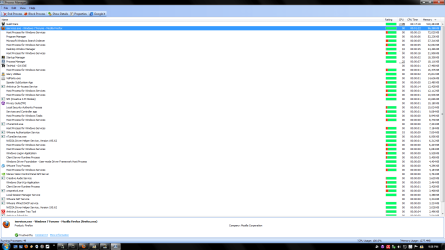
iservices.exe

burger

New member
Local time
2:25 PM
Messages
22
Have a question on a startup process but didn't know what forum to post this up at so I picked security.

:huh: Hey I found a startup process called iservices.exe with the name kUD218Orbu but I only see this in Glary Utilities and not msconfig. I have searched the internet and found nothing about it. The only things that came up were services.exe with out the "i" or iservice.exe without the "s" not plural. Also when I ran firefox in my running processes I see that iservices was in front of my firefox process. I have ran Avira, malwarebytes, windows defender, and trend micros house call. Found nothing! Also I can not locate this file at all when I do a search for it? Is this a Windows 7 process or something from a program I installed? This thing is weird. oh and if anyone knows where a good forum for this subject please post it. Thanks.
 

My Computer

Computer Manufacturer/Model Number
Custom
OS
Windows 7 Pro x64 Build 7600
CPU
AMD64
Motherboard
ECS C51G-M754
Memory
Kingston Hyper X
Graphics Card(s)
Nvidia 9800GT
Sound Card
Creative X-FI Xtreme Music
Monitor(s) Displays
Acer H213H
Screen Resolution
1920x1080
Hard Drives
Sata Maxtor
Sata WD
IDE WD
PSU
350W
Case
Antec
Cooling
AMD
Keyboard
Logitech
Mouse
Logitech MX518

My Computer

Computer type
PC/Desktop
Computer Manufacturer/Model Number
Bruce ... somewhere in his 40's
OS
Windows 7 Ultimate 32bit SP1
CPU
Intel(R) Core(TM)2 Quad CPU @ 2.40GHz, 2400 MHz
Motherboard
INTEL/D975XBX2
Memory
4 GB
Graphics Card(s)
ATI Radeon HD 2600 Pro
Monitor(s) Displays
Samsung SyncMaster 914v
Screen Resolution
1280 x 1024
Hard Drives
2/500GB each ... ST3500630AS ATA Device.
One is not connected
PSU
Rocketfish 700 W
Case
G.Skill Gigabyte Chassis
Keyboard
Standard PS/2 Keyboard
Mouse
Microsoft PS/2 Mouse
Internet Speed
DSL
Antivirus
Avira Internet Security
Browser
IE 11
Other Info
ATI HDMI Audio
I only see this process in Glary utilities startup manager and when I click browse it just dumps me into my documents folder. Registery Im not that good with it and its hard for me to filter were the location would be.

iservices.png
 

My Computer

Computer Manufacturer/Model Number
Custom
OS
Windows 7 Pro x64 Build 7600
CPU
AMD64
Motherboard
ECS C51G-M754
Memory
Kingston Hyper X
Graphics Card(s)
Nvidia 9800GT
Sound Card
Creative X-FI Xtreme Music
Monitor(s) Displays
Acer H213H
Screen Resolution
1920x1080
Hard Drives
Sata Maxtor
Sata WD
IDE WD
PSU
350W
Case
Antec
Cooling
AMD
Keyboard
Logitech
Mouse
Logitech MX518
This is what a Google search brings up: "Your search - KUD218bOrbu - did not match any documents"
 

My Computer

Computer type
PC/Desktop
Computer Manufacturer/Model Number
Bruce ... somewhere in his 40's
OS
Windows 7 Ultimate 32bit SP1
CPU
Intel(R) Core(TM)2 Quad CPU @ 2.40GHz, 2400 MHz
Motherboard
INTEL/D975XBX2
Memory
4 GB
Graphics Card(s)
ATI Radeon HD 2600 Pro
Monitor(s) Displays
Samsung SyncMaster 914v
Screen Resolution
1280 x 1024
Hard Drives
2/500GB each ... ST3500630AS ATA Device.
One is not connected
PSU
Rocketfish 700 W
Case
G.Skill Gigabyte Chassis
Keyboard
Standard PS/2 Keyboard
Mouse
Microsoft PS/2 Mouse
Internet Speed
DSL
Antivirus
Avira Internet Security
Browser
IE 11
Other Info
ATI HDMI Audio
Download HijackThis!
HijackThis - Trend Micro USA
Right click on it and choose "Run as Administrator". Click 'Do a System Scan and Save logfile'.
The HJT log will open in notepad. Please copy and paste the .txt log in your next reply.
 

My Computer

Computer type
PC/Desktop
Computer Manufacturer/Model Number
Bruce ... somewhere in his 40's
OS
Windows 7 Ultimate 32bit SP1
CPU
Intel(R) Core(TM)2 Quad CPU @ 2.40GHz, 2400 MHz
Motherboard
INTEL/D975XBX2
Memory
4 GB
Graphics Card(s)
ATI Radeon HD 2600 Pro
Monitor(s) Displays
Samsung SyncMaster 914v
Screen Resolution
1280 x 1024
Hard Drives
2/500GB each ... ST3500630AS ATA Device.
One is not connected
PSU
Rocketfish 700 W
Case
G.Skill Gigabyte Chassis
Keyboard
Standard PS/2 Keyboard
Mouse
Microsoft PS/2 Mouse
Internet Speed
DSL
Antivirus
Avira Internet Security
Browser
IE 11
Other Info
ATI HDMI Audio
Logfile of Trend Micro HijackThis v2.0.2
Scan saved at 3:46:25 PM, on 12/17/2009
Platform: Unknown Windows (WinNT 6.01.3504)
MSIE: Internet Explorer v8.00 (8.00.7600.16385)
Boot mode: Normal

Running processes:
C:\Program Files (x86)\Avira\AntiVir Desktop\avgnt.exe
C:\Program Files (x86)\Creative\Volume Panel\VolPanlu.exe
M:\VMware\vmware-tray.exe
C:\Windows\SysWOW64\CTXFISPI.EXE
C:\Program Files (x86)\CyberScrub Privacy Suite\CSRiskMon.exe
C:\Program Files (x86)\Mozilla Firefox\firefox.exe
C:\Program Files (x86)\Internet Explorer\iexplore.exe
C:\Windows\SysWow64\Macromed\Flash\FlashUtil10c.exe
M:\VMware\vmware.exe
C:\Program Files (x86)\Yahoo!\Messenger\YahooMessenger.exe
C:\Program Files (x86)\Trend Micro\HijackThis\HijackThis.exe

R1 - HKCU\Software\Microsoft\Internet Explorer\Main,Search Page = Bing
R1 - HKLM\Software\Microsoft\Internet Explorer\Main,Default_Page_URL = MSN.com
R1 - HKLM\Software\Microsoft\Internet Explorer\Main,Default_Search_URL = Bing
R1 - HKLM\Software\Microsoft\Internet Explorer\Main,Search Page = Bing
R0 - HKLM\Software\Microsoft\Internet Explorer\Main,Start Page = MSN.com
R0 - HKLM\Software\Microsoft\Internet Explorer\Search,SearchAssistant =
R0 - HKLM\Software\Microsoft\Internet Explorer\Search,CustomizeSearch =
R0 - HKLM\Software\Microsoft\Internet Explorer\Main,Local Page = C:\Windows\SysWOW64\blank.htm
R0 - HKCU\Software\Microsoft\Internet Explorer\Toolbar,LinksFolderName =
F2 - REG:system.ini: UserInit=userinit.exe
O2 - BHO: AcroIEHelperStub - {18DF081C-E8AD-4283-A596-FA578C2EBDC3} - C:\Program Files (x86)\Common Files\Adobe\Acrobat\ActiveX\AcroIEHelperShim.dll
O2 - BHO: Groove GFS Browser Helper - {72853161-30C5-4D22-B7F9-0BBC1D38A37E} - C:\PROGRA~2\MICROS~1\Office14\GROOVEEX.DLL
O2 - BHO: Windows Live Sign-in Helper - {9030D464-4C02-4ABF-8ECC-5164760863C6} - C:\Program Files (x86)\Common Files\Microsoft Shared\Windows Live\WindowsLiveLogin.dll
O2 - BHO: URLRedirectionBHO - {B4F3A835-0E21-4959-BA22-42B3008E02FF} - C:\PROGRA~2\MICROS~1\Office14\URLREDIR.DLL
O2 - BHO: Java(tm) Plug-In 2 SSV Helper - {DBC80044-A445-435b-BC74-9C25C1C588A9} - C:\Program Files (x86)\Java\jre6\bin\jp2ssv.dll
O4 - HKLM\..\Run: [avgnt] "C:\Program Files (x86)\Avira\AntiVir Desktop\avgnt.exe" /min
O4 - HKLM\..\Run: [VolPanel] "C:\Program Files (x86)\Creative\Volume Panel\VolPanlu.exe" /r
O4 - HKLM\..\Run: [vmware-tray] "M:\VMware\vmware-tray.exe"
O4 - HKCU\..\Run: [Privacy Suite RiskMonitor] "C:\Program Files (x86)\CyberScrub Privacy Suite\Launch.exe" "C:\Program Files (x86)\CyberScrub Privacy Suite\CSRiskMon.exe"
O4 - HKUS\S-1-5-19\..\Run: [Sidebar] %ProgramFiles%\Windows Sidebar\Sidebar.exe /autoRun (User 'LOCAL SERVICE')
O4 - HKUS\S-1-5-19\..\RunOnce: [mctadmin] C:\Windows\System32\mctadmin.exe (User 'LOCAL SERVICE')
O4 - HKUS\S-1-5-20\..\Run: [Sidebar] %ProgramFiles%\Windows Sidebar\Sidebar.exe /autoRun (User 'NETWORK SERVICE')
O4 - HKUS\S-1-5-20\..\RunOnce: [mctadmin] C:\Windows\System32\mctadmin.exe (User 'NETWORK SERVICE')
O4 - HKUS\S-1-5-18\..\Run: [CtxfiReg] CTXFIREG.exe /FAIL1 (User 'SYSTEM')
O4 - HKUS\.DEFAULT\..\Run: [CtxfiReg] CTXFIREG.exe /FAIL1 (User 'Default user')
O8 - Extra context menu item: E&xport to Microsoft Excel - res://C:\PROGRA~2\MICROS~1\Office14\EXCEL.EXE/3000
O8 - Extra context menu item: Se&nd to OneNote - res://C:\PROGRA~2\MICROS~1\Office14\ONBttnIE.dll/105
O9 - Extra button: Send to OneNote - {2670000A-7350-4f3c-8081-5663EE0C6C49} - C:\Program Files (x86)\Microsoft Office\Office14\ONBttnIE.dll
O9 - Extra 'Tools' menuitem: Se&nd to OneNote - {2670000A-7350-4f3c-8081-5663EE0C6C49} - C:\Program Files (x86)\Microsoft Office\Office14\ONBttnIE.dll
O9 - Extra button: OneNote Lin&ked Notes - {789FE86F-6FC4-46A1-9849-EDE0DB0C95CA} - C:\Program Files (x86)\Microsoft Office\Office14\ONBttnIELinkedNotes.dll
O9 - Extra 'Tools' menuitem: OneNote Lin&ked Notes - {789FE86F-6FC4-46A1-9849-EDE0DB0C95CA} - C:\Program Files (x86)\Microsoft Office\Office14\ONBttnIELinkedNotes.dll
O9 - Extra button: Research - {92780B25-18CC-41C8-B9BE-3C9C571A8263} - C:\PROGRA~2\MICROS~1\Office12\REFIEBAR.DLL
O10 - Unknown file in Winsock LSP: m:\vmware\vsocklib.dll
O13 - Gopher Prefix:
O16 - DPF: {4871A87A-BFDD-4106-8153-FFDE2BAC2967} (DLM Control) - http://dlm.tools.akamai.com/dlmanager/versions/activex/dlm-activex-2.2.5.0.cab
O16 - DPF: {D27CDB6E-AE6D-11CF-96B8-444553540000} (Shockwave Flash Object) - http://fpdownload2.macromedia.com/get/shockwave/cabs/flash/swflash.cab
O16 - DPF: {F6ACF75C-C32C-447B-9BEF-46B766368D29} (Creative Software AutoUpdate Support Package) - http://ccfiles.creative.com/Web/softwareupdate/su2/ocx/15109/CTPID.cab
O17 - HKLM\System\CCS\Services\Tcpip\Parameters: Domain = blackbox.com
O17 - HKLM\System\CS1\Services\Tcpip\Parameters: Domain = blackbox.com
O18 - Filter hijack: text/xml - {807573E5-5146-11D5-A672-00B0D022E945} - C:\Program Files (x86)\Common Files\Microsoft Shared\OFFICE14\MSOXMLMF.DLL
O23 - Service: @%SystemRoot%\system32\Alg.exe,-112 (ALG) - Unknown owner - C:\Windows\System32\alg.exe (file missing)
O23 - Service: Avira AntiVir Scheduler (AntiVirSchedulerService) - Avira GmbH - C:\Program Files (x86)\Avira\AntiVir Desktop\sched.exe
O23 - Service: Avira AntiVir Guard (AntiVirService) - Avira GmbH - C:\Program Files (x86)\Avira\AntiVir Desktop\avguard.exe
O23 - Service: Creative ALchemy AL6 Licensing Service - Creative Labs - C:\Program Files (x86)\Common Files\Creative Labs Shared\Service\AL6Licensing.exe
O23 - Service: Creative Audio Engine Licensing Service - Creative Labs - C:\Program Files (x86)\Common Files\Creative Labs Shared\Service\CTAELicensing.exe
O23 - Service: Creative Dolby Digital Live Pack Licensing Service - Creative Labs - C:\Program Files (x86)\Common Files\Creative Labs Shared\Service\DDLLicensing.exe
O23 - Service: Creative Audio Service (CTAudSvcService) - Creative Technology Ltd - C:\Program Files (x86)\Creative\Shared Files\CTAudSvc.exe
O23 - Service: @%SystemRoot%\system32\efssvc.dll,-100 (EFS) - Unknown owner - C:\Windows\System32\lsass.exe (file missing)
O23 - Service: @%systemroot%\system32\fxsresm.dll,-118 (Fax) - Unknown owner - C:\Windows\system32\fxssvc.exe (file missing)
O23 - Service: @keyiso.dll,-100 (KeyIso) - Unknown owner - C:\Windows\system32\lsass.exe (file missing)
O23 - Service: @comres.dll,-2797 (MSDTC) - Unknown owner - C:\Windows\System32\msdtc.exe (file missing)
O23 - Service: @%SystemRoot%\System32\netlogon.dll,-102 (Netlogon) - Unknown owner - C:\Windows\system32\lsass.exe (file missing)
O23 - Service: Performance Service (nTuneService) - NVIDIA - C:\Program Files (x86)\NVIDIA Corporation\nTune\nTuneService.exe
O23 - Service: NVIDIA Display Driver Service (nvsvc) - Unknown owner - C:\Windows\system32\nvvsvc.exe (file missing)
O23 - Service: @%systemroot%\system32\psbase.dll,-300 (ProtectedStorage) - Unknown owner - C:\Windows\system32\lsass.exe (file missing)
O23 - Service: @%systemroot%\system32\Locator.exe,-2 (RpcLocator) - Unknown owner - C:\Windows\system32\locator.exe (file missing)
O23 - Service: @%SystemRoot%\system32\samsrv.dll,-1 (SamSs) - Unknown owner - C:\Windows\system32\lsass.exe (file missing)
O23 - Service: @%SystemRoot%\system32\snmptrap.exe,-3 (SNMPTRAP) - Unknown owner - C:\Windows\System32\snmptrap.exe (file missing)
O23 - Service: @%systemroot%\system32\spoolsv.exe,-1 (Spooler) - Unknown owner - C:\Windows\System32\spoolsv.exe (file missing)
O23 - Service: @%SystemRoot%\system32\sppsvc.exe,-101 (sppsvc) - Unknown owner - C:\Windows\system32\sppsvc.exe (file missing)
O23 - Service: Steam Client Service - Valve Corporation - C:\Program Files (x86)\Common Files\Steam\SteamService.exe
O23 - Service: NVIDIA Stereoscopic 3D Driver Service (Stereo Service) - NVIDIA Corporation - C:\Program Files (x86)\NVIDIA Corporation\3D Vision\nvSCPAPISvr.exe
O23 - Service: VMware Agent Service (ufad-ws60) - VMware, Inc. - M:\VMware\vmware-ufad.exe
O23 - Service: @%SystemRoot%\system32\ui0detect.exe,-101 (UI0Detect) - Unknown owner - C:\Windows\system32\UI0Detect.exe (file missing)
O23 - Service: @%SystemRoot%\system32\vaultsvc.dll,-1003 (VaultSvc) - Unknown owner - C:\Windows\system32\lsass.exe (file missing)
O23 - Service: @%SystemRoot%\system32\vds.exe,-100 (vds) - Unknown owner - C:\Windows\System32\vds.exe (file missing)
O23 - Service: VMware Authorization Service (VMAuthdService) - VMware, Inc. - M:\VMware\vmware-authd.exe
O23 - Service: VMware DHCP Service (VMnetDHCP) - VMware, Inc. - C:\Windows\system32\vmnetdhcp.exe
O23 - Service: VMware USB Arbitration Service (VMUSBArbService) - VMware, Inc. - C:\Program Files (x86)\Common Files\VMware\USB\vmware-usbarbitrator.exe
O23 - Service: VMware NAT Service - VMware, Inc. - C:\Windows\system32\vmnat.exe
O23 - Service: @%systemroot%\system32\vssvc.exe,-102 (VSS) - Unknown owner - C:\Windows\system32\vssvc.exe (file missing)
O23 - Service: @%systemroot%\system32\wbengine.exe,-104 (wbengine) - Unknown owner - C:\Windows\system32\wbengine.exe (file missing)
O23 - Service: @%Systemroot%\system32\wbem\wmiapsrv.exe,-110 (wmiApSrv) - Unknown owner - C:\Windows\system32\wbem\WmiApSrv.exe (file missing)
O23 - Service: @%PROGRAMFILES%\Windows Media Player\wmpnetwk.exe,-101 (WMPNetworkSvc) - Unknown owner - C:\Program Files (x86)\Windows Media Player\wmpnetwk.exe (file missing)

--
End of file - 9718 bytes

 

My Computer

Computer Manufacturer/Model Number
Custom
OS
Windows 7 Pro x64 Build 7600
CPU
AMD64
Motherboard
ECS C51G-M754
Memory
Kingston Hyper X
Graphics Card(s)
Nvidia 9800GT
Sound Card
Creative X-FI Xtreme Music
Monitor(s) Displays
Acer H213H
Screen Resolution
1920x1080
Hard Drives
Sata Maxtor
Sata WD
IDE WD
PSU
350W
Case
Antec
Cooling
AMD
Keyboard
Logitech
Mouse
Logitech MX518
Download OTS to your Desktop
  • Double-click on OTS.exe to start the program. Make sure you close all other programs.
  • Now click the Run Scan button on the toolbar. Make sure not to use the PC while the program is running or it will freeze.
  • When the scan is complete Notepad will open with the report file loaded in it.
  • Click the Format menu and make sure that Wordwrap is not checked. If it is then click on it to uncheck it.
Use the Add Reply button and post the information back here as an attachment. I will review it when it comes in. The last line is < End of Report >, so make sure that is the last line in the attached report.

Make sure you attach the report in your reply. If it is too big to upload, then zip the text file and upload it that way.
 

My Computer

Computer type
PC/Desktop
Computer Manufacturer/Model Number
Bruce ... somewhere in his 40's
OS
Windows 7 Ultimate 32bit SP1
CPU
Intel(R) Core(TM)2 Quad CPU @ 2.40GHz, 2400 MHz
Motherboard
INTEL/D975XBX2
Memory
4 GB
Graphics Card(s)
ATI Radeon HD 2600 Pro
Monitor(s) Displays
Samsung SyncMaster 914v
Screen Resolution
1280 x 1024
Hard Drives
2/500GB each ... ST3500630AS ATA Device.
One is not connected
PSU
Rocketfish 700 W
Case
G.Skill Gigabyte Chassis
Keyboard
Standard PS/2 Keyboard
Mouse
Microsoft PS/2 Mouse
Internet Speed
DSL
Antivirus
Avira Internet Security
Browser
IE 11
Other Info
ATI HDMI Audio
There you go, the very last line was [/code] but I switched it so < End of Report > was the last line.
 

Attachments

My Computer

Computer Manufacturer/Model Number
Custom
OS
Windows 7 Pro x64 Build 7600
CPU
AMD64
Motherboard
ECS C51G-M754
Memory
Kingston Hyper X
Graphics Card(s)
Nvidia 9800GT
Sound Card
Creative X-FI Xtreme Music
Monitor(s) Displays
Acer H213H
Screen Resolution
1920x1080
Hard Drives
Sata Maxtor
Sata WD
IDE WD
PSU
350W
Case
Antec
Cooling
AMD
Keyboard
Logitech
Mouse
Logitech MX518
I see instances of iservices:
iservices.reg -> C:\Users\Snowman\Desktop\iservices.reg
reg found iservices.jpg -> C:\Users\Snowman\Desktop\reg found iservices.jpg
iservices.png -> C:\Users\Snowman\Desktop\iservices.png

I don't see KUD218bOrbu
 

My Computer

Computer type
PC/Desktop
Computer Manufacturer/Model Number
Bruce ... somewhere in his 40's
OS
Windows 7 Ultimate 32bit SP1
CPU
Intel(R) Core(TM)2 Quad CPU @ 2.40GHz, 2400 MHz
Motherboard
INTEL/D975XBX2
Memory
4 GB
Graphics Card(s)
ATI Radeon HD 2600 Pro
Monitor(s) Displays
Samsung SyncMaster 914v
Screen Resolution
1280 x 1024
Hard Drives
2/500GB each ... ST3500630AS ATA Device.
One is not connected
PSU
Rocketfish 700 W
Case
G.Skill Gigabyte Chassis
Keyboard
Standard PS/2 Keyboard
Mouse
Microsoft PS/2 Mouse
Internet Speed
DSL
Antivirus
Avira Internet Security
Browser
IE 11
Other Info
ATI HDMI Audio
It might have been something that was previously installed cause there is no iservices.exe anywhere on my comp. Just that registry location which I found and deleted. So who knows, thanks for your effort and time though. Also those findings you see where a export of the deleted registry entry (backup) and the others where just screenshots of it for the forums.

EDIT: After adding this post I double checked again and see iservices.exe is in front of my firefox. The thing is I dont see this in any other apps but Glary.

I think its this http://www.bleepingcomputer.com/startups/zsmsgs-7833.html or http://www.sophos.com/security/analyses/viruses-and-spyware/trojbancosbu.html
 

Attachments

  • iservices.firefox.png.png
    iservices.firefox.png.png
    62.4 KB · Views: 36
Last edited:

My Computer

Computer Manufacturer/Model Number
Custom
OS
Windows 7 Pro x64 Build 7600
CPU
AMD64
Motherboard
ECS C51G-M754
Memory
Kingston Hyper X
Graphics Card(s)
Nvidia 9800GT
Sound Card
Creative X-FI Xtreme Music
Monitor(s) Displays
Acer H213H
Screen Resolution
1920x1080
Hard Drives
Sata Maxtor
Sata WD
IDE WD
PSU
350W
Case
Antec
Cooling
AMD
Keyboard
Logitech
Mouse
Logitech MX518
Let's see if SuperAntiSpyware finds anything...

Download SUPERAntiSpyware Home Edition (free version)
SUPERAntiSpyware
Home Edition (free version)

Install it and double-click the icon on your desktop to run it.
It will ask if you want to update the program definitions, click Yes.
***Close all other browser windows before
scanning
  • Under Configuration and Preferences, click the Preferences button.
  • Click the Scanning Control tab.
  • Under Scanner Options make sure the following are checked:
  • Scan for tracking cookie
  • Terminate memory threats before quarantining.
    Please leave the others unchecked.
  • Click the Close button to leave the control center screen.
  • On the main screen, under Scan for Harmful Software
    click Scan your computer.
  • On the left check C:\Fixed Drive.
  • On the right, under Complete Scan, choose Perform
    Complete Scan.
Click Next to start the scan. Please be patient while it scans your
computer.
After the scan is complete a summary box will appear. Click OK.
Make sure everything in the white box has a check next to it, then click
Next.
It will quarantine what it found and if it asks if you want to reboot, click
Yes.
To retrieve the removal information, please do the following:
[*]After reboot, double-click the SUPERAntispyware icon on your
desktop.
Click Preferences. Click the Statistics/Logs tab.
[*]Under Scanner Logs, double-click SUPERAntiSpyware Scan
Log.
It will open in your default text editor (such as Notepad/Wordpad).
[*]Highlight everything in the notepad, then right-click and choose copy.
Click close and close again to exit the program.
Please copy and paste that information
 

My Computer

Computer type
PC/Desktop
Computer Manufacturer/Model Number
Bruce ... somewhere in his 40's
OS
Windows 7 Ultimate 32bit SP1
CPU
Intel(R) Core(TM)2 Quad CPU @ 2.40GHz, 2400 MHz
Motherboard
INTEL/D975XBX2
Memory
4 GB
Graphics Card(s)
ATI Radeon HD 2600 Pro
Monitor(s) Displays
Samsung SyncMaster 914v
Screen Resolution
1280 x 1024
Hard Drives
2/500GB each ... ST3500630AS ATA Device.
One is not connected
PSU
Rocketfish 700 W
Case
G.Skill Gigabyte Chassis
Keyboard
Standard PS/2 Keyboard
Mouse
Microsoft PS/2 Mouse
Internet Speed
DSL
Antivirus
Avira Internet Security
Browser
IE 11
Other Info
ATI HDMI Audio
Back
Top