ISO: A method / softwares, etc...

1337

New member
Member
VIP
Local time
4:27 AM
Messages
167
Location
Singapore!
Okay, hello again and sorry for the trouble...
I'm looking for 'something' which can be a method, software or whatever that I can put applications like MSN, IDM and some other softwares and make them run in one go when I just double click or 'activate' them once only rather than going through all of them in one go...

Does anyone has any idea in mind?
Sorry and thanks! :)
 

My Computer

Computer type
PC/Desktop
OS
Microsoft Windows 7 Ultimate (x64) Build 7601
CPU
Intel Core i5-3570K
Motherboard
MSI Z77A-G45
Memory
Corsair Vengeance 1600.9 (4GB x 3)
Graphics Card(s)
MSI GeForce GTX-560Ti Twin Frozr II (OC Edition)
Monitor(s) Displays
Dell U2312HM
Screen Resolution
1920 x 1080
Hard Drives
Intel 330 SSD - 120GB, WD Black HDD - 1TB & WD Green HDD - 500GB
PSU
Seasonic S12II (620W)
Case
Corsair Carbide 400R
Cooling
Cooler Master Hyper 612 PWM
Keyboard
Logitech Gaming Keyboard G110
Mouse
Razer DeathAdder 3.5G
Antivirus
Kaspersky Internet Security 2013
Browser
Chrome
Other Info
Mouse Pad: Razer Goliathus Speed Edition - Medium: 355mm x 254mm x 3mm
Gamepad: Logitech Wireless Gamepad F710
Speaker: SonicGear Evo 7 Pro
Headset: SteelSeries Siberia V2 USB
Webcam: Logitech Webcam C170
Hi, 1337. Have a look here.

Here's a really simple .bat I whipped for no reason (obviously) that opens Calculator, Explorer and Firefox (Minefield in my case). :)

Code:
echo off
cd\

start /d "c:\windows\system32" calc.exe

start /d "c:\windows" explorer.exe

start /d "c:\Program Files\Minefield" firefox.exe
Read through the link I presented initially and you'll be an expert in no time.
 

My Computer

Computer Manufacturer/Model Number
Toshiba L355D
OS
Windows 7 Ultimate x64 SP1
CPU
Core2 Duo
Motherboard
Intel
Memory
4 GB
Graphics Card(s)
GM965 on-board
Sound Card
RealTek on-board
Monitor(s) Displays
19"+17"(laptop)
Screen Resolution
1440x900 (x 2)
Hard Drives
500GB Ext. 200GB Internal
PSU
N/A
Case
N/A
Cooling
N/A
Good one @mikedl, Its nice to see the batch commands again. Brings back old memories :)

@1337,
If you don't want the command prompt to pop up then you can use the Windows Scripting Host.

Start applications
Code:
<job id="vbs">
    <script language="VBScript">
        Set WshShell=WScript.CreateObject("WScript.Shell")
        On Error Resume Next

        WshShell.Run("C:\Windows\notepad.exe")
        WshShell.Run("C:\Windows\system32\calc.exe")
    </script>
</job>
Add a new WshShell.Run("....") for each application you want to start.

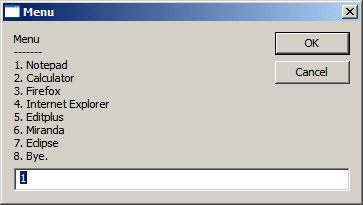
If you want a menu based solution,
Application Menu.png
then you can try this
Code:
<job id="vbs">
    <script language="VBScript">
        Set WshShell=WScript.CreateObject("WScript.Shell")
        On Error Resume Next
        strMenu="Menu" & vbCrLf & "-------" & vbCrLf &_
            "1. Notepad" & vbCrLf &_
            "2. Calculator" & vbCrLf &_
            "3. Firefox" & vbCrLf &_
            "4. Internet Explorer" & vbCrLf &_
            "5. Editplus" & vbCrLf &_
            "6. Miranda" & vbCrLf &_
            "7. Eclipse" & vbCrLf &_
            "8. Bye."
        menuSel=0
        While menuSel<>8
            menuSel=InputBox(strMenu, "Menu", 1)
            If IsNumeric(menuSel) Then
                Select Case menuSel
                    Case 1:
                        WshShell.Run("C:\Windows\notepad.exe")
                    Case 2:
                        WshShell.Run("C:\Windows\system32\calc.exe")
                    Case 3:
                    Case 4:
                    Case 5:
                    Case 6:
                    Case 7:
                End Select
            Else
                WScript.Echo "Invalid option. Numbers only."
            End If
        Wend
    </script>
</job>
Add as many Case statements and new WshShell.Run("....") for each application you want to start and make sure the Exit number is in the While menuSel<> statement.

You can save these to a file with the extension .wsf and create a shortcut with WScript "Path to the wsf file" on the desktop.

I've attached the files also with this post.
 

Attachments

My Computer

Computer type
Laptop
Computer Manufacturer/Model Number
HP EliteBook 8530w Mobile Workstation
OS
Windows 7 Ultimate x64 (XP, 98SE, 95, 3.11, DOS 7.10 on VM) + Ubuntu 10.04 LTS Lucid Lynx
CPU
Intel Core 2 Duo Processor P8600 (2.40 GHz, 3 MB L2 cache)
Motherboard
Mobile Intel PM45 Express Chipset ICH9M-Enhanced
Memory
4GB 800 MHz DDR2 SDRAM
Graphics Card(s)
ATI Mobility FireGL V5700 with 256 MB
Sound Card
SoundMAX Integrated Digital HD Audio
Monitor(s) Displays
15.4-inch WXGA anti-glare (1280 x 800 resolution)
Screen Resolution
1280 x 800
Hard Drives
500GB + 1TB
Mouse
Synaptics PS/2 Port Touchpad, USB Mouse
Internet Speed
4 Mbps
Antivirus
MSE
Browser
Firefox, Chrome, IE
Other Info
Authentec AES2810 Fingerprint Reader
Cool stuff, gladson1976! I really need to learn a bit more about that scripting. :)

Thanks for sharing and demonstrating a more up-to-date and cleaner looking method than a .bat file. :geek:
 

My Computer

Computer Manufacturer/Model Number
Toshiba L355D
OS
Windows 7 Ultimate x64 SP1
CPU
Core2 Duo
Motherboard
Intel
Memory
4 GB
Graphics Card(s)
GM965 on-board
Sound Card
RealTek on-board
Monitor(s) Displays
19"+17"(laptop)
Screen Resolution
1440x900 (x 2)
Hard Drives
500GB Ext. 200GB Internal
PSU
N/A
Case
N/A
Cooling
N/A
Scripting is quite powerful, but I still prefer the good old command prompt and batch files for simple tasks, but some others may prefer to see some GUI :)
 

My Computer

Computer type
Laptop
Computer Manufacturer/Model Number
HP EliteBook 8530w Mobile Workstation
OS
Windows 7 Ultimate x64 (XP, 98SE, 95, 3.11, DOS 7.10 on VM) + Ubuntu 10.04 LTS Lucid Lynx
CPU
Intel Core 2 Duo Processor P8600 (2.40 GHz, 3 MB L2 cache)
Motherboard
Mobile Intel PM45 Express Chipset ICH9M-Enhanced
Memory
4GB 800 MHz DDR2 SDRAM
Graphics Card(s)
ATI Mobility FireGL V5700 with 256 MB
Sound Card
SoundMAX Integrated Digital HD Audio
Monitor(s) Displays
15.4-inch WXGA anti-glare (1280 x 800 resolution)
Screen Resolution
1280 x 800
Hard Drives
500GB + 1TB
Mouse
Synaptics PS/2 Port Touchpad, USB Mouse
Internet Speed
4 Mbps
Antivirus
MSE
Browser
Firefox, Chrome, IE
Other Info
Authentec AES2810 Fingerprint Reader
Thank you so much, guys!

I love the .bat one, simple and nice and the attachment by gladson1976 which is so lovely.
Both is simple and very useful to me.

Once again, thanks a lot!!!


My Computer

Computer type
PC/Desktop
OS
Microsoft Windows 7 Ultimate (x64) Build 7601
CPU
Intel Core i5-3570K
Motherboard
MSI Z77A-G45
Memory
Corsair Vengeance 1600.9 (4GB x 3)
Graphics Card(s)
MSI GeForce GTX-560Ti Twin Frozr II (OC Edition)
Monitor(s) Displays
Dell U2312HM
Screen Resolution
1920 x 1080
Hard Drives
Intel 330 SSD - 120GB, WD Black HDD - 1TB & WD Green HDD - 500GB
PSU
Seasonic S12II (620W)
Case
Corsair Carbide 400R
Cooling
Cooler Master Hyper 612 PWM
Keyboard
Logitech Gaming Keyboard G110
Mouse
Razer DeathAdder 3.5G
Antivirus
Kaspersky Internet Security 2013
Browser
Chrome
Other Info
Mouse Pad: Razer Goliathus Speed Edition - Medium: 355mm x 254mm x 3mm
Gamepad: Logitech Wireless Gamepad F710
Speaker: SonicGear Evo 7 Pro
Headset: SteelSeries Siberia V2 USB
Webcam: Logitech Webcam C170
Back
Top