ISO bootdisk for WIN7 install disk

BarrieNoodles

New member
Member
Local time
5:59 PM
Messages
64
Location
Ontario, Canada
This learning curve is having a larger radius by the day. I'm attempting to copy my Win 7 download copy to a bootable DVD. The Ms file is called DLMWin7Pro32Caen.exe, which I have a copy on one of my HDs. I have to do a clean install and I'm double booting Vista Ultimate and Win 7 Pro.

MS says ""you may choose to download an Executable file to start your upgrade immediately or an ISO image, which you can burn to DVD and create your own bootable media. You may choose to download either or both.
" Do I just copy DLMWin7Pro32Caen.exe to a DVD and it will set itself up as a bootable version of Win 7 or do I need to use an ISO burner.

ISO Burner "BurnCDCC" is only good for CD's, I don't have any, all I have OH is DVDs. Is there a free DVD ISO burner? At this point I don't know if I even need one.Please advise. Thank You.
 

My Computer

Computer Manufacturer/Model Number
Dell Dimension 9200
OS
Windows Vista Ultimate 32 bit & Win 7 Professional 32 bit
CPU
Intel Core 2 E6320 Duo (4MB L2 cache, 1.86Ghz, 1066FSB
Motherboard
Dell
Memory
4GB Kingston Dual Channel DDR2, PC2-5300, 667Mhz
Graphics Card(s)
256MB nVidia GeForce 8600GTS
Sound Card
Integrated Sound Blaster Audigy
Monitor(s) Displays
22 inch Widescreen Digital(Dell) @ 19" Acer LCD
Screen Resolution
Dell 1680 x 1050, Axcer 1280 x1024
Hard Drives
500GB Serial ATA 3Gb/s, 7200rpm w/ DataBurst Cache
1TB Seagate Barracuda 7200.12, 2 x 1TB USB drives for BU
PSU
APC Back UPS ES 750
Case
Standard
Cooling
Standard
Keyboard
MX5500 Logitech
Mouse
Logitech Bluetooth MX5500
Other Info
Dell Studio Laptop, Win 7 Pro 64 bit.

Attachments

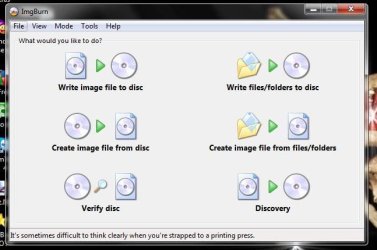
  • ImgBurn.JPG
    ImgBurn.JPG
    40.3 KB · Views: 9
  • ImgBurn_Verify.JPG
    ImgBurn_Verify.JPG
    54.5 KB · Views: 9

My Computer

Computer type
PC/Desktop
Computer Manufacturer/Model Number
Built them myself, Science Experiments !
OS
Win7 Enterprise, Win7 x86 (Ult 7600), Win7 x64 Ult 7600, TechNet RTM on AMD x64 (2.8Ghz)
CPU
AMD fx8350 4ghz, AMD-32 2400mhz, AMD-64 3200mhz, AMDx64 2.8G
Motherboard
SIS 755, ECS-K8M890M-M (Ult 7600), GigaByte & others
Memory
2gb, 4gb on the Ult 7600, 4gb on Technet RTM, 32gb on FX8350
Graphics Card(s)
Draw my own Graphics, several nVidia cards
Sound Card
on motherboard
Monitor(s) Displays
19" flat scr, 28" I-Inc widescr,22" Emprex Widescr, 23" Acer
Screen Resolution
1280 x 1024, 1440 x 900, 1920 x 1080
Hard Drives
6 pata Ide HD's & 2 Sata HD's
added 80gb external on Ult 7600 computer,
numerous extra 1tb, 2TB, 3Tb SATA HD's
A collection of ext HD Docks w/ HDs
PSU
430w, 550w, 600w, 700, 800, etc
Case
All Generic Full Towers
Cooling
Open Air & a few fans, some w/ colored LEDs
Keyboard
Compaq & Dell recycled from GoodWill
Mouse
Made in China Optical Wired Mouse
Internet Speed
Fast Cable InterNet
Antivirus
AVG Free on 24 different Desktops, NO Problems!
Browser
IE 8 is preferred, but use FireFox sometimes
Other Info
Linksys Routers, switches, & Hubs
Too Many USB Flash Drives to count, Biggest is 64GB !
Eight computers in my home network.
Sixteen computers at my business network.
Linked via TeamViewer !
Lots of old used spare computer parts everywhere!
If you can still download the .iso, I reccomend doing that. It's possible to prepare a bootable DVD from the .exe that you mention, although I've never done it.

If your system can boot from a USB key drive, it may be easier to prepare one:

Use a USB Key to Install Windows 7—Even on a Netbook

It has the added benefit of installing Windows considerably faster than from the DVD.
 

My Computer

Computer Manufacturer/Model Number
homegrown
OS
Windows 7 Pro X64 SP1
CPU
Intel Core I7-3930k
Motherboard
Asus P9X79 Pro
Memory
16 GB Gskill DDR3-2133
Graphics Card(s)
eVGA GTX680
Sound Card
Creative X-Fi Titanium
Monitor(s) Displays
As PA246Q
Screen Resolution
1920 X 1200
Hard Drives
Corsair Force GT, 120 GB
WDC 1.5TB Caviar Black
PSU
PCP&C Silencer 750 Crossfire
Case
Silverstone FT02
Cooling
Noctua NH-D14
Keyboard
cheap Logitech USB
Mouse
Microsoft Intellimouse Explorer (old optical) USB
Internet Speed
6Mb cable
Other Info
Pioneer BDR-205
Samsung SH-203B
Monsoon 5.1 speakers

My Computer

Computer type
PC/Desktop
Computer Manufacturer/Model Number
Lenovo IdeaCenter 450
OS
Windows 10 Pro X64
CPU
Intel Quad Core i7-4770 @ 3.4Ghz
Memory
16.0GB PC3-12800 DDR3 SDRAM 1600 MHz
Graphics Card(s)
Intel Integrated HD Graphics
Sound Card
Realtek HD Audio
Monitor(s) Displays
HP 22" LCD
Screen Resolution
1680 x 1050
Hard Drives
250GB Samsung EVO SATA-3 SSD
2TB Seagate ST2000DM001 SATA-2
1.5TB Seagate ST3150041AS SATA
Keyboard
Dell USB
Mouse
Lenovo USB
Internet Speed
Cable via Road Runner 3MB Upload, 30MB Download
Antivirus
Windows Defender, MBAM Pro, MBAE
Browser
Seamonkey
Other Info
UEFI/GPT
PLDS DVD-RW DH16AERSH
Back
Top