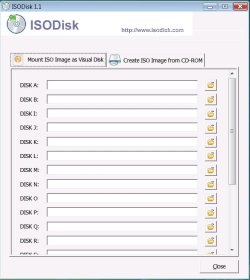
ISO mounting

i used PowerISO to mount W7 with no probs at all.....;)

:)SK
 

My Computer

Computer Manufacturer/Model Number
myself
OS
SEVEN x64
CPU
Q9450 @ 3.6GHZ 1.34v
Motherboard
ASUS P5K PREMIUM P35
Memory
8GB 1066 buffalo firestix @ 1152mhz CL5
Graphics Card(s)
Sapphire HD 5970 + GTX260 (physX)
Sound Card
Creative X-FI Xtreme Gamer
Monitor(s) Displays
SAMSUNG 20'' & SAMSUNG 23'' (dual screens)
Screen Resolution
2048x1152 & 1680x1050
Hard Drives
1x seagate 160gb IDE & 1x seagate 160gb SATA
PSU
XCILIO 850w (78A)
Case
CM590 1x 120x38mm & 2x92x38mm / 4x 120x25mm
Cooling
AC7 PRO @ 92x38mm blower, Lamptron military bus bay controll
Keyboard
LOGITECH E110
Mouse
logitech NX5
Internet Speed
2MB
Other Info
its a continual ''work in progress''....
Yep PowerISO is what I ended up using ;)
 

My Computer

Computer type
PC/Desktop
OS
Windows 11 Workstation
I like poweriso better than Daemon tools.
 

My Computer

Computer Manufacturer/Model Number
HP Compaq Presario/SR5113WM
OS
Windows 7 Ultimate x64/ Windows Vista Ultimate x64
CPU
AMD Athlon 64 X2 3600+ 1.9Ghz
Motherboard
Asus M2N68-LA
Memory
PNY Optima Memory DDR2 2GB 2x1 kit
Graphics Card(s)
PNY Nvidia 8400 GS 256MB
Sound Card
On board RealTek
Monitor(s) Displays
Acer X163W LCD
Screen Resolution
1366x768
Hard Drives
Western Digital 160 GB SATA 3G (3.0Gb/sec)
7200 rpm
Western Digital 160 GB IDE
PSU
Dynex 400w
Case
Nothin Special
Cooling
Stock
Keyboard
Standard 102 key with volume and sleep buttons
Mouse
Wireless Logitech LX7
Internet Speed
Comcrap 10mb cable
Other Info
Insignia 2.1 speakers, wireless Xbox 360 controller w/plug n play charger, Belkin wireless G + mimo usb network adapter.
All I ever need is basic ISO mounting functionality of which the free daemon tools has always been ideal, once they get a windows 7 x64 version out that will revert to my tool of choice.
 

My Computer

Computer type
PC/Desktop
OS
Windows 11 Workstation

My Computer

Computer type
PC/Desktop
Computer Manufacturer/Model Number
Self built custom
OS
64-bit Windows 11 Pro for Workstations
CPU
Intel i7-8700K OC'd to 5 GHz
Motherboard
ASUS ROG Maximus XI Formula Z390
Memory
64 GB (4x16GB) G.SKILL TridentZ RGB DDR4 3600 MHz
Graphics Card(s)
ASUS ROG-STRIX-GTX1080TI-O11G-GAMING
Sound Card
Integrated
Monitor(s) Displays
2 x Samsung Odyssey G7 27"
Screen Resolution
2560x1440
Hard Drives
1TB Samsung 990 PRO M.2,
4TB Samsung 990 PRO PRO M.2,
TerraMaster F8 SSD Plus NAS
PSU
Seasonic Prime Titanium 850W
Case
Thermaltake Core P3
Cooling
Corsair Hydro H115i
Keyboard
Logitech wireless K800
Mouse
Logitech MX Master 4
Internet Speed
2 Gb/s Download and 100 Mb/s Upload
Antivirus
Malwarebyte Anti-Malware Premium
Browser
Google Chrome
Other Info
Logitech Z625 speaker system,
Logitech BRIO 4K Pro webcam,
HP Color LaserJet Pro MFP M477fdn,
APC SMART-UPS RT 1000 XL - SURT1000XLI,
Galaxy S23 Plus phone

My Computer

Computer type
PC/Desktop
Computer Manufacturer/Model Number
Self built custom
OS
64-bit Windows 11 Pro for Workstations
CPU
Intel i7-8700K OC'd to 5 GHz
Motherboard
ASUS ROG Maximus XI Formula Z390
Memory
64 GB (4x16GB) G.SKILL TridentZ RGB DDR4 3600 MHz
Graphics Card(s)
ASUS ROG-STRIX-GTX1080TI-O11G-GAMING
Sound Card
Integrated
Monitor(s) Displays
2 x Samsung Odyssey G7 27"
Screen Resolution
2560x1440
Hard Drives
1TB Samsung 990 PRO M.2,
4TB Samsung 990 PRO PRO M.2,
TerraMaster F8 SSD Plus NAS
PSU
Seasonic Prime Titanium 850W
Case
Thermaltake Core P3
Cooling
Corsair Hydro H115i
Keyboard
Logitech wireless K800
Mouse
Logitech MX Master 4
Internet Speed
2 Gb/s Download and 100 Mb/s Upload
Antivirus
Malwarebyte Anti-Malware Premium
Browser
Google Chrome
Other Info
Logitech Z625 speaker system,
Logitech BRIO 4K Pro webcam,
HP Color LaserJet Pro MFP M477fdn,
APC SMART-UPS RT 1000 XL - SURT1000XLI,
Galaxy S23 Plus phone
Thanks for the PowerISO Suggestion whoever gave it Lol, works like a charm in W7 :)
 

My Computer

Computer Manufacturer/Model Number
Custom Rig
OS
Windows 7 Home Premium 64-Bit
CPU
AMD Phenom X3 720 (Unlocked Quad @ 3.6 Ghz 1.47v.)
Motherboard
Gigabyte 785gx Micro Atx Board
Memory
4 GB G.Skill 1333 DDR3 @ 1.6v
Graphics Card(s)
HIS HD 5850 @ Stock
Sound Card
Realtek Intergrated Sound
Monitor(s) Displays
24' Asus HDMI 1080p Monitor
Screen Resolution
1920X1080
Hard Drives
Seagate 500GB SATA II HD
PSU
550w Corsair ATXv 2.2 41a on the 12v rail.
Case
CoolerMaster 300 Mid-Tower
Cooling
3 Apevia 120mm Blue-LED Fans; Arctic Cooling Freezer Pro r2
Keyboard
Logitech Illuminated Keyboard
Mouse
Logitech G500
Internet Speed
DSL 7 Mbit down/ 1 Mbit Up
You welcome too bad its not free huh
 

My Computer

Computer Manufacturer/Model Number
HP Compaq Presario/SR5113WM
OS
Windows 7 Ultimate x64/ Windows Vista Ultimate x64
CPU
AMD Athlon 64 X2 3600+ 1.9Ghz
Motherboard
Asus M2N68-LA
Memory
PNY Optima Memory DDR2 2GB 2x1 kit
Graphics Card(s)
PNY Nvidia 8400 GS 256MB
Sound Card
On board RealTek
Monitor(s) Displays
Acer X163W LCD
Screen Resolution
1366x768
Hard Drives
Western Digital 160 GB SATA 3G (3.0Gb/sec)
7200 rpm
Western Digital 160 GB IDE
PSU
Dynex 400w
Case
Nothin Special
Cooling
Stock
Keyboard
Standard 102 key with volume and sleep buttons
Mouse
Wireless Logitech LX7
Internet Speed
Comcrap 10mb cable
Other Info
Insignia 2.1 speakers, wireless Xbox 360 controller w/plug n play charger, Belkin wireless G + mimo usb network adapter.
You welcome too bad its not free huh

YES! :cry: Luckily though the Game that I mount is less then the limit that PowerISO imposes so I got lucky Lol;)
 

My Computer

Computer Manufacturer/Model Number
Custom Rig
OS
Windows 7 Home Premium 64-Bit
CPU
AMD Phenom X3 720 (Unlocked Quad @ 3.6 Ghz 1.47v.)
Motherboard
Gigabyte 785gx Micro Atx Board
Memory
4 GB G.Skill 1333 DDR3 @ 1.6v
Graphics Card(s)
HIS HD 5850 @ Stock
Sound Card
Realtek Intergrated Sound
Monitor(s) Displays
24' Asus HDMI 1080p Monitor
Screen Resolution
1920X1080
Hard Drives
Seagate 500GB SATA II HD
PSU
550w Corsair ATXv 2.2 41a on the 12v rail.
Case
CoolerMaster 300 Mid-Tower
Cooling
3 Apevia 120mm Blue-LED Fans; Arctic Cooling Freezer Pro r2
Keyboard
Logitech Illuminated Keyboard
Mouse
Logitech G500
Internet Speed
DSL 7 Mbit down/ 1 Mbit Up
Hi all,

Just an update on VirtualCloneDrive

I installed on both Vista Home premium x86 and Windows 7 6801 and although the program worked fine on both, my set-up had problems with the installed driver when Going into or returning from hibernation.

It either Blue Screened (0x0000009f - Driver problem), on entry or made the system un-responsive on waking requiring a hard reset to solve. :(

This may well be peculiar to my system but thought I would mention it :)
 

My Computers

System One System Two

  • Computer type
    PC/Desktop
    Computer Manufacturer/Model Number
    ChillBlast - Custom to my design
    OS
    Windows 11 Pro x64 [Latest Release and Release Preview]
    CPU
    Ryzen 9 5950X, 3.8 - 5.2 MHz
    Motherboard
    Asus Prime X570-Pro
    Memory
    64GB [2 x 32GB] DDR4 3200MHz
    Graphics Card(s)
    4GB NVIDIA GEFORCE GTX 1650 Ti
    Sound Card
    On-board SPDIF to 5.1 System + HDMI [5.1 system]
    Monitor(s) Displays
    32" UHD 32 Bit HDR Monitor + 43" UHD 4K 32Bit HDR TV
    Screen Resolution
    2 x 3840 x 2160 @60Hz
    Hard Drives
    1TB M2 SSD OS, 500GB Fast Access SSD, 2 x 8TB Data + Various Externals from 1TB to 4TB, 10TB NAS
    PSU
    NZXT C750 80 PLUS Gold 750W Modular PSU
    Case
    Workstation Case [Matt Black]
    Cooling
    NZXT Kraken X63 280mm CPU Cooler +2x Quiet Case fans
    Keyboard
    Logitech Wireless MX Keys & K400 + others
    Mouse
    Logitech Wireless MX Master 3S
    Internet Speed
    920 MB Down 50 MB Up
    Antivirus
    BitDefender Total Security Pro
    Browser
    Chrome (always run latest Non-Beta)
    Other Info
    Also run ...
    Laptop - Quad 8GB - Windows 10 Pro x64
    Nexus 7 Android tablet x2
    Samsung 10.2" tablet
    Blackview TAB 8 4G Android Tablet c/w Keyboard
    Wacom Intuos Pro Medium Pen Pad
    Wacom Intuos Pro Small Pen Pad
    Wacom Expresskeys Remote
    Loopdeck+ Graphics Controller
    Shuttle Pro v2 Control
  • Computer type
    Laptop
    System Manufacturer/Model Number
    Dell XPS 17 10750H
    OS
    Windows 11 Pro x64 Latest RP
    CPU
    Intel I7 10750H 5.0GHz
    Motherboard
    Dell XPS
    Memory
    32GB [2x16GB] DDR4 2933 MHz
    Graphics Card(s)
    nVidia GTX1650Ti 4 GB GDDR6
    Sound Card
    Stock [Realtek] 4 Speaker
    Monitor(s) Displays
    17" IPS UHD+ Infinity Edge Touchscreen
    Screen Resolution
    3840 x 2400
    Hard Drives
    2TB M2 NVMe, 4TB External + various 500GB & 1TB External NVMe (also have access to spinner HDD from
    PSU
    Stock
    Case
    Stock XPS Aluminium & Carbon Fibre
    Cooling
    Stock - Active Fan Control
    Keyboard
    Backlit + Various Logitech
    Mouse
    Stock Track Pad + Logitech MX Trackball
    Internet Speed
    72 MB Down 18MB Up
    Browser
    Chrome
    Other Info
    Also run ...
    Laptop - Quad 8GB - Windows 10 Pro x64
    Nexus 7 Android tablet x2
    10.2" tablet
    Sony Z3 Android Smartphone
    Wacom Intuos Pro Medium Pen Pad
    Wacom Intuos Pro Small Pen Pad
    Wacom Expresskeys Remote
    Loopdeck+ Graphics Controller
    Shuttle Pro v2 Control Pad
    10TB NAS
Haven't got any problems to report so far. I always disable virtual drive after I used it.
 

My Computer

OS
Microsoft Windows 6.1 (Build 6801)
Hi all,

@MegaFixer
It's probably something on my system glad it's working for you :D


Would like to warn everyone ...

Do not even try MagicDisc on windows 7 ...

Have just spent the last hour trying to get rid of this ISO mounter

The driver it loads is totally incompatible with Windows 7 - to the extent that it .


  • Locked me out of explorer
  • Stopped System restore form completing, Inside windows and from the dvd :confused:
  • SFC failed to complete
  • could not the remove the driver
  • Could not delete certain of it's Registry entries,

all of the above was true even in safe mode :shock:

Managed to find the driver ( mcdbus.sys ) and delete in from the disk in an elevated command prompt in safe mode and then clean up the rest of it's mess.

Am working OK again and could have re-installed in less time but I did enjoy the challenge :D re-installing is something I don't like to do ;)
 

My Computers

System One System Two

  • Computer type
    PC/Desktop
    Computer Manufacturer/Model Number
    ChillBlast - Custom to my design
    OS
    Windows 11 Pro x64 [Latest Release and Release Preview]
    CPU
    Ryzen 9 5950X, 3.8 - 5.2 MHz
    Motherboard
    Asus Prime X570-Pro
    Memory
    64GB [2 x 32GB] DDR4 3200MHz
    Graphics Card(s)
    4GB NVIDIA GEFORCE GTX 1650 Ti
    Sound Card
    On-board SPDIF to 5.1 System + HDMI [5.1 system]
    Monitor(s) Displays
    32" UHD 32 Bit HDR Monitor + 43" UHD 4K 32Bit HDR TV
    Screen Resolution
    2 x 3840 x 2160 @60Hz
    Hard Drives
    1TB M2 SSD OS, 500GB Fast Access SSD, 2 x 8TB Data + Various Externals from 1TB to 4TB, 10TB NAS
    PSU
    NZXT C750 80 PLUS Gold 750W Modular PSU
    Case
    Workstation Case [Matt Black]
    Cooling
    NZXT Kraken X63 280mm CPU Cooler +2x Quiet Case fans
    Keyboard
    Logitech Wireless MX Keys & K400 + others
    Mouse
    Logitech Wireless MX Master 3S
    Internet Speed
    920 MB Down 50 MB Up
    Antivirus
    BitDefender Total Security Pro
    Browser
    Chrome (always run latest Non-Beta)
    Other Info
    Also run ...
    Laptop - Quad 8GB - Windows 10 Pro x64
    Nexus 7 Android tablet x2
    Samsung 10.2" tablet
    Blackview TAB 8 4G Android Tablet c/w Keyboard
    Wacom Intuos Pro Medium Pen Pad
    Wacom Intuos Pro Small Pen Pad
    Wacom Expresskeys Remote
    Loopdeck+ Graphics Controller
    Shuttle Pro v2 Control
  • Computer type
    Laptop
    System Manufacturer/Model Number
    Dell XPS 17 10750H
    OS
    Windows 11 Pro x64 Latest RP
    CPU
    Intel I7 10750H 5.0GHz
    Motherboard
    Dell XPS
    Memory
    32GB [2x16GB] DDR4 2933 MHz
    Graphics Card(s)
    nVidia GTX1650Ti 4 GB GDDR6
    Sound Card
    Stock [Realtek] 4 Speaker
    Monitor(s) Displays
    17" IPS UHD+ Infinity Edge Touchscreen
    Screen Resolution
    3840 x 2400
    Hard Drives
    2TB M2 NVMe, 4TB External + various 500GB & 1TB External NVMe (also have access to spinner HDD from
    PSU
    Stock
    Case
    Stock XPS Aluminium & Carbon Fibre
    Cooling
    Stock - Active Fan Control
    Keyboard
    Backlit + Various Logitech
    Mouse
    Stock Track Pad + Logitech MX Trackball
    Internet Speed
    72 MB Down 18MB Up
    Browser
    Chrome
    Other Info
    Also run ...
    Laptop - Quad 8GB - Windows 10 Pro x64
    Nexus 7 Android tablet x2
    10.2" tablet
    Sony Z3 Android Smartphone
    Wacom Intuos Pro Medium Pen Pad
    Wacom Intuos Pro Small Pen Pad
    Wacom Expresskeys Remote
    Loopdeck+ Graphics Controller
    Shuttle Pro v2 Control Pad
    10TB NAS
No such problems with UltraIso:D
 

My Computer

Computer Manufacturer/Model Number
Self build
OS
Windows 7 Ultimate x64
CPU
AMD Phenom II x4
Motherboard
Gigabyte 880
Memory
8GB
Graphics Card(s)
NVIDIA GeForce HD
Sound Card
Realtek HD Audio
Screen Resolution
1920 x 1080
Hard Drives
2 x 1TB
PSU
Thermalake 550w
Case
XCase
Internet Speed
8MB
Hi all,

Just an update on VirtualCloneDrive

I installed on both Vista Home premium x86 and Windows 7 6801 and although the program worked fine on both, my set-up had problems with the installed driver when Going into or returning from hibernation.

It either Blue Screened (0x0000009f - Driver problem), on entry or made the system un-responsive on waking requiring a hard reset to solve. :(

This may well be peculiar to my system but thought I would mention it :)

I think it is your system - I have no issues at all with VCD in Vista Ultimate x64, and I am an old, old *old* Daemon Toolz user....This install was the first for me to try VCD again since they had released the x64 version - and I have yet to install DT....because VCD simply works.


Haven't got any problems to report so far. I always disable virtual drive after I used it.

I don't do that either. I get an unknown USB device when resuming from stand-by/sleep, but that goes away and I am fine after that.


Nice find - I am going to check that out as well.
 

My Computers

System One System Two

  • Computer type
    PC/Desktop
    Computer Manufacturer/Model Number
    The Beast Model A (homebrew)
    OS
    Windows 11 21H2 Current build
    CPU
    AMD Ryzen 9 3950X
    Motherboard
    MSI MEG X570 GODLIKE
    Memory
    4 * 32 GB - Corsair Vengeance 3600 MHz
    Graphics Card(s)
    EVGA GeForce RTX 3080 Ti XC3 ULTRA GAMING (12G-P5-3955-KR)
    Sound Card
    Realtek® ALC1220 Codec
    Monitor(s) Displays
    2x Eve Spectrum ES07D03 4K Gaming Monitor (Matte) | Eve Spec
    Screen Resolution
    3x 3840 x 2160
    Hard Drives
    3x Samsung 980 Pro NVMe PCIe 4 M.2 2 TB SSD (MZ-V8P2T0B/AM) } 3x Sabrent Rocket NVMe 4.0 1 TB SSD
    PSU
    PC Power & Cooling’s Silencer Series 1050 Watt, 80 Plus Plat
    Case
    Fractal Design Define 7 XL Dark ATX Full Tower Case
    Cooling
    SteelSeries Apex Pro Wired Gaming Keyboard
    Keyboard
    SteelSeries Apex Pro
    Mouse
    Logitech MX Master 3S | MX Master 3 for business
    Internet Speed
    AT&T LightSpeed Gigabit Duplex Ftth
    Antivirus
    Windows Defender + MB 3
    Browser
    Nightly (default) + Firefox (stable),Chrome, Edge
  • Computer type
    PC/Desktop
    System Manufacturer/Model Number
    Dell Latitude E5470
    OS
    ChromeOS Flex Dev Channel (current)
    CPU
    Intel(R) Core(TM) i5-6300U CPU @ 2.40GHz, 2501 Mhz, 2 Core(s), 4 Logical Processor(s)
    Motherboard
    Dell
    Memory
    16 GB
    Graphics Card(s)
    Intel(R) HD Graphics 520
    Sound Card
    Intel(R) HD Graphics 520 + RealTek Audio
    Monitor(s) Displays
    Dell laptop display 15"
    Screen Resolution
    1920 * 1080
    Hard Drives
    Toshiba 128GB M.2 22300 drive
    INTEL Cherryville 520 Series SSDSC2CW180A 180 GB SATA III SSD
    PSU
    Dell
    Case
    Dell
    Cooling
    Dell
    Keyboard
    Dell
    Mouse
    Logitech MX Master 3S (shared w. Sys 1) | Dell TouchPad
    Internet Speed
    AT&T LightSpeed Gigabit Duplex Ftth
Right click the executable, select Properties.
Under the Compatibility tab, set the the Compatibility mode to Vista RTM.
 

My Computer

OS
6.1.6975.2
Hi all,

@MegaFixer
It's probably something on my system glad it's working for you :D


Would like to warn everyone ...

Do not even try MagicDisc on windows 7 ...

Have just spent the last hour trying to get rid of this ISO mounter

The driver it loads is totally incompatible with Windows 7 - to the extent that it .


  • Locked me out of explorer
  • Stopped System restore form completing, Inside windows and from the dvd :confused:
  • SFC failed to complete
  • could not the remove the driver
  • Could not delete certain of it's Registry entries,
all of the above was true even in safe mode :shock:

Managed to find the driver ( mcdbus.sys ) and delete in from the disk in an elevated command prompt in safe mode and then clean up the rest of it's mess.

Am working OK again and could have re-installed in less time but I did enjoy the challenge :D re-installing is something I don't like to do ;)

LOL, i signed up on this fourm because i saw this and laughed. Not to make fun of you, but, all you had to do was get into msconfig and disable the program from starting up, then u can uninstall it with their uninstaller :P took me 2 mins to figure it out. xD
 

My Computer

Computer Manufacturer/Model Number
Hp Pavillion dv9200 CTO
OS
Windows XP/Windows Vista/Windows 7/Hp Quickplay Quad-Boot :)
CPU
Centrino Duo
Memory
1.5 GB
Graphics Card(s)
nVidia GeForce Go 7600
Sound Card
HD audio
Monitor(s) Displays
17 inches of pure greatness
Screen Resolution
1680-1050
Hard Drives
180 GB sata/100 GB sata
Case
Laptop
Back
Top