ISO to USB flash drive, what software

Shootist

New member
Local time
10:17 PM
Messages
578
I know I have done this before but for some reason I can NOT figure out how I did it.

I want to burn a bootable ISO file to a USB flash drive and have it boot.

I have searched the web for a program that can do that but have come up short.

I have tried Ultra ISO but can't for the life of me figure out how to do it.

Is there a program that easily will burn a ISO file to a USB flash stick.

I'm not trying to do it for windows, already have that done.
I have been successful in using 7ZIP to extract ISOs to flash sticks and some boot but others don't. These are bootable ISO files. Like for Easeus Partition Master. If I burn the Win PE ISO to CD it boots but if I extract the ISO to flash stick using 7ZIP it doesn't boot.
 

My Computer My Computer

Computer Manufacturer/Model Number
Built be Me
OS
Windows 7 Pro x64
CPU
i5 760
Motherboard
Asus P7P55D-E Pro
Memory
16GB
Graphics Card(s)
Nvidia GTS450
Sound Card
On board
Monitor(s) Displays
Dell 2007WFP Dell 1800FP
Screen Resolution
1680x1050 1280x1024
Hard Drives
Seagate 250GB & 750GB
WD 1TB
PSU
Antec 750
Case
In Win
Cooling
Cooler Master Hyper 212+
Keyboard
IBM
Mouse
MS
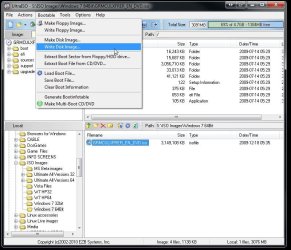
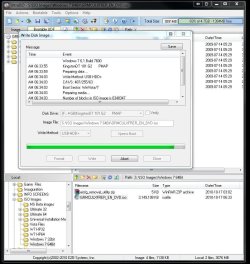
You have the one formerly mentioned in one of the guides here for writing iso images to make up usb installation keys. Once you browse to the location where you have the iso and click on it to open it you simply go to the menu bar in UltraISO and select the bootable option to write the iso to a flash drive.

The two images attached here show how easy that is. Note the option seen for formatting greyed out in the second screen. You can format a flash drive to NTFS as well as Fat 32 while Fat 16 is default.
 

Attachments

  • UltraISO Write Disk Image.jpg
    UltraISO Write Disk Image.jpg
    90.5 KB · Views: 2,166
  • UltraISO Going to Town.jpg
    UltraISO Going to Town.jpg
    103.3 KB · Views: 1,588

My Computers My Computers

System One System Two

  • Computer type
    PC/Desktop
    Computer Manufacturer/Model Number
    Custom builds = 2
    OS
    W7 Ultimate x64/W10 Pro x64/W11 Pro Triple Boot - Main PC W7 Remote PC Micro ATX W7 Pro x64/W11 Pro
    CPU
    AMD Phenom II X4 975 Deneb 3.6ghz - 965 2nd remote pc
    Motherboard
    Gigabyte GA-790XTA-UD4-Gigabyte GA-880GM-D2H remote pc
    Memory
    Kingston Hyper X DDR3 1600 1.5v 16gb - Hyper X Fury 8gb 2nd
    Graphics Card(s)
    MSI HD Radeon 5750 1gb - MSI HD Radeon 6450 on mini tower
    Sound Card
    Creative Labs X-Fi Xtreme Audio P - Realtek onooard 2nd case
    Monitor(s) Displays
    ASUS VW199T-P 19" HP 2082a Main-HP 2082a 20" remote pc
    Screen Resolution
    Asus 1440x900 - HP 1600x900
    Hard Drives
    WD Black 1TB HD per OS W7, W10, and pending W11 presently on 500gb OS Drive - Pending Triple 1TB HDs for Spanned Storage/backup volume
    Single 2TB external USB enclosure, single 1TB System 7 Host/Boot drive, Pending 8TB external HD for system image b
    PSU
    Corsair 750TX - primary / Corsair CX600 - second
    Case
    Antec 900-2 - SSD compatible / NZXT Vulcan mini tower
    Cooling
    Zalman CNPS9900A
    Keyboard
    AZIO L70 Backlit Letters Gaming - ONN Cordless/USB
    Mouse
    MSI DS200 Programmable, Logitech Cordless
    Internet Speed
    30mbps upgrade - primary hard wired - mini tower usb WiFi
    Antivirus
    GFI VIPRE Internet Security 2014 on W7 2016 beta on W10,
    Browser
    Cyberfox, WaterFox 64bit FF variants, FireFox x64, Pale Moon
    Other Info
    Accomdata fan cooled usb 2.0 PIDE/Sata II, III external enclosure.
    Sambient usb/eSata PATA/Sata II, III external enclosure.
  • Computer type
    PC/Desktop
    System Manufacturer/Model Number
    CUSTOM ASSEMBLY
    OS
    W7 Pro x64/W11 Pro
    CPU
    AMD Deneb 3.6ghz - 965
    Motherboard
    Gigabyte GA-880GM-D2H remote pc
    Memory
    Kingston Hyper X Fury 8gb
    Graphics Card(s)
    MSI HD Radeon 6450 DVI Output
    Sound Card
    Realtek onooard Creative or Other separate PENDING
    Monitor(s) Displays
    VIZIO 32" LCD TV Separate LCD Pending
    Screen Resolution
    1600x1080
    Hard Drives
    WD 500GB OS Host/Boot WD Green 1TB Storage/Backup
    PSU
    Corsair 600W - THERMALTAKE 600W spare case
    Case
    NZXT Vulcan mini tower
    Cooling
    Twin 120mm Top Fans - 240mm Side Cover
    Keyboard
    ONN Cordless/USB Logitech Cordless
    Mouse
    ONN USB/Cordless - Logitech Cordless
    Internet Speed
    DSL 5G
    Browser
    MS Edge, FireFox, WaterFox x64, FireFox Nightly
    Other Info
    OS Testing-Remote Access to Main TeamViewer

My Computer My Computer

Computer Manufacturer/Model Number
Dell E520
OS
Windows 7 Enterprise x64 SP1, Ubuntu 11.04 x64
CPU
Core2Quad Q6700 - 2.66 GHz
Motherboard
Whatever the heck Dell put in there...
Memory
8 Gig Mushkin DDR2 800 MHz
Graphics Card(s)
EVGA NVIDIA 9800GT - 512MB DDR3
Monitor(s) Displays
2 x 19" ViewSonic LCD
Screen Resolution
2560x1024
Hard Drives
1 Intel X25-M 120G SSD, 1 300G VelociRaptor, 1 WD Caviar Black 1TB
PSU
PCPower & Cooling Silencer 500 Watt
Internet Speed
15/2 Roadrunner Cable
Other Info
NOD32 AV - Malwarebytes
UltraISO will work for other OSs as well as for install keys. I use here often for wrting ubuntu and other distros for a live sticks or even to make up live data recovery sticks. Just the shareware version will see all that done.
 

My Computers My Computers

System One System Two

  • Computer type
    PC/Desktop
    Computer Manufacturer/Model Number
    Custom builds = 2
    OS
    W7 Ultimate x64/W10 Pro x64/W11 Pro Triple Boot - Main PC W7 Remote PC Micro ATX W7 Pro x64/W11 Pro
    CPU
    AMD Phenom II X4 975 Deneb 3.6ghz - 965 2nd remote pc
    Motherboard
    Gigabyte GA-790XTA-UD4-Gigabyte GA-880GM-D2H remote pc
    Memory
    Kingston Hyper X DDR3 1600 1.5v 16gb - Hyper X Fury 8gb 2nd
    Graphics Card(s)
    MSI HD Radeon 5750 1gb - MSI HD Radeon 6450 on mini tower
    Sound Card
    Creative Labs X-Fi Xtreme Audio P - Realtek onooard 2nd case
    Monitor(s) Displays
    ASUS VW199T-P 19" HP 2082a Main-HP 2082a 20" remote pc
    Screen Resolution
    Asus 1440x900 - HP 1600x900
    Hard Drives
    WD Black 1TB HD per OS W7, W10, and pending W11 presently on 500gb OS Drive - Pending Triple 1TB HDs for Spanned Storage/backup volume
    Single 2TB external USB enclosure, single 1TB System 7 Host/Boot drive, Pending 8TB external HD for system image b
    PSU
    Corsair 750TX - primary / Corsair CX600 - second
    Case
    Antec 900-2 - SSD compatible / NZXT Vulcan mini tower
    Cooling
    Zalman CNPS9900A
    Keyboard
    AZIO L70 Backlit Letters Gaming - ONN Cordless/USB
    Mouse
    MSI DS200 Programmable, Logitech Cordless
    Internet Speed
    30mbps upgrade - primary hard wired - mini tower usb WiFi
    Antivirus
    GFI VIPRE Internet Security 2014 on W7 2016 beta on W10,
    Browser
    Cyberfox, WaterFox 64bit FF variants, FireFox x64, Pale Moon
    Other Info
    Accomdata fan cooled usb 2.0 PIDE/Sata II, III external enclosure.
    Sambient usb/eSata PATA/Sata II, III external enclosure.
  • Computer type
    PC/Desktop
    System Manufacturer/Model Number
    CUSTOM ASSEMBLY
    OS
    W7 Pro x64/W11 Pro
    CPU
    AMD Deneb 3.6ghz - 965
    Motherboard
    Gigabyte GA-880GM-D2H remote pc
    Memory
    Kingston Hyper X Fury 8gb
    Graphics Card(s)
    MSI HD Radeon 6450 DVI Output
    Sound Card
    Realtek onooard Creative or Other separate PENDING
    Monitor(s) Displays
    VIZIO 32" LCD TV Separate LCD Pending
    Screen Resolution
    1600x1080
    Hard Drives
    WD 500GB OS Host/Boot WD Green 1TB Storage/Backup
    PSU
    Corsair 600W - THERMALTAKE 600W spare case
    Case
    NZXT Vulcan mini tower
    Cooling
    Twin 120mm Top Fans - 240mm Side Cover
    Keyboard
    ONN Cordless/USB Logitech Cordless
    Mouse
    ONN USB/Cordless - Logitech Cordless
    Internet Speed
    DSL 5G
    Browser
    MS Edge, FireFox, WaterFox x64, FireFox Nightly
    Other Info
    OS Testing-Remote Access to Main TeamViewer
Thanks to all.
I settled on Ultra ISO.
 

My Computer My Computer

Computer Manufacturer/Model Number
Built be Me
OS
Windows 7 Pro x64
CPU
i5 760
Motherboard
Asus P7P55D-E Pro
Memory
16GB
Graphics Card(s)
Nvidia GTS450
Sound Card
On board
Monitor(s) Displays
Dell 2007WFP Dell 1800FP
Screen Resolution
1680x1050 1280x1024
Hard Drives
Seagate 250GB & 750GB
WD 1TB
PSU
Antec 750
Case
In Win
Cooling
Cooler Master Hyper 212+
Keyboard
IBM
Mouse
MS

My Computer My Computer

OS
Windows 7 Ultimate x64 SP1
CPU
Intel Core i7-2600
Motherboard
Gigabyte GA-P67A-UD3P-B3
Memory
12 GB Patriot Extreme DDR3-1333
Graphics Card(s)
Nvidia GTX 470
Monitor(s) Displays
Dell UltraSharp 2209WA
Hard Drives
OCZ Agility3 240 GB, WD5001AALS, WD7501AALS
PSU
OCZ ModStream 700W
Case
CoolerMaster HAF 912 Advanced
Cooling
CoolerMaster Hyper 212 Plus

My Computer My Computer

Computer Manufacturer/Model Number
Built be Me
OS
Windows 7 Pro x64
CPU
i5 760
Motherboard
Asus P7P55D-E Pro
Memory
16GB
Graphics Card(s)
Nvidia GTS450
Sound Card
On board
Monitor(s) Displays
Dell 2007WFP Dell 1800FP
Screen Resolution
1680x1050 1280x1024
Hard Drives
Seagate 250GB & 750GB
WD 1TB
PSU
Antec 750
Case
In Win
Cooling
Cooler Master Hyper 212+
Keyboard
IBM
Mouse
MS
If you did search, you should/would have found the one referred to in all the guides here.

Windows 7 USB/DVD Download Tool - Free software downloads and software reviews - CNET Download.com

Thanks I already have that tool. But that is only for making a bootable Win 7 install USB stick.
I was looking for a program to take any ISO and burn it to a USB flash stick


i struggled with that program an did not like it.

as above ultraiso all the way, easy and quick. i did have an issue burning ubuntu 10.10 and booting, but no issues with hiren's and several windows disto's
 

My Computer My Computer

Computer Manufacturer/Model Number
Windows 7 Ultimate 64-bit
OS
Windows 7 Ultimate N 64-bit
CPU
AMD Black Edition - AMD Phenom X4 2.5 GHz Processor
Motherboard
Bio Star
Memory
8GB DDR2 800MHZ BRANDED
Graphics Card(s)
Palti NVIDIA GeForce GTX 460
Monitor(s) Displays
3D 23.6" & 22"
Screen Resolution
1920x1080@120Hz
Hard Drives
313GB SAMSUNG SAMSUNG HD321KJ
PSU
OCZ 600W StealthXStream PSU, PowerWhisper, Active PFC
Internet Speed
22793
Why don't you try this? It is super simple. And you can pack your pendrive with as many bootable ISOs as you would like and boot from any. It will take just five minutes to download it and make your bootable pendrive. You can also have the Acronis Rescue CD ( latest addition in its list)
YUMI - Multiboot USB Creator (Windows) | USB Pen Drive Linux

Also have a look here for more details.
 

My Computer My Computer

Computer Manufacturer/Model Number
self-assembled
OS
Windows 7 Ultimate 32bit
CPU
AMD Phenom II X3 720 Processor
Motherboard
Gigabyte GA-MA78GM-S2H Revision 1.0
Memory
Transcend DDR2 (PC2 6400) 4 X 1GB
Graphics Card(s)
Integrated + ATI Radeon 4550
Sound Card
Integrated Realtek ALC 889A
Monitor(s) Displays
DELL 1704 FPT
Screen Resolution
1280 x 1024
Hard Drives
Western Digital Caviar SE16 250 GB x2 in RAID 0
PSU
Coolermaster 400 W
Case
Zebronics Cube
Cooling
stock
Keyboard
Microsoft - wired
Mouse
Microsoft - wired
Internet Speed
ADSL 256-512Kbps
Why don't you try this? It is super simple. And you can pack your pendrive with as many bootable ISOs as you would like and boot from any. It will take just five minutes to download it and make your bootable pendrive. You can also have the Acronis Rescue CD ( latest addition in its list)
YUMI - Multiboot USB Creator (Windows) | USB Pen Drive Linux

Also have a look here for more details.

Thanks.
Question.
Is there such a thing as a Bootable ISO/ Or is it just a ISO that once burned/extracted it can be booted from.
I'm kind of smart but some times I don;t feel like it.
 

My Computer My Computer

Computer Manufacturer/Model Number
Built be Me
OS
Windows 7 Pro x64
CPU
i5 760
Motherboard
Asus P7P55D-E Pro
Memory
16GB
Graphics Card(s)
Nvidia GTS450
Sound Card
On board
Monitor(s) Displays
Dell 2007WFP Dell 1800FP
Screen Resolution
1680x1050 1280x1024
Hard Drives
Seagate 250GB & 750GB
WD 1TB
PSU
Antec 750
Case
In Win
Cooling
Cooler Master Hyper 212+
Keyboard
IBM
Mouse
MS
It should be a bootable ISO. If you just make an ISO image of any non copy-protected movie DVD it is not a bootable ISO.:) But if you make an ISO image of any bootable CD/DVD (like Windows 7 OS media), it will be a bootable ISO just like the media from which you created it. ISO is an exact image of the media. Many compilations such as the Linux Live CDs, Ultimate Boot CD, Hiren's Boot CD etc., are bootable ISOs.
You can also make your own bootable CD/DVDs by injecting a boot image during the burning process, and from these your bootable ISOs but thats not my cup of tea.:)
 

My Computer My Computer

Computer Manufacturer/Model Number
self-assembled
OS
Windows 7 Ultimate 32bit
CPU
AMD Phenom II X3 720 Processor
Motherboard
Gigabyte GA-MA78GM-S2H Revision 1.0
Memory
Transcend DDR2 (PC2 6400) 4 X 1GB
Graphics Card(s)
Integrated + ATI Radeon 4550
Sound Card
Integrated Realtek ALC 889A
Monitor(s) Displays
DELL 1704 FPT
Screen Resolution
1280 x 1024
Hard Drives
Western Digital Caviar SE16 250 GB x2 in RAID 0
PSU
Coolermaster 400 W
Case
Zebronics Cube
Cooling
stock
Keyboard
Microsoft - wired
Mouse
Microsoft - wired
Internet Speed
ADSL 256-512Kbps
If the Win PE has a tool similar to the bootsect.exe found in the boot folder on the Vista/7 dvd you could simply use the DiskPart tool to make up a Win PE install key. While in the elevated command prompt you first clean the flash drive once selected, format it to NTFS once a new primary is created, and change to the optical drive to run the tool.

Once made bootable using the manual method you simply copy the contents onto the flash drive. UltraISO on the other hand also features the option to create images from OS media and see them written to flash drives using the gui method.

I ended up with the full version here for other things like putting GParted onto a live stick to carry in a belt holder for flash drives as well as a second data recovery stick. At times people running older machines with XP or older versions on you don't see the repair options as seen with Vista and now 7.

It was found to be far more flexible for things over the other usb tools seen so far for any 3rd party app. First make sure you save any files found on the flash drive you intend to use however since those will be lost during the automatic reformat. Other then that simply give it a try and let us know how it works out. :D
 

My Computers My Computers

System One System Two

  • Computer type
    PC/Desktop
    Computer Manufacturer/Model Number
    Custom builds = 2
    OS
    W7 Ultimate x64/W10 Pro x64/W11 Pro Triple Boot - Main PC W7 Remote PC Micro ATX W7 Pro x64/W11 Pro
    CPU
    AMD Phenom II X4 975 Deneb 3.6ghz - 965 2nd remote pc
    Motherboard
    Gigabyte GA-790XTA-UD4-Gigabyte GA-880GM-D2H remote pc
    Memory
    Kingston Hyper X DDR3 1600 1.5v 16gb - Hyper X Fury 8gb 2nd
    Graphics Card(s)
    MSI HD Radeon 5750 1gb - MSI HD Radeon 6450 on mini tower
    Sound Card
    Creative Labs X-Fi Xtreme Audio P - Realtek onooard 2nd case
    Monitor(s) Displays
    ASUS VW199T-P 19" HP 2082a Main-HP 2082a 20" remote pc
    Screen Resolution
    Asus 1440x900 - HP 1600x900
    Hard Drives
    WD Black 1TB HD per OS W7, W10, and pending W11 presently on 500gb OS Drive - Pending Triple 1TB HDs for Spanned Storage/backup volume
    Single 2TB external USB enclosure, single 1TB System 7 Host/Boot drive, Pending 8TB external HD for system image b
    PSU
    Corsair 750TX - primary / Corsair CX600 - second
    Case
    Antec 900-2 - SSD compatible / NZXT Vulcan mini tower
    Cooling
    Zalman CNPS9900A
    Keyboard
    AZIO L70 Backlit Letters Gaming - ONN Cordless/USB
    Mouse
    MSI DS200 Programmable, Logitech Cordless
    Internet Speed
    30mbps upgrade - primary hard wired - mini tower usb WiFi
    Antivirus
    GFI VIPRE Internet Security 2014 on W7 2016 beta on W10,
    Browser
    Cyberfox, WaterFox 64bit FF variants, FireFox x64, Pale Moon
    Other Info
    Accomdata fan cooled usb 2.0 PIDE/Sata II, III external enclosure.
    Sambient usb/eSata PATA/Sata II, III external enclosure.
  • Computer type
    PC/Desktop
    System Manufacturer/Model Number
    CUSTOM ASSEMBLY
    OS
    W7 Pro x64/W11 Pro
    CPU
    AMD Deneb 3.6ghz - 965
    Motherboard
    Gigabyte GA-880GM-D2H remote pc
    Memory
    Kingston Hyper X Fury 8gb
    Graphics Card(s)
    MSI HD Radeon 6450 DVI Output
    Sound Card
    Realtek onooard Creative or Other separate PENDING
    Monitor(s) Displays
    VIZIO 32" LCD TV Separate LCD Pending
    Screen Resolution
    1600x1080
    Hard Drives
    WD 500GB OS Host/Boot WD Green 1TB Storage/Backup
    PSU
    Corsair 600W - THERMALTAKE 600W spare case
    Case
    NZXT Vulcan mini tower
    Cooling
    Twin 120mm Top Fans - 240mm Side Cover
    Keyboard
    ONN Cordless/USB Logitech Cordless
    Mouse
    ONN USB/Cordless - Logitech Cordless
    Internet Speed
    DSL 5G
    Browser
    MS Edge, FireFox, WaterFox x64, FireFox Nightly
    Other Info
    OS Testing-Remote Access to Main TeamViewer
Why don't you try this? It is super simple. And you can pack your pendrive with as many bootable ISOs as you would like and boot from any. It will take just five minutes to download it and make your bootable pendrive. You can also have the Acronis Rescue CD ( latest addition in its list)
YUMI - Multiboot USB Creator (Windows) | USB Pen Drive Linux

Also have a look here for more details.


cool will try, but u have to select your disto, ultriso is just 2 clicks
 

My Computer My Computer

Computer Manufacturer/Model Number
Windows 7 Ultimate 64-bit
OS
Windows 7 Ultimate N 64-bit
CPU
AMD Black Edition - AMD Phenom X4 2.5 GHz Processor
Motherboard
Bio Star
Memory
8GB DDR2 800MHZ BRANDED
Graphics Card(s)
Palti NVIDIA GeForce GTX 460
Monitor(s) Displays
3D 23.6" & 22"
Screen Resolution
1920x1080@120Hz
Hard Drives
313GB SAMSUNG SAMSUNG HD321KJ
PSU
OCZ 600W StealthXStream PSU, PowerWhisper, Active PFC
Internet Speed
22793
Why don't you try this? It is super simple. And you can pack your pendrive with as many bootable ISOs as you would like and boot from any. It will take just five minutes to download it and make your bootable pendrive. You can also have the Acronis Rescue CD ( latest addition in its list)
YUMI - Multiboot USB Creator (Windows) | USB Pen Drive Linux

Also have a look here for more details.


cool will try, but u have to select your disto, ultriso is just 2 clicks

I want to say thanks to the first quoted poster, Ponmayilal.
I looked at that a while ago but I am of the suspicious nature and did not trust what it said it can do and for the simple fact that I really have no desire to run Linux (although I have) and didn't need a program to put multiple Linux versions on a USB stick.
But since it can take multiple ISO files and combine them on one USB stick and then boot to those ISOs from a boot menu is great.
I now have Win 7 SP1, Win XP SP3, Mustang PE with Arconis True Image & Direct Director and a couple of other utility programs all on one USB stick.
 

My Computer My Computer

Computer Manufacturer/Model Number
Built be Me
OS
Windows 7 Pro x64
CPU
i5 760
Motherboard
Asus P7P55D-E Pro
Memory
16GB
Graphics Card(s)
Nvidia GTS450
Sound Card
On board
Monitor(s) Displays
Dell 2007WFP Dell 1800FP
Screen Resolution
1680x1050 1280x1024
Hard Drives
Seagate 250GB & 750GB
WD 1TB
PSU
Antec 750
Case
In Win
Cooling
Cooler Master Hyper 212+
Keyboard
IBM
Mouse
MS
Why don't you try this? It is super simple. And you can pack your pendrive with as many bootable ISOs as you would like and boot from any. It will take just five minutes to download it and make your bootable pendrive. You can also have the Acronis Rescue CD ( latest addition in its list)
YUMI - Multiboot USB Creator (Windows) | USB Pen Drive Linux

Also have a look here for more details.


cool will try, but u have to select your disto, ultriso is just 2 clicks

Hmmmm.... a year or so ago, I also thought that this program is only for running Linux distros until I rediscovered that it also can be used to boot any bootable ISO from the pendrive. There is absolutely no need for downloading any of the Linux distros listed in it. You just show it the path to your bootable ISO - any - and click create and that is it.

Well, you have here > http://www.sevenforums.com/software/116968-say-no-burning-bootable-cds-dvds-isos.html three ways of booting the bootable ISOs.


1. Using EasyBCD to boot the bootable ISOs stored in your system. Disadvantage: will not work if your HDD fails.

2. Using UltraISO for creating your bootable pendrive. Disadvantage: You need one pendrive exclusively for each bootable ISO.

3. Using this program to pack as many bootable ISOs as you would like in the pendrive and selecting /running one from the menu. Especially useful for those with netbooks that do not have an optical drive/for laptop/desktop users with compromised optical drives - which is not very uncommon.

So read the complete thread and pick your choice as per your requirement.:)
 
Last edited:

My Computer My Computer

Computer Manufacturer/Model Number
self-assembled
OS
Windows 7 Ultimate 32bit
CPU
AMD Phenom II X3 720 Processor
Motherboard
Gigabyte GA-MA78GM-S2H Revision 1.0
Memory
Transcend DDR2 (PC2 6400) 4 X 1GB
Graphics Card(s)
Integrated + ATI Radeon 4550
Sound Card
Integrated Realtek ALC 889A
Monitor(s) Displays
DELL 1704 FPT
Screen Resolution
1280 x 1024
Hard Drives
Western Digital Caviar SE16 250 GB x2 in RAID 0
PSU
Coolermaster 400 W
Case
Zebronics Cube
Cooling
stock
Keyboard
Microsoft - wired
Mouse
Microsoft - wired
Internet Speed
ADSL 256-512Kbps
Well I tried out the multi boot to do a repair install of a XP PC.
Multiboot loaded fine but the XP install didn't. I then brought it to win 7 and tried to boot to the Win 7 ISO on multiboot. Basically the same thing. Came up with errors wouldn't boot.

I'll use it for utilities but as far as puttiing a OS install on it, other then Linux it's a NO GO.
 

My Computer My Computer

Computer Manufacturer/Model Number
Built be Me
OS
Windows 7 Pro x64
CPU
i5 760
Motherboard
Asus P7P55D-E Pro
Memory
16GB
Graphics Card(s)
Nvidia GTS450
Sound Card
On board
Monitor(s) Displays
Dell 2007WFP Dell 1800FP
Screen Resolution
1680x1050 1280x1024
Hard Drives
Seagate 250GB & 750GB
WD 1TB
PSU
Antec 750
Case
In Win
Cooling
Cooler Master Hyper 212+
Keyboard
IBM
Mouse
MS
Your ISOs should be clean and not corrupted in anyway. Use your genuine Windows 7/XP media to make the ISOs using the simple and straight-forward ISORecorder.( Google and you should find it).

Another thing the author suggests when the ISOs do not boot is to defragment the ISO in the pendrive.

So try these and then report.

( I have not installed the OS from the multiboot pendrive so far though I have used it for imaging and restoring. I had used the Microsoft tool and the OS ISO created from my licensed media on the two machines long back prior to hitting on this program. Since you have reported some problems with OS install/repair, I shall now do it from the multiboot pendrive and then report but that is going to be only after 15 July 2011 when I get back to India and my work desk.:))
 
Last edited:

My Computer My Computer

Computer Manufacturer/Model Number
self-assembled
OS
Windows 7 Ultimate 32bit
CPU
AMD Phenom II X3 720 Processor
Motherboard
Gigabyte GA-MA78GM-S2H Revision 1.0
Memory
Transcend DDR2 (PC2 6400) 4 X 1GB
Graphics Card(s)
Integrated + ATI Radeon 4550
Sound Card
Integrated Realtek ALC 889A
Monitor(s) Displays
DELL 1704 FPT
Screen Resolution
1280 x 1024
Hard Drives
Western Digital Caviar SE16 250 GB x2 in RAID 0
PSU
Coolermaster 400 W
Case
Zebronics Cube
Cooling
stock
Keyboard
Microsoft - wired
Mouse
Microsoft - wired
Internet Speed
ADSL 256-512Kbps
Well I tried out the multi boot to do a repair install of a XP PC.
Multiboot loaded fine but the XP install didn't. I then brought it to win 7 and tried to boot to the Win 7 ISO on multiboot. Basically the same thing. Came up with errors wouldn't boot.

I'll use it for utilities but as far as puttiing a OS install on it, other then Linux it's a NO GO.

It was intended for Linux to be able to load various distros or installers for various programs. Windows installers on the other hand are a bit more fussy and tend to be stabd alone type installers to start with.

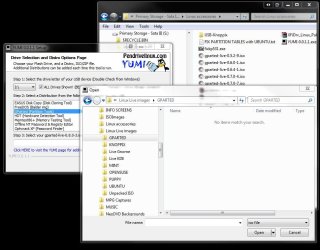
And one other thing to add is that when giving this a look here with several iso images not one is visible browsing to the folder locations for both Linux and a slipstreamed 7 iso. When GParted was selected I went to a folder holding several releases and none were seen. Not a reliable tool it seems.( see attached)

The only mention of Windows is the XP, Vista, and 7 is requirement to use Windows to create a multi distro stick not to multiply Windows installers. The "other OSs" references refers to the various distros and other UNIX based OSs.

It also depends on what you are going to be using the flash drive for which was only for Win PE. If your flash has already been made bootable another option is simply placing the contents onto the flash drive and boot live from it.

For a fast write of an iso and seeing the drive made bootable in one shot UltraISO has been working fine for a variety of projects so far.
 

Attachments

  • YUMI No ISOs Found.jpg
    YUMI No ISOs Found.jpg
    93.1 KB · Views: 61

My Computers My Computers

System One System Two

  • Computer type
    PC/Desktop
    Computer Manufacturer/Model Number
    Custom builds = 2
    OS
    W7 Ultimate x64/W10 Pro x64/W11 Pro Triple Boot - Main PC W7 Remote PC Micro ATX W7 Pro x64/W11 Pro
    CPU
    AMD Phenom II X4 975 Deneb 3.6ghz - 965 2nd remote pc
    Motherboard
    Gigabyte GA-790XTA-UD4-Gigabyte GA-880GM-D2H remote pc
    Memory
    Kingston Hyper X DDR3 1600 1.5v 16gb - Hyper X Fury 8gb 2nd
    Graphics Card(s)
    MSI HD Radeon 5750 1gb - MSI HD Radeon 6450 on mini tower
    Sound Card
    Creative Labs X-Fi Xtreme Audio P - Realtek onooard 2nd case
    Monitor(s) Displays
    ASUS VW199T-P 19" HP 2082a Main-HP 2082a 20" remote pc
    Screen Resolution
    Asus 1440x900 - HP 1600x900
    Hard Drives
    WD Black 1TB HD per OS W7, W10, and pending W11 presently on 500gb OS Drive - Pending Triple 1TB HDs for Spanned Storage/backup volume
    Single 2TB external USB enclosure, single 1TB System 7 Host/Boot drive, Pending 8TB external HD for system image b
    PSU
    Corsair 750TX - primary / Corsair CX600 - second
    Case
    Antec 900-2 - SSD compatible / NZXT Vulcan mini tower
    Cooling
    Zalman CNPS9900A
    Keyboard
    AZIO L70 Backlit Letters Gaming - ONN Cordless/USB
    Mouse
    MSI DS200 Programmable, Logitech Cordless
    Internet Speed
    30mbps upgrade - primary hard wired - mini tower usb WiFi
    Antivirus
    GFI VIPRE Internet Security 2014 on W7 2016 beta on W10,
    Browser
    Cyberfox, WaterFox 64bit FF variants, FireFox x64, Pale Moon
    Other Info
    Accomdata fan cooled usb 2.0 PIDE/Sata II, III external enclosure.
    Sambient usb/eSata PATA/Sata II, III external enclosure.
  • Computer type
    PC/Desktop
    System Manufacturer/Model Number
    CUSTOM ASSEMBLY
    OS
    W7 Pro x64/W11 Pro
    CPU
    AMD Deneb 3.6ghz - 965
    Motherboard
    Gigabyte GA-880GM-D2H remote pc
    Memory
    Kingston Hyper X Fury 8gb
    Graphics Card(s)
    MSI HD Radeon 6450 DVI Output
    Sound Card
    Realtek onooard Creative or Other separate PENDING
    Monitor(s) Displays
    VIZIO 32" LCD TV Separate LCD Pending
    Screen Resolution
    1600x1080
    Hard Drives
    WD 500GB OS Host/Boot WD Green 1TB Storage/Backup
    PSU
    Corsair 600W - THERMALTAKE 600W spare case
    Case
    NZXT Vulcan mini tower
    Cooling
    Twin 120mm Top Fans - 240mm Side Cover
    Keyboard
    ONN Cordless/USB Logitech Cordless
    Mouse
    ONN USB/Cordless - Logitech Cordless
    Internet Speed
    DSL 5G
    Browser
    MS Edge, FireFox, WaterFox x64, FireFox Nightly
    Other Info
    OS Testing-Remote Access to Main TeamViewer
Your ISOs should be clean and not corrupted in anyway. Use your genuine Windows 7/XP media to make the ISOs using the simple and straight-forward ISORecorder.( Google and you should find it).

Another thing the author suggests when the ISOs do not boot is to defragment the ISO in the pendrive.

So try these and then report.

( I have not installed the OS from the multiboot pendrive so far though I have used it for imaging and restoring. I had used the Microsoft tool and the OS ISO created from my licensed media on the two machines long back prior to hitting on this program. Since you have reported some problems with OS install/repair, I shall now do it from the multiboot pendrive and then report but that is going to be only after 15 July 2011 when I get back to India and my work desk.:))

ISO is perfectly clean. Used REAL XP, Win 7 CD/DVD. Used the MS tool to load both Win 7 on this same thumb drive and Win 7+SP1 Slipstreamed on another thumb drive. Both booted and loaded files just fine. Don't remember the errors. I'll still use it to make utility thumb.
 

My Computer My Computer

Computer Manufacturer/Model Number
Built be Me
OS
Windows 7 Pro x64
CPU
i5 760
Motherboard
Asus P7P55D-E Pro
Memory
16GB
Graphics Card(s)
Nvidia GTS450
Sound Card
On board
Monitor(s) Displays
Dell 2007WFP Dell 1800FP
Screen Resolution
1680x1050 1280x1024
Hard Drives
Seagate 250GB & 750GB
WD 1TB
PSU
Antec 750
Case
In Win
Cooling
Cooler Master Hyper 212+
Keyboard
IBM
Mouse
MS
Back
Top