ISP says computer to blame for slow internet

I thought that speed test you did after installing was twice as fast as what you're getting now. Am I wrong about that?

You are correct. What I meant earlier when I said it was slow was that it wasn't even the minimum speed that my ISP considers to be the normal range. ISP says the minimum is 3 mbps.
 

My Computer My Computer

At a glance

Windows 7 64bitIntel Core i7 920 @ 2.67GHz15 GB512MB ATI Radeon HD 4850
Computer type
PC/Desktop
Computer Manufacturer/Model Number
Dell XPS 435T
OS
Windows 7 64bit
CPU
Intel Core i7 920 @ 2.67GHz
Memory
15 GB
Graphics Card(s)
512MB ATI Radeon HD 4850
Monitor(s) Displays
Dell S2409W 24in. Widescreen
Hard Drives
Seagate Barracuda 7200.12 SATA 3Gb/s 1TB
Antivirus
MSE
Browser
Firefox
You are correct. What I meant earlier when I said it was slow was that it wasn't even the minimum speed that my ISP considers to be the normal range. ISP says the minimum is 3 mbps.

So it was much closer, but still no cigar.

BTW, when you go through the BIOS checking your settings, make sure you dig into any relevant submenus.
 

My Computer My Computer

At a glance

Windows 7 Ultimate x64
OS
Windows 7 Ultimate x64
My internet speed is still the after clearing the CMOS.

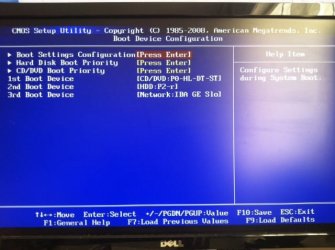
I went into BIOS, selected "Load Defaults," and okayed the action. I assume that that was clearing the CMOS. Afterwards, I went in to the menus and looked for any changes. I noticed that in the order of my drives changed. Before clearing CMOS, CD/DVD was in the 2nd spot.

BTW, when you go through the BIOS checking your settings, make sure you dig into any relevant submenus.
Blasts, I didn't see this until after I went into BIOS. The very menu that I mentioned above had 3 submenus that I did not check.
 

Attachments

  • biosBootDevice.jpg
    biosBootDevice.jpg
    41.5 KB · Views: 12

My Computer My Computer

At a glance

Windows 7 64bitIntel Core i7 920 @ 2.67GHz15 GB512MB ATI Radeon HD 4850
Computer type
PC/Desktop
Computer Manufacturer/Model Number
Dell XPS 435T
OS
Windows 7 64bit
CPU
Intel Core i7 920 @ 2.67GHz
Memory
15 GB
Graphics Card(s)
512MB ATI Radeon HD 4850
Monitor(s) Displays
Dell S2409W 24in. Widescreen
Hard Drives
Seagate Barracuda 7200.12 SATA 3Gb/s 1TB
Antivirus
MSE
Browser
Firefox
I'm pretty sure this is for your model; check to be sure. Check out item 29 in the second graphic:

Documentation

I think that may be the best way to ensure you've cleared it. Link to the rest of the documentation (to make sure you know how to to use item 29):

Documentation
 

My Computer My Computer

At a glance

Windows 7 Ultimate x64
OS
Windows 7 Ultimate x64
I tried clearing the CMOS again. This time I did it manually. It has definitely been cleared. When I stared my computer I saw this message: CMOS setting wrong CMOS Date/Time Not Set
I went into BIOS and fixed the date and time. I wasn't sure if there was an easier way. I may be like a second or two off.

Bad news: My speed is still the same.
Good news: That little alert (at boot up) is gone and my printer driver is fine again.
 

My Computer My Computer

At a glance

Windows 7 64bitIntel Core i7 920 @ 2.67GHz15 GB512MB ATI Radeon HD 4850
Computer type
PC/Desktop
Computer Manufacturer/Model Number
Dell XPS 435T
OS
Windows 7 64bit
CPU
Intel Core i7 920 @ 2.67GHz
Memory
15 GB
Graphics Card(s)
512MB ATI Radeon HD 4850
Monitor(s) Displays
Dell S2409W 24in. Widescreen
Hard Drives
Seagate Barracuda 7200.12 SATA 3Gb/s 1TB
Antivirus
MSE
Browser
Firefox
:\ I think I'm going to reinstall Norton. We saw that it wasn't responsible for my slow internet speed and I paid money for it so I want to take advantage of it.
 

My Computer My Computer

At a glance

Windows 7 64bitIntel Core i7 920 @ 2.67GHz15 GB512MB ATI Radeon HD 4850
Computer type
PC/Desktop
Computer Manufacturer/Model Number
Dell XPS 435T
OS
Windows 7 64bit
CPU
Intel Core i7 920 @ 2.67GHz
Memory
15 GB
Graphics Card(s)
512MB ATI Radeon HD 4850
Monitor(s) Displays
Dell S2409W 24in. Widescreen
Hard Drives
Seagate Barracuda 7200.12 SATA 3Gb/s 1TB
Antivirus
MSE
Browser
Firefox
No AV is a 100% effective, paid or free. Some of the free ones are just as effective as any of the paid ones. And the free ones can be lighter on system resources.

If it was me I would let it go, even if there was time left on it, especially as you've already 'uninstalled' it (I don't recall if you ran their tool that does a more effective removal).

Instead I would invest in a router (if you don't have one), use the built in w7 firewall, and install something like MSE:

Microsoft Security Essentials - Free Antivirus for Windows
 

My Computer My Computer

At a glance

Windows 7 Ultimate x64
OS
Windows 7 Ultimate x64
I have already uninstalled MSE and reinstalled Norton. As soon as Norton expires, I will be sure to go back to MSE.
 

My Computer My Computer

At a glance

Windows 7 64bitIntel Core i7 920 @ 2.67GHz15 GB512MB ATI Radeon HD 4850
Computer type
PC/Desktop
Computer Manufacturer/Model Number
Dell XPS 435T
OS
Windows 7 64bit
CPU
Intel Core i7 920 @ 2.67GHz
Memory
15 GB
Graphics Card(s)
512MB ATI Radeon HD 4850
Monitor(s) Displays
Dell S2409W 24in. Widescreen
Hard Drives
Seagate Barracuda 7200.12 SATA 3Gb/s 1TB
Antivirus
MSE
Browser
Firefox
Don't forget about a router. I recall that all your machines connect directly to a modem, right? Installing a router that connects to the modem greatly enhances security for all machines that will then connect to the router instead of directly to the modem.
 

My Computer My Computer

At a glance

Windows 7 Ultimate x64
OS
Windows 7 Ultimate x64
I already use a router. The router is connected to the modem in my room. My sister uses a wireless connection on her laptop. I disabled the network adapter in my desktop so it wouldn't connect wirelessly.
 

My Computer My Computer

At a glance

Windows 7 64bitIntel Core i7 920 @ 2.67GHz15 GB512MB ATI Radeon HD 4850
Computer type
PC/Desktop
Computer Manufacturer/Model Number
Dell XPS 435T
OS
Windows 7 64bit
CPU
Intel Core i7 920 @ 2.67GHz
Memory
15 GB
Graphics Card(s)
512MB ATI Radeon HD 4850
Monitor(s) Displays
Dell S2409W 24in. Widescreen
Hard Drives
Seagate Barracuda 7200.12 SATA 3Gb/s 1TB
Antivirus
MSE
Browser
Firefox
Gotcha!
 

My Computer My Computer

At a glance

Windows 7 Ultimate x64
OS
Windows 7 Ultimate x64
it could be your IP Stack is not optimized for the connection, such thing as MTU lower than what the ISPs router/connection uses

use TCP Optimizer, check "modify all network adapters" , slide the speed to 6Mbps and at bottom check "optimal" for settings then apply and reboot, then retest the download speed

sorry if its already been suggested
 

My Computer My Computer

At a glance

Windows 7 Pro x64Intel Core-i5 3470 @ 3.67Ghz (Ivy-Bridge)8Gb (2x4) 1616Mhz Crucial BallistixnVidia GTX650
Computer type
PC/Desktop
Computer Manufacturer/Model Number
GT1000
OS
Windows 7 Pro x64
CPU
Intel Core-i5 3470 @ 3.67Ghz (Ivy-Bridge)
Motherboard
Gigabyte H77M-D3H
Memory
8Gb (2x4) 1616Mhz Crucial Ballistix
Graphics Card(s)
nVidia GTX650
Sound Card
Via 2021T
Monitor(s) Displays
19" LG Flatron
Screen Resolution
1440x900
Hard Drives
2 x 120Gb Samsung 840 EVO in RAID '0' (1GB/s - 800MB/s - 140k IOPS)
500Gb Seagate Barracuda HDD
PSU
XFX 450 Pro Core Edition
Case
NXZT
Cooling
Arctic 7 Freezer Pro
Keyboard
Q-Connect Wi-Fi
Mouse
Q-Connect Wi-Fi
Internet Speed
16Mbps
Antivirus
(none) - Private Firewall + WinPatrol
Browser
Chrome
Other Info
Home-Built Computer
Back
Top