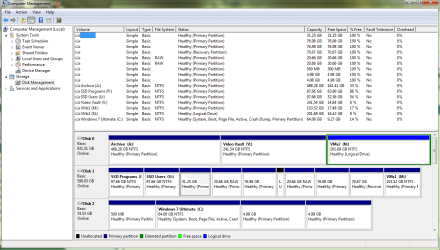
Issue 2: Can't resolve "unknown device" for 1 standard SATA drive
I have a customized Asus M4A875-M system with:
- Phenom quad core 9750 CPU @ 2.4GHz
- 16GB RAM
- BluRay & DVD R/W optical drives (2)
- 500W Antec power supply
- 4 disks:
= drive 0 - Vertex2 80GB SSD 2.5"
= drive 1 - Toshiba 680GB 2.5"
= drive 2 - White Label 1TB 3.5"
= drive 3 - Seagate 1TB ST31000528AS (just upgraded drive firmware to CC49 from CC45)
-Multiboot:
= Windows 7 Ultimate
= OpenSUSE tumbleweed linux
= Linux Mint 17.2
= Windows 10
= Windows 7 Home Premium
= OpenSUSE v12.2
My boot loader is grub2 with a nice custom boot menu using
 .
.
The issue is the Seagate drive is listed as an "unknown device" under Windows 7 Ultimate OS (along with 3 other volumes) despite the fact it works OK when I boot Windows 7 Home Premium. Haven't gotten Windows 10 to boot yet, so don't know about that, but its just fine under all of the Linux OSs too.
I have all of these backed up using Macrium on a 3TB external USB also.
All of the UUIDs for each disk and partition (volume) are unique as reported by gparted under Linux. Having an issue with Windows 10, but I'm saving that for a separate thread.
The Seagate was showing up OK before the FW and RAM update. I may have confused the Win 7 Ultimate OS when I had to remove the CMOS battery to reset mobo, and I forget to switch the SATA ports to AHCI mode. Win 7 Ult. booted up, but many volumes weren't recognized. When I discovered and fixed the mode 4 items shown as "unknown", starting with the Seagate drive explicitly labeled and 3 other drives, presumable the other NTFS partitions on that same drive.
For a map of the partitions on all of the drives see my Issue 3: Can't boot Windows 10 on multiboot system thread.
I have a customized Asus M4A875-M system with:
- Phenom quad core 9750 CPU @ 2.4GHz
- 16GB RAM
- BluRay & DVD R/W optical drives (2)
- 500W Antec power supply
- 4 disks:
= drive 0 - Vertex2 80GB SSD 2.5"
= drive 1 - Toshiba 680GB 2.5"
= drive 2 - White Label 1TB 3.5"
= drive 3 - Seagate 1TB ST31000528AS (just upgraded drive firmware to CC49 from CC45)
-Multiboot:
= Windows 7 Ultimate
= OpenSUSE tumbleweed linux
= Linux Mint 17.2
= Windows 10
= Windows 7 Home Premium
= OpenSUSE v12.2
My boot loader is grub2 with a nice custom boot menu using
The issue is the Seagate drive is listed as an "unknown device" under Windows 7 Ultimate OS (along with 3 other volumes) despite the fact it works OK when I boot Windows 7 Home Premium. Haven't gotten Windows 10 to boot yet, so don't know about that, but its just fine under all of the Linux OSs too.
I have all of these backed up using Macrium on a 3TB external USB also.
All of the UUIDs for each disk and partition (volume) are unique as reported by gparted under Linux. Having an issue with Windows 10, but I'm saving that for a separate thread.
The Seagate was showing up OK before the FW and RAM update. I may have confused the Win 7 Ultimate OS when I had to remove the CMOS battery to reset mobo, and I forget to switch the SATA ports to AHCI mode. Win 7 Ult. booted up, but many volumes weren't recognized. When I discovered and fixed the mode 4 items shown as "unknown", starting with the Seagate drive explicitly labeled and 3 other drives, presumable the other NTFS partitions on that same drive.
For a map of the partitions on all of the drives see my Issue 3: Can't boot Windows 10 on multiboot system thread.
Last edited:
My Computer
At a glance
Windows 7 Ultimate x64, Windows 7 Home Premiu...Phenom quad16GBNvidia 520
- Computer type
- PC/Desktop
- Computer Manufacturer/Model Number
- Asus, custom build
- OS
- Windows 7 Ultimate x64, Windows 7 Home Premium x64
- CPU
- Phenom quad
- Motherboard
- M4A785-M
- Memory
- 16GB
- Graphics Card(s)
- Nvidia 520
- Hard Drives
- Seagate 1TB, White Label 1TB, Toshiba 680GB, Vertex2 80GB SSD
- Antivirus
- Bitdefender
- Browser
- Firefox, IE11