
Issue w. laptop & external monitor

harpua

New member
Guru
VIP
Local time
6:50 AM
Messages
1,011
Location
Honolulu, HI, USA
I recently got a 24" 1920 x 1080 external LCD monitor for my laptop. It's awesome. I've been using laptops only for many years and now I'm very sorry I waited so long before getting one. But, on to my issue:

I want to only use the external monitor and keep the laptop screen turned off. The problem is that when I resume from sleep sometimes, but not always, the laptop display comes back on showing only the desktop wallpaper. So I then have to hit the windows key plus "p" (for projector) and select projector to get the laptop display turned off again.

I know how to select the external monitor in W7. Basically, one goes to screen resolution from the desktop right click context menu and make the proper selection under multiple monitors (see screenshot below).

But windows 7 seems to forget this setting sometimes and it's a mild annoyance to have to check the laptop monitor and if it's on, hit the windows key plus "p" each time (or almost each time).

So I'm wondering if there's some way to force windows 7 to remember to use only the external monitor and keep the laptop monitor off until I tell it otherwise? I suppose this issue is likely due to some bug in one of my drivers but I am using all the latest drivers.
 

Attachments
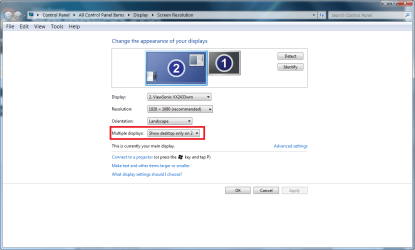
  • multiple monitors.png
    multiple monitors.png
    44.1 KB · Views: 609

My Computer My Computer

At a glance

Windows 7 Ultimate x64 (Retail)i7-Q 7206 GBnVidia GeForce GT 230M (1GB)
Computer Manufacturer/Model Number
HP DV8t quad
OS
Windows 7 Ultimate x64 (Retail)
CPU
i7-Q 720
Motherboard
Motherboard Chipset Intel Ibex Peak-M PM55, Intel Lynnfield
Memory
6 GB
Graphics Card(s)
nVidia GeForce GT 230M (1GB)
Sound Card
IDT High Definition Audio CODEC
Monitor(s) Displays
18.4 inch HP Infinity FHD (Samsung 184HT03-001)
Screen Resolution
1920 x 1080
Hard Drives
Hitachi 500GB 7200 rpm (x2)
Seagate FreeAgent 1.5 TB External USB (x2)
Thermaltake BlacX eSATA/USB 2.0 3.5/2.5 HD dock
Cooling
Zalman NC-2000 notebook cooling pad
Keyboard
laptop
Mouse
Logitech VX Revolution
Other Info
Backup Unit: Lenovo T61p
Why not just keep the laptop lid closed? The external monitor will display, and your laptop display will be turned off. OR, are you using the keyboard and touch pad on the laptop? If that's the case, do yourself a favor and get a full size keyboard and mouse, and plug it into the laptop, push the laptop off to the side, and keep the lid closed. Alternately, you could invest in a docking station so you don't have to plug everything in each time. That's what I do at work.
 

My Computer My Computer

At a glance

Win 7 Ultimate x64 & x86AMD Anthalon 64 XT 6000+ 3.0Ghz4 GBNvidia GeForce 8500 GT
Computer Manufacturer/Model Number
Home Built
OS
Win 7 Ultimate x64 & x86
CPU
AMD Anthalon 64 XT 6000+ 3.0Ghz
Motherboard
Asus M2N-eE
Memory
4 GB
Graphics Card(s)
Nvidia GeForce 8500 GT
You might try disabling the primary monitor, although it might not automatically re-enable if its the only monitor (meaning your projector is not attached.)
 

My Computer My Computer

At a glance

windows 7 RTM x64Phenom II 965 Quad Core 3.4GhzMushkin Blackline 8GB (4x2gb)XFX Radeon 5970 Black Edition
Computer Manufacturer/Model Number
Black_Box (homebuilt)
OS
windows 7 RTM x64
CPU
Phenom II 965 Quad Core 3.4Ghz
Motherboard
Asus M4A79T Deluxe
Memory
Mushkin Blackline 8GB (4x2gb)
Graphics Card(s)
XFX Radeon 5970 Black Edition
Sound Card
onboard
Monitor(s) Displays
Dell 2408WPF-main Dell E248WFP-secondary
Screen Resolution
1920x1200-main 1920x1200-secondary
Hard Drives
OCZ Vertex Limited Edition 100GB (OS)
x1 WD Black Edition 500GB drive (Storage)
PSU
XFX 850w Black Edition (Modular)
Case
Mountian Mods H2go
Cooling
CoolITSystems ECO A.L.C.
Keyboard
Logitech MX 5500 wireless keyboard
Mouse
Razor Copperhead
Internet Speed
16Mb down/2Mb up Wowway Cable Internet
I am now having this problem, but the symptoms are somewhat different. With my previous Acer Aspire 5610z, Vista Home Premium 32-bit and Intel GMA 4500MHD graphics connected via a VGA cable to an external monitor, I had no problem.

With my new Acer Aspire 5536-5142, Windows 7 Home Premium 64-bit and ATI Radeon HD 3200 connected to the same external monitor but with an HDMI-to-DVI cable, the driver in the laptop forgets that there is an external monitor every time it goes to sleep. The Catalyst video configuration app no longer even lists a second monitor. I have to reboot. On reboot, the external monitor is again used without my having to re-select. When I check Catalyst, it again lists two monitors.

This is more than annoying.
 

My Computer My Computer

At a glance

Windows 7 Home Premium 64-bitIntel Core i5-3450 Ivy Bridge 3.1GHz (3.5GHz ...8 GIG DDR3Intel HD Graphics 2500 BX80637I53450
Computer type
PC/Desktop
Computer Manufacturer/Model Number
Custon Build
OS
Windows 7 Home Premium 64-bit
CPU
Intel Core i5-3450 Ivy Bridge 3.1GHz (3.5GHz Turbo) LGA 1155
Motherboard
ASRock Extreme 4 H77
Memory
8 GIG DDR3
Graphics Card(s)
Intel HD Graphics 2500 BX80637I53450
Sound Card
Realtek ALC898 Audio Codec 7.1
Monitor(s) Displays
23" AOC widescreen
Screen Resolution
1920x1080
Hard Drives
128GB SSD for System
2TB Green drive for data
5 external USB WD My Book's (approx 13 tb)
PSU
Antec EarthWatts Green EA-380D Green 380W
Case
Built into my desk
Cooling
Unnecessary except for standard CPU and Gate fans
Keyboard
Unicomp buckling-spring mechanical Spanish Language
Mouse
Ordinary laster - laptop size
Internet Speed
5 GB download
Antivirus
COMDO Suite
Browser
Firefox running inside Sandboxie
Other Info
USB 3.0 Card Reader
Blueray/DVD drive
The solution was to stop using the HDMI-DVI cable and revert to using the analog VGA cable. I can discern no difference in video quality and the external monitor is no longer forgotten.
 

My Computer My Computer

At a glance

Windows 7 Home Premium 64-bitIntel Core i5-3450 Ivy Bridge 3.1GHz (3.5GHz ...8 GIG DDR3Intel HD Graphics 2500 BX80637I53450
Computer type
PC/Desktop
Computer Manufacturer/Model Number
Custon Build
OS
Windows 7 Home Premium 64-bit
CPU
Intel Core i5-3450 Ivy Bridge 3.1GHz (3.5GHz Turbo) LGA 1155
Motherboard
ASRock Extreme 4 H77
Memory
8 GIG DDR3
Graphics Card(s)
Intel HD Graphics 2500 BX80637I53450
Sound Card
Realtek ALC898 Audio Codec 7.1
Monitor(s) Displays
23" AOC widescreen
Screen Resolution
1920x1080
Hard Drives
128GB SSD for System
2TB Green drive for data
5 external USB WD My Book's (approx 13 tb)
PSU
Antec EarthWatts Green EA-380D Green 380W
Case
Built into my desk
Cooling
Unnecessary except for standard CPU and Gate fans
Keyboard
Unicomp buckling-spring mechanical Spanish Language
Mouse
Ordinary laster - laptop size
Internet Speed
5 GB download
Antivirus
COMDO Suite
Browser
Firefox running inside Sandboxie
Other Info
USB 3.0 Card Reader
Blueray/DVD drive
Back
Top