
ZoidbergForPrez
New member
- Local time
- 12:34 AM
- Messages
- 3
Hello,
I'm just new on the forum and hopefully, you'll be able to help me fix this issue.
It's an issue I've been having for some time but could find a workaround but the arrival of a NAS changed the matter.
Here are the actors:
1 A modem/router allowing me to connect to the internet
2 My main wired computer connected to the router (ASH)
3 Another computer connected to the wireless network (either my other desktop in the living room or my Asus laptop)
4 My brand new Synology NAS connected to the router through a cable (AVALON - also the name of the wireless network, shouldn't be a problem though, wired network has the default name and I don't know if I can change it on the router)
The issue was, and still is, that wireless devices can access the shares on my main computer, but my main computer cannot access the shares on other (including the NAS).
On the laptop, under network, every device appear and is clickable without an error allowing access to the shares.
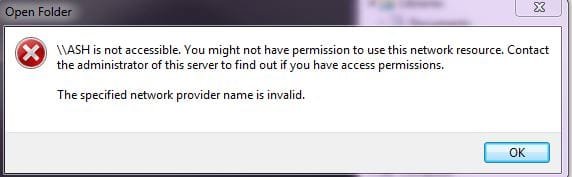
On the main wired desktop, I do not see the nas but I see the laptop and the main desktop itself but when I click I get an error (see attachment).
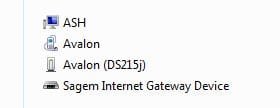
Also, while not seeing the NAS "share device" (computer icon) I see both the nas device from which I can access from the wired computer through the web interface by double clicking on it (see second capture).
I've searched the web and tried a bunch of fixes, to no avail. The problem is still there and I cannot access my nas through my main wired computer.
Any idea what the problem is and, more importantly, how to fix it?
Thanks in advance for any clue...
I'm just new on the forum and hopefully, you'll be able to help me fix this issue.
It's an issue I've been having for some time but could find a workaround but the arrival of a NAS changed the matter.
Here are the actors:
1 A modem/router allowing me to connect to the internet
2 My main wired computer connected to the router (ASH)
3 Another computer connected to the wireless network (either my other desktop in the living room or my Asus laptop)
4 My brand new Synology NAS connected to the router through a cable (AVALON - also the name of the wireless network, shouldn't be a problem though, wired network has the default name and I don't know if I can change it on the router)
The issue was, and still is, that wireless devices can access the shares on my main computer, but my main computer cannot access the shares on other (including the NAS).
On the laptop, under network, every device appear and is clickable without an error allowing access to the shares.
On the main wired desktop, I do not see the nas but I see the laptop and the main desktop itself but when I click I get an error (see attachment).
Also, while not seeing the NAS "share device" (computer icon) I see both the nas device from which I can access from the wired computer through the web interface by double clicking on it (see second capture).
I've searched the web and tried a bunch of fixes, to no avail. The problem is still there and I cannot access my nas through my main wired computer.
Any idea what the problem is and, more importantly, how to fix it?
Thanks in advance for any clue...
Attachments
My Computer
- Computer type
- PC/Desktop
- Computer Manufacturer/Model Number
- Custom
- OS
- Windows 7 Ultimate 64bits
- CPU
- i5 2500K
- Memory
- 8GB
- Graphics Card(s)
- gtx770
- Hard Drives
- SSD+HDD
- Antivirus
- Avast Free
- Browser
- Firefox

