Issue with being able to close Chrome and Edge with my Logitech mouse

Melissa

New member
Power User
Local time
4:31 PM
Messages
394
Just in the past week I have not been able to close tabs on both Google Chrome and MS Edge.
I have installed and re-installed the programs to no avail.
I have been using the keyboard shortcuts in the interim.

I understand that it may not be a MS issue, but being a pain in the backside.

If anyone could direct me to a relevant solution I would be grateful
 

Attachments

  • GOOGLE TABS.JPG
    GOOGLE TABS.JPG
    14.2 KB · Views: 15

My Computer My Computer

At a glance

Windows 7 Home Premium 64bitWindows 7 Service Pack 1 x86 NTFS4 GB
Computer type
Laptop
Computer Manufacturer/Model Number
Sony VAIO / E Series VPCEB46FG
OS
Windows 7 Home Premium 64bit
CPU
Windows 7 Service Pack 1 x86 NTFS
Motherboard
AMD E-350 Processor
Memory
4 GB
Hard Drives
500GB
Other Info
1.6GHz
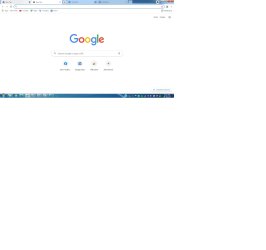
You didn't explain why you can't close the tabs. You also didn't explain what we are suppose to be looking at with this screenshot. I guess I'll have to use my Jedi powers.
 

My Computers My Computers

  • At a glance

    Windows 7 pro/Windows 10 ProIntel i7 860 Quad core 2.8 ghz8 gbATI Radeon HD 5770 1 gb ram
    Computer type
    PC/Desktop
    Computer Manufacturer/Model Number
    HP Pavillion Elite HPE-250f
    OS
    Windows 7 pro/Windows 10 Pro
    CPU
    Intel i7 860 Quad core 2.8 ghz
    Memory
    8 gb
    Graphics Card(s)
    ATI Radeon HD 5770 1 gb ram
    Monitor(s) Displays
    Alienware 25 AW2521HF & Viewsonic
    Screen Resolution
    1920 x1080 & 1680x1050
    Hard Drives
    WD blue 1 tb & 500 gb.
    Browser
    FF of course.
    Other Info
    https://www.bestbuy.com/site/hp-pavilion-elite-desktop-intel-core-i7-processor-8gb-memory-1tb-hard-drive/9921493.p?skuId=9921493
  • At a glance

    Windows 2012 R2 Data center/Linux Minti3 9100 3.6GHz, 8M cache, 4C/4T8GB 2666MT/s DDR4 ECC UDIMM
    Computer type
    PC/Desktop
    System Manufacturer/Model Number
    Dell Poweredge T140
    OS
    Windows 2012 R2 Data center/Linux Mint
    CPU
    i3 9100 3.6GHz, 8M cache, 4C/4T
    Memory
    8GB 2666MT/s DDR4 ECC UDIMM
    Monitor(s) Displays
    Viewsonic
    Screen Resolution
    1680x1050
    Hard Drives
    1 TB & 750 GB
    Other Info
    https://www.dell.com/en-us/work/shop/productdetailstxn/poweredge-t140?~ck=bt
Use of mouse to close the tabs via clicking on the 'X' on Browsers

Thank you for your response.

I have also posted my quandary on the Google community and not getting anywhere.

The same problem seems to happen on Microsoft Edge - so then I went to mouse settings.
I Uninstalled the mouse (Logitech M150) - reinstalled - same problem was apparent. I then went to Device Manager - updated drivers. Tried the mouse and the behaviour of trying to close any tabs that I opened other than the first one I opened by simply hovering over the 'X' and clicking - the tab would not close.
I then went to using the keyboard shortcut (Control + W).

I then went to the Command Prompt - ran a sfc/scannow

I do know how to submit a problem steps recorder of the steps taken -- but unsure if that will assist anyone reading this thread.

Thank you for your time
 

Attachments

  • GOOGLE TABS - print screen.jpg
    GOOGLE TABS - print screen.jpg
    47.3 KB · Views: 1
  • google tabs PSR.zip
    google tabs PSR.zip
    159.9 KB · Views: 1

My Computer My Computer

At a glance

Windows 7 Home Premium 64bitWindows 7 Service Pack 1 x86 NTFS4 GB
Computer type
Laptop
Computer Manufacturer/Model Number
Sony VAIO / E Series VPCEB46FG
OS
Windows 7 Home Premium 64bit
CPU
Windows 7 Service Pack 1 x86 NTFS
Motherboard
AMD E-350 Processor
Memory
4 GB
Hard Drives
500GB
Other Info
1.6GHz
I suggest scanning your computer for viruses. Those are known to do some strange things. Also do you have any extensions or toolbars you like to install? If so remove them. Also have you tried Firefox or IE and if so does it happen on those browsers? Have you tested another mouse? Do you have full functionality of all the keys on other applications? Do you have the logitech software installed? If so check to see if there is an application override set for the left click button or reinstall the logitech software.
 

My Computers My Computers

  • At a glance

    Windows 7 pro/Windows 10 ProIntel i7 860 Quad core 2.8 ghz8 gbATI Radeon HD 5770 1 gb ram
    Computer type
    PC/Desktop
    Computer Manufacturer/Model Number
    HP Pavillion Elite HPE-250f
    OS
    Windows 7 pro/Windows 10 Pro
    CPU
    Intel i7 860 Quad core 2.8 ghz
    Memory
    8 gb
    Graphics Card(s)
    ATI Radeon HD 5770 1 gb ram
    Monitor(s) Displays
    Alienware 25 AW2521HF & Viewsonic
    Screen Resolution
    1920 x1080 & 1680x1050
    Hard Drives
    WD blue 1 tb & 500 gb.
    Browser
    FF of course.
    Other Info
    https://www.bestbuy.com/site/hp-pavilion-elite-desktop-intel-core-i7-processor-8gb-memory-1tb-hard-drive/9921493.p?skuId=9921493
  • At a glance

    Windows 2012 R2 Data center/Linux Minti3 9100 3.6GHz, 8M cache, 4C/4T8GB 2666MT/s DDR4 ECC UDIMM
    Computer type
    PC/Desktop
    System Manufacturer/Model Number
    Dell Poweredge T140
    OS
    Windows 2012 R2 Data center/Linux Mint
    CPU
    i3 9100 3.6GHz, 8M cache, 4C/4T
    Memory
    8GB 2666MT/s DDR4 ECC UDIMM
    Monitor(s) Displays
    Viewsonic
    Screen Resolution
    1680x1050
    Hard Drives
    1 TB & 750 GB
    Other Info
    https://www.dell.com/en-us/work/shop/productdetailstxn/poweredge-t140?~ck=bt
I have done the following:

1. Installed Microsoft Edge - and the same issue arises when I attempt to close tabs.
2. Installed and Re-installed Google Chrome - same issue arises when I attempt to close tabs. I then went to close all extensions, even under developer mode.
3. I have full functionality to a certain degree - left click works to a certain degree.
4. Did think to go to the Logitech website and install all the drivers and control sets.

I will keep you updated in between restarting and resetting - and trialing in safe mode.

Thanks for all your fantastic ideas - love this forum

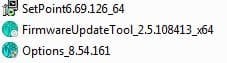
Below is the list of drivers that I have used.

Thinking that if it is a virus - will throw my lap top into the nearest river. I did used to have ad block - but I know that that you never know in this environment at the moment.

MOUSE DRIVERS.JPG
 

My Computer My Computer

At a glance

Windows 7 Home Premium 64bitWindows 7 Service Pack 1 x86 NTFS4 GB
Computer type
Laptop
Computer Manufacturer/Model Number
Sony VAIO / E Series VPCEB46FG
OS
Windows 7 Home Premium 64bit
CPU
Windows 7 Service Pack 1 x86 NTFS
Motherboard
AMD E-350 Processor
Memory
4 GB
Hard Drives
500GB
Other Info
1.6GHz
I suggest that you scan for viruses and remove any extensions/toolbars that don't come with the browser. You might try uninstalling anything under programs and features that says logitech. Also you didn't answer my question about using either IE or Firefox or if you have tried an alternate mouse. What do you mean by "works do a certain degree"? Does it not work as well as it should with any application? If so there might be a problem with the mouse. You could also try using that mouse on another computer. Where there is questionable use of computer hardware and accessories you need to do substitution tests. Known working mouse used on a questionable computer or questionable mouse on a known good computer or both (which is what I would prefer).

Personally I use firefox so I'm not as familiar with Chrome and Edge.
 

My Computers My Computers

  • At a glance

    Windows 7 pro/Windows 10 ProIntel i7 860 Quad core 2.8 ghz8 gbATI Radeon HD 5770 1 gb ram
    Computer type
    PC/Desktop
    Computer Manufacturer/Model Number
    HP Pavillion Elite HPE-250f
    OS
    Windows 7 pro/Windows 10 Pro
    CPU
    Intel i7 860 Quad core 2.8 ghz
    Memory
    8 gb
    Graphics Card(s)
    ATI Radeon HD 5770 1 gb ram
    Monitor(s) Displays
    Alienware 25 AW2521HF & Viewsonic
    Screen Resolution
    1920 x1080 & 1680x1050
    Hard Drives
    WD blue 1 tb & 500 gb.
    Browser
    FF of course.
    Other Info
    https://www.bestbuy.com/site/hp-pavilion-elite-desktop-intel-core-i7-processor-8gb-memory-1tb-hard-drive/9921493.p?skuId=9921493
  • At a glance

    Windows 2012 R2 Data center/Linux Minti3 9100 3.6GHz, 8M cache, 4C/4T8GB 2666MT/s DDR4 ECC UDIMM
    Computer type
    PC/Desktop
    System Manufacturer/Model Number
    Dell Poweredge T140
    OS
    Windows 2012 R2 Data center/Linux Mint
    CPU
    i3 9100 3.6GHz, 8M cache, 4C/4T
    Memory
    8GB 2666MT/s DDR4 ECC UDIMM
    Monitor(s) Displays
    Viewsonic
    Screen Resolution
    1680x1050
    Hard Drives
    1 TB & 750 GB
    Other Info
    https://www.dell.com/en-us/work/shop/productdetailstxn/poweredge-t140?~ck=bt
I have tried using my mouse with Internet Explorer - my mouse worked with all of the applications - closing tabs and opening tabs.
I have not tried Firefox - but will install that today.
I have looked at previous forums and perhaps know that it could be an extension causing the issue. I also saw that on the Google update that other OP were having issues.
I dug through my drawers and used another mouse and it also did not operate on my system.

If it is the mouse - I simply may buy another Microsoft or Logitech mouse and see if that is the issue - or perhaps go to a psychical store and perhaps troubleshoot if it may be something simple and will not cos me as I am currently in hospital undergoing cancer treatment.

Again thank you for your assistance
 

My Computer My Computer

At a glance

Windows 7 Home Premium 64bitWindows 7 Service Pack 1 x86 NTFS4 GB
Computer type
Laptop
Computer Manufacturer/Model Number
Sony VAIO / E Series VPCEB46FG
OS
Windows 7 Home Premium 64bit
CPU
Windows 7 Service Pack 1 x86 NTFS
Motherboard
AMD E-350 Processor
Memory
4 GB
Hard Drives
500GB
Other Info
1.6GHz

My Computers My Computers

  • At a glance

    Windows 7 pro/Windows 10 ProIntel i7 860 Quad core 2.8 ghz8 gbATI Radeon HD 5770 1 gb ram
    Computer type
    PC/Desktop
    Computer Manufacturer/Model Number
    HP Pavillion Elite HPE-250f
    OS
    Windows 7 pro/Windows 10 Pro
    CPU
    Intel i7 860 Quad core 2.8 ghz
    Memory
    8 gb
    Graphics Card(s)
    ATI Radeon HD 5770 1 gb ram
    Monitor(s) Displays
    Alienware 25 AW2521HF & Viewsonic
    Screen Resolution
    1920 x1080 & 1680x1050
    Hard Drives
    WD blue 1 tb & 500 gb.
    Browser
    FF of course.
    Other Info
    https://www.bestbuy.com/site/hp-pavilion-elite-desktop-intel-core-i7-processor-8gb-memory-1tb-hard-drive/9921493.p?skuId=9921493
  • At a glance

    Windows 2012 R2 Data center/Linux Minti3 9100 3.6GHz, 8M cache, 4C/4T8GB 2666MT/s DDR4 ECC UDIMM
    Computer type
    PC/Desktop
    System Manufacturer/Model Number
    Dell Poweredge T140
    OS
    Windows 2012 R2 Data center/Linux Mint
    CPU
    i3 9100 3.6GHz, 8M cache, 4C/4T
    Memory
    8GB 2666MT/s DDR4 ECC UDIMM
    Monitor(s) Displays
    Viewsonic
    Screen Resolution
    1680x1050
    Hard Drives
    1 TB & 750 GB
    Other Info
    https://www.dell.com/en-us/work/shop/productdetailstxn/poweredge-t140?~ck=bt
Back
Top