Solved Issue with changing Duplex Speed on Network adapter

403Phaze

New member
Member
Local time
1:45 PM
Messages
56
Location
Calgary, AB, Canada
Hey All,

My question is..

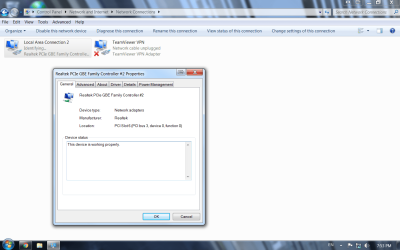
My windows Network adapter settings only show Local Area Connection #2, and when I Click into settings I am unable to change the Duplex settings, not sure if I would be able to delete the settings and by creating a new one would fix my issue or not, but it seems like since I do not have "Local Area Connection (1)" i'm unable to adjust the settings on the adapter
 

Attachments
  • net Connect.png
    net Connect.png
    278.5 KB · Views: 0

My Computer

Computer type
PC/Desktop
OS
Windows 7 Pro 64Bit
The name of the LAN connection will make no difference to what Speed\Duplex settings it currently has but if you want to change it have you tried right clicking on it and selecting rename?

Also why are you trying to change Speed Duplex settings? Unless it is running 10\Half or 100\Half leave it to autonegotiate with the device at the other end would be my advice. To check what it is set to click on the Advanced tab in the Properties window (the one you posted a screen shot of earlier) and in there should be an option for Speed Duplex.
 
Last edited:

My Computer

Computer type
PC/Desktop
Computer Manufacturer/Model Number
Custom Build
OS
Windows 7 64bit
CPU
Intel(R) Core(TM) i7-4770K CPU @ 3.50GHz
Motherboard
Gigabyte Technology Co., Ltd. Z87-DS3H
Memory
Corsair XMS3 16GB kit (2x8GB) DDR3 1333MHz Unbuffered CL9 DI
Graphics Card(s)
(1) Intel(R) HD Graphics 4600 (2) NVIDIA GeForce GT 640
Hard Drives
(1) Samsung SSD 840 EVO 250G SCSI Disk Device (2) Samsung SSD 850 EVO 250G SCSI Disk Device (3) WDC WD10EZEX-00KUWA0 SCSI Disk Device
Antivirus
MSE
Browser
Pale Moon
The name of the LAN connection will make no difference to what Speed\Duplex settings it currently has but if you want to change it have you tried right clicking on it and selecting rename?

Also why are you trying to change Speed Duplex settings? Unless it is running 10\Half or 100\Half leave it to autonegotiate with the device at the other end would be my advice. To check what it is set to click on the Advanced tab in the Properties window (the one you posted a screen shot of earlier) and in there should be an option for Speed Duplex.

Thanks for replying,

the issue is my LAN connection speed is being capped @ 100mbps for some odd reason and my router has capabilities of 1000mbps, so I wanted to changed from whatever the setting is (10/100/1000/auto) to 1GBps if its possible, instead of having it @ auto negotiate

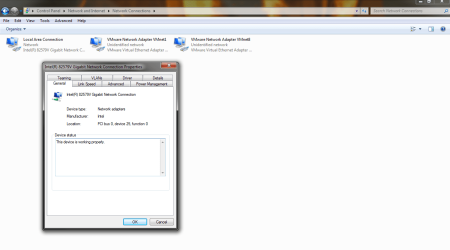
this is the option of networking from one of my OTHER pc's, as where I have the options to do a whole bunch more

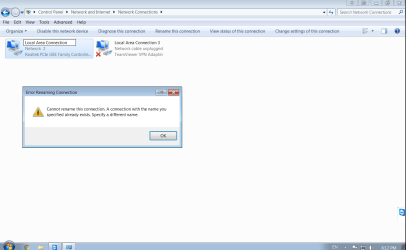
the 2nd picture is showing that even though its not showed, Im unable to rename since the connection is already made and wont let me fix it

netspeed.png

netspeed 2.png
 

My Computer

Computer type
PC/Desktop
OS
Windows 7 Pro 64Bit
Has it ever worked at 1Gbps? Be curious to know - would also recommend swapping out the cable for a known good Cat 5E cable to see if that helps and also try another port on the router if you can to make sure that's not where the issue lies.

If none of those work then I would Uninstall the NIC in Windows and reboot to see if Windows will load new drivers for it. Would make sure that you have a copy of the drivers from the manufacturer (and you know where they are) prior to doing this just in case Windows decides it has nothing suitable to install. ;)
 

My Computer

Computer type
PC/Desktop
Computer Manufacturer/Model Number
Custom Build
OS
Windows 7 64bit
CPU
Intel(R) Core(TM) i7-4770K CPU @ 3.50GHz
Motherboard
Gigabyte Technology Co., Ltd. Z87-DS3H
Memory
Corsair XMS3 16GB kit (2x8GB) DDR3 1333MHz Unbuffered CL9 DI
Graphics Card(s)
(1) Intel(R) HD Graphics 4600 (2) NVIDIA GeForce GT 640
Hard Drives
(1) Samsung SSD 840 EVO 250G SCSI Disk Device (2) Samsung SSD 850 EVO 250G SCSI Disk Device (3) WDC WD10EZEX-00KUWA0 SCSI Disk Device
Antivirus
MSE
Browser
Pale Moon
Has it ever worked at 1Gbps? Be curious to know - would also recommend swapping out the cable for a known good Cat 5E cable to see if that helps and also try another port on the router if you can to make sure that's not where the issue lies.

If none of those work then I would Uninstall the NIC in Windows and reboot to see if Windows will load new drivers for it. Would make sure that you have a copy of the drivers from the manufacturer (and you know where they are) prior to doing this just in case Windows decides it has nothing suitable to install. ;)

I actually just uninstalled/reinstalled the driver for the mobo manufacture, no change, it actually says it's working at 1GBps, but i was just curious seeing as how both my PC's are W7 and they have completely different interfaces for the Properties of the Nic adapter, so I figured that the "LAN #2 connection" might have been a culprit seeing as how "LAN con #1" has disappeared

Also, the cables I am using are all Cat5E, and I have a cat6a I made for TS issues with an old job, and even with that cable it wouldn't get better performance haha

all good, no need to fret, and I appreciate your help!

thanks
 

My Computer

Computer type
PC/Desktop
OS
Windows 7 Pro 64Bit
Back
Top