Solved Issue with Icons showing up weird on my laptop

mjazi

New member
Local time
8:41 PM
Messages
5
Location
The Secret Ultra Hidden Base of Fun
cec70c


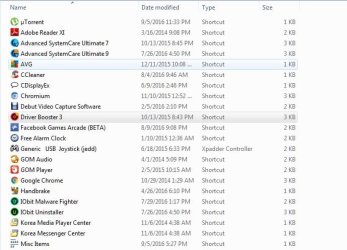
Hello guys! I am actually a new owner of a Dell Laptop and everything was fine but after a recent windows update almost all the the icons on my laptop are not showing up, instead it is replaced by a default image atop the actual icon image.

How can this be fixed?
 

Attachments

  • Screenshot_1.jpg
    Screenshot_1.jpg
    45.2 KB · Views: 1

My Computer My Computer

At a glance

Windows 7 Ultimate 32bit
Computer type
Laptop
Computer Manufacturer/Model Number
Dell
OS
Windows 7 Ultimate 32bit

My Computer My Computer

At a glance

OEM Windows 7 Ult (x64) SP1Intel Core-i7 3770 @ 3.4 GHz16 GB DDR3 SDRAM @ 1333 MHzNVidia GeForce GT620 1 GB
Computer type
PC/Desktop
Computer Manufacturer/Model Number
Dell Studio XPS 8500
OS
OEM Windows 7 Ult (x64) SP1
CPU
Intel Core-i7 3770 @ 3.4 GHz
Motherboard
"Dell" branded
Memory
16 GB DDR3 SDRAM @ 1333 MHz
Graphics Card(s)
NVidia GeForce GT620 1 GB
Sound Card
THX TruStudio PC
Monitor(s) Displays
Dell U2410 Full HD
Hard Drives
2.0 TB SATA2 @ 7200 RPM
PSU
350W
Keyboard
MS 4000 Ergon - Wired
Mouse
Logitech Anywhere MX
Internet Speed
Cable HSI w/Turbo (router)
Antivirus
KIS-MBAM Premium-MBAE Premium
Browser
Fx (current version); IE
Other Info
And a Win7/64 Pro laptop; And a Win10/64 Pro desktop.
Still persists

Hello! I tried the steps you provided, unfortunately it still persists
 

My Computer My Computer

At a glance

Windows 7 Ultimate 32bit
Computer type
Laptop
Computer Manufacturer/Model Number
Dell
OS
Windows 7 Ultimate 32bit
It looks like the "shortcut arrow" has been replaced by a different icon.

Have a look at this page:The suggested fixes didn't seem to help the OP, but they might work for you.
 

My Computer My Computer

At a glance

W7 Ultimate SP1, LM19.2 MATE, W10 Home 1703, ...AMD Phenom II x6 1100T, 3.3 GHz12GB DDR3 1333 G-Skill (4GB x 2), G-Skill (2G...NVIDIA GeForce GTX 660
Computer type
PC/Desktop
Computer Manufacturer/Model Number
n/a
OS
W7 Ultimate SP1, LM19.2 MATE, W10 Home 1703, W10 Pro 1703 VM, #All 64 bit
CPU
AMD Phenom II x6 1100T, 3.3 GHz
Motherboard
ASUS M4A88T-M/USB3 (AM3)
Memory
12GB DDR3 1333 G-Skill (4GB x 2), G-Skill (2GB x 2)
Graphics Card(s)
NVIDIA GeForce GTX 660
Sound Card
Realtek?
Monitor(s) Displays
Samsung S23B350
Screen Resolution
1920x1080
Hard Drives
WD Green 2TB (SATA), WD Green 3TB (SATA), WD Blue 4TB (SATA), WD Blue 6TB (SATA)
PSU
Cooler Master
Case
Antec GX300 Tower
Cooling
3x Antec TRICOOL 120mm Fans
Mouse
Wired Optical
Internet Speed
DSL
Antivirus
Avast
Browser
Pale Moon (64 bit)
Other Info
2018-12-27 Upgraded HDDs
2015-12-10 Upgraded case, graphics card, storage
2015-08-15 Upgraded motherboard & RAM
2015-07-15 Upgraded LM17.1 to LM17.2
The programs were all deleted &or moved.

First, delete all the them.

When you said you are the new owner, this mean you just bought from someone, not retailer as brand new.

Most of the icon are inside the program itself only.
Just like windows do have a lot of icons in the .dll file.

If you do not want to delete and want to show, but it is easy to rebuild using the program itself.

Icon will not harm the system, as these are shortcut only.

When you boot the system, it will seek the location of the icon to have the original icon from the program itself.
After deleted, no need to do anything.

When you run the program, you can, at the same time, make the icon on the desktop or location you want.
 

My Computer My Computer

At a glance

Windows 7 x64
Computer type
Laptop
Computer Manufacturer/Model Number
Toshiba L630 and L735
OS
Windows 7 x64
Hard Drives
240 GB SSD
Hi, @mjazi:

In addition to @lehnerus2000's excellent advice...

...the "safest" approach with a second-hand computer (refurbished, used or hand-me-down) might be to flatten it and reinstall Windows.
One never really knows what badness (corruption, malware, etc.) lurks on a second-hand computer.

Just a thought.

MM
 

My Computer My Computer

At a glance

OEM Windows 7 Ult (x64) SP1Intel Core-i7 3770 @ 3.4 GHz16 GB DDR3 SDRAM @ 1333 MHzNVidia GeForce GT620 1 GB
Computer type
PC/Desktop
Computer Manufacturer/Model Number
Dell Studio XPS 8500
OS
OEM Windows 7 Ult (x64) SP1
CPU
Intel Core-i7 3770 @ 3.4 GHz
Motherboard
"Dell" branded
Memory
16 GB DDR3 SDRAM @ 1333 MHz
Graphics Card(s)
NVidia GeForce GT620 1 GB
Sound Card
THX TruStudio PC
Monitor(s) Displays
Dell U2410 Full HD
Hard Drives
2.0 TB SATA2 @ 7200 RPM
PSU
350W
Keyboard
MS 4000 Ergon - Wired
Mouse
Logitech Anywhere MX
Internet Speed
Cable HSI w/Turbo (router)
Antivirus
KIS-MBAM Premium-MBAE Premium
Browser
Fx (current version); IE
Other Info
And a Win7/64 Pro laptop; And a Win10/64 Pro desktop.
Once Advanced System Care by IObit has been installed on a computer anything can happen.
Just removing ASC by IObits will not undo all the changes it's done to the system.

I personally would do a Clean Install of Windows 7.
 

My Computer My Computer

At a glance

Windows 10 Pro. 64/ version 1709 Windows 7 Pr...Intel i7-6800K @ 4.3Corsair Platinum 16 gig @2400EVGA GTX 1070 OC
Computer type
PC/Desktop
Computer Manufacturer/Model Number
Home made Desktop
OS
Windows 10 Pro. 64/ version 1709 Windows 7 Pro/64
CPU
Intel i7-6800K @ 4.3
Motherboard
ASUS X-99 Deluxe II
Memory
Corsair Platinum 16 gig @2400
Graphics Card(s)
EVGA GTX 1070 OC
Monitor(s) Displays
Asus 27" LED LCD/VE278Q
Screen Resolution
1920-1080 or 1280-720 HDMI
Hard Drives
INTEL SSD 730-240 Gb Sata 3.0/
PSU
EVGA Platium 1200W
Case
Phanteks Luxe Tempered Glass 8 fans/ one radiator
Cooling
XSPC/ Water Cooled CPU
Keyboard
Das 4 Professional
Mouse
Logitech M705/MX Anywhere 2-S
Internet Speed
100 mbits
Antivirus
Microsoft Security Essentials/ Malwarebytes Premium 3.0/ SAS
Browser
I.E. 11 default/Firefox/ ISP Time Warner Cable/Spectrum
Other Info
LG BluRay Burner/
Sound system-KLipsch-THX/
Icy Dock ssd Hot Swap bays.
Well For starters I am an owner of a brand new Dell Inspiron 5520 R 1TB laptop
I tried the suggestions provided but to no avail
So Advanced System Care by IObit can mess my laptop?
If I remove ASC what would you recommend I replace it with?
 

My Computer My Computer

At a glance

Windows 7 Ultimate 32bit
Computer type
Laptop
Computer Manufacturer/Model Number
Dell
OS
Windows 7 Ultimate 32bit

Attachments

  • Screenshot_1.jpg
    Screenshot_1.jpg
    49.3 KB · Views: 12
Last edited:

My Computer My Computer

At a glance

Windows 7 Ultimate 32bit
Computer type
Laptop
Computer Manufacturer/Model Number
Dell
OS
Windows 7 Ultimate 32bit
Thank you for the ones who extended their help!
Kudos to all of you!
 

My Computer My Computer

At a glance

Windows 7 Ultimate 32bit
Computer type
Laptop
Computer Manufacturer/Model Number
Dell
OS
Windows 7 Ultimate 32bit
LOL.
What a difference a word makes...

You said you were a "new owner of a Dell laptop", rather than an "owner of a new Dell laptop".
So I mistakenly read that to mean it was second-hand.;)

Yes, IOBit ASC (and programs like it) is worse than snake oil.
Corporate intellectual property theft/piracy issues aside (google it), programs like it often cause more harm than good.
Others here will disagree about "registry cleaners" and "optimizers", but as a whole they are of no proven benefit. (Sometimes no harm, but rarely of true benefit.)
Some may suggest the Registry Cleaner feature of CCleaner as safe enough. Your choice.

Thanks for posting the solution to your issue, by the way.:D

Cheers,
 

My Computer My Computer

At a glance

OEM Windows 7 Ult (x64) SP1Intel Core-i7 3770 @ 3.4 GHz16 GB DDR3 SDRAM @ 1333 MHzNVidia GeForce GT620 1 GB
Computer type
PC/Desktop
Computer Manufacturer/Model Number
Dell Studio XPS 8500
OS
OEM Windows 7 Ult (x64) SP1
CPU
Intel Core-i7 3770 @ 3.4 GHz
Motherboard
"Dell" branded
Memory
16 GB DDR3 SDRAM @ 1333 MHz
Graphics Card(s)
NVidia GeForce GT620 1 GB
Sound Card
THX TruStudio PC
Monitor(s) Displays
Dell U2410 Full HD
Hard Drives
2.0 TB SATA2 @ 7200 RPM
PSU
350W
Keyboard
MS 4000 Ergon - Wired
Mouse
Logitech Anywhere MX
Internet Speed
Cable HSI w/Turbo (router)
Antivirus
KIS-MBAM Premium-MBAE Premium
Browser
Fx (current version); IE
Other Info
And a Win7/64 Pro laptop; And a Win10/64 Pro desktop.
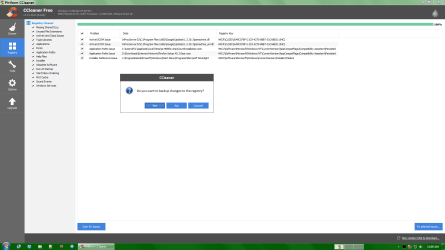
Create Backups

Others here will disagree about "registry cleaners" and "optimizers", but as a whole they are of no proven benefit. (Sometimes no harm, but rarely of true benefit.)
Some may suggest the Registry Cleaner feature of CCleaner as safe enough. Your choice.
If you are not sure that the Registry entries can be safely deleted, make sure to use the backup option when CCleaner offers it.
CC - Backup.png
You could also create a System Restore Point and/or a backup system image before cleaning.

Until recently, the only issue I've had is with MS Project 2010.
It seems to create a bunch of empty Registry keys and if they are deleted (cleaned) the program doesn't run properly.

Recently, I installed VMware Workstation 12 and it also creates an empty key.
When that key is deleted (cleaned) the program vanishes from the "Programs and Features" list.
 
Last edited:

My Computer My Computer

At a glance

W7 Ultimate SP1, LM19.2 MATE, W10 Home 1703, ...AMD Phenom II x6 1100T, 3.3 GHz12GB DDR3 1333 G-Skill (4GB x 2), G-Skill (2G...NVIDIA GeForce GTX 660
Computer type
PC/Desktop
Computer Manufacturer/Model Number
n/a
OS
W7 Ultimate SP1, LM19.2 MATE, W10 Home 1703, W10 Pro 1703 VM, #All 64 bit
CPU
AMD Phenom II x6 1100T, 3.3 GHz
Motherboard
ASUS M4A88T-M/USB3 (AM3)
Memory
12GB DDR3 1333 G-Skill (4GB x 2), G-Skill (2GB x 2)
Graphics Card(s)
NVIDIA GeForce GTX 660
Sound Card
Realtek?
Monitor(s) Displays
Samsung S23B350
Screen Resolution
1920x1080
Hard Drives
WD Green 2TB (SATA), WD Green 3TB (SATA), WD Blue 4TB (SATA), WD Blue 6TB (SATA)
PSU
Cooler Master
Case
Antec GX300 Tower
Cooling
3x Antec TRICOOL 120mm Fans
Mouse
Wired Optical
Internet Speed
DSL
Antivirus
Avast
Browser
Pale Moon (64 bit)
Other Info
2018-12-27 Upgraded HDDs
2015-12-10 Upgraded case, graphics card, storage
2015-08-15 Upgraded motherboard & RAM
2015-07-15 Upgraded LM17.1 to LM17.2
Back
Top