
Solved Issue with Re-Install of Windows 7

flightmedic

New member
Member
Local time
4:15 PM
Messages
78
Tried to search for this error and couldn't find it so here it goes...

Trying to clean install Windows 7 via USB

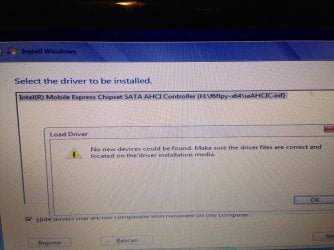
When I get to the "load drivers" part, it pulls up the iastor file and I try to load it but I get an error that states: "no new media found" (picture attached).

I tried a fresh download of it and still no-go.

Can I disable the RAID set up on my laptop? I don't have an mSSD attached to it and it's a single 620 GB hard drive.

Or how can I get past this error.

Thanks in Advance,

Jim
 

Attachments
  • IMG_2058.jpg
    IMG_2058.jpg
    975.4 KB · Views: 14

My Computer My Computer

At a glance

Windows 7Intel Core i5-2410M [email protected]6 GB
Computer type
PC/Desktop
Computer Manufacturer/Model Number
HP DV6-6167cl
OS
Windows 7
CPU
Intel Core i5-2410M [email protected]
Memory
6 GB
Hard Drives
1x 500GB Samsung SSD (primary)
1x 640GB SATA
HP DV6 Notebook PC


   Information
We always assume you have made your Recovery Disks using the OEM manufacturer's Recovery Media Creator app the first day you had your new PC.
& made the Startup Repair CD.
startup repair disc-create


Did you make the OEM manufacturer's Recovery Disks?

Pressing the f11 key during startup on a computer with an HP factory image will start the system recovery process even if the prompt is not displayed.

How to use HP Recovery:
http://h10025.www1.hp.com/ewfrf/wc/document?docname=c01895783&cc=us&dlc=en&lc=en
Performing an HP System Recovery (Windows 7) | HP® Support
How to make HP Recovery DVD disks:
Performing an HP System Recovery (Windows Vista) | HP® Support

How to make HP Recovery USB disk:
Using the Downloadable USB Recovery Flash Disk Creation Utility HP Pavilion dv6700z CTO Entertainment Notebook PC | HP® Support

or
You can Order HP Recovery Disks from here:
Country-Language Selector | HP® Support
 

My Computer My Computer

At a glance

ME/XP/Vista/Win7
OS
ME/XP/Vista/Win7
I do not have the original discs. The laptop did not come with them.

When I hit f11, it says that no system could be found. I tried to load the drivers and get the errror "no hardware information about your computer could be found."

Thanks.
 

My Computer My Computer

At a glance

Windows 7Intel Core i5-2410M [email protected]6 GB
Computer type
PC/Desktop
Computer Manufacturer/Model Number
HP DV6-6167cl
OS
Windows 7
CPU
Intel Core i5-2410M [email protected]
Memory
6 GB
Hard Drives
1x 500GB Samsung SSD (primary)
1x 640GB SATA
The error most often means a bad installer, not that modern SATA drivers are needed since they are all in the installer to begin with.

In your case RAID could be the complication too, since Win7 doesn't much like RAID and we see nothing but problems with it here and no real advantages when you weight it out.

I would set my SATA controller to AHCI in BIOS setup to try again, following these steps which also counteract other install problems:

Back up your files, unplug all other HD's and peripherals,

Boot into BIOS setup, reset to defaults, save changes. If an EFI BIOS, enable Legacy BIOS or Compatibility Support Module, set DVD drive first to boot, HD second. Then set SATA controller to AHCI. Save changes and Exit.

Then boot into installer DVD or flash stick burned or written using tool and latest ISO for your licensed OS version here. Be sure to do this since the installer is suspect.

At first installer screen Press Shift + F10 to open a Command Box, type:

DISKPART
LIST DISK
SELECT DISK 0 (after confirming Windows 7 target HD #)
CLEAN
CREATE PARTITION PRIMARY SIZE=102400 (for 100gb partition, adjust as desired)
FORMAT FS=NTFS LABEL="WINDOWS 7"
ACTIVE
EXIT
EXIT

Next click Install Now, then Custom install to Clean Install Windows 7 to the partition you created. If it fails then report back at which step and the verbatim error message.

In addition read over these steps to understand the tools and methods which work best to get and maintain a perfect Clean Reinstall - Factory OEM Windows 7. The steps are the same for retail.

After install you can adjust partition size or Create new partitions for data, etc. in Disk Mgmt.You are creating the partition here for the purpose of marking it Active which overcomes certain install failures.
 
Flight medic

A little advice on the format FS=NTFS label="Windows 7" you want to add this quick at the end so the format could go quicker .
 

My Computer My Computer

At a glance

Windows 7 Ultimate 32-Bit & Windows 7 Ultimat...Intel Core i7 CPU 950 @ 3.07GHzOCZ 6GB (3 x 2GB) 240-Pin DDR3 SDRAM DDR3 160...ATI Radeon HD 5700 Series
Computer Manufacturer/Model Number
Custom Built
OS
Windows 7 Ultimate 32-Bit & Windows 7 Ultimate 64-Bit
CPU
Intel Core i7 CPU 950 @ 3.07GHz
Motherboard
ASUS P6T DELUXE V2
Memory
OCZ 6GB (3 x 2GB) 240-Pin DDR3 SDRAM DDR3 1600 OCZ3X1600R2
Graphics Card(s)
ATI Radeon HD 5700 Series
Sound Card
OnBoard
Hard Drives
WD6400AACS-00M3B0 (640GB SATA )
PSU
CORSAIR 850w
Case
NZXT LEXA
Cooling
Intel Stock Heatsink Fan
Keyboard
Microsoft Wireless Laser Keyboard 7000
Mouse
Microsoft Wireless Laser Mouse 7000
Followed all instructions. Formatted C: to "Windows 7"

Began loading from the USB (which I redownloaded and recreated using the tool) and when it came time to load the f6 drivers I received the same errror: "No new devices could be found. Make sure the driver files are correct loaded on the driver installation media."

I downloaded the f6 drivers directly from the intel site.

James
 

My Computer My Computer

At a glance

Windows 7Intel Core i5-2410M [email protected]6 GB
Computer type
PC/Desktop
Computer Manufacturer/Model Number
HP DV6-6167cl
OS
Windows 7
CPU
Intel Core i5-2410M [email protected]
Memory
6 GB
Hard Drives
1x 500GB Samsung SSD (primary)
1x 640GB SATA
As stated you shouldn't have to load SATA driver if the installer is written correctly. All SATA drivers are in the Win7 installer.

What is the error you get prompting you to install SATA driver?

What is the SATA controller setting in BIOS? Do you have an EFI BIOS? If so how it it set?
 
After clicking the "Install Now", I get a popup that states: "A required CD/DVD drive device driver is missing. If you have a driver floppy disk, CD, DVD or YSB flash drive, please insert it now. Note: if the windows installation media is in the CD/DVD drive, you can safely remove it for this step."

I lad the USB with the f6 drivers and it finds the following driver: Intel (r) Mobile Express Chipset SATA AHCI Controller (E:\f6flpy-x64\iaAHCIC.inf)

When I click next I get the following popup error: No new devices could be found. Make sure the driver files are correct and located on the driver installation media.

I can't get beyond this point.

I've redownloaded the Windows 7 iso from the link on the tutorials on this site. I've also recreated the bootable USB utilizing the instructions. I redownloaded a fresh set of the f6 drivers also.

Thanks in advance for your help. Sorry for the delay in coming back to this thread. Had to drive 1,100 miles for work.

Thanks.

Jim
 

My Computer My Computer

At a glance

Windows 7Intel Core i5-2410M [email protected]6 GB
Computer type
PC/Desktop
Computer Manufacturer/Model Number
HP DV6-6167cl
OS
Windows 7
CPU
Intel Core i5-2410M [email protected]
Memory
6 GB
Hard Drives
1x 500GB Samsung SSD (primary)
1x 640GB SATA
1) When you get to the pop up "A required CD/DVD drive device driver is missing", go back to "INSTALL NOW", than remove the USB pendrive & change USB port, click "INSTALL NOW"

2) Try with the 32gb SSD acceleration cache, removed.
 

My Computer My Computer

At a glance

ME/XP/Vista/Win7
OS
ME/XP/Vista/Win7
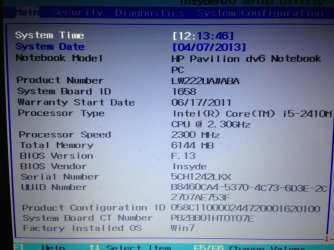
Will get the camera shots. I forgot to remove some old info on system info. There is NO SSD on this system.

AHCI is set by default.

Jim
 

My Computer My Computer

At a glance

Windows 7Intel Core i5-2410M [email protected]6 GB
Computer type
PC/Desktop
Computer Manufacturer/Model Number
HP DV6-6167cl
OS
Windows 7
CPU
Intel Core i5-2410M [email protected]
Memory
6 GB
Hard Drives
1x 500GB Samsung SSD (primary)
1x 640GB SATA
Theog seems to think this model HP has the 32bit acceleration cache which is an SSD chip on the mobo or HD, and can present certain problems.

I would go to the HP Support Downloads website now to read the Manual for your exact model and go over its Specs to see for sure.
 
I read the manuals online and there is no SSD.

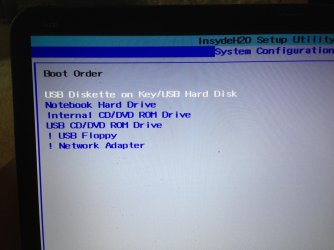
The attached are for when I hit f1 and f10 on startup. No other options were available.

Jim
 

Attachments

  • IMG_2069.jpg
    IMG_2069.jpg
    1,003 KB · Views: 2
  • IMG_2070.jpg
    IMG_2070.jpg
    999.1 KB · Views: 2

My Computer My Computer

At a glance

Windows 7Intel Core i5-2410M [email protected]6 GB
Computer type
PC/Desktop
Computer Manufacturer/Model Number
HP DV6-6167cl
OS
Windows 7
CPU
Intel Core i5-2410M [email protected]
Memory
6 GB
Hard Drives
1x 500GB Samsung SSD (primary)
1x 640GB SATA
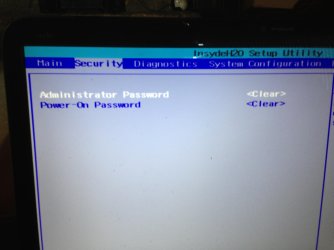
What about the other tabs shown in the first screenshot? That is only the Main tab.

Did you try Theog's suggestion for unplugging and replugging the stick? Are you plugging it into a USB3 port?

Can you try DVD install?
 
Thought they uploaded last time.
 

Attachments

  • IMG_2073.jpg
    IMG_2073.jpg
    326.5 KB · Views: 2
  • IMG_2074.jpg
    IMG_2074.jpg
    1,016.9 KB · Views: 2
  • IMG_2075.jpg
    IMG_2075.jpg
    994.4 KB · Views: 2

My Computer My Computer

At a glance

Windows 7Intel Core i5-2410M [email protected]6 GB
Computer type
PC/Desktop
Computer Manufacturer/Model Number
HP DV6-6167cl
OS
Windows 7
CPU
Intel Core i5-2410M [email protected]
Memory
6 GB
Hard Drives
1x 500GB Samsung SSD (primary)
1x 640GB SATA
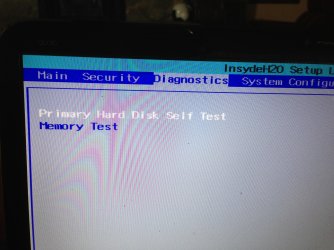
Boot options? Same as shown in Boot Menu?

I'd reformat the flash stick with UltraISO Software To Create Bootable USB Flash Drive
or try a DVD install burned with ImgBurn at 4x speed. It's rare MS Download Tool doesn't produce bootable media, but even rarer that a SATA driver is actually needed.

Can you try booting the installer on another PC to see if it sees HD at Drive Selection screen.

Confirm you wiped the HD with Clean Command and defined an Active Primary NTFS partition as given in my earlier steps.
 
Yes. the HD is cleaned and defined.
 

My Computer My Computer

At a glance

Windows 7Intel Core i5-2410M [email protected]6 GB
Computer type
PC/Desktop
Computer Manufacturer/Model Number
HP DV6-6167cl
OS
Windows 7
CPU
Intel Core i5-2410M [email protected]
Memory
6 GB
Hard Drives
1x 500GB Samsung SSD (primary)
1x 640GB SATA
If installer will see the HD on another PC you can swap your HD into it to install with all others unplugged.

Then when you move the HD back to the problem PC, boot Paragon Adaptive Restore CD and run P2P adjust on the Win7 installation to adjust it to boot on different hardware. If it asks for the SATA driver you'll know for sure that's the issue and its easier to inject it.

You can also do this after applying to the HD any backup image you have for the same version Win7, or moving an image over which you install on another HD and capture for this purpose.
 
Will get the camera shots. I forgot to remove some old info on system info. There is NO SSD on this system.

AHCI is set by default.

Jim

Theog seems to think this model HP has the 32bit acceleration cache which is an SSD chip on the mobo or HD, and can present certain problems.

I would go to the HP Support Downloads website now to read the Manual for your exact model and go over its Specs to see for sure.

OP old specs 2x750gb HDD 1x32gb SDD cache
 

My Computer My Computer

At a glance

ME/XP/Vista/Win7
OS
ME/XP/Vista/Win7
Another chapter to the saga. I put in a new hard drive and get the same error about the SATA drivers.

Is there a way to fix this via command prompt? Can I install windows on the c drive on another computer and then physically install the HD into the laptop? Whay about using Ubuntu to side load windows or fix it?

I'm not sure if this is a MoBo issue or not.

I want to upgrade to am SSD but don't want to if I won't be able to install windows.

Thanks,

Jim
 

My Computer My Computer

At a glance

Windows 7Intel Core i5-2410M [email protected]6 GB
Computer type
PC/Desktop
Computer Manufacturer/Model Number
HP DV6-6167cl
OS
Windows 7
CPU
Intel Core i5-2410M [email protected]
Memory
6 GB
Hard Drives
1x 500GB Samsung SSD (primary)
1x 640GB SATA
Back
Top