Issue with wireless driver

egozi44

New member
Member
VIP
Local time
1:29 AM
Messages
207
So I got new laptop (Asus X556UQ) which had win10 preinstalled on it, and since I really like Win10 as much as I like Trojan virus I delete and install win7 64 bit as my main OS, after many hardships that Asus and MS made so people will think twice before they delete the beloved 10 I finally was able to install Win7

The only issue was (Surprise! Surprise!) that it came without any drivers (even for USB ports since they 3 and 3.1 And touchpad mouse)

Being aware of it as someone who formatted laptops before (though they were mostly for win 8 and 7 since 10 still was at beta phase back at the day) I simply looked for the network and wireless drivers at Asus site, But when I looked in the support pages it claimed it only have drivers for win10 BUT! the drivers they had there were actually more up to date drivers of the basic Realtek drivers that should works with win7, So first I tried a bit more older drivers of the Network and wireless network and didn't saw it change anything (the OS still won't show any network to connect to), So I deleted them and tried the Win10 drivers only to get the same results

My laptop don't have USB or mouse support without drivers which force me to use the freaking ODD in order to pass drivers each times, as long as I have internet I could download everything from windows update but no matter what I tried the wifi won't work, I tried all 3 options the wifi section in asus site provide and didn't saw any change

What I do wrong? do I missing something here or it just lost case and I will have to move back to win Sa10?


I included the site just in case

Access Denied
 

My Computer

Computer type
PC/Desktop
Computer Manufacturer/Model Number
Self built custom
OS
Windows 7 SP1 Ultimate x64 bit
CPU
Intel I7 3770
Motherboard
Asus maximus v gene BIOS Version 1903
Memory
G.Skill Ares Quad Channel Low Profile 16 GB (4x4GB) DDR3
Graphics Card(s)
Asus GTX980 Ti 6GB STRIX-GTX980TI-DC3OC-6GD5-GAMING DirectCU
Monitor(s) Displays
AOC 24G2U/BK + DELL U2410 A010
Screen Resolution
1920x1080
Hard Drives
Samsung SSD 860 EVO 1TB


TOSHIBA MK1002TSKB 1TB 24/7, 7200 RPM, 64MB, SATA II


TOSHIBA MK1002TSKB 1TB 24/7, 7200 RPM, 64MB, SATA II
PSU
AcBel R88 1100W
Case
Corsair Carbide Series 500R White Mid-Tower Case
Cooling
ZALMAN CPU COOLER CNPS9900A LED + 2 more fans in the case
Keyboard
SteelSeries APEX 7
Mouse
SteelSeries Sensei 310
Hello ego now mate I had a similar conundrum when I bought my Asus ROG G750JM gamer laptop and I had the option to have 7 installed on it BUT when I got the machine delivered found that I had to update the BIOS to be able to get 7 drivers downloaded and installed:mad:

Now I was apprehensive about doing that but bit the bullet and the drivers were able to be downloaded. Now I am not saying that this is what you have to do but more that it might be an idea to contact Asus support to see if that can be done with your machine - having said that I have a horrible feeling that it will not be possible.

However I did a search for that CPU and it does have drivers for the graphics on that chip
Downloads for Intel(R) Core™ i7-6500U Processor (4M Cache, up to 3.10 GHz)
so not all hope is lost as I did see somewhere today that most Windows systems can run on back compatible drivers.

I shall keep on looking for a while though:)

Edit: I should have asked just where did you find the specs for the network stuff??
 

My Computer

Computer type
PC/Desktop
Computer Manufacturer/Model Number
Own build (new) Desk1 / Asus ROG Win 7 / Desk2 1st build
OS
Desk1 7 Home Prem / Desk2 10 Pro / Main lap Asus ROG 10 Pro 2 laptop Toshiba 7 Pro Asus P2520 7 & 10
CPU
Desk1 i5 3750K / Laptop i7 GTX 860M / Desk2 i5 2500
Motherboard
Desk1 Asus P877-V / Desk2 Gigabyte H67 UD3H / Laptop ?
Memory
Desk1 8GB (1866) / Desk2 16GB (1333) / Laptop 8Gb DDR3
Graphics Card(s)
Desk 1& 2NVidia GTX 650 & Laptops on board Intel
Sound Card
Desk 1 & 2 -XONAR DG Realtek High Def audio Laptop
Monitor(s) Displays
Desk 1 Benq HD 2450 / Desk2 Philips 24" / Laptop 17.5"
Screen Resolution
1920x1080 D1 & D2 & Laptop 1
Hard Drives
Desk1 Samsung 120GB 830 SSD
Asus ROG 256GB 850 Pro SSD
Desk2 Samsung 840 256 SSD
Toshiba 120GB EVO
PSU
Desk 1 Corsair HX 1050/ Laptop ? / Desk 2 Corsair HX 650
Case
Desk 1 Cooler HAF XM ? Toshiba laptop / Desk2 Coolermaster
Cooling
Fans on all Desk1 -2 Desk2 - all Coolermasters 5 Laptop ?
Keyboard
Desk 1 MS Sidewinder X6 Desk 2 MS Sidewinder X 4
Mouse
Desk 1&2 - Gigabyte MS 900 gamer - laptop - Logitec wireless
Internet Speed
ADSL2+
Other Info
One other Desktop (tester) and spare Toshba laptop both with SSD's
Running Kaspersky 2016 ISS on all machines config'd identically
Logitec audio stereo systems on each machine (x3)
Canon MG5250MFC
Router/modem TP-Link running WPA2SK
Go to the device manager and check the Ethernet or the wifi driver and install it. There will be an option that will say if you want to download the new driver via internet or search inside the hard drive. Select the option that will scan your computer for drivers. If you are successful then go to the internet and download an application Slim Drivers.

Slim Drivers Link: SlimDrivers Free - Free download and software reviews - CNET Download.com

This will update all your outdated drivers.

If you cannot install the network adapters, open your laptop , take out the drive use a hard drive adapter and then connect it to another computer. Send Slim Drivers there and reconnect the hard drive to your "outdated" computer.This option is hard..
 

My Computer

Computer type
PC/Desktop
Computer Manufacturer/Model Number
Cooler Master
OS
Windows 7 Home Premium 32bit
CPU
Intel Core i5 3470 CPU 3.20GHz
Motherboard
ASUS P8B75-M LX
Memory
Kingstone 4GB DDR3 Dual Channel
Graphics Card(s)
Gigabyte nvidia 650 gtx
Monitor(s) Displays
Samsung
Screen Resolution
1920x1080
Hard Drives
SSD SATA 3 - 6Gb/s
Case
Cooler Master
Keyboard
Microsoft Wired Keyboard 400
Mouse
Microsoft Basic Optical Mouse v2.0
Internet Speed
200 - 700 Kbps
Antivirus
Microsoft Security Essentials
Browser
Google Chrome
Yes what Nick has suggested is the only add on software I will use - in desperation of course and just as by the by I also use this to stop any add on rubbish such as Askbar and the Google toolbar being loaded with it because the ticked boxes are so easy to miss.

Unchecky - Keeps your checkboxes clear

Plus I always uninstall it after use the Slim Driver stuff I mean ;)

Having said that I still think it is worth looking for the manufacturer's site first and if not found then Slim Drivers.
 

My Computer

Computer type
PC/Desktop
Computer Manufacturer/Model Number
Own build (new) Desk1 / Asus ROG Win 7 / Desk2 1st build
OS
Desk1 7 Home Prem / Desk2 10 Pro / Main lap Asus ROG 10 Pro 2 laptop Toshiba 7 Pro Asus P2520 7 & 10
CPU
Desk1 i5 3750K / Laptop i7 GTX 860M / Desk2 i5 2500
Motherboard
Desk1 Asus P877-V / Desk2 Gigabyte H67 UD3H / Laptop ?
Memory
Desk1 8GB (1866) / Desk2 16GB (1333) / Laptop 8Gb DDR3
Graphics Card(s)
Desk 1& 2NVidia GTX 650 & Laptops on board Intel
Sound Card
Desk 1 & 2 -XONAR DG Realtek High Def audio Laptop
Monitor(s) Displays
Desk 1 Benq HD 2450 / Desk2 Philips 24" / Laptop 17.5"
Screen Resolution
1920x1080 D1 & D2 & Laptop 1
Hard Drives
Desk1 Samsung 120GB 830 SSD
Asus ROG 256GB 850 Pro SSD
Desk2 Samsung 840 256 SSD
Toshiba 120GB EVO
PSU
Desk 1 Corsair HX 1050/ Laptop ? / Desk 2 Corsair HX 650
Case
Desk 1 Cooler HAF XM ? Toshiba laptop / Desk2 Coolermaster
Cooling
Fans on all Desk1 -2 Desk2 - all Coolermasters 5 Laptop ?
Keyboard
Desk 1 MS Sidewinder X6 Desk 2 MS Sidewinder X 4
Mouse
Desk 1&2 - Gigabyte MS 900 gamer - laptop - Logitec wireless
Internet Speed
ADSL2+
Other Info
One other Desktop (tester) and spare Toshba laptop both with SSD's
Running Kaspersky 2016 ISS on all machines config'd identically
Logitec audio stereo systems on each machine (x3)
Canon MG5250MFC
Router/modem TP-Link running WPA2SK
I respectfully disagree. Anything from Slimware (just like Mindspark) is suspect at best. Their habit of sneaking in uninvited and installing crap you didn't want disqualifies them from any serious consideration IMHO. I have found Snappy Driver (Snappy Driver Installer - Install and Update Drivers for Free) to be clean, safe and reliable. Additionally, for people like me who work on a lot of computers, you can download their complete driver packs so you have it all on a flash drive and don't have to wait for downloads in the field.
 

My Computer

Computer type
PC/Desktop
Computer Manufacturer/Model Number
Dell, HP, Toshiba, Compaq
OS
Windows 7 Ultimate x86 and x64
I respectfully disagree. Anything from Slimware (just like Mindspark) is suspect at best. Their habit of sneaking in uninvited and installing crap you didn't want disqualifies them from any serious consideration IMHO. I have found Snappy Driver (Snappy Driver Installer - Install and Update Drivers for Free) to be clean, safe and reliable. Additionally, for people like me who work on a lot of computers, you can download their complete driver packs so you have it all on a flash drive and don't have to wait for downloads in the field.

Ok mate no worries I will test that site out when I get home. I did make the "disclaimer" that the Slim Driver should be uninstalled after use and that one should always use the Unchecky for software sites and that I use it in desperation mode only;).

But yes you are right there are a lot of freebies out there and personally unless a member in this forum advises any such software is safe or I am on my tester desktop I don't use anything. I did say too that any drivers really should be got from the manufacturers site and I would add to that because the Windows feature is pretty weak - in my humble opinion.

Yep well I am also in the process of making a take along USB drive for testing machines I have been asked to look at not that I am an expert it is my hobby and I only do this for family an VERY good friends;) and I store all drivers for my machines on external drives of whatever kind.

Back to this issue I think we might be hard pushed to find a driver for the OP as I think the machine was only meant to function using 10 drivers as far as I can tell.
 

My Computer

Computer type
PC/Desktop
Computer Manufacturer/Model Number
Own build (new) Desk1 / Asus ROG Win 7 / Desk2 1st build
OS
Desk1 7 Home Prem / Desk2 10 Pro / Main lap Asus ROG 10 Pro 2 laptop Toshiba 7 Pro Asus P2520 7 & 10
CPU
Desk1 i5 3750K / Laptop i7 GTX 860M / Desk2 i5 2500
Motherboard
Desk1 Asus P877-V / Desk2 Gigabyte H67 UD3H / Laptop ?
Memory
Desk1 8GB (1866) / Desk2 16GB (1333) / Laptop 8Gb DDR3
Graphics Card(s)
Desk 1& 2NVidia GTX 650 & Laptops on board Intel
Sound Card
Desk 1 & 2 -XONAR DG Realtek High Def audio Laptop
Monitor(s) Displays
Desk 1 Benq HD 2450 / Desk2 Philips 24" / Laptop 17.5"
Screen Resolution
1920x1080 D1 & D2 & Laptop 1
Hard Drives
Desk1 Samsung 120GB 830 SSD
Asus ROG 256GB 850 Pro SSD
Desk2 Samsung 840 256 SSD
Toshiba 120GB EVO
PSU
Desk 1 Corsair HX 1050/ Laptop ? / Desk 2 Corsair HX 650
Case
Desk 1 Cooler HAF XM ? Toshiba laptop / Desk2 Coolermaster
Cooling
Fans on all Desk1 -2 Desk2 - all Coolermasters 5 Laptop ?
Keyboard
Desk 1 MS Sidewinder X6 Desk 2 MS Sidewinder X 4
Mouse
Desk 1&2 - Gigabyte MS 900 gamer - laptop - Logitec wireless
Internet Speed
ADSL2+
Other Info
One other Desktop (tester) and spare Toshba laptop both with SSD's
Running Kaspersky 2016 ISS on all machines config'd identically
Logitec audio stereo systems on each machine (x3)
Canon MG5250MFC
Router/modem TP-Link running WPA2SK
Thanks for all of your replies and sorry for the delay, I tried so far everything I can without Internet or USB support, I tried to download USB 3 drivers and network drivers from asus site (just tried different ones) and they all failed to install, I tried to install them manually in the device manager or let it look for the driver in the HDD, and no luck

I need offline driver pack app that will detect and will install all the drivers as Mr whoopee suggested, The issue is however that what you gave me is 11 gb and I can't use the USB slots At All :0

I can split them with rar to 3 dvds... but I want to know it have higher chances of working before I do so (since I spent so much disks and time trying to make the WiFi works and I almost ran out of disks and energy)
 

My Computer

Computer type
PC/Desktop
Computer Manufacturer/Model Number
Self built custom
OS
Windows 7 SP1 Ultimate x64 bit
CPU
Intel I7 3770
Motherboard
Asus maximus v gene BIOS Version 1903
Memory
G.Skill Ares Quad Channel Low Profile 16 GB (4x4GB) DDR3
Graphics Card(s)
Asus GTX980 Ti 6GB STRIX-GTX980TI-DC3OC-6GD5-GAMING DirectCU
Monitor(s) Displays
AOC 24G2U/BK + DELL U2410 A010
Screen Resolution
1920x1080
Hard Drives
Samsung SSD 860 EVO 1TB


TOSHIBA MK1002TSKB 1TB 24/7, 7200 RPM, 64MB, SATA II


TOSHIBA MK1002TSKB 1TB 24/7, 7200 RPM, 64MB, SATA II
PSU
AcBel R88 1100W
Case
Corsair Carbide Series 500R White Mid-Tower Case
Cooling
ZALMAN CPU COOLER CNPS9900A LED + 2 more fans in the case
Keyboard
SteelSeries APEX 7
Mouse
SteelSeries Sensei 310
Well you can try the link I sent because I have never had an issue with it but do remember what I put in the post re uninstalling after and using the Unchecky.

However the choice is yours and just where did you find that the other was 11GB download that seems awfully large??
 

My Computer

Computer type
PC/Desktop
Computer Manufacturer/Model Number
Own build (new) Desk1 / Asus ROG Win 7 / Desk2 1st build
OS
Desk1 7 Home Prem / Desk2 10 Pro / Main lap Asus ROG 10 Pro 2 laptop Toshiba 7 Pro Asus P2520 7 & 10
CPU
Desk1 i5 3750K / Laptop i7 GTX 860M / Desk2 i5 2500
Motherboard
Desk1 Asus P877-V / Desk2 Gigabyte H67 UD3H / Laptop ?
Memory
Desk1 8GB (1866) / Desk2 16GB (1333) / Laptop 8Gb DDR3
Graphics Card(s)
Desk 1& 2NVidia GTX 650 & Laptops on board Intel
Sound Card
Desk 1 & 2 -XONAR DG Realtek High Def audio Laptop
Monitor(s) Displays
Desk 1 Benq HD 2450 / Desk2 Philips 24" / Laptop 17.5"
Screen Resolution
1920x1080 D1 & D2 & Laptop 1
Hard Drives
Desk1 Samsung 120GB 830 SSD
Asus ROG 256GB 850 Pro SSD
Desk2 Samsung 840 256 SSD
Toshiba 120GB EVO
PSU
Desk 1 Corsair HX 1050/ Laptop ? / Desk 2 Corsair HX 650
Case
Desk 1 Cooler HAF XM ? Toshiba laptop / Desk2 Coolermaster
Cooling
Fans on all Desk1 -2 Desk2 - all Coolermasters 5 Laptop ?
Keyboard
Desk 1 MS Sidewinder X6 Desk 2 MS Sidewinder X 4
Mouse
Desk 1&2 - Gigabyte MS 900 gamer - laptop - Logitec wireless
Internet Speed
ADSL2+
Other Info
One other Desktop (tester) and spare Toshba laptop both with SSD's
Running Kaspersky 2016 ISS on all machines config'd identically
Logitec audio stereo systems on each machine (x3)
Canon MG5250MFC
Router/modem TP-Link running WPA2SK
The link Mr whoopee sent have lite version or full version for offline computers (and the full is 11 gb)

Since my laptop don't have any access to the Internet At All I can't use apps that look and download their drivers on the Internet (since there isn't one without any net driver)

Taking the HDD out and put it in other pc for the sake of installing the drivers also won't work as the driver app will look for drivers that are needed for the machine I connect the HDD into And not for my laptop's hardware , and i myself have no clue what drivers it need if asus drivers are out of question.

What you sent was some sort of driver downloader correct? :o


Btw

Edit: I should have asked just where did you find the specs for the network stuff??

What did you meant? Where I got the laptop? Or where you can look on the spec?

In case it was the spec, here you go:
Access Denied
 

My Computer

Computer type
PC/Desktop
Computer Manufacturer/Model Number
Self built custom
OS
Windows 7 SP1 Ultimate x64 bit
CPU
Intel I7 3770
Motherboard
Asus maximus v gene BIOS Version 1903
Memory
G.Skill Ares Quad Channel Low Profile 16 GB (4x4GB) DDR3
Graphics Card(s)
Asus GTX980 Ti 6GB STRIX-GTX980TI-DC3OC-6GD5-GAMING DirectCU
Monitor(s) Displays
AOC 24G2U/BK + DELL U2410 A010
Screen Resolution
1920x1080
Hard Drives
Samsung SSD 860 EVO 1TB


TOSHIBA MK1002TSKB 1TB 24/7, 7200 RPM, 64MB, SATA II


TOSHIBA MK1002TSKB 1TB 24/7, 7200 RPM, 64MB, SATA II
PSU
AcBel R88 1100W
Case
Corsair Carbide Series 500R White Mid-Tower Case
Cooling
ZALMAN CPU COOLER CNPS9900A LED + 2 more fans in the case
Keyboard
SteelSeries APEX 7
Mouse
SteelSeries Sensei 310
Let's try to identify the actual Wi-Fi adapter. Asus says that it's either a Qualcomm Atheros or Realtek
Access Denied

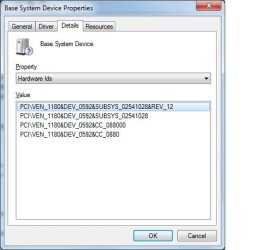
We need the Hardware ID from the Device Manager to determine which.
How to Find Drivers for Devices Using a Hardware ID | Dell US

We will also need the Hardware ID for the USB ports. Asus does not list any drivers because Win10 supports USB 3 natively while Win7 does not.

Once we have the Hardware IDs we can look for the correct drivers.
 

My Computer

Computer type
PC/Desktop
Computer Manufacturer/Model Number
Dell, HP, Toshiba, Compaq
OS
Windows 7 Ultimate x86 and x64
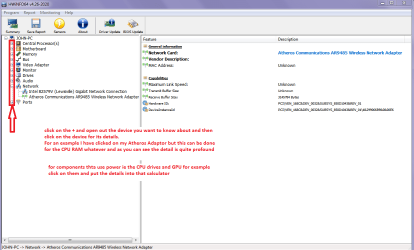
In addition to that I find this is the bees knees to find details of components too see link but you will need to download it somewhere on another machine.
Using HW Info
PART A:
You can test the volts on the PSU with HW Info HWiNFO - Download < download the right bit version and close the right hand window select Sensors and scroll down to the power section where you will see what the volts are doing see my pic. In my pic the section (Nuvoton) with VBATT as a dead give away you are in the section for the rail voltages. There are other section titles and one that pops up often is ITE (sometimes the usual one for Gigabyte boards)
Now the voltage on the different rails have to be within 5% =+/- of what is required or the machine will not work properly if at all.
Limits +/- (minimum - correct - maximum)
12v1 = 11.4 - 12 - 12.6v
12v2 = 11.4 - 12- 12.6v
5v = 4.75 – 5 - 5.25v
3.3v = 3.135 – 3 – 3.465v
-12v = -10.80 - -12 - -13.20v
+5VSB = 4.75 – 5 - 5.25v
The Power good signal voltage at pin 8 on the 24 pin plug (grey cable) should be the same as the 5v rail reading/s
See this for the rail voltage info
PSUs 101: A Detailed Look Into Power Supplies (Section 2.)
The original right hand window shows the machine running and is handy for that but for looking at the components in some detail close it and use the main left hand side panel
FOR OTHER COMPONENTS
PART B:
Open each small square with + in it on the section the components are in and then click on the individual component/s (it will highlight in blue) - in the right hand side will appear all sorts of details including brands speeds and other essential info that particular device. See pics for example.
I have given you one pic for an example too
 

Attachments

  • HW INFO DEVICES.PNG
    HW INFO DEVICES.PNG
    32.3 KB · Views: 1
  • HW INFO NETWORK ADAPTOR.PNG
    HW INFO NETWORK ADAPTOR.PNG
    25.1 KB · Views: 1

My Computer

Computer type
PC/Desktop
Computer Manufacturer/Model Number
Own build (new) Desk1 / Asus ROG Win 7 / Desk2 1st build
OS
Desk1 7 Home Prem / Desk2 10 Pro / Main lap Asus ROG 10 Pro 2 laptop Toshiba 7 Pro Asus P2520 7 & 10
CPU
Desk1 i5 3750K / Laptop i7 GTX 860M / Desk2 i5 2500
Motherboard
Desk1 Asus P877-V / Desk2 Gigabyte H67 UD3H / Laptop ?
Memory
Desk1 8GB (1866) / Desk2 16GB (1333) / Laptop 8Gb DDR3
Graphics Card(s)
Desk 1& 2NVidia GTX 650 & Laptops on board Intel
Sound Card
Desk 1 & 2 -XONAR DG Realtek High Def audio Laptop
Monitor(s) Displays
Desk 1 Benq HD 2450 / Desk2 Philips 24" / Laptop 17.5"
Screen Resolution
1920x1080 D1 & D2 & Laptop 1
Hard Drives
Desk1 Samsung 120GB 830 SSD
Asus ROG 256GB 850 Pro SSD
Desk2 Samsung 840 256 SSD
Toshiba 120GB EVO
PSU
Desk 1 Corsair HX 1050/ Laptop ? / Desk 2 Corsair HX 650
Case
Desk 1 Cooler HAF XM ? Toshiba laptop / Desk2 Coolermaster
Cooling
Fans on all Desk1 -2 Desk2 - all Coolermasters 5 Laptop ?
Keyboard
Desk 1 MS Sidewinder X6 Desk 2 MS Sidewinder X 4
Mouse
Desk 1&2 - Gigabyte MS 900 gamer - laptop - Logitec wireless
Internet Speed
ADSL2+
Other Info
One other Desktop (tester) and spare Toshba laptop both with SSD's
Running Kaspersky 2016 ISS on all machines config'd identically
Logitec audio stereo systems on each machine (x3)
Canon MG5250MFC
Router/modem TP-Link running WPA2SK
I was able to make the WiFi and usbs work with the 11 gb app Mr whoopee gave me, while most drivers now works it seem the touch pad is one of the few things that still persist on not working unless I in the bios screen.

I tried let windows search driver for it, tried trun it off/on with the hot keys, tried to look on the mouse settings (it not even there), tried look in the bios (nothing there mention mouse pad), tried install asus mouse pad driver (which finally was able to finish the installation rather than fail mid way like before) but even when the installation succeed all of my attempt to make the pad work had failed, asus driver and app shows there's nothing worng but the touch pad not working.

I also have 2 unknown devices in the device manager which I have no idea to what they belongs since they not under any category, and manually update them or let windows handle it didn't help.

I assume that one of them (or both of them) relate to the touch pad...

Any idea what I can do at this point?
I thought about trying other driver searcher app or download older asus driver for win7 (since the one I tried was for 10) but older versions will tell me they detected i don't have the OS version/hardware they need..
 

My Computer

Computer type
PC/Desktop
Computer Manufacturer/Model Number
Self built custom
OS
Windows 7 SP1 Ultimate x64 bit
CPU
Intel I7 3770
Motherboard
Asus maximus v gene BIOS Version 1903
Memory
G.Skill Ares Quad Channel Low Profile 16 GB (4x4GB) DDR3
Graphics Card(s)
Asus GTX980 Ti 6GB STRIX-GTX980TI-DC3OC-6GD5-GAMING DirectCU
Monitor(s) Displays
AOC 24G2U/BK + DELL U2410 A010
Screen Resolution
1920x1080
Hard Drives
Samsung SSD 860 EVO 1TB


TOSHIBA MK1002TSKB 1TB 24/7, 7200 RPM, 64MB, SATA II


TOSHIBA MK1002TSKB 1TB 24/7, 7200 RPM, 64MB, SATA II
PSU
AcBel R88 1100W
Case
Corsair Carbide Series 500R White Mid-Tower Case
Cooling
ZALMAN CPU COOLER CNPS9900A LED + 2 more fans in the case
Keyboard
SteelSeries APEX 7
Mouse
SteelSeries Sensei 310
Congratulations! How did you get Snappy Driver working with no functioning USB ports?

You should still be able to get the Hardware IDs for the unknown devices as I described in my previous post. Do the same for the touchpad. These IDs will allow us to try to find drivers for them.
 

My Computer

Computer type
PC/Desktop
Computer Manufacturer/Model Number
Dell, HP, Toshiba, Compaq
OS
Windows 7 Ultimate x86 and x64
Hmm well at least it is fixed eh? Personally I cannot abide the touchpads on my laptops I disable them as soon as I buy a new machine and use a Blu tooth mouse but each to his/her own:cool:
 

My Computer

Computer type
PC/Desktop
Computer Manufacturer/Model Number
Own build (new) Desk1 / Asus ROG Win 7 / Desk2 1st build
OS
Desk1 7 Home Prem / Desk2 10 Pro / Main lap Asus ROG 10 Pro 2 laptop Toshiba 7 Pro Asus P2520 7 & 10
CPU
Desk1 i5 3750K / Laptop i7 GTX 860M / Desk2 i5 2500
Motherboard
Desk1 Asus P877-V / Desk2 Gigabyte H67 UD3H / Laptop ?
Memory
Desk1 8GB (1866) / Desk2 16GB (1333) / Laptop 8Gb DDR3
Graphics Card(s)
Desk 1& 2NVidia GTX 650 & Laptops on board Intel
Sound Card
Desk 1 & 2 -XONAR DG Realtek High Def audio Laptop
Monitor(s) Displays
Desk 1 Benq HD 2450 / Desk2 Philips 24" / Laptop 17.5"
Screen Resolution
1920x1080 D1 & D2 & Laptop 1
Hard Drives
Desk1 Samsung 120GB 830 SSD
Asus ROG 256GB 850 Pro SSD
Desk2 Samsung 840 256 SSD
Toshiba 120GB EVO
PSU
Desk 1 Corsair HX 1050/ Laptop ? / Desk 2 Corsair HX 650
Case
Desk 1 Cooler HAF XM ? Toshiba laptop / Desk2 Coolermaster
Cooling
Fans on all Desk1 -2 Desk2 - all Coolermasters 5 Laptop ?
Keyboard
Desk 1 MS Sidewinder X6 Desk 2 MS Sidewinder X 4
Mouse
Desk 1&2 - Gigabyte MS 900 gamer - laptop - Logitec wireless
Internet Speed
ADSL2+
Other Info
One other Desktop (tester) and spare Toshba laptop both with SSD's
Running Kaspersky 2016 ISS on all machines config'd identically
Logitec audio stereo systems on each machine (x3)
Canon MG5250MFC
Router/modem TP-Link running WPA2SK
Hmm well at least it is fixed eh? Personally I cannot abide the touchpads on my laptops I disable them as soon as I buy a new machine and use a Blu tooth mouse but each to his/her own:cool:

Many of my clients also hate touchpads and have me disable them. I have to work on so many machines in different configurations that I have gotten comfortable with almost every conceivable device. A mouse configured for left-hand operation is the most challenging.
 

My Computer

Computer type
PC/Desktop
Computer Manufacturer/Model Number
Dell, HP, Toshiba, Compaq
OS
Windows 7 Ultimate x86 and x64
A mouse configured for left-hand operation is the most challenging

Funny you should say that I have to use my mice left handed as my right arm having a wrecked shoulder aches too much holding a mouse for long periods, and it annoys the heck out of my work colleagues:geek:

To be honest though I am a tad ambidextrous;)
 

My Computer

Computer type
PC/Desktop
Computer Manufacturer/Model Number
Own build (new) Desk1 / Asus ROG Win 7 / Desk2 1st build
OS
Desk1 7 Home Prem / Desk2 10 Pro / Main lap Asus ROG 10 Pro 2 laptop Toshiba 7 Pro Asus P2520 7 & 10
CPU
Desk1 i5 3750K / Laptop i7 GTX 860M / Desk2 i5 2500
Motherboard
Desk1 Asus P877-V / Desk2 Gigabyte H67 UD3H / Laptop ?
Memory
Desk1 8GB (1866) / Desk2 16GB (1333) / Laptop 8Gb DDR3
Graphics Card(s)
Desk 1& 2NVidia GTX 650 & Laptops on board Intel
Sound Card
Desk 1 & 2 -XONAR DG Realtek High Def audio Laptop
Monitor(s) Displays
Desk 1 Benq HD 2450 / Desk2 Philips 24" / Laptop 17.5"
Screen Resolution
1920x1080 D1 & D2 & Laptop 1
Hard Drives
Desk1 Samsung 120GB 830 SSD
Asus ROG 256GB 850 Pro SSD
Desk2 Samsung 840 256 SSD
Toshiba 120GB EVO
PSU
Desk 1 Corsair HX 1050/ Laptop ? / Desk 2 Corsair HX 650
Case
Desk 1 Cooler HAF XM ? Toshiba laptop / Desk2 Coolermaster
Cooling
Fans on all Desk1 -2 Desk2 - all Coolermasters 5 Laptop ?
Keyboard
Desk 1 MS Sidewinder X6 Desk 2 MS Sidewinder X 4
Mouse
Desk 1&2 - Gigabyte MS 900 gamer - laptop - Logitec wireless
Internet Speed
ADSL2+
Other Info
One other Desktop (tester) and spare Toshba laptop both with SSD's
Running Kaspersky 2016 ISS on all machines config'd identically
Logitec audio stereo systems on each machine (x3)
Canon MG5250MFC
Router/modem TP-Link running WPA2SK
Congratulations! How did you get Snappy Driver working with no functioning USB ports?
Luckily I had few dvds that have overwrite function, so I slit the 11 gb with rar to 3 parts and burn them to 3 disks :D

I hate touch pad myself btw, but it always better to have one than none if you don't have mice nearby, it also bother me to have few hardware in my machine that the OS don't recognize (who know maybe one of the two unknown devices out there are important or in worst case they can make my laptop get BSOD randomly because they lack driver)

Do I need app to check the devices ids? Or the device manager is enough?


Oh and one last note, it seem my laptop model is actually x556uqk (from the bios at least), my sticker show it x556uq but when I updated the bios yesterday it claimed my model is x556uqk and didn't accept the uq bios, updating to the UQK bios was success though.
 

My Computer

Computer type
PC/Desktop
Computer Manufacturer/Model Number
Self built custom
OS
Windows 7 SP1 Ultimate x64 bit
CPU
Intel I7 3770
Motherboard
Asus maximus v gene BIOS Version 1903
Memory
G.Skill Ares Quad Channel Low Profile 16 GB (4x4GB) DDR3
Graphics Card(s)
Asus GTX980 Ti 6GB STRIX-GTX980TI-DC3OC-6GD5-GAMING DirectCU
Monitor(s) Displays
AOC 24G2U/BK + DELL U2410 A010
Screen Resolution
1920x1080
Hard Drives
Samsung SSD 860 EVO 1TB


TOSHIBA MK1002TSKB 1TB 24/7, 7200 RPM, 64MB, SATA II


TOSHIBA MK1002TSKB 1TB 24/7, 7200 RPM, 64MB, SATA II
PSU
AcBel R88 1100W
Case
Corsair Carbide Series 500R White Mid-Tower Case
Cooling
ZALMAN CPU COOLER CNPS9900A LED + 2 more fans in the case
Keyboard
SteelSeries APEX 7
Mouse
SteelSeries Sensei 310
Sorry for the delay, here the ids

Unknown device number 1:
ACPI\FTE1001
*FTE1001


Unknown device number 2:
ACPI\MSFT0101
*MSFT0101
 

My Computer

Computer type
PC/Desktop
Computer Manufacturer/Model Number
Self built custom
OS
Windows 7 SP1 Ultimate x64 bit
CPU
Intel I7 3770
Motherboard
Asus maximus v gene BIOS Version 1903
Memory
G.Skill Ares Quad Channel Low Profile 16 GB (4x4GB) DDR3
Graphics Card(s)
Asus GTX980 Ti 6GB STRIX-GTX980TI-DC3OC-6GD5-GAMING DirectCU
Monitor(s) Displays
AOC 24G2U/BK + DELL U2410 A010
Screen Resolution
1920x1080
Hard Drives
Samsung SSD 860 EVO 1TB


TOSHIBA MK1002TSKB 1TB 24/7, 7200 RPM, 64MB, SATA II


TOSHIBA MK1002TSKB 1TB 24/7, 7200 RPM, 64MB, SATA II
PSU
AcBel R88 1100W
Case
Corsair Carbide Series 500R White Mid-Tower Case
Cooling
ZALMAN CPU COOLER CNPS9900A LED + 2 more fans in the case
Keyboard
SteelSeries APEX 7
Mouse
SteelSeries Sensei 310
Sorry for the delay, here the ids


Unknown device number 1:
ACPI\FTE1001
*FTE1001


Unknown device number 2:
ACPI\MSFT0101
*MSFT0101

Google reveals that:
ACPI\FTE1001 is the ASUS Smart Gesture Touchpad driver, specifically Focaltech FTE1001
ASUS Smart Gesture problem with Windows Installer - Ivan Ridao Freitas
this page gives several ideas for installing balky drivers.


ACPI\MSFT0101 is the Intel Trusted Platform Module, which enables Bitlocker drive encryption.
Solved: ACPI\MSFT0101 there is any driver that can install this? - HP Support Forum - 5794305

A Hotfix is available from Microsoft for Win7x64
https://support.microsoft.com/en-us/help/2920188/update-to-add-support-for-tpm-2.0-in-windows-7-and-windows-server-2008-r2

You may be able to disable the Trusted Platform Module in the BIOS if you're not going to be using Bitlocker.
 

My Computer

Computer type
PC/Desktop
Computer Manufacturer/Model Number
Dell, HP, Toshiba, Compaq
OS
Windows 7 Ultimate x86 and x64
Back
Top