Issues about replacing HDD with an SSD

crockhamtown

New member
Local time
2:44 AM
Messages
15
The HDD of my HP Compaq nx7400 Laptop has ceased to work properly.

What are the issues to consider if I replace it with an SSD and do a clean install of Win7?

Would be grateful for advice.
 

My Computer

Computer type
Laptop
Computer Manufacturer/Model Number
HP
OS
Windows7 64 bit

My Computer

Computer type
PC/Desktop
Computer Manufacturer/Model Number
HP Desktop & Compaq Laptop
OS
Win 10 x64, Linux Lite, Win 7 x64, BlackArch, & Kali
Hard Drives
Samsung 850 Pro 256Gb,
Hitachi HDD 1Tb,
Crucial MX SSD 250Gb
Segate 3Tb USB 3.0 Ext. Backup HDD
Internet Speed
150Mbps dn, 20Mbps up
Antivirus
Avast Free, Malwarebytes Anti-Exploit & Anti-Ransomware
Browser
Firefox, Chrome, Opera, & VPN
1147133057_20190407_085244_5474235_resized.jpg

-1421414358_20190407_085319_4658869_resized.jpg

2069594668_20190407_085342_3808819_resized.jpg

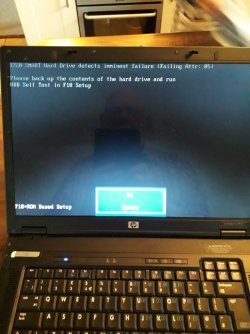
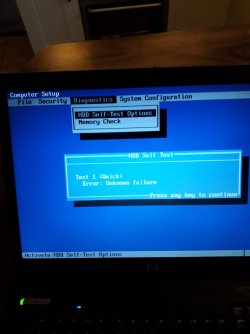
I was trying to reinstall Win7. And from the attachments you will see that failure was imminent which couldn't be resolved.

Thanks for your interest SNICK and a link to the tutorial.
 

My Computer

Computer type
Laptop
Computer Manufacturer/Model Number
HP
OS
Windows7 64 bit
Will your computer still boot?
I assume you don't have a system image on external drive.
 

My Computer

Computer type
PC/Desktop
Computer Manufacturer/Model Number
HP Desktop & Compaq Laptop
OS
Win 10 x64, Linux Lite, Win 7 x64, BlackArch, & Kali
Hard Drives
Samsung 850 Pro 256Gb,
Hitachi HDD 1Tb,
Crucial MX SSD 250Gb
Segate 3Tb USB 3.0 Ext. Backup HDD
Internet Speed
150Mbps dn, 20Mbps up
Antivirus
Avast Free, Malwarebytes Anti-Exploit & Anti-Ransomware
Browser
Firefox, Chrome, Opera, & VPN
When I switch on without a DVD the messages in the previous attachments come up.

If I put say a Win7 install disk in, it accepts it. But going through the install process it throws up errors which I have explored elsewhere on the Win7 forum which cannot be resolved.

The HDD has no data on it . All I want to do is take it out and in its recess replace with a SSD.

I don't think this covered on the link you gave.
 

My Computer

Computer type
Laptop
Computer Manufacturer/Model Number
HP
OS
Windows7 64 bit
Back
Top