Issues logging into Windows.

Upload the log files. So Cottonball can take a look at them.

@Cottonball

He didn't have the option to choose Repair your computer so I had him run the FRST tool inside SafeMode.
 

My Computer

Computer Manufacturer/Model Number
Custom Built
OS
Windows 7 Ultimate 32-Bit & Windows 7 Ultimate 64-Bit
CPU
Intel Core i7 CPU 950 @ 3.07GHz
Motherboard
ASUS P6T DELUXE V2
Memory
OCZ 6GB (3 x 2GB) 240-Pin DDR3 SDRAM DDR3 1600 OCZ3X1600R2
Graphics Card(s)
ATI Radeon HD 5700 Series
Sound Card
OnBoard
Hard Drives
WD6400AACS-00M3B0 (640GB SATA )
PSU
CORSAIR 850w
Case
NZXT LEXA
Cooling
Intel Stock Heatsink Fan
Keyboard
Microsoft Wireless Laser Keyboard 7000
Mouse
Microsoft Wireless Laser Mouse 7000
any resolution to this issue this morning?
 

My Computer

Computer type
PC/Desktop
Computer Manufacturer/Model Number
HP
OS
Windows 7 Home
GilV37,

Just glanced at the thread in he BSOD forum...

In Safe Mode with Networking, please download a new copy of the Farbar Recovery Scan Tool
Select the 64-bit version.


Save it to your Desktop.
  • Double-click the downloaded file to run it.
  • When the tool opens click Yes to disclaimer.
  • Press the Scan button.
  • FRST64 makes a log (FRST.txt) in the same directory from which the tool is run (Desktop).
Please provide the FRST.txt in your reply. <<---


The first time the tool is run, it also makes another log: Addition.txt
Also post the Addition.txt in your reply. Just attach the one from the previous run.
 

My Computer

Computer type
PC/Desktop
Computer Manufacturer/Model Number
An ol' eMachines
OS
Windows 7 Home Premium
Internet Speed
Fine for me...I'm retired!
AS requested, here are the two files.

Addition.txt
FRST.txt
 

Attachments

My Computer

Computer type
PC/Desktop
Computer Manufacturer/Model Number
HP
OS
Windows 7 Home
amsecure.exe --->
What is amsecure.exe? This word is a synonym to the rogue anti-spyware application called Internet Security 2013. This is the malicious application which we described in our previous article. Amsecure.exe is its core process that starts running on the attacked machine from the very first moments of system startup. All attempts of users to get rid of Internet Security 2013 virus turn out to be vain because they can’t terminate this amsecure.exe process. Thus, if one succeeds in stopping this dangerous process on the attacked machine, he/she will surely be able to completely remove the rogue.

Click “Start” menu and go to “Run” option. Type-in the following text exactly as it is specified here:
taskkill.exe /F /IM amsecure.exe

This should stop the process of Internet Security 2013. (if you could not do it from the first attempt then try again).

Wait for cottonball to give you more instructions.
 

My Computer

Computer type
PC/Desktop
Computer Manufacturer/Model Number
Bruce ... somewhere in his 40's
OS
Windows 7 Ultimate 32bit SP1
CPU
Intel(R) Core(TM)2 Quad CPU @ 2.40GHz, 2400 MHz
Motherboard
INTEL/D975XBX2
Memory
4 GB
Graphics Card(s)
ATI Radeon HD 2600 Pro
Monitor(s) Displays
Samsung SyncMaster 914v
Screen Resolution
1280 x 1024
Hard Drives
2/500GB each ... ST3500630AS ATA Device.
One is not connected
PSU
Rocketfish 700 W
Case
G.Skill Gigabyte Chassis
Keyboard
Standard PS/2 Keyboard
Mouse
Microsoft PS/2 Mouse
Internet Speed
DSL
Antivirus
Avira Internet Security
Browser
IE 11
Other Info
ATI HDMI Audio
I did this twice, and still got the blue screen of Death.
 

My Computer

Computer type
PC/Desktop
Computer Manufacturer/Model Number
HP
OS
Windows 7 Home
GilV37

The step you did that Jacee had you do will not remove the rootkit you have. The rootkit is what is causing your BSOD

The step only stops the Internet Security 2013 from running.
 

My Computer

Computer Manufacturer/Model Number
Custom Built
OS
Windows 7 Ultimate 32-Bit & Windows 7 Ultimate 64-Bit
CPU
Intel Core i7 CPU 950 @ 3.07GHz
Motherboard
ASUS P6T DELUXE V2
Memory
OCZ 6GB (3 x 2GB) 240-Pin DDR3 SDRAM DDR3 1600 OCZ3X1600R2
Graphics Card(s)
ATI Radeon HD 5700 Series
Sound Card
OnBoard
Hard Drives
WD6400AACS-00M3B0 (640GB SATA )
PSU
CORSAIR 850w
Case
NZXT LEXA
Cooling
Intel Stock Heatsink Fan
Keyboard
Microsoft Wireless Laser Keyboard 7000
Mouse
Microsoft Wireless Laser Mouse 7000
ok.
 

My Computer

Computer type
PC/Desktop
Computer Manufacturer/Model Number
HP
OS
Windows 7 Home
GilV37,

That FRSt report is loaded with problems.

While I go thru it, please do the following in normal Windows or Safe Mode with Networking...whichever works:

Please download RogueKiller:
Tlcharger RogueKiller (Site Officiel)

When you get to the website, go to where it says:
(Download link) Lien de téléchargement:
Select the version with the x64. (Presuming that is what your system is.)
Click the dark-blue button to download.
Save to the Desktop.

Close all windows and browsers.

Right-click and select: Run as Administrator

At the program console, wait for the prescan to finish. (Under Status, it says: Prescan finished.)

Press: SCAN

When done, a report opens on the Desktop: RKreport.txt

Please provide the RKreport.txt (Mode: Scan) in your reply.


Bear with me, because the timing for all this has to be right, and the FRST fix has to follow RogueKiller, without any reboot in between.
 

My Computer

Computer type
PC/Desktop
Computer Manufacturer/Model Number
An ol' eMachines
OS
Windows 7 Home Premium
Internet Speed
Fine for me...I'm retired!
Do you know how long the Prescan is supposed to run? its been checking the processes on rundll32.exe for quit a while.
 

My Computer

Computer type
PC/Desktop
Computer Manufacturer/Model Number
HP
OS
Windows 7 Home
GilV37,

If RogueKiller has not finished, just cancel it out, and let's press on...

BTW, this might be the largest fixlist ever processed by this program.
There are still toolbars and other "stuff", as well as files that may be malware. However, we'll handle those after we get done with this run.

Please open Notepad (Start > All Programs > Accessories > Notepad)
Copy/paste all the text inside the quote box to Notepad (Do not copy the word 'Quote')

In Notepad, click File (at the top), and select: Save as...
In the Save as prompt, name the file fixlist.txt, and save it to the Desktop <<---Important!!

start
HKCU\...\Run: [Gogeecni] "C:\Users\Ferreira Family\AppData\Roaming\Mufin\aluce.exe" [208896 2013-01-02] ()
HKCU\...\Run: [Dehyquu] "C:\Users\Ferreira Family\AppData\Roaming\Yrvihu\yccif.exe" [208896 2013-02-08] ()
HKCU\...\Run: [Internet Security] C:\ProgramData\amsecure.exe [830976 2013-05-07] (Apple Computer, Inc.)
HKCR\...409d6c4515e9\InprocServer32: [Default-shell32] C:\Users\FERREI~1\AppData\Local\Temp\sibwxwx\sqonbam\wow64.dll ATTENTION! ====> ZeroAccess
HKLM-x32\...\Run: [] [x]
Startup: C:\Users\Default\AppData\Roaming\Microsoft\Windows\Start Menu\Programs\Startup\soxyme.exe ()
Startup: C:\Users\Default User\AppData\Roaming\Microsoft\Windows\Start Menu\Programs\Startup\acaxku.exe (DT Soft Ltd)
Startup: C:\Users\Default User\AppData\Roaming\Microsoft\Windows\Start Menu\Programs\Startup\soxyme.exe ()
URLSearchHook: (No Name) - {CA3EB689-8F09-4026-AA10-B9534C691CE0} - No File
URLSearchHook: (No Name) - {f4c28532-b9d0-4950-a2df-e83f9929242b} - No File
2013-05-07 17:31 - 2013-05-07 17:31 - 00000645 ____A C:\Users\Public\Desktop\Internet Security 2013.lnk
ZeroAccess: C:\$Recycle.Bin\S-1-5-21-2451089773-2969554723-1024505751-1000\$71d7cbe246470cbaec705e091023f4e2
ZeroAccess: C:\$Recycle.Bin\S-1-5-18\$71d7cbe246470cbaec705e091023f4e2
C:\Windows\svchost.exe
ATTENTION ====> Check for partition/boot infection.C:\ProgramData\amsecure.exe
C:\ProgramData\y86I4d8e.exe
C:\ProgramData\36m6K07.dat
C:\Windows\Tasks\At1.job
C:\Windows\Tasks\At10.job
C:\Windows\Tasks\At11.job
C:\Windows\Tasks\At12.job
C:\Windows\Tasks\At13.job
C:\Windows\Tasks\At14.job
C:\Windows\Tasks\At15.job
C:\Windows\Tasks\At16.job
C:\Windows\Tasks\At17.job
C:\Windows\Tasks\At18.job
C:\Windows\Tasks\At19.job
C:\Windows\Tasks\At2.job
C:\Windows\Tasks\At20.job
C:\Windows\Tasks\At21.job
C:\Windows\Tasks\At22.job
C:\Windows\Tasks\At23.job
C:\Windows\Tasks\At24.job
C:\Windows\Tasks\At25.job
C:\Windows\Tasks\At26.job
C:\Windows\Tasks\At27.job
C:\Windows\Tasks\At28.job
C:\Windows\Tasks\At29.job
C:\Windows\Tasks\At3.job
C:\Windows\Tasks\At30.job
C:\Windows\Tasks\At31.job
C:\Windows\Tasks\At32.job
C:\Windows\Tasks\At33.job
C:\Windows\Tasks\At34.job
C:\Windows\Tasks\At35.job
C:\Windows\Tasks\At36.job
C:\Windows\Tasks\At37.job
C:\Windows\Tasks\At38.job
C:\Windows\Tasks\At39.job
C:\Windows\Tasks\At4.job
C:\Windows\Tasks\At40.job
C:\Windows\Tasks\At41.job
C:\Windows\Tasks\At42.job
C:\Windows\Tasks\At43.job
C:\Windows\Tasks\At44.job
C:\Windows\Tasks\At45.job
C:\Windows\Tasks\At46.job
C:\Windows\Tasks\At47.job
C:\Windows\Tasks\At48.job
C:\Windows\Tasks\At5.job
C:\Windows\Tasks\At6.job
C:\Windows\Tasks\At7.job
C:\Windows\Tasks\At8.job
C:\Windows\Tasks\At9.job
TDL4: custom:26000022 <===== ATTENTION!
end

NOTE. It is important that FRST64 and the fixlist.txt are in the same location (Desktop) or this will not work.

Now, run FRST64 and press the Fix button, just once, and wait.

When done, the tool makes a log on the Desktop: Fixlog.txt
Please post Fixlog.txt in your reply.

Try to boot the computer into normal Windows and post back on what happens.


NOTICE: This script was written specifically for GilV37, for use on this particular computer.
Running this on another computer may cause damage to the Operating System!!

 

My Computer

Computer type
PC/Desktop
Computer Manufacturer/Model Number
An ol' eMachines
OS
Windows 7 Home Premium
Internet Speed
Fine for me...I'm retired!
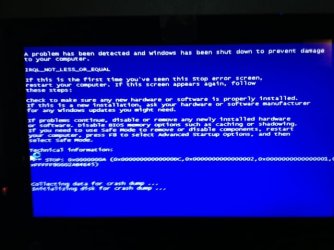
Was up and running in windows for about 30 seconds, and got the bsod again. I took a snapshot of it and going to upload the photo. also attached is the fixlog.txt file.
 

Attachments

  • BSOD.JPG
    BSOD.JPG
    112.9 KB · Views: 9
  • Fixlog.txt
    Fixlog.txt
    4.1 KB · Views: 6

My Computer

Computer type
PC/Desktop
Computer Manufacturer/Model Number
HP
OS
Windows 7 Home
I think we are ok now. I goggled that other error and it said to uninstall the video drive and reinstall it. Did that and the PC has been stable now for about 10 mins.
 

My Computer

Computer type
PC/Desktop
Computer Manufacturer/Model Number
HP
OS
Windows 7 Home
:D Good job, GilV37!!

Please try running RogueKiller now. Presuming you are in normal Windows.

It should not hang.

There is more to do here, but, let's go one step at a time. We do not want to return to another BSOD.

Will be back in about 30 minutes.
 

My Computer

Computer type
PC/Desktop
Computer Manufacturer/Model Number
An ol' eMachines
OS
Windows 7 Home Premium
Internet Speed
Fine for me...I'm retired!
Ok, I Ran it, and I have attached the report file.
 

Attachments

My Computer

Computer type
PC/Desktop
Computer Manufacturer/Model Number
HP
OS
Windows 7 Home
Let's press on with RogueKiller...

•Please quit all programs
•Right-click the RogueKiller file and select 'Run as Administrator'
•Wait until the Prescan finishes
•Press: Scan
•Once the scan is done, press the [Delete] button.
Please post the new RKreport (Mode: Delete) in your reply.
(It is created on the Desktop.)
 

My Computer

Computer type
PC/Desktop
Computer Manufacturer/Model Number
An ol' eMachines
OS
Windows 7 Home Premium
Internet Speed
Fine for me...I'm retired!
Presume you are still in Windows, if not, let me know.

Please go to the TDSSKiller Download
Select the .exe version
Double-click on TDSSKiller.exe to run the program.


When the TDSSKiller console opens, click on: Change Parameters
Under Additional Options, place a check in the box next to: Detect TDLFS File System
Click: OK


Press: Start Scan


•If a suspicious object is detected by this program, the default action is Skip. Leave this action as is, and click on: Continue
•If malicious objects are found, they show in the Scan results.
Ensure Cure (the default action) is selected, then click: Continue > Reboot now, to finish the cleaning process.
(Note: If Cure is not available, select Skip, >>Do not select: Delete<<)


When done, the tool creates a log on the disk with the Windows Operating System, normally C:\


Logs have a name like:
C:\TDSSKiller.X.X.X_1.05.2013_15.31.43_log.txt


Please attach the TDSSKiller log in your reply.


Now, let's see if there are services damaged.


Please press on with Downloading Farbar Service Scanner

Save to the Desktop.
  • Make sure the following options are checked:
    • Internet Services
    • Windows Firewall
    • System Restore
    • Security Center
    • Windows Update
    • Windows Defender
  • Press: Scan
  • FSS creates a log, FSS.txt, on the Desktop.
Please provide the FSS.txt in your reply.
 

My Computer

Computer type
PC/Desktop
Computer Manufacturer/Model Number
An ol' eMachines
OS
Windows 7 Home Premium
Internet Speed
Fine for me...I'm retired!
Back
Top