
You are using an out of date browser. It may not display this or other websites correctly.
You should upgrade or use an alternative browser.
You should upgrade or use an alternative browser.
Issues logging into Windows.
- Thread starter GilV37
- Start date

GilV37,
The scan did not run properly...
After:
20:00:01.0396 4392 Initialize success
20:00:01.0396 4392 ============================================================
You should have:
20:00:26.0356 2960 ============================================================
20:00:26.0356 2960 Scan started
20:00:26.0356 2960 Mode: Manual; TDLFS;
20:00:26.0356 2960 ============================================================
20:00:26.0668 2960 ================ Scan system memory ========================
20:00:26.0668 2960 System memory - ok
20:00:26.0668 2960 ================ Scan services =============================
etc., etc., etc...
Is there another TDSSKiller report in C:\?
If not, please give this another try.
The scan did not run properly...
After:
20:00:01.0396 4392 Initialize success
20:00:01.0396 4392 ============================================================
You should have:
20:00:26.0356 2960 ============================================================
20:00:26.0356 2960 Scan started
20:00:26.0356 2960 Mode: Manual; TDLFS;
20:00:26.0356 2960 ============================================================
20:00:26.0668 2960 ================ Scan system memory ========================
20:00:26.0668 2960 System memory - ok
20:00:26.0668 2960 ================ Scan services =============================
etc., etc., etc...
Is there another TDSSKiller report in C:\?
If not, please give this another try.
My Computer
- Computer type
- PC/Desktop
- Computer Manufacturer/Model Number
- An ol' eMachines
- OS
- Windows 7 Home Premium
- Internet Speed
- Fine for me...I'm retired!
My Computer
- Computer type
- PC/Desktop
- Computer Manufacturer/Model Number
- HP
- OS
- Windows 7 Home
Yes! 
Please run TDSSKiller once again, and this time, when presented with the TDSS File System entry in Threats Detected, select: Delete
Please attach the new TDSSKiller log in your reply.
Next, please use the Malwarebytes Anti-Rootkit Download
Save to the Desktop (easy to find)
Right-click the downloaded file and select: Extract here...
In the MBAR folder that appears on the Desktop, open it, and double-click the MBAR application.
At the main program console click: Next
At the Update Database prompt, click: Update
When the update is done, click: Next
At the Scan System prompt, under Scan targets, check: Drivers, Sectors, and System (If these items are already checked, that's fine.) Now, click on the SCAN button!
The results from the scan are shown as follows (Just an example)(Image courtesy of BleepingComputer):
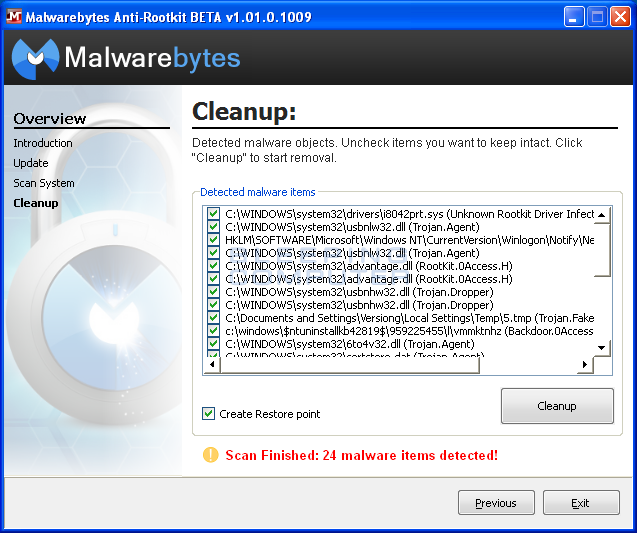
If any threats are reported, DO NOT click on the Cleanup button to remove them!!!
At this point go back to the MBAR folder on the Desktop, and look for two reports:
1. system-log.txt
2. mbar-log-2013-04-30 (20-13-32).txt
(corresponds to mbar-log-year-month-day (hour-minute-second).txt)
Please attach the mbar-log and the system-log in your reply.
On the Cleanup screen, just press: Exit
Please run TDSSKiller once again, and this time, when presented with the TDSS File System entry in Threats Detected, select: Delete
Please attach the new TDSSKiller log in your reply.
Next, please use the Malwarebytes Anti-Rootkit Download
Save to the Desktop (easy to find)
Right-click the downloaded file and select: Extract here...
In the MBAR folder that appears on the Desktop, open it, and double-click the MBAR application.
At the main program console click: Next
At the Update Database prompt, click: Update
When the update is done, click: Next
At the Scan System prompt, under Scan targets, check: Drivers, Sectors, and System (If these items are already checked, that's fine.) Now, click on the SCAN button!
The results from the scan are shown as follows (Just an example)(Image courtesy of BleepingComputer):
If any threats are reported, DO NOT click on the Cleanup button to remove them!!!
At this point go back to the MBAR folder on the Desktop, and look for two reports:
1. system-log.txt
2. mbar-log-2013-04-30 (20-13-32).txt
(corresponds to mbar-log-year-month-day (hour-minute-second).txt)
Please attach the mbar-log and the system-log in your reply.
On the Cleanup screen, just press: Exit
My Computer
- Computer type
- PC/Desktop
- Computer Manufacturer/Model Number
- An ol' eMachines
- OS
- Windows 7 Home Premium
- Internet Speed
- Fine for me...I'm retired!
My Computer
- Computer type
- PC/Desktop
- Computer Manufacturer/Model Number
- HP
- OS
- Windows 7 Home
GilV37,
TDSSKiller is good.
Did you reboot after running MBAR?
TDSSKiller is good.
Did you reboot after running MBAR?
My Computer
- Computer type
- PC/Desktop
- Computer Manufacturer/Model Number
- An ol' eMachines
- OS
- Windows 7 Home Premium
- Internet Speed
- Fine for me...I'm retired!

- Local time
- 10:54 AM
- Messages
- 8,608
Is this a "Legal" copy of Windows 7? I don't mean to offend, but my goodness you have a boat load of malware!!:shock:
My Computer
- Computer type
- PC/Desktop
- Computer Manufacturer/Model Number
- Bruce ... somewhere in his 40's
- OS
- Windows 7 Ultimate 32bit SP1
- CPU
- Intel(R) Core(TM)2 Quad CPU @ 2.40GHz, 2400 MHz
- Motherboard
- INTEL/D975XBX2
- Memory
- 4 GB
- Graphics Card(s)
- ATI Radeon HD 2600 Pro
- Monitor(s) Displays
- Samsung SyncMaster 914v
- Screen Resolution
- 1280 x 1024
- Hard Drives
- 2/500GB each ... ST3500630AS ATA Device.
One is not connected
- PSU
- Rocketfish 700 W
- Case
- G.Skill Gigabyte Chassis
- Keyboard
- Standard PS/2 Keyboard
- Mouse
- Microsoft PS/2 Mouse
- Internet Speed
- DSL
- Antivirus
- Avira Internet Security
- Browser
- IE 11
- Other Info
- ATI HDMI Audio
Please reboot, and run MBAR once again.
This time, press: Cleanup
Also, post the new mbar-log-2013-05-11 (22-32-54).txt
This time, press: Cleanup
Also, post the new mbar-log-2013-05-11 (22-32-54).txt
My Computer
- Computer type
- PC/Desktop
- Computer Manufacturer/Model Number
- An ol' eMachines
- OS
- Windows 7 Home Premium
- Internet Speed
- Fine for me...I'm retired!

- Local time
- 10:54 AM
- Messages
- 6,830
Jacee
If you want a MGADiag
GilV37
Please download MGADiag and save it to your desktop.
:ar: Double click
 icon on your desktop.
:ar: Click on the
 button
:ar: Click on the
 button
:ar: Paste the log inside the box . Highlight all of the text then code wrap by pressing on the # icon on the top .
If you want a MGADiag
GilV37
Please download MGADiag and save it to your desktop.
:ar: Double click
:ar: Click on the
:ar: Click on the
:ar: Paste the log inside the box . Highlight all of the text then code wrap by pressing on the # icon on the top .
My Computer
- Computer Manufacturer/Model Number
- Custom Built
- OS
- Windows 7 Ultimate 32-Bit & Windows 7 Ultimate 64-Bit
- CPU
- Intel Core i7 CPU 950 @ 3.07GHz
- Motherboard
- ASUS P6T DELUXE V2
- Memory
- OCZ 6GB (3 x 2GB) 240-Pin DDR3 SDRAM DDR3 1600 OCZ3X1600R2
- Graphics Card(s)
- ATI Radeon HD 5700 Series
- Sound Card
- OnBoard
- Hard Drives
- WD6400AACS-00M3B0 (640GB SATA )
- PSU
- CORSAIR 850w
- Case
- NZXT LEXA
- Cooling
- Intel Stock Heatsink Fan
- Keyboard
- Microsoft Wireless Laser Keyboard 7000
- Mouse
- Microsoft Wireless Laser Mouse 7000
Diagnostic Report (1.9.0027.0):
-----------------------------------------
Windows Validation Data-->
Validation Code: 0
Cached Online Validation Code: 0x0
Windows Product Key: *****-*****-73CQT-WMF7J-3Q6C9
Windows Product Key Hash: KaFG+RmurcM3ZxzWyfEP9WtPUJw=
Windows Product ID: 00359-OEM-8992687-00010
Windows Product ID Type: 2
Windows License Type: OEM SLP
Windows OS version: 6.1.7601.2.00010300.1.0.003
ID: {8DA200FF-184B-4B3E-85EF-46D22234E403}(1)
Is Admin: Yes
TestCab: 0x0
LegitcheckControl ActiveX: N/A, hr = 0x80070002
Signed By: N/A, hr = 0x80070002
Product Name: Windows 7 Home Premium
Architecture: 0x00000009
Build lab: 7601.win7sp1_gdr.130318-1533
TTS Error:
Validation Diagnostic:
Resolution Status: N/A
Vista WgaER Data-->
ThreatID(s): N/A, hr = 0x80070002
Version: N/A, hr = 0x80070002
Windows XP Notifications Data-->
Cached Result: N/A, hr = 0x80070002
File Exists: No
Version: N/A, hr = 0x80070002
WgaTray.exe Signed By: N/A, hr = 0x80070002
WgaLogon.dll Signed By: N/A, hr = 0x80070002
OGA Notifications Data-->
Cached Result: N/A, hr = 0x80070002
Version: N/A, hr = 0x80070002
OGAExec.exe Signed By: N/A, hr = 0x80070002
OGAAddin.dll Signed By: N/A, hr = 0x80070002
OGA Data-->
Office Status: 100 Genuine
Microsoft Office Ultimate 2007 - 100 Genuine
OGA Version: N/A, 0x80070002
Signed By: N/A, hr = 0x80070002
Office Diagnostics: 77F760FE-153-80070002_7E90FEE8-175-80070002_025D1FF3-364-80041010_025D1FF3-229-80041010_025D1FF3-230-1_025D1FF3-517-80040154_025D1FF3-237-80040154_025D1FF3-238-2_025D1FF3-244-80070002_025D1FF3-258-3_E2AD56EA-765-d003_E2AD56EA-766-0_E2AD56EA-134-80004005
Browser Data-->
Proxy settings: N/A
User Agent: Mozilla/4.0 (compatible; MSIE 8.0; Win32)
Default Browser: N/A, hr=0x80070002
Download signed ActiveX controls: Prompt
Download unsigned ActiveX controls: Disabled
Run ActiveX controls and plug-ins: Allowed
Initialize and script ActiveX controls not marked as safe: Disabled
Allow scripting of Internet Explorer Webbrowser control: Disabled
Active scripting: Allowed
Script ActiveX controls marked as safe for scripting: Allowed
File Scan Data-->
Other data-->
Office Details: <GenuineResults><MachineData><UGUID>{8DA200FF-184B-4B3E-85EF-46D22234E403}</UGUID><Version>1.9.0027.0</Version><OS>6.1.7601.2.00010300.1.0.003</OS><Architecture>x64</Architecture><PKey>*****-*****-*****-*****-3Q6C9</PKey><PID>00359-OEM-8992687-00010</PID><PIDType>2</PIDType><SID>S-1-5-21-2451089773-2969554723-1024505751</SID><SYSTEM><Manufacturer>Hewlett-Packard</Manufacturer><Model>320-1030</Model></SYSTEM><BIOS><Manufacturer>AMI</Manufacturer><Version>7.06</Version><SMBIOSVersion major="2" minor="7"/><Date>20110817000000.000000+000</Date></BIOS><HWID>312C3407018400FC</HWID><UserLCID>0409</UserLCID><SystemLCID>0409</SystemLCID><TimeZone>Eastern Standard Time(GMT-05:00)</TimeZone><iJoin>0</iJoin><SBID><stat>3</stat><msppid></msppid><name></name><model></model></SBID><OEM><OEMID>HPQOEM</OEMID><OEMTableID>SLIC-CPC</OEMTableID></OEM><GANotification/></MachineData><Software><Office><Result>100</Result><Products><Product GUID="{91120000-002E-0000-0000-0000000FF1CE}"><LegitResult>100</LegitResult><Name>Microsoft Office Ultimate 2007</Name><Ver>12</Ver><Val>B3B48F0A3153F78</Val><Hash>dtzYaXO51bY83XMHrkoUb/kE6eg=</Hash><Pid>81608-956-5929962-65498</Pid><PidType>1</PidType></Product></Products><Applications><App Id="15" Version="12" Result="100"/><App Id="16" Version="12" Result="100"/><App Id="18" Version="12" Result="100"/><App Id="19" Version="12" Result="100"/><App Id="1A" Version="12" Result="100"/><App Id="1B" Version="12" Result="100"/><App Id="44" Version="12" Result="100"/><App Id="A1" Version="12" Result="100"/><App Id="BA" Version="12" Result="100"/></Applications></Office></Software></GenuineResults>
Spsys.log Content: 0x80070002
Licensing Data-->
Software licensing service version: 6.1.7601.17514
Name: Windows(R) 7, HomePremium edition
Description: Windows Operating System - Windows(R) 7, OEM_SLP channel
Activation ID: d2c04e90-c3dd-4260-b0f3-f845f5d27d64
Application ID: 55c92734-d682-4d71-983e-d6ec3f16059f
Extended PID: 00359-00178-926-800010-02-1033-7601.0000-0422011
Installation ID: 008931128134918603979650227492532444956431322666978233
Processor Certificate URL: http://go.microsoft.com/fwlink/?LinkID=88338
Machine Certificate URL: http://go.microsoft.com/fwlink/?LinkID=88339
Use License URL: http://go.microsoft.com/fwlink/?LinkID=88341
Product Key Certificate URL: http://go.microsoft.com/fwlink/?LinkID=88340
Partial Product Key: 3Q6C9
License Status: Licensed
Remaining Windows rearm count: 1
Trusted time: 5/11/2013 11:30:51 PM
Windows Activation Technologies-->
HrOffline: 0x00000000
HrOnline: 0x00000000
HealthStatus: 0x0000000000000000
Event Time Stamp: 4:21:2013 09:58
ActiveX: Registered, Version: 7.1.7600.16395
Admin Service: Registered, Version: 7.1.7600.16395
HealthStatus Bitmask Output:
HWID Data-->
HWID Hash Current: LgAAAAIAAQABAAEAAAABAAAAAgABAAEA6GG+ZafH6DKgZALxyhq63C6odlmM0Q==
OEM Activation 1.0 Data-->
N/A
OEM Activation 2.0 Data-->
BIOS valid for OA 2.0: yes
Windows marker version: 0x20001
OEMID and OEMTableID Consistent: yes
BIOS Information:
ACPI Table Name OEMID Value OEMTableID Value
APIC HPQOEM SLIC-CPC
FACP HPQOEM SLIC-CPC
DBGP HPQOEM SLIC-CPC
HPET HPQOEM SLIC-CPC
MCFG A M I GMCH945.
SLIC HPQOEM SLIC-CPC
SSDT AMD POWERNOW
SSDT AMD POWERNOW
-----------------------------------------
Windows Validation Data-->
Validation Code: 0
Cached Online Validation Code: 0x0
Windows Product Key: *****-*****-73CQT-WMF7J-3Q6C9
Windows Product Key Hash: KaFG+RmurcM3ZxzWyfEP9WtPUJw=
Windows Product ID: 00359-OEM-8992687-00010
Windows Product ID Type: 2
Windows License Type: OEM SLP
Windows OS version: 6.1.7601.2.00010300.1.0.003
ID: {8DA200FF-184B-4B3E-85EF-46D22234E403}(1)
Is Admin: Yes
TestCab: 0x0
LegitcheckControl ActiveX: N/A, hr = 0x80070002
Signed By: N/A, hr = 0x80070002
Product Name: Windows 7 Home Premium
Architecture: 0x00000009
Build lab: 7601.win7sp1_gdr.130318-1533
TTS Error:
Validation Diagnostic:
Resolution Status: N/A
Vista WgaER Data-->
ThreatID(s): N/A, hr = 0x80070002
Version: N/A, hr = 0x80070002
Windows XP Notifications Data-->
Cached Result: N/A, hr = 0x80070002
File Exists: No
Version: N/A, hr = 0x80070002
WgaTray.exe Signed By: N/A, hr = 0x80070002
WgaLogon.dll Signed By: N/A, hr = 0x80070002
OGA Notifications Data-->
Cached Result: N/A, hr = 0x80070002
Version: N/A, hr = 0x80070002
OGAExec.exe Signed By: N/A, hr = 0x80070002
OGAAddin.dll Signed By: N/A, hr = 0x80070002
OGA Data-->
Office Status: 100 Genuine
Microsoft Office Ultimate 2007 - 100 Genuine
OGA Version: N/A, 0x80070002
Signed By: N/A, hr = 0x80070002
Office Diagnostics: 77F760FE-153-80070002_7E90FEE8-175-80070002_025D1FF3-364-80041010_025D1FF3-229-80041010_025D1FF3-230-1_025D1FF3-517-80040154_025D1FF3-237-80040154_025D1FF3-238-2_025D1FF3-244-80070002_025D1FF3-258-3_E2AD56EA-765-d003_E2AD56EA-766-0_E2AD56EA-134-80004005
Browser Data-->
Proxy settings: N/A
User Agent: Mozilla/4.0 (compatible; MSIE 8.0; Win32)
Default Browser: N/A, hr=0x80070002
Download signed ActiveX controls: Prompt
Download unsigned ActiveX controls: Disabled
Run ActiveX controls and plug-ins: Allowed
Initialize and script ActiveX controls not marked as safe: Disabled
Allow scripting of Internet Explorer Webbrowser control: Disabled
Active scripting: Allowed
Script ActiveX controls marked as safe for scripting: Allowed
File Scan Data-->
Other data-->
Office Details: <GenuineResults><MachineData><UGUID>{8DA200FF-184B-4B3E-85EF-46D22234E403}</UGUID><Version>1.9.0027.0</Version><OS>6.1.7601.2.00010300.1.0.003</OS><Architecture>x64</Architecture><PKey>*****-*****-*****-*****-3Q6C9</PKey><PID>00359-OEM-8992687-00010</PID><PIDType>2</PIDType><SID>S-1-5-21-2451089773-2969554723-1024505751</SID><SYSTEM><Manufacturer>Hewlett-Packard</Manufacturer><Model>320-1030</Model></SYSTEM><BIOS><Manufacturer>AMI</Manufacturer><Version>7.06</Version><SMBIOSVersion major="2" minor="7"/><Date>20110817000000.000000+000</Date></BIOS><HWID>312C3407018400FC</HWID><UserLCID>0409</UserLCID><SystemLCID>0409</SystemLCID><TimeZone>Eastern Standard Time(GMT-05:00)</TimeZone><iJoin>0</iJoin><SBID><stat>3</stat><msppid></msppid><name></name><model></model></SBID><OEM><OEMID>HPQOEM</OEMID><OEMTableID>SLIC-CPC</OEMTableID></OEM><GANotification/></MachineData><Software><Office><Result>100</Result><Products><Product GUID="{91120000-002E-0000-0000-0000000FF1CE}"><LegitResult>100</LegitResult><Name>Microsoft Office Ultimate 2007</Name><Ver>12</Ver><Val>B3B48F0A3153F78</Val><Hash>dtzYaXO51bY83XMHrkoUb/kE6eg=</Hash><Pid>81608-956-5929962-65498</Pid><PidType>1</PidType></Product></Products><Applications><App Id="15" Version="12" Result="100"/><App Id="16" Version="12" Result="100"/><App Id="18" Version="12" Result="100"/><App Id="19" Version="12" Result="100"/><App Id="1A" Version="12" Result="100"/><App Id="1B" Version="12" Result="100"/><App Id="44" Version="12" Result="100"/><App Id="A1" Version="12" Result="100"/><App Id="BA" Version="12" Result="100"/></Applications></Office></Software></GenuineResults>
Spsys.log Content: 0x80070002
Licensing Data-->
Software licensing service version: 6.1.7601.17514
Name: Windows(R) 7, HomePremium edition
Description: Windows Operating System - Windows(R) 7, OEM_SLP channel
Activation ID: d2c04e90-c3dd-4260-b0f3-f845f5d27d64
Application ID: 55c92734-d682-4d71-983e-d6ec3f16059f
Extended PID: 00359-00178-926-800010-02-1033-7601.0000-0422011
Installation ID: 008931128134918603979650227492532444956431322666978233
Processor Certificate URL: http://go.microsoft.com/fwlink/?LinkID=88338
Machine Certificate URL: http://go.microsoft.com/fwlink/?LinkID=88339
Use License URL: http://go.microsoft.com/fwlink/?LinkID=88341
Product Key Certificate URL: http://go.microsoft.com/fwlink/?LinkID=88340
Partial Product Key: 3Q6C9
License Status: Licensed
Remaining Windows rearm count: 1
Trusted time: 5/11/2013 11:30:51 PM
Windows Activation Technologies-->
HrOffline: 0x00000000
HrOnline: 0x00000000
HealthStatus: 0x0000000000000000
Event Time Stamp: 4:21:2013 09:58
ActiveX: Registered, Version: 7.1.7600.16395
Admin Service: Registered, Version: 7.1.7600.16395
HealthStatus Bitmask Output:
HWID Data-->
HWID Hash Current: LgAAAAIAAQABAAEAAAABAAAAAgABAAEA6GG+ZafH6DKgZALxyhq63C6odlmM0Q==
OEM Activation 1.0 Data-->
N/A
OEM Activation 2.0 Data-->
BIOS valid for OA 2.0: yes
Windows marker version: 0x20001
OEMID and OEMTableID Consistent: yes
BIOS Information:
ACPI Table Name OEMID Value OEMTableID Value
APIC HPQOEM SLIC-CPC
FACP HPQOEM SLIC-CPC
DBGP HPQOEM SLIC-CPC
HPET HPQOEM SLIC-CPC
MCFG A M I GMCH945.
SLIC HPQOEM SLIC-CPC
SSDT AMD POWERNOW
SSDT AMD POWERNOW
My Computer
- Computer type
- PC/Desktop
- Computer Manufacturer/Model Number
- HP
- OS
- Windows 7 Home
Did you reboot after running MBAR?
Was there a prompt asking you to reboot?
Was there a prompt asking you to reboot?
My Computer
- Computer type
- PC/Desktop
- Computer Manufacturer/Model Number
- An ol' eMachines
- OS
- Windows 7 Home Premium
- Internet Speed
- Fine for me...I'm retired!
- Local time
- 10:54 AM
- Messages
- 6,830
GilV37
You're good. Just an idea . If you ever need to reinstall Windows again . Write the Product Key under neath the Laptop and save it in a safe place . Those COA stickers are known to fade away .
You're good. Just an idea . If you ever need to reinstall Windows again . Write the Product Key under neath the Laptop and save it in a safe place . Those COA stickers are known to fade away .
My Computer
- Computer Manufacturer/Model Number
- Custom Built
- OS
- Windows 7 Ultimate 32-Bit & Windows 7 Ultimate 64-Bit
- CPU
- Intel Core i7 CPU 950 @ 3.07GHz
- Motherboard
- ASUS P6T DELUXE V2
- Memory
- OCZ 6GB (3 x 2GB) 240-Pin DDR3 SDRAM DDR3 1600 OCZ3X1600R2
- Graphics Card(s)
- ATI Radeon HD 5700 Series
- Sound Card
- OnBoard
- Hard Drives
- WD6400AACS-00M3B0 (640GB SATA )
- PSU
- CORSAIR 850w
- Case
- NZXT LEXA
- Cooling
- Intel Stock Heatsink Fan
- Keyboard
- Microsoft Wireless Laser Keyboard 7000
- Mouse
- Microsoft Wireless Laser Mouse 7000
GilV37,
Have more work to do, but, will catch up with you tomorrow. It won't be before 11:00AM CST
Not an early riser...
Have more work to do, but, will catch up with you tomorrow. It won't be before 11:00AM CST
Not an early riser...
My Computer
- Computer type
- PC/Desktop
- Computer Manufacturer/Model Number
- An ol' eMachines
- OS
- Windows 7 Home Premium
- Internet Speed
- Fine for me...I'm retired!
Still need to run program to get rid of Toolbars, etc., need to fix some services...
Can't make predictions with all the malware that was floating in this system.
Can't make predictions with all the malware that was floating in this system.
My Computer
- Computer type
- PC/Desktop
- Computer Manufacturer/Model Number
- An ol' eMachines
- OS
- Windows 7 Home Premium
- Internet Speed
- Fine for me...I'm retired!
GilV37,
Please do the following before moving on to the next step: http://www.sevenforums.com/tutorials/697-system-restore-point-create.html
Now, download ComboFix:
http://download.bleepingcomputer.com/sUBs/ComboFix.exe
Save ComboFix.exe to the Desktop <<---
Next, please disable your AntiVirus and AntiSpyware applications, as they may interfere with this tool.
Info: How To Temporarily Disable Your Anti-virus, Firewall And Anti-malware Programs - Security Mini-Guides
Double-click combofix.exe and follow the prompts.
There are several stages processed by CF. Please be patient, as it may take a while to run. (Estimated time: o/a 1 hour)
When done, ComboFix produces a log: C:\ComboFix.txt
Please attach the ComboFix.txt in your reply. <<---
Notes:
1. Please do not mouse-click the ComboFix window while it is running. This action may cause a stall.
2. ComboFix may reset a number of Internet Explorer's settings, including making IE the default browser.
3. It also disconnects the computer from the Internet. However, the connection is automatically restored before CF completes its run. If CF runs into difficulty and terminates prematurely, the connection can be manually restored by restarting your computer.
4. If ComboFix detects any Rootkit/Bootkit activity, it gives a warning and prompts for a reboot. Please allow it to do so. The screen may stay black for several minutes on reboot, however, this is normal.
5. If the following message appears, please reboot to resolve the issue:
"Illegal operation attempted on Registry key that has been marked for deletion."
When done with ComboFix, please run the Farbar Service Scanner, and also attach its results.
Please do the following before moving on to the next step: http://www.sevenforums.com/tutorials/697-system-restore-point-create.html
Now, download ComboFix:
http://download.bleepingcomputer.com/sUBs/ComboFix.exe
Save ComboFix.exe to the Desktop <<---
Next, please disable your AntiVirus and AntiSpyware applications, as they may interfere with this tool.
Info: How To Temporarily Disable Your Anti-virus, Firewall And Anti-malware Programs - Security Mini-Guides
Double-click combofix.exe and follow the prompts.
There are several stages processed by CF. Please be patient, as it may take a while to run. (Estimated time: o/a 1 hour)
When done, ComboFix produces a log: C:\ComboFix.txt
Please attach the ComboFix.txt in your reply. <<---
Notes:
1. Please do not mouse-click the ComboFix window while it is running. This action may cause a stall.
2. ComboFix may reset a number of Internet Explorer's settings, including making IE the default browser.
3. It also disconnects the computer from the Internet. However, the connection is automatically restored before CF completes its run. If CF runs into difficulty and terminates prematurely, the connection can be manually restored by restarting your computer.
4. If ComboFix detects any Rootkit/Bootkit activity, it gives a warning and prompts for a reboot. Please allow it to do so. The screen may stay black for several minutes on reboot, however, this is normal.
5. If the following message appears, please reboot to resolve the issue:
"Illegal operation attempted on Registry key that has been marked for deletion."
When done with ComboFix, please run the Farbar Service Scanner, and also attach its results.
My Computer
- Computer type
- PC/Desktop
- Computer Manufacturer/Model Number
- An ol' eMachines
- OS
- Windows 7 Home Premium
- Internet Speed
- Fine for me...I'm retired!