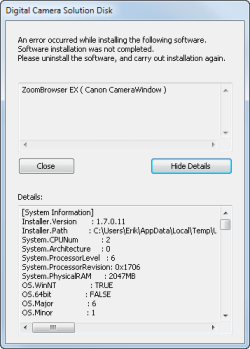
Issues when installing camera software.

darkhorse

New member
Power User
Local time
11:19 PM
Messages
514
Location
Denmark
Hi.
I want to install software for my Canon IXUS 130 camera on my Windows 7 Ultimate 32bit computer.

When I do this, I get this:


It starts with this:


What is wrong ?.
 

Attachments

  • DigitalCameraSolutionDisk.png
    DigitalCameraSolutionDisk.png
    8.8 KB · Views: 9

My Computer

Computer type
PC/Desktop
Computer Manufacturer/Model Number
Homemade
OS
Windows 7 Ultimate
CPU
E7300
Motherboard
ASUS P5Q DeLuxe
Memory
4g
Graphics Card(s)
NVIDIA GeForce 7300 LE
Sound Card
N/A
Monitor(s) Displays
Acer
Screen Resolution
1600x1200
Hard Drives
Samsung HD503HI ATA Device
PSU
Seasonic
Case
ATX
Cooling
FAN
Keyboard
Logitech
Mouse
HP
Internet Speed
20/2
Antivirus
MSE
Browser
IE9, Chrome, Firefox
missed the BIG PNG file :-(
 

Attachments

  • DigitalCameraSolutionDisk1.jpg
    DigitalCameraSolutionDisk1.jpg
    1.3 MB · Views: 5

My Computer

Computer type
PC/Desktop
Computer Manufacturer/Model Number
Homemade
OS
Windows 7 Ultimate
CPU
E7300
Motherboard
ASUS P5Q DeLuxe
Memory
4g
Graphics Card(s)
NVIDIA GeForce 7300 LE
Sound Card
N/A
Monitor(s) Displays
Acer
Screen Resolution
1600x1200
Hard Drives
Samsung HD503HI ATA Device
PSU
Seasonic
Case
ATX
Cooling
FAN
Keyboard
Logitech
Mouse
HP
Internet Speed
20/2
Antivirus
MSE
Browser
IE9, Chrome, Firefox
Canon's Zoom Browser is an image editor and organiser: Canon ZoomBrowser / ImageBrowser - Canon UK

Trouble is, it's not compatible with Windows 7, according to Canon.

You could try installing it in compatibility mode for Windows XP SP3.

Failing that, just dispense with Canon's image editor and use Microsoft's own Live Picture Gallery instead.

http://windows.microsoft.com/en-GB/windows7/products/features/photo-gallery

The GIMP is another option and is a powerful, open-source editor that is free.

http://www.gimp.org/
 

My Computer

Computer Manufacturer/Model Number
HP Pavilion Elite 495UK
OS
Windows 7 Ultimate SP1 64-Bit
CPU
Intel Core i7 870 @ 2.93GHz
Motherboard
MSI 2A9C (CPU1)
Memory
8Gb Dual-Channel DDR3 @ 664MHz
Graphics Card(s)
nVidia GeForce GTX 460 1024MB dedicated RAM
Sound Card
Realtek HD Audio
Monitor(s) Displays
HP2310i
Screen Resolution
1920 x 1080
Hard Drives
1x1954GB Hitachi HDS22020ALA 330 (RAID), 1x1954GB Hitachi External for backup and storage
PSU
460W
Case
HP Elite
Cooling
Air cooled
Keyboard
Logitech K750 solar-powered keyboard
Mouse
Logitech Wireless M180 mouse
Internet Speed
2Mb
Other Info
Pure Avanti Flow Internet Radio with iPod Dock, 64Gb iPod, HP USB Speakers, Sony MDR-V500 Headphones, Sony Vaio F-Series Laptop
Thanks for the reply.

For your information, I installed it on an Windows 7 Ultimate 64bit, where it installed troublefree.

I have saved a file from the computer, where the installing didn't succeded.

Do you reach this file on this link ?

http://www.urbakken.dk/DigitalCameraSolutionDisk2.png

It's a huge file, and should be opened and be zoomed in on to be able to view.
 

My Computer

Computer type
PC/Desktop
Computer Manufacturer/Model Number
Homemade
OS
Windows 7 Ultimate
CPU
E7300
Motherboard
ASUS P5Q DeLuxe
Memory
4g
Graphics Card(s)
NVIDIA GeForce 7300 LE
Sound Card
N/A
Monitor(s) Displays
Acer
Screen Resolution
1600x1200
Hard Drives
Samsung HD503HI ATA Device
PSU
Seasonic
Case
ATX
Cooling
FAN
Keyboard
Logitech
Mouse
HP
Internet Speed
20/2
Antivirus
MSE
Browser
IE9, Chrome, Firefox
I have installed Zoom Browser EX v6.6.0 on my cousin's machine (Win7 Home Premium 64-bit) and then applied the 6.7.2.33 update. It's running perfectly. Can't recall exactly where I got the files, but I did it last September. If you're trying to install the software from the CD that came with the camera it's likely only usable with WinXP.

It's a Rebel camera that she uses, rather than a IXUS 130, but the software itself is what we're talking about here.

The 6.6.0 installer file is 57MB, and the 6.7.2.33 updater is another 36MB. I can make both files available to you for download, if you PM me your personal email address. Again, I know I did some research trying to find these files back in September but eventually I did.

Now we weren't able to get usable Win7 drivers to support her old model Rebel camera. But that problem was solved simply by removing the flash card from the camera and inserting it into the card reader of her new computer. Win7 has no problem reading SD cards, and Zoom Browser has no problem sucking in images from cards. The card does not have to be in the camera for Zoom Browser to be 100% functional... just put the card into a card reader.

Now, will this all work for you and your IXUS 130? Who knows, till you try it?

 

My Computer

Computer type
PC/Desktop
Computer Manufacturer/Model Number
Home-built, two systems (1) and (2)
OS
Windows 7 Pro x64 (1), Win7 Pro X64 (2)
CPU
i5-3350p 3.1Ghz/6MB-cache (1); E8400 3.0Ghz/6MB-cache (2)
Motherboard
ASUS P8Z77-V Pro (1); ASUS P5Q3 (2)
Memory
8GB PC3-12800 DDR3 (1); 4GB PC3-10600 DDR3 (2)
Graphics Card(s)
ATI HD7750 (1), (see TV cards); ATI R7 250 (2)
Sound Card
Realtek ALC892 HD Audio (1); Realtek ALC1200 HD Audio (2)
Monitor(s) Displays
Eizo HD2441W LCD, Eizo S2433W (1); Eizo 24" S2433W (2)
Screen Resolution
1920x1200, 1920x1200 (1); 1920x1200 (2)
Hard Drives
(1) 1TB SATA-II (7200RPM), 2x2TB SATA-III (7200RPM), 250GB SATA-III (10000RPM) for OS; 2x2TB external USB 3.0

(2) 320GB SATA-II (7200RPM), 750GB SATA-II (7200RPM), 150GB SATA-II (10000RPM) for OS; 2TB external USB 3.0
PSU
Nesteq ECS-6001 600W (1); Nesteq ECS-5001 500W (2)
Case
Acousti-Case 360 (1) and (2)
Cooling
Noctua NH-U12P SE2 for CPU, 2x120mm case fans (1) and (2)
Keyboard
IBM PS/2 (1) and (2)
Mouse
Logitech MX Revolution wireless (1); Microsoft wired (2)
Internet Speed
100mbps down / 10mbps up
Antivirus
Microsoft Security Essentials; Malwarebyte Anti-Malware Pro
Browser
Firefox
Other Info
Ceton InfiniTV 4-tuner cablecard-enabled TV card as well as Hauppauge HVR-2250 OTA/ATSC 2-tuner TV card in (1), running under Win7 WMC
I have PM'ed you
 

My Computer

Computer type
PC/Desktop
Computer Manufacturer/Model Number
Homemade
OS
Windows 7 Ultimate
CPU
E7300
Motherboard
ASUS P5Q DeLuxe
Memory
4g
Graphics Card(s)
NVIDIA GeForce 7300 LE
Sound Card
N/A
Monitor(s) Displays
Acer
Screen Resolution
1600x1200
Hard Drives
Samsung HD503HI ATA Device
PSU
Seasonic
Case
ATX
Cooling
FAN
Keyboard
Logitech
Mouse
HP
Internet Speed
20/2
Antivirus
MSE
Browser
IE9, Chrome, Firefox
Well, here is the Canon page to download the 6.7.2.33 updater.

But it requires a currently installed version 6.6, so now I need to find where I got that full installer from back last September.

Ok. I'm back.

Here's the Canon page to download the 6.6.0b "updater" file, which theoretically itself requires a pre-installed prior version of Zoom Browser.

But according to the notes:

Precautions for Windows Vista /7 Users
To Users of Windows Vista /7:
Users who purchased Windows Vista for the first time can use this updater to install the application. In this case, please have the CD-ROM (DIGITAL CAMERA Solution Disk) bundled with the product ready.

  1. Download and start this updater.
  2. Insert the CD-ROM (DIGITAL CAMERA Solution Disk) into the computer's drive.
  3. Follow the on-screen instructions to complete the installation.
So it looks like you can use this 6.6.0b "updater" file as the complete product installer, as long as it can read the Digital Camera Solution CD (which you obviously have, since that's what it looks like you tried to use) to pick up the license/verification from that CD. That's also how Adobe works, as well as Microsoft products... when you install for the first time on a new machine and don't want to install the old product first. You just run the new "upgrade" product and let it "see" the old CD that you have, and that's all it needs as proof you're legit.
 

My Computer

Computer type
PC/Desktop
Computer Manufacturer/Model Number
Home-built, two systems (1) and (2)
OS
Windows 7 Pro x64 (1), Win7 Pro X64 (2)
CPU
i5-3350p 3.1Ghz/6MB-cache (1); E8400 3.0Ghz/6MB-cache (2)
Motherboard
ASUS P8Z77-V Pro (1); ASUS P5Q3 (2)
Memory
8GB PC3-12800 DDR3 (1); 4GB PC3-10600 DDR3 (2)
Graphics Card(s)
ATI HD7750 (1), (see TV cards); ATI R7 250 (2)
Sound Card
Realtek ALC892 HD Audio (1); Realtek ALC1200 HD Audio (2)
Monitor(s) Displays
Eizo HD2441W LCD, Eizo S2433W (1); Eizo 24" S2433W (2)
Screen Resolution
1920x1200, 1920x1200 (1); 1920x1200 (2)
Hard Drives
(1) 1TB SATA-II (7200RPM), 2x2TB SATA-III (7200RPM), 250GB SATA-III (10000RPM) for OS; 2x2TB external USB 3.0

(2) 320GB SATA-II (7200RPM), 750GB SATA-II (7200RPM), 150GB SATA-II (10000RPM) for OS; 2TB external USB 3.0
PSU
Nesteq ECS-6001 600W (1); Nesteq ECS-5001 500W (2)
Case
Acousti-Case 360 (1) and (2)
Cooling
Noctua NH-U12P SE2 for CPU, 2x120mm case fans (1) and (2)
Keyboard
IBM PS/2 (1) and (2)
Mouse
Logitech MX Revolution wireless (1); Microsoft wired (2)
Internet Speed
100mbps down / 10mbps up
Antivirus
Microsoft Security Essentials; Malwarebyte Anti-Malware Pro
Browser
Firefox
Other Info
Ceton InfiniTV 4-tuner cablecard-enabled TV card as well as Hauppauge HVR-2250 OTA/ATSC 2-tuner TV card in (1), running under Win7 WMC
Thank you, I'll try it out, and will report back.

But first I want to get an email from Canon, where I also have asked
 

My Computer

Computer type
PC/Desktop
Computer Manufacturer/Model Number
Homemade
OS
Windows 7 Ultimate
CPU
E7300
Motherboard
ASUS P5Q DeLuxe
Memory
4g
Graphics Card(s)
NVIDIA GeForce 7300 LE
Sound Card
N/A
Monitor(s) Displays
Acer
Screen Resolution
1600x1200
Hard Drives
Samsung HD503HI ATA Device
PSU
Seasonic
Case
ATX
Cooling
FAN
Keyboard
Logitech
Mouse
HP
Internet Speed
20/2
Antivirus
MSE
Browser
IE9, Chrome, Firefox
Back
Top