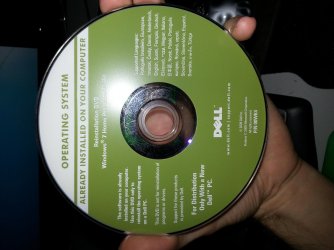
I am having issues tying to wipe and reinstall my windows installation or repair te installation I already have on one my hard drives. The reason I want to re install is that after I was changing my cpu multiplier my computer crashed while booting windows and now it wont boot at all. I am booting with a dvd (Pictured) I borrowed from a friend because mine is missing. if I try to go through set up now it just sits there..with that blue circle for hours. and then when I click repair I get the "System recovery option" window (Pictured) and just hangs there for hours..I cant get into a command prompt to make any changes and I don't know what else to do. Safe mode wont boot either. I have cleared my cmos as well
Attachments
20121007_132720.jpg
263.7 KB
· Views: 11
20121007_135205.jpg
526.7 KB
· Views: 9
My Computer
At a glance
Windows 7 professional 64 bitAmd phenom IIx4 9958 GBAMD 5770
I'd guess that the Dell disc has problems with your Me because it isn't a Dell.
I'd download a legit Windows 7 ISO from mydigitallife.info and burn it to a disc. Install from that disc. Activate with your own Product Key, which I assume you have?
My Computer
At a glance
Windows 7 Home Premium SP1, 64-bitIntel Skylake i5-6600K, not overclocked8 GB HyperX DDR4-2666 (2 x 4 GB)none; graphics are integrated on CPU
Computer type
PC/Desktop
Computer Manufacturer/Model Number
Ignatz Special; 4 speed manual gearbox; factory air conditioning; one of one
OS
Windows 7 Home Premium SP1, 64-bit
CPU
Intel Skylake i5-6600K, not overclocked
Motherboard
AsRock Z170M Extreme 4, micro ATX
Memory
8 GB HyperX DDR4-2666 (2 x 4 GB)
Graphics Card(s)
none; graphics are integrated on CPU
Sound Card
onboard: Realtek ALC1150; external: USB Behringer UF0-202
Monitor(s) Displays
Dell S2340M 23 inch IPS
Screen Resolution
1600 x 900
Hard Drives
System: Crucial MX100 series SSD, 128 GB;
Data: Samsung Spinpoint 103SJ, 1 TB;
Backup: WD Caviar Green WD30EZRX-00D8PB0, 3 TB
Microsoft Security Essentials and Malwarebytes Premium
Browser
Pale Moon
Other Info
All fans PWM; speeds at idle: CPU circa 500 rpm; intake circa 600 rpm; exhaust circa 600 rpm; CPU temps 27 idle and 47 C load in a warm room (27 C/81 F) when running Intel Extreme Tuning Utility stress test.
Burn the DVD using tool from steps 1/2 in Clean Reinstall - Factory OEM Windows 7 then boot to try several Startup Repairs. This might adjust the OS to the hardware change. If not follow the steps to get a perfect reinstall.
Microsoft Security Essentials and Malwarebytes Premium
Browser
Pale Moon
Other Info
All fans PWM; speeds at idle: CPU circa 500 rpm; intake circa 600 rpm; exhaust circa 600 rpm; CPU temps 27 idle and 47 C load in a warm room (27 C/81 F) when running Intel Extreme Tuning Utility stress test.
yeah I have 4 hard drives connected to the motherboard all sata. I used the disk utility that is part of the MAC OS to mount and burn the image. The iso came directly from Microsoft/digital river.
My Computer
At a glance
Windows 7 professional 64 bitAmd phenom IIx4 9958 GBAMD 5770
Microsoft Security Essentials and Malwarebytes Premium
Browser
Pale Moon
Other Info
All fans PWM; speeds at idle: CPU circa 500 rpm; intake circa 600 rpm; exhaust circa 600 rpm; CPU temps 27 idle and 47 C load in a warm room (27 C/81 F) when running Intel Extreme Tuning Utility stress test.



 computer.