Solved Issues with hiberfil.sys / safemode / admin / et al

ajpn

New member
Local time
6:28 AM
Messages
7
I just recently built this computer and was checking my harddrive last night and realized I was already at 87 gigs of 111 gigs available.

This made absolutely no sense since I only have Windows 7, Nero and a copy of Skyrim installed thusfar.

I started making inquiries and lo and behold I found that pagefile.sys and the aforementioned hiberfil.sys were hogging in excess of 54 gigs of my harddrive.

I started searching for methods in which to remedy this and was able to eradicate the pagefile.sys file and regain about 30 gigs of my drive.

The hiberfil.sys file has been another story. I have tried to disable hibernate and succeeded via GUI. But I cannot delete the file afterwards. I get this:

The action cannot be completed because the file is open in another program.

Thus I embarked on trying to enter: powercfg.exe -h off into the command prompt.

I get this:

You do not have permission enable or disable the Hibernate feature.

So, I figure it is because my user name, which actually does have admin privileges, is not an admin or something. I tried starting in safemode but for the life of me I can't get this computer to start in safemode. f8 = nothing except stuck key alarm.

I have followed this:

http://www.sevenforums.com/tutorials/819-hibernate-enable-disable.html

and associated links. I have searched here and on Tom's and found no one else facing the same issue.

If anyone can help me I would be eternally grateful.

Thank you in advance.
 

My Computer My Computer

At a glance

Windows 7 64 biti7-3970X32gbgtx760
Computer type
PC/Desktop
Computer Manufacturer/Model Number
Intel
OS
Windows 7 64 bit
CPU
i7-3970X
Motherboard
DX79SI
Memory
32gb
Graphics Card(s)
gtx760
Hard Drives
Corsair Force 120
Antivirus
Secutiry Essentials
Browser
IE11
When I say no one with the same issue. I mean no one who has not reached a positive conclusion.
 

My Computer My Computer

At a glance

Windows 7 64 biti7-3970X32gbgtx760
Computer type
PC/Desktop
Computer Manufacturer/Model Number
Intel
OS
Windows 7 64 bit
CPU
i7-3970X
Motherboard
DX79SI
Memory
32gb
Graphics Card(s)
gtx760
Hard Drives
Corsair Force 120
Antivirus
Secutiry Essentials
Browser
IE11
Reboot?

Hi,

In my experience the hiberfil.sys file doesn't need to be manually deleted. A simple reboot after disabling hibernation should do the trick.

Also if you have more than one power plan - check that hibernate is disabled in the settings for each power plan.

Re: Pagefile.

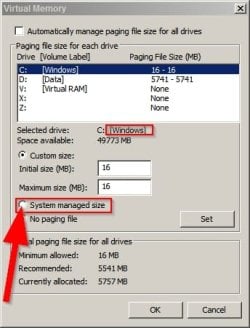
The pagefiile should not grow to a huge size. Check your Virtual Memory settings and set the page file for your windows partition to system managed size. Ignore the settings in the screenshot as they are specific to my machine. Just highlight your windows partition and select "system managed" size.

Start > Run then type:

sysdm.cpl

Press Enter.

On the "Advanced" tab choose "Settings" under "Performance" then on the "Advanced" tab select "Change" under "Virtual Memory"

Virtual Memory.jpg
 
Last edited:

My Computer My Computer

At a glance

Microsoft Windows 7 Home Premium 64-bit 7601 ...AMD C-60 APU with Radeon(tm) HD Graphics4.00 GBAMD Radeon HD 6290 Graphics
Computer type
Laptop
Computer Manufacturer/Model Number
ASUS
OS
Microsoft Windows 7 Home Premium 64-bit 7601 Multiprocessor Free Service Pack 1
CPU
AMD C-60 APU with Radeon(tm) HD Graphics
Motherboard
ASUSTeK COMPUTER INC. X501U
Memory
4.00 GB
Graphics Card(s)
AMD Radeon HD 6290 Graphics
Sound Card
(1) AMD High Definition Audio Device (2) Realtek High Defi
Screen Resolution
1366 x 768 x 32 bits (4294967296 colors) @ 60 Hz
Hard Drives
Hitachi HTS545050A7E380 SATA Disk Device
Antivirus
Comodo CIS & FW, SecureAplus App Whitelisting, Threatfire
Browser
Cyberfox 64bit, Opera 64bit, Airfox
Other Info
Spy-The-Spy, HitmanPro.Alert, Norton Connect Safe, MJRegWatcher, BitDefender TrafficLight, Voodoo Shield, Zemana AntiMalware

My Computer My Computer

At a glance

Windows 7 Ultimate X64 SP1Intel i5-2550K, Differing ~4.4-4.8GHz No buil...16GB G.Skill Sniper 1866MHz @ 2133MHz 2x8GBASUS GTX650TIB-DC2OC-2GD5, (650TI Boost)
Computer type
PC/Desktop
Computer Manufacturer/Model Number
Home Built Desktop By DataTech
OS
Windows 7 Ultimate X64 SP1
CPU
Intel i5-2550K, Differing ~4.4-4.8GHz No built in GPU
Motherboard
ASUS P8Z68-V PRO/GEN3
Memory
16GB G.Skill Sniper 1866MHz @ 2133MHz 2x8GB
Graphics Card(s)
ASUS GTX650TIB-DC2OC-2GD5, (650TI Boost)
Sound Card
Onboard Realtek 5-1
Monitor(s) Displays
Samsung P2570HD
Screen Resolution
1920x1080
Hard Drives
Samsung 840 Pro 256GB SSD for OS, 500GB Seagate Constellation (Enterprise drive) for Data
PSU
Corsair HX650W
Case
Inwin Dragon Rider
Cooling
Hyper 212 EVO w/two Noctua fans, push-pull, @1300 RPM
Keyboard
E-Z Eyes, bright yellow keys with large characters
Mouse
steelseries SENSEI Laser Pro Gaming
Internet Speed
48-51Mbs Mbs down, 11 Mbs up Xfinity Cable
Antivirus
Norton Internet Security 2013
Browser
IE 10, Opera, Pale Moon if needed
Other Info
4 case fans, LG BluRay-RE, ASUS DVD-RW, Mr. Fusion power supply, 1.21 gigawatts.
HI Callender,

Thank you. As stated, the pagefile issue was dealt with and is no longer an issue.

My issue now is only with hiberfil.sys

I have rebooted and the file is still sitting there and still hogging 23.9 gigs of my hard drive. So yeah, I would like to delete it. But I cannot because the file is still open in another program.

Nothing I do suggested in any number of forum threads is doing anything because I don't have the permissions to make those changes supposedly.
 

My Computer My Computer

At a glance

Windows 7 64 biti7-3970X32gbgtx760
Computer type
PC/Desktop
Computer Manufacturer/Model Number
Intel
OS
Windows 7 64 bit
CPU
i7-3970X
Motherboard
DX79SI
Memory
32gb
Graphics Card(s)
gtx760
Hard Drives
Corsair Force 120
Antivirus
Secutiry Essentials
Browser
IE11
Hi Britton30,

I just tried this elevated command prompt by typing %HOMEDRIVE%%HOMEPATH% into the properties box. I applied it and close it and now when I try to open the command prompt it opens it's file location on the C drive.

When I type the program into the search box and open it, it opens the user command prompt. I'm not sure how I am suppose to get the system32 command prompt to open. But typing the powercfg -h off after the only prompt I can get to opne doesn't do anything..
 

My Computer My Computer

At a glance

Windows 7 64 biti7-3970X32gbgtx760
Computer type
PC/Desktop
Computer Manufacturer/Model Number
Intel
OS
Windows 7 64 bit
CPU
i7-3970X
Motherboard
DX79SI
Memory
32gb
Graphics Card(s)
gtx760
Hard Drives
Corsair Force 120
Antivirus
Secutiry Essentials
Browser
IE11
Hi Britton30,

That worked. The elevated command prompt did it.

79 gigs of 111 hd remain now, as opposed to 28 previously!

Thank you. Big props.
 

My Computer My Computer

At a glance

Windows 7 64 biti7-3970X32gbgtx760
Computer type
PC/Desktop
Computer Manufacturer/Model Number
Intel
OS
Windows 7 64 bit
CPU
i7-3970X
Motherboard
DX79SI
Memory
32gb
Graphics Card(s)
gtx760
Hard Drives
Corsair Force 120
Antivirus
Secutiry Essentials
Browser
IE11
Good to hear, that's a good gain.
In the future just type cmd in the Start/Search field, in the results is CMD prompt, right click it and select Run as Administrator.
 

My Computer My Computer

At a glance

Windows 7 Ultimate X64 SP1Intel i5-2550K, Differing ~4.4-4.8GHz No buil...16GB G.Skill Sniper 1866MHz @ 2133MHz 2x8GBASUS GTX650TIB-DC2OC-2GD5, (650TI Boost)
Computer type
PC/Desktop
Computer Manufacturer/Model Number
Home Built Desktop By DataTech
OS
Windows 7 Ultimate X64 SP1
CPU
Intel i5-2550K, Differing ~4.4-4.8GHz No built in GPU
Motherboard
ASUS P8Z68-V PRO/GEN3
Memory
16GB G.Skill Sniper 1866MHz @ 2133MHz 2x8GB
Graphics Card(s)
ASUS GTX650TIB-DC2OC-2GD5, (650TI Boost)
Sound Card
Onboard Realtek 5-1
Monitor(s) Displays
Samsung P2570HD
Screen Resolution
1920x1080
Hard Drives
Samsung 840 Pro 256GB SSD for OS, 500GB Seagate Constellation (Enterprise drive) for Data
PSU
Corsair HX650W
Case
Inwin Dragon Rider
Cooling
Hyper 212 EVO w/two Noctua fans, push-pull, @1300 RPM
Keyboard
E-Z Eyes, bright yellow keys with large characters
Mouse
steelseries SENSEI Laser Pro Gaming
Internet Speed
48-51Mbs Mbs down, 11 Mbs up Xfinity Cable
Antivirus
Norton Internet Security 2013
Browser
IE 10, Opera, Pale Moon if needed
Other Info
4 case fans, LG BluRay-RE, ASUS DVD-RW, Mr. Fusion power supply, 1.21 gigawatts.
Back
Top