Solved Can't delete hiberfil.sys

kenC

New member
Pro User
Local time
10:43 AM
Messages
184
I notice I have 3gb in the Hibernate file (hiberfil.sys) and as I don't use hibernate I thought I'd delete it.
I tried Brink's tutorial: http://www.sevenforums.com/tutorials/819-hibernate-enable-disable.html
but it doesn't work for me.
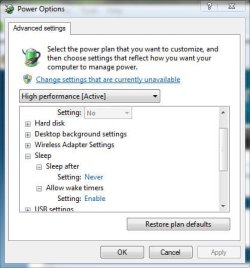
The first part - to enable hibernate works but the second part to disable doesn't show hibernate at all under 'sleep' so there's no way to set it to 'never'
Any other method?
 

My Computer

Computer Manufacturer/Model Number
Acer 7738G
OS
Windows 7 Home Premium X64 SP1
CPU
Intel Core2 duo T6600
Memory
4gb
Graphics Card(s)
Nvidia GeForce GT 1gb
Hard Drives
2 X 500 gb
On the upper part of that window there is " change settings that are currently unavailable" ,

See if that allows you to then set to never.
 

My Computer

Computer type
PC/Desktop
Computer Manufacturer/Model Number
Self Built
OS
Win 10 Pro x64
CPU
Intel I5-2500K @3.3GHz
Motherboard
Asrock P67 Extreme4
Memory
16GB G.Skill Ripjaws X (4x4GB)
Graphics Card(s)
EVGA GeForce 750 Ti SC 2GB
Sound Card
ASUS Xonar DG 5.1 Channels 24-bit 96KHz PCI Interface Sound
Monitor(s) Displays
auria eq2367
Screen Resolution
1920 x 1080
Hard Drives
250GB Samsung 850 EVO SSD
1TB WD Blue
1TB Hitachi
PSU
SeaSonic X 650W 80 Plus Gold
Case
Corsair Obsidian 750D
Cooling
Corsair H60, Three 140mm case fans
Keyboard
Logitech Wireless Keyboard K520
Mouse
Logitech Wireless Mouse M310
Internet Speed
Wave Broadband ~ 100 dn 5 up
Antivirus
Windows Defender, Malwarebytes Premium
Browser
Edge, IE11, Chrome
Other Info
Laptop specs: HP g7-1365dx /
CPU: AMD A6-3420M APU with Radeon(tm) HD Graphics /
RAM: Crucial 8Gb (2x4Gb) /
SSD: Crucial M4-CT128M4SSD2 ATA Device/ FW 000F /
GFX: AMD Radeon HD 6520G /
OS: Windows 10 Pro x64
Thanks for replying, but, no that doesn't bring up 'hibernate'
 

My Computer

Computer Manufacturer/Model Number
Acer 7738G
OS
Windows 7 Home Premium X64 SP1
CPU
Intel Core2 duo T6600
Memory
4gb
Graphics Card(s)
Nvidia GeForce GT 1gb
Hard Drives
2 X 500 gb

Attachments

  • hibernate.JPG
    hibernate.JPG
    35.6 KB · Views: 117
  • hibernate 2.JPG
    hibernate 2.JPG
    71.5 KB · Views: 245

My Computer

Computer type
PC/Desktop
Computer Manufacturer/Model Number
Self Built
OS
Win 10 Pro x64
CPU
Intel I5-2500K @3.3GHz
Motherboard
Asrock P67 Extreme4
Memory
16GB G.Skill Ripjaws X (4x4GB)
Graphics Card(s)
EVGA GeForce 750 Ti SC 2GB
Sound Card
ASUS Xonar DG 5.1 Channels 24-bit 96KHz PCI Interface Sound
Monitor(s) Displays
auria eq2367
Screen Resolution
1920 x 1080
Hard Drives
250GB Samsung 850 EVO SSD
1TB WD Blue
1TB Hitachi
PSU
SeaSonic X 650W 80 Plus Gold
Case
Corsair Obsidian 750D
Cooling
Corsair H60, Three 140mm case fans
Keyboard
Logitech Wireless Keyboard K520
Mouse
Logitech Wireless Mouse M310
Internet Speed
Wave Broadband ~ 100 dn 5 up
Antivirus
Windows Defender, Malwarebytes Premium
Browser
Edge, IE11, Chrome
Other Info
Laptop specs: HP g7-1365dx /
CPU: AMD A6-3420M APU with Radeon(tm) HD Graphics /
RAM: Crucial 8Gb (2x4Gb) /
SSD: Crucial M4-CT128M4SSD2 ATA Device/ FW 000F /
GFX: AMD Radeon HD 6520G /
OS: Windows 10 Pro x64
disable hybrid sleep and hibernation in control panel then type this in run

powercfg.exe -h off

the file should disappear

even when you disable all the stuff in control panel you cant delete that file unless you run that command
 

My Computer

OS
Windows 7 x64
disable hybrid sleep and hibernation in control panel then type this in run

powercfg.exe -h off

the file should disappear

even when you disable all the stuff in control panel you cant delete that file unless you run that command

Thanks Sem,

That's in the tutorial he's referring to in his first post.;)

Should be

In the elevated command prompt, type powercfg -h off and press Enter
 

My Computer

Computer type
PC/Desktop
Computer Manufacturer/Model Number
Self Built
OS
Win 10 Pro x64
CPU
Intel I5-2500K @3.3GHz
Motherboard
Asrock P67 Extreme4
Memory
16GB G.Skill Ripjaws X (4x4GB)
Graphics Card(s)
EVGA GeForce 750 Ti SC 2GB
Sound Card
ASUS Xonar DG 5.1 Channels 24-bit 96KHz PCI Interface Sound
Monitor(s) Displays
auria eq2367
Screen Resolution
1920 x 1080
Hard Drives
250GB Samsung 850 EVO SSD
1TB WD Blue
1TB Hitachi
PSU
SeaSonic X 650W 80 Plus Gold
Case
Corsair Obsidian 750D
Cooling
Corsair H60, Three 140mm case fans
Keyboard
Logitech Wireless Keyboard K520
Mouse
Logitech Wireless Mouse M310
Internet Speed
Wave Broadband ~ 100 dn 5 up
Antivirus
Windows Defender, Malwarebytes Premium
Browser
Edge, IE11, Chrome
Other Info
Laptop specs: HP g7-1365dx /
CPU: AMD A6-3420M APU with Radeon(tm) HD Graphics /
RAM: Crucial 8Gb (2x4Gb) /
SSD: Crucial M4-CT128M4SSD2 ATA Device/ FW 000F /
GFX: AMD Radeon HD 6520G /
OS: Windows 10 Pro x64
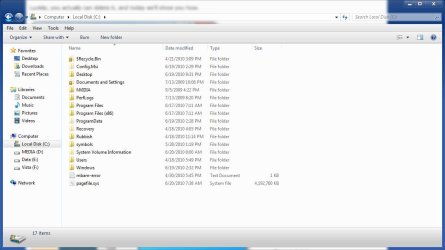
<Mine doesn't bring up hibernate either but I know it works because the hiberfil.sys folder is gone.

Have you checked to make sure yours is gone?

You need to show protected operating system files to see.>


Thanks :) I checked the hidden/files folders and, yes, it's gone!

I was checking with WinDirSat earlier and that showed it still there. However, it's not showing in that now, either.

Another satisfied customer!! Thanks again.
 

My Computer

Computer Manufacturer/Model Number
Acer 7738G
OS
Windows 7 Home Premium X64 SP1
CPU
Intel Core2 duo T6600
Memory
4gb
Graphics Card(s)
Nvidia GeForce GT 1gb
Hard Drives
2 X 500 gb
You're welcome!

Glad you got it sorted out.
 

My Computer

Computer type
PC/Desktop
Computer Manufacturer/Model Number
Self Built
OS
Win 10 Pro x64
CPU
Intel I5-2500K @3.3GHz
Motherboard
Asrock P67 Extreme4
Memory
16GB G.Skill Ripjaws X (4x4GB)
Graphics Card(s)
EVGA GeForce 750 Ti SC 2GB
Sound Card
ASUS Xonar DG 5.1 Channels 24-bit 96KHz PCI Interface Sound
Monitor(s) Displays
auria eq2367
Screen Resolution
1920 x 1080
Hard Drives
250GB Samsung 850 EVO SSD
1TB WD Blue
1TB Hitachi
PSU
SeaSonic X 650W 80 Plus Gold
Case
Corsair Obsidian 750D
Cooling
Corsair H60, Three 140mm case fans
Keyboard
Logitech Wireless Keyboard K520
Mouse
Logitech Wireless Mouse M310
Internet Speed
Wave Broadband ~ 100 dn 5 up
Antivirus
Windows Defender, Malwarebytes Premium
Browser
Edge, IE11, Chrome
Other Info
Laptop specs: HP g7-1365dx /
CPU: AMD A6-3420M APU with Radeon(tm) HD Graphics /
RAM: Crucial 8Gb (2x4Gb) /
SSD: Crucial M4-CT128M4SSD2 ATA Device/ FW 000F /
GFX: AMD Radeon HD 6520G /
OS: Windows 10 Pro x64
Hi all, this information was very usefull for me. I dont know why but the correct command that works for me was the one with the .exe

powercfg.exe -h off

I have tryed the other

powercfg -h off

but didnt deleted the file.

Best regards

luismo
 

My Computer

Computer type
Laptop
Computer Manufacturer/Model Number
DELL 4200
OS
Windows 7 Profesional, 64 bit
Hard Drives
SSD 160 Gb
I'm following the instructions given in this thread but always get this error message: C:\Users\fred\PowerCfg.exe -h off is not a valid WIN32 application. I'm running Home Premium 64 bit SP1. Any assist appreciated ... Never mind ... I needed to enter 'cd \' (without the quotes) first ...
 
Last edited:

My Computer

Computer Manufacturer/Model Number
HP dv6t-2100
OS
Windows 7 Home Premium 64bit.
CPU
Intel Core i5 CPU M 430 @ 2.27GHz, 2261 MHz
Memory
4GB
Hard Drives
Toshiba MK5056GSY

My Computer

OS
Windows 7 Pro RTM
CPU
Intel Core2Duo E6750 @ 2.66 GHz
Motherboard
ASUS P5KR
Memory
2x 1GB + 2x 500MB = 3GB GEIL DDR2
Graphics Card(s)
EVGA GeoForce 9500GT 1GB DDR2 PCI
Sound Card
Creative Sound Blaster X-Fi Xtreme Audio
Monitor(s) Displays
Samsung 22" LCD 2232GW 2ms
Screen Resolution
3000:1
Hard Drives
Internal:
Seagate 80 GB SATA/7200/32MB-O/S
Seagate 250 GB SATA/7200/32MB-Applications
2x Seagate 1 TB SATA/7200/32MB-Data
Externals (3x Cases):
Seagate 1 TB SATA/7200/32MB-Data
2x Seagate 500GB SATA/7200/32MB/RAID1-Backups
Maxtor 250GB/EDI-Old
PSU
Enermax 460
Case
Thermaltake Kandalf SL
Cooling
7x Internal Fans in Case
Keyboard
Microsoft Wired RT2300
Mouse
Logitech Trackman
Other Info
Internet Modem/Router -
Linksys ADSL2 Gateway 4-Port
AG241
Back
Top