Issues with Media Player

DarthWenus

New member
Local time
1:31 AM
Messages
1
So the issue I am having it when it comes to removing music from my media library. I cannot delete a single song, an artist or a single album. I had to move all my music to another drive since I was running low on space on my main drive but, now I'm having my current issues. I can still add in the music files from the new location on my drive but, now my media player is listing duplicates of each song. One files will player as usual but, the other won't and when I click on this file, the message prompt says the file cannot be located. It's understandable that the program would warn me of the issue but, this shouldn't be an issue if I could simply delete those empty files from my library. Just right now I check the properties of one of the files and I get this:

C:\$RECYCLE.BIN\S-1-5-21-3562425829-811864874-3300820589-1002\$RBVGTM1\Glastonbury '04\Citizen Erased.mp3

My recycle bin is empty. Could I have a virus?

Anyways, any help would be greatly appreciated.
 

My Computer

Computer type
Laptop
OS
Canada
The files showing in the library are NOT duplicates of the files on your main storage hard drive. They are just links to the location where the actual files are stored. If you move that location then the links wont work. You need to empty the library and start again adding to the library from the new location!
If you think you have a virus, do you have an up to date A/V software installed?
 

My Computer

Computer type
PC/Desktop
OS
Microsoft Windows 7 Home Premium 64-bit 7601 Multiprocessor Free Service Pack 1
CPU
Intel(R) Core(TM) i7-3770 CPU @ 3.40GHz
Motherboard
ASUSTeK COMPUTER INC. P8H77-M
Memory
8.00 GB
Graphics Card(s)
Intel(R) HD Graphics 4000
Sound Card
On Board
Monitor(s) Displays
Dell 24"
Screen Resolution
1920 x 1080
Hard Drives
(1) INTEL SSDSC2CT180A3 ATA Device (2) ST500DM002-1BD142 ATA Device (3) WDC WD3200AAKS-75L9A0 ATA Device (4) Generic- Compact Flash USB Device (5) Generic- MS/MS-Pro USB Device (6) Generic- SD/MMC USB Device (7) Generic- SM/xD-Picture USB
PSU
500w Corsair
Case
Cooler Master
Cooling
3 Fans
Keyboard
Logitech MK300
Mouse
Logitech WOM
Internet Speed
75Mb
Antivirus
Norton 360
Browser
Firefox, Opera, IE
also just make sure in wmp options that you have unchecked "delete from computer when deleting from media player."

as mitchell says you need to clear the library before setting up again.
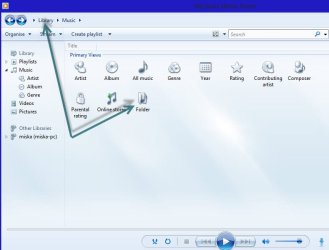
one way to do it is to click library at the top of wmp, then click the folder icon ,open that then delete the lot, making sure the delete from pc is unchecked first.
then close wmp and it should rebuild the library when you re open wmp.

wmp.jpg
 

My Computer

Computer Manufacturer/Model Number
Hewlett packard/p6512uk
OS
Microsoft Windows 7 Home Premium 64-bit 7600
CPU
IIx4 amd athelon 635 processor
Motherboard
FOXCONN 2AA9
Memory
2x2gb
Graphics Card(s)
ati radeon HD 5450
Sound Card
(1) Realtek High Definition Audio (2) AMD High Definition
Monitor(s) Displays
samsung lcd tv 32"
Screen Resolution
1360x 768
Hard Drives
(1) WDC WD10 01FAES-60Z2A0 SATA Disk Device (2) Maxtor OneTouch USB Device (3) ST310003 33AS USB Device (4) WD My Book 1111 USB Device
PSU
?
Cooling
air!
Keyboard
wireless hp
Mouse
wireless Hp,optical
Internet Speed
1.10mb/s
Antivirus
MSE
Browser
Firefox
Back
Top