Issues with Windows 7 identifier

lincer556

New member
Member
Local time
10:15 AM
Messages
35
Location
Argentina
Hello guys!
Well this is kinda odd since my pc has no problems but i need to repair this kind of CRITICAL mistake, because is not an error...

Thing goes like this, i've cloned my drive from a 160gb disk to a 320 one with XXCLONE utility, and since then, Windows has a strange boot, my Windows work on spanish and the boot is in english...

The problem is the next, i know that to fix this, i need to repair boot or something like it, but here's were it comes trouble and makes all the mistakes, the Windows identifier under BOOT sequence is broken, need to show you a picture of the 'Boot' section of msconfig for you guys to understand me
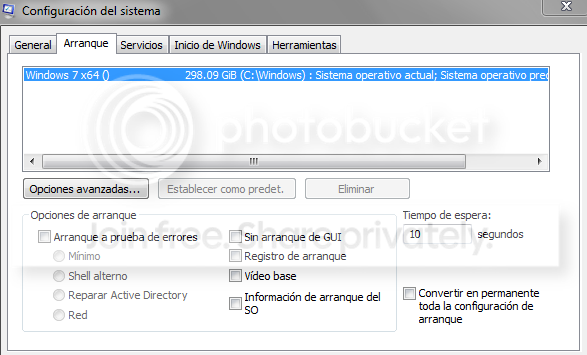
windows.png


As you can see, the identifier is broken because is says "Windows 7 x64 () 298.09GiB" and i know that this need's to say "Windows 7 x64 (Professional)" the issues of this mismatch on the identifier is that i cannot do any type Repair/Upgrade install with the Windows 7 disk, the same used to install the system... And also i cannot repair the system because the mismatch...

Windows works, but if i have any type of problem on the system, i cannot repair it....

Please guys, i need help for correcting this ''Clone'' Windows issue, and thanks!
 

My Computer My Computer

Computer type
PC/Desktop
Computer Manufacturer/Model Number
ISEA Creations Desktop
OS
Windows 7 Professional x64 (Build 7601 RTM)
CPU
Intel i5 2310
Motherboard
ASUS P8H61M-LX
Memory
4GB DDR3 1333mhz Kingston
Graphics Card(s)
XFX GTS250 512mb
Sound Card
Realtek High Definition 5.1
Monitor(s) Displays
Samsung SyncMaster SA3''
Screen Resolution
1600x9000
Hard Drives
Samsung 320gb (HD322HJ)
Seagate Barracuda ST500DM002
Case
EQQUS
Keyboard
A4 Tech Mini
Mouse
A4 Tech X-750F Laser 2500dpi
Internet Speed
3mbps
Antivirus
Avast Free
Make sure the 160GB drive is not connected to the PC and try it. Also...
This may help, run the steps outlined in this tutorial, Option Two, and reboot the system:
http://www.sevenforums.com/tutorials/1538-sfc-scannow-command-system-file-checker.html#post14392
If that doesn't correct the issue, run it two or more times with a reboot between.
You may get this result:
Code:
Windows Resource Protection found corrupt files and successfully repaired
them. Details are included in the CBS.Log windir\Logs\CBS\CBS.log. For
example C:\Windows\Logs\CBS\CBS.log
The system file repair changes will take effect after the next reboot.
Or a message that no integrity violations were found.
Or that Windows Resource Protection found errors it cannot repair, if so rerun the steps above.

Untitled.jpg
 

My Computer My Computer

Computer type
PC/Desktop
Computer Manufacturer/Model Number
Home Built Desktop By DataTech
OS
Windows 7 Ultimate X64 SP1
CPU
Intel i5-2550K, Differing ~4.4-4.8GHz No built in GPU
Motherboard
ASUS P8Z68-V PRO/GEN3
Memory
16GB G.Skill Sniper 1866MHz @ 2133MHz 2x8GB
Graphics Card(s)
ASUS GTX650TIB-DC2OC-2GD5, (650TI Boost)
Sound Card
Onboard Realtek 5-1
Monitor(s) Displays
Samsung P2570HD
Screen Resolution
1920x1080
Hard Drives
Samsung 840 Pro 256GB SSD for OS, 500GB Seagate Constellation (Enterprise drive) for Data
PSU
Corsair HX650W
Case
Inwin Dragon Rider
Cooling
Hyper 212 EVO w/two Noctua fans, push-pull, @1300 RPM
Keyboard
E-Z Eyes, bright yellow keys with large characters
Mouse
steelseries SENSEI Laser Pro Gaming
Internet Speed
48-51Mbs Mbs down, 11 Mbs up Xfinity Cable
Antivirus
Norton Internet Security 2013
Browser
IE 10, Opera, Pale Moon if needed
Other Info
4 case fans, LG BluRay-RE, ASUS DVD-RW, Mr. Fusion power supply, 1.21 gigawatts.
Hello Lincer,

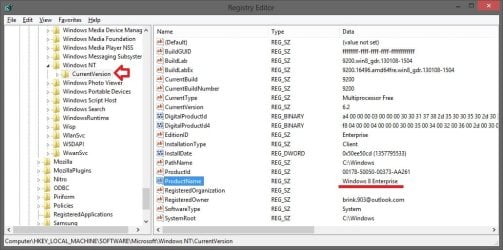
That is only the name listed in the "Windows Boot Manager" screen at boot. It's not what is used to identify the OS.

Instead, the registry location below is what is used to ID the OS.
HKEY_LOCAL_MACHINE\SOFTWARE\Microsoft\Windows NT\CurrentVersion

Windows_name.jpg
If you like, the tutorial below can help show you how to change this OS name displayed in msconfig and "Windows Boot Manager" to what you like instead.
Hope this helps, :)
Shawn
 

My Computer My Computer

Computer type
PC/Desktop
Computer Manufacturer/Model Number
Self built custom
OS
64-bit Windows 11 Pro for Workstations
CPU
Intel i7-8700K OC'd to 5 GHz
Motherboard
ASUS ROG Maximus XI Formula Z390
Memory
64 GB (4x16GB) G.SKILL TridentZ RGB DDR4 3600 MHz
Graphics Card(s)
ASUS ROG-STRIX-GTX1080TI-O11G-GAMING
Sound Card
Integrated
Monitor(s) Displays
2 x Samsung Odyssey G7 27"
Screen Resolution
2560x1440
Hard Drives
1TB Samsung 990 PRO M.2,
4TB Samsung 990 PRO PRO M.2,
TerraMaster F8 SSD Plus NAS
PSU
Seasonic Prime Titanium 850W
Case
Thermaltake Core P3
Cooling
Corsair Hydro H115i
Keyboard
Logitech wireless K800
Mouse
Logitech MX Master 4
Internet Speed
2 Gb/s Download and 100 Mb/s Upload
Antivirus
Malwarebyte Anti-Malware Premium
Browser
Google Chrome
Other Info
Logitech Z625 speaker system,
Logitech BRIO 4K Pro webcam,
HP Color LaserJet Pro MFP M477fdn,
APC SMART-UPS RT 1000 XL - SURT1000XLI,
Galaxy S23 Plus phone
Make sure the 160GB drive is not connected to the PC and try it. Also...
This may help, run the steps outlined in this tutorial, Option Two, and reboot the system:
http://www.sevenforums.com/tutorials/1538-sfc-scannow-command-system-file-checker.html#post14392
If that doesn't correct the issue, run it two or more times with a reboot between.
You may get this result:
Code:
Windows Resource Protection found corrupt files and successfully repaired
them. Details are included in the CBS.Log windir\Logs\CBS\CBS.log. For
example C:\Windows\Logs\CBS\CBS.log
The system file repair changes will take effect after the next reboot.
Or a message that no integrity violations were found.
Or that Windows Resource Protection found errors it cannot repair, if so rerun the steps above.

View attachment 258801

Already tried the CBS last night with no good results, actually sorry for the foreign language, it says "Current Operating System, Default Operating System"

Hello Lincer,

That is only the name listed in the "Windows Boot Manager" screen at boot. It's not what is used to identify the OS.

Instead, the registry location below is what is used to ID the OS.
HKEY_LOCAL_MACHINE\SOFTWARE\Microsoft\Windows NT\CurrentVersion

View attachment 258878
If you like, the tutorial below can help show you how to change this OS name displayed in msconfig and "Windows Boot Manager" to what you like instead.Hope this helps, :)
Shawn

Gonna try this one Shawn!

EDIT: I've found another issue, while trying to perform a ''Repair Install'' the Windows 7 compatibility report it says the next:
Compatibilidad.png


Translated it's quite simple:
-Cannot update from a Windows version of 64 bits to another from 32 bits. For update, get a 64 bits version of the install disk of Windows or check this website to see how to install Windows 7 without losing Files and Configs (Ps. nothing intresting here)

This is driving me nuts, i've tried to fix files with the sfc and repair the identifier, but nothing seems to work...
DSC_0449.jpg

Sorry for crappy quality, basically this is the Windows 7 DVD at boot and trying to repair system, but mostly it's like the same as que "Compatibility Report" at the repair install...

Needless to say, that this is the same DVD that installed my Windows 7 unto my PC.
 
Last edited:

My Computer My Computer

Computer type
PC/Desktop
Computer Manufacturer/Model Number
ISEA Creations Desktop
OS
Windows 7 Professional x64 (Build 7601 RTM)
CPU
Intel i5 2310
Motherboard
ASUS P8H61M-LX
Memory
4GB DDR3 1333mhz Kingston
Graphics Card(s)
XFX GTS250 512mb
Sound Card
Realtek High Definition 5.1
Monitor(s) Displays
Samsung SyncMaster SA3''
Screen Resolution
1600x9000
Hard Drives
Samsung 320gb (HD322HJ)
Seagate Barracuda ST500DM002
Case
EQQUS
Keyboard
A4 Tech Mini
Mouse
A4 Tech X-750F Laser 2500dpi
Internet Speed
3mbps
Antivirus
Avast Free
Are you using a 64 bit Installation DVD or System Repair Disk to try the repairs? The screenshot shows you are in boot mode which probably means you're trying to run Startup Repair or SFC /SCANNOW Run in Command Prompt at Boot , not a Repair Install which is run from the desktop. I would run both.

Thing is, i cannot make any type of repair, nor going to DVD boot and execute SFC or Startup Repair, and not even Repair Install... There's something on my system that is badly broke, the PC works, i can use it, but i need to repair this before having any kind of trouble wich if i had, wouldn't be able to repair since i can't execute the system repair tools.
 

My Computer My Computer

Computer type
PC/Desktop
Computer Manufacturer/Model Number
ISEA Creations Desktop
OS
Windows 7 Professional x64 (Build 7601 RTM)
CPU
Intel i5 2310
Motherboard
ASUS P8H61M-LX
Memory
4GB DDR3 1333mhz Kingston
Graphics Card(s)
XFX GTS250 512mb
Sound Card
Realtek High Definition 5.1
Monitor(s) Displays
Samsung SyncMaster SA3''
Screen Resolution
1600x9000
Hard Drives
Samsung 320gb (HD322HJ)
Seagate Barracuda ST500DM002
Case
EQQUS
Keyboard
A4 Tech Mini
Mouse
A4 Tech X-750F Laser 2500dpi
Internet Speed
3mbps
Antivirus
Avast Free
Lincer,

We need to know if you are booting from a 32-bit or 64-bit DVD.

The error you are getting is basically saying that you must boot from a 64-bit DVD instead.
 

My Computer My Computer

Computer type
PC/Desktop
Computer Manufacturer/Model Number
Self built custom
OS
64-bit Windows 11 Pro for Workstations
CPU
Intel i7-8700K OC'd to 5 GHz
Motherboard
ASUS ROG Maximus XI Formula Z390
Memory
64 GB (4x16GB) G.SKILL TridentZ RGB DDR4 3600 MHz
Graphics Card(s)
ASUS ROG-STRIX-GTX1080TI-O11G-GAMING
Sound Card
Integrated
Monitor(s) Displays
2 x Samsung Odyssey G7 27"
Screen Resolution
2560x1440
Hard Drives
1TB Samsung 990 PRO M.2,
4TB Samsung 990 PRO PRO M.2,
TerraMaster F8 SSD Plus NAS
PSU
Seasonic Prime Titanium 850W
Case
Thermaltake Core P3
Cooling
Corsair Hydro H115i
Keyboard
Logitech wireless K800
Mouse
Logitech MX Master 4
Internet Speed
2 Gb/s Download and 100 Mb/s Upload
Antivirus
Malwarebyte Anti-Malware Premium
Browser
Google Chrome
Other Info
Logitech Z625 speaker system,
Logitech BRIO 4K Pro webcam,
HP Color LaserJet Pro MFP M477fdn,
APC SMART-UPS RT 1000 XL - SURT1000XLI,
Galaxy S23 Plus phone
Back
Top