
Windows 7:
Checked in at Windows Update and found two that needed to be done; ran the usual "update" click and then was presented with Error Code 800F020B -- which, from a www search appears to be a regular little the-gift-that-keeps-on-giving-all-year-long that Microsoft bestows on people. . .
So: One of the online solutions was to go to MS (https://www.microsoft.com/en-us/download/details.aspx?id=49924) and download Debug Diagnostic Tool v2 Update 2, which I did.
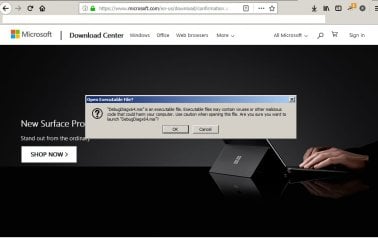
However: When attempting to run the downloaded .exe file, the attached warning popped up.
Why: Please, do tell, should a supposedly "official" download from an official MS website show up with a BEWARE of this download message? (I'm not even interested in attempting to navigate through MS's swamp of imaginary online "support" and "help" offerings because I have other things to do for the next day-and-a-half!)
Any info about whether it's safe to just pass by the BEWARE popup?
Many thanks!
Checked in at Windows Update and found two that needed to be done; ran the usual "update" click and then was presented with Error Code 800F020B -- which, from a www search appears to be a regular little the-gift-that-keeps-on-giving-all-year-long that Microsoft bestows on people. . .
So: One of the online solutions was to go to MS (https://www.microsoft.com/en-us/download/details.aspx?id=49924) and download Debug Diagnostic Tool v2 Update 2, which I did.
However: When attempting to run the downloaded .exe file, the attached warning popped up.
Why: Please, do tell, should a supposedly "official" download from an official MS website show up with a BEWARE of this download message? (I'm not even interested in attempting to navigate through MS's swamp of imaginary online "support" and "help" offerings because I have other things to do for the next day-and-a-half!)
Any info about whether it's safe to just pass by the BEWARE popup?
Many thanks!
Attachments
My Computer
At a glance
Windows 7 Home Premium (x64) Service Pack 1
- Computer type
- PC/Desktop
- Computer Manufacturer/Model Number
- Hard Drives NW
- OS
- Windows 7 Home Premium (x64) Service Pack 1

