It detects a nonexistent second monitor - the cursor goes out of view

255

New member
Member
Local time
4:58 PM
Messages
33
Please take into consideration that I'm translating terms from my language, so the actual Win7 options names can be different.

Post edited for recapitulation of the problem.
Sometimes my cursor goes out of view (to the right). I know that the cursor is almost invisible when it hits the right, but it's not that, it's actually going far off the screen and I have to move the mouse a lot back before seeing the cursor again.
This happens because windows detects a second nonexistent monitor.

If I go to "Screen resolution" and I click "Detect", another monitor appears on the right, near the first one; and it says: "another display not detected".
Clicking on it it says:
Screen: disponible output screen for: ATI Radeon HD 5700 Series.

When I first log in, the mouse stops where it's supposed to stop. I discovered that the "bug" happens when I logoff and log in with another user. When logging off and returning to my account, if I move the mouse at the right edge, it goes off the screen, on the ghost monitor to the right.
So I have to go to screen resolution, clicking "Detect" and "OK" and then everything gets ok.

This problem is annoying because sometimes you just happen to lose your pointer.
Also, closing a fully maximized window with the "X" is annoying because the cursor goes too far and don't hit the "X" button. You have to slowly point at it, you can't do fast moves.

On the Monitors category of Device Manager there's only one monitor:
generic monitor plug and play. ID hardware PHLC074, which seems correct since its Philips.
I'm using VGA (connected on the VGA input of my ASUS EAH5770 CUcore).

I played on the "Screen resolution" window a lot, but whatever thing I do the problem re-appears the next time I load the OS and I log in with multiple accounts.
My monitor is 246EL2SBH Philips, my GPU the ASUS EAH5770 CUcore and my motherboard it's PC-AM3RS890G (Sapphire).
Monitor's and GPU's latest drivers are installed.

What I tried
Formatting Windows. So it's not about old monitors/old GPUs.
Using "Screen resolution" to disable the ghost monitor.
Using AMD Catalyst control center to disable the ghost monitor.

dsperber seems to have that problem too. Please see its post so you can also see an image with the problem (he has two monitors and the third nonexistent one appears on the right; I have one monitor and the ghost as the second one): http://www.sevenforums.com/graphic-...nitor-cursor-goes-out-view-3.html#post1892557

Is this a bug of Windows 7?
 
Last edited:

My Computer My Computer

At a glance

Windows 7 Ultimate 64bitHD 5770
Computer type
PC/Desktop
OS
Windows 7 Ultimate 64bit
Graphics Card(s)
HD 5770
Monitor(s) Displays
Philips 246EL2SBH
Are you saying that Catalyst Control Center thinks you have two monitors connected but you only have one? Strange.

Incidentally, I too have a Sapphire dual-DVI HD5770 in my machine (ASUS P5Q3). But I actually DO have two monitors... both Eizo 24" LCD's running at 1920x1200 each.

Anyway, you can certainly get rid of the extended desktop, i.e. the phantom second monitor using CCC.

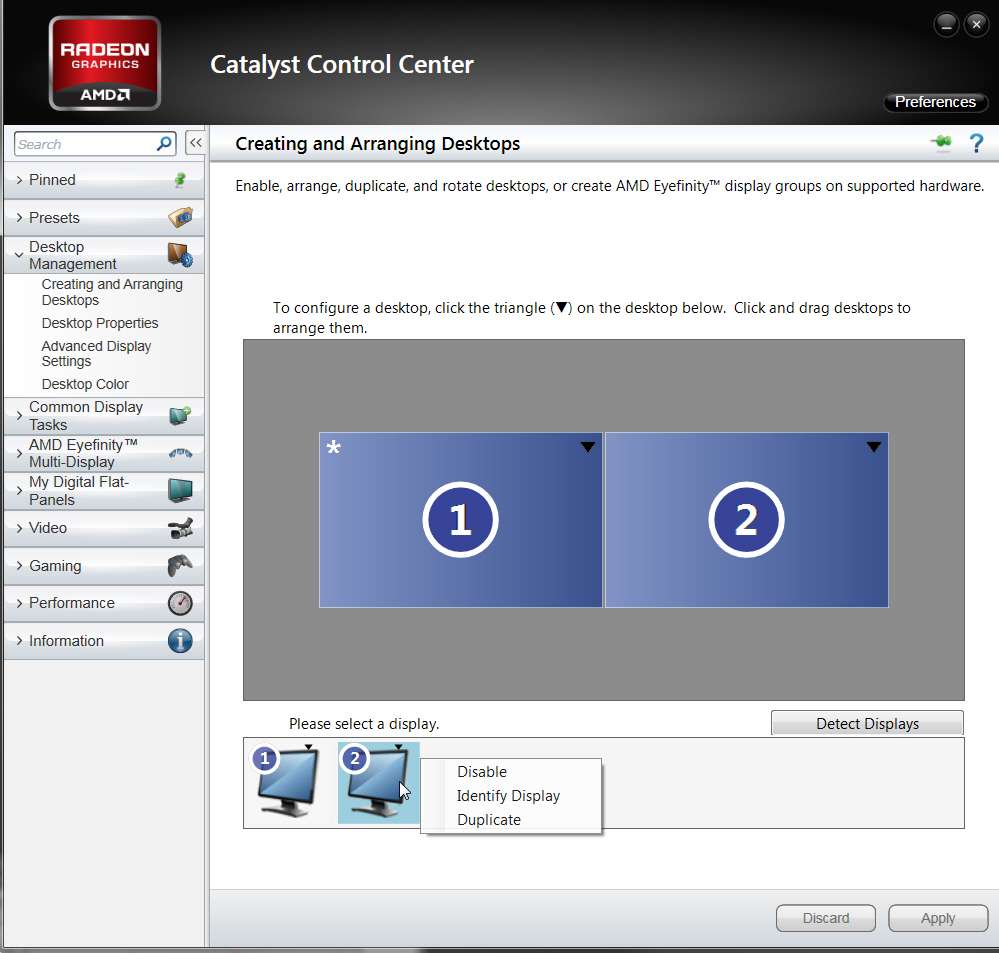
Right-click on desktop, select Catalyst Control Center. Then go into Desktop Management, Creating and Arranging Desktops.

If you really do see "1" and "2" then for some reason the HD5770 thinks you have two monitors connected! Very odd.

But you can certainly disable "2". Just right-click on the second monitor icon in the lower part of the display, and select "disable".

disablemonitor2.jpg


Does that help?
 

My Computer My Computer

At a glance

Windows 7 Pro x64 (1), Win7 Pro X64 (2)i5-3350p 3.1Ghz/6MB-cache (1); E8400 3.0Ghz/6...8GB PC3-12800 DDR3 (1); 4GB PC3-10600 DDR3 (2)ATI HD7750 (1), (see TV cards); ATI R7 250 (2)
Computer type
PC/Desktop
Computer Manufacturer/Model Number
Home-built, two systems (1) and (2)
OS
Windows 7 Pro x64 (1), Win7 Pro X64 (2)
CPU
i5-3350p 3.1Ghz/6MB-cache (1); E8400 3.0Ghz/6MB-cache (2)
Motherboard
ASUS P8Z77-V Pro (1); ASUS P5Q3 (2)
Memory
8GB PC3-12800 DDR3 (1); 4GB PC3-10600 DDR3 (2)
Graphics Card(s)
ATI HD7750 (1), (see TV cards); ATI R7 250 (2)
Sound Card
Realtek ALC892 HD Audio (1); Realtek ALC1200 HD Audio (2)
Monitor(s) Displays
Eizo HD2441W LCD, Eizo S2433W (1); Eizo 24" S2433W (2)
Screen Resolution
1920x1200, 1920x1200 (1); 1920x1200 (2)
Hard Drives
(1) 1TB SATA-II (7200RPM), 2x2TB SATA-III (7200RPM), 250GB SATA-III (10000RPM) for OS; 2x2TB external USB 3.0

(2) 320GB SATA-II (7200RPM), 750GB SATA-II (7200RPM), 150GB SATA-II (10000RPM) for OS; 2TB external USB 3.0
PSU
Nesteq ECS-6001 600W (1); Nesteq ECS-5001 500W (2)
Case
Acousti-Case 360 (1) and (2)
Cooling
Noctua NH-U12P SE2 for CPU, 2x120mm case fans (1) and (2)
Keyboard
IBM PS/2 (1) and (2)
Mouse
Logitech MX Revolution wireless (1); Microsoft wired (2)
Internet Speed
100mbps down / 10mbps up
Antivirus
Microsoft Security Essentials; Malwarebyte Anti-Malware Pro
Browser
Firefox
Other Info
Ceton InfiniTV 4-tuner cablecard-enabled TV card as well as Hauppauge HVR-2250 OTA/ATSC 2-tuner TV card in (1), running under Win7 WMC
Are you saying that Catalyst Control Center thinks you have two monitors connected but you only have one?
Actually: right click on desktop ->screen resolution, but yes, I didn't think about changing that on CCC. It seems it works now. Thank you.
 

My Computer My Computer

At a glance

Windows 7 Ultimate 64bitHD 5770
Computer type
PC/Desktop
OS
Windows 7 Ultimate 64bit
Graphics Card(s)
HD 5770
Monitor(s) Displays
Philips 246EL2SBH
Damn, problem still not solved. The problem appears again. Now the second one is "generic non-plug and play monitor", 1024x768.
 

My Computer My Computer

At a glance

Windows 7 Ultimate 64bitHD 5770
Computer type
PC/Desktop
OS
Windows 7 Ultimate 64bit
Graphics Card(s)
HD 5770
Monitor(s) Displays
Philips 246EL2SBH
Did you ever actually have two monitors plugged in at one time?
 

My Computer My Computer

At a glance

Windows 7 Pro x64 (1), Win7 Pro X64 (2)i5-3350p 3.1Ghz/6MB-cache (1); E8400 3.0Ghz/6...8GB PC3-12800 DDR3 (1); 4GB PC3-10600 DDR3 (2)ATI HD7750 (1), (see TV cards); ATI R7 250 (2)
Computer type
PC/Desktop
Computer Manufacturer/Model Number
Home-built, two systems (1) and (2)
OS
Windows 7 Pro x64 (1), Win7 Pro X64 (2)
CPU
i5-3350p 3.1Ghz/6MB-cache (1); E8400 3.0Ghz/6MB-cache (2)
Motherboard
ASUS P8Z77-V Pro (1); ASUS P5Q3 (2)
Memory
8GB PC3-12800 DDR3 (1); 4GB PC3-10600 DDR3 (2)
Graphics Card(s)
ATI HD7750 (1), (see TV cards); ATI R7 250 (2)
Sound Card
Realtek ALC892 HD Audio (1); Realtek ALC1200 HD Audio (2)
Monitor(s) Displays
Eizo HD2441W LCD, Eizo S2433W (1); Eizo 24" S2433W (2)
Screen Resolution
1920x1200, 1920x1200 (1); 1920x1200 (2)
Hard Drives
(1) 1TB SATA-II (7200RPM), 2x2TB SATA-III (7200RPM), 250GB SATA-III (10000RPM) for OS; 2x2TB external USB 3.0

(2) 320GB SATA-II (7200RPM), 750GB SATA-II (7200RPM), 150GB SATA-II (10000RPM) for OS; 2TB external USB 3.0
PSU
Nesteq ECS-6001 600W (1); Nesteq ECS-5001 500W (2)
Case
Acousti-Case 360 (1) and (2)
Cooling
Noctua NH-U12P SE2 for CPU, 2x120mm case fans (1) and (2)
Keyboard
IBM PS/2 (1) and (2)
Mouse
Logitech MX Revolution wireless (1); Microsoft wired (2)
Internet Speed
100mbps down / 10mbps up
Antivirus
Microsoft Security Essentials; Malwarebyte Anti-Malware Pro
Browser
Firefox
Other Info
Ceton InfiniTV 4-tuner cablecard-enabled TV card as well as Hauppauge HVR-2250 OTA/ATSC 2-tuner TV card in (1), running under Win7 WMC
No, but I had a different monitor some months ago, which then I've thrown away.
I've recently restored the Windows partition from an old backup (this is how I re-install windows), but maybe this backup still has some settings of the old monitor, so this could be the cause. Even if this is the case, how could I solve this (apart re-installing windows of course).
 

My Computer My Computer

At a glance

Windows 7 Ultimate 64bitHD 5770
Computer type
PC/Desktop
OS
Windows 7 Ultimate 64bit
Graphics Card(s)
HD 5770
Monitor(s) Displays
Philips 246EL2SBH
Have you tried plugging the monitor in to the other port on the graphics card?
 

My Computer My Computer

At a glance

Windows 8.1 Pro RTM x64Intel Core-i5-3570K 4-core @ 3.4GHz (Ivy Brid...4 x 4GB DDR3-1600 Corsair Vengeance CMZ8GX3M2...MSI GeForce GTX770 Gaming OC 2GB
Computer type
PC/Desktop
Computer Manufacturer/Model Number
Dwarf Dwf/11/2012 r09/2013
OS
Windows 8.1 Pro RTM x64
CPU
Intel Core-i5-3570K 4-core @ 3.4GHz (Ivy Bridge) (OC 4.4GHz)
Motherboard
ASRock Z77 Extreme4-M
Memory
4 x 4GB DDR3-1600 Corsair Vengeance CMZ8GX3M2A1600C9B (16GB)
Graphics Card(s)
MSI GeForce GTX770 Gaming OC 2GB
Sound Card
Realtek High Definition on board solution (ALC 898)
Monitor(s) Displays
ViewSonic VA1912w Widescreen (VGA)
Screen Resolution
1440x900
Hard Drives
OCZ Agility 3 SSD 120GB SATA III x2 (RAID 0)
Samsung HD501LJ 500GB SATA II x2
Hitachi HDS721010CLA332 1TB SATA II
Iomega 1.5TB Ext USB 2.0
WD 2.0TB Ext USB 3.0
PSU
XFX Pro Series 850W Semi-Modular
Case
Gigabyte IF233
Cooling
1 x 120mm Front Inlet 1 x 120mm Rear Exhaust
Keyboard
Microsoft Comfort Curve Keyboard 3000 (USB)
Mouse
Microsoft Comfort Mouse 3000 for Business (USB)
Internet Speed
NetGear DG834Gv3 ADSL Modem/Router (Ethernet) ~4.0 Mb/s (O2)
Antivirus
Avast! 8.0.1497
Browser
IE 11
Other Info
Optical Drive: HL-DT-ST BD-RE BH10LS30 SATA Bluray
Lexmark S305 Printer/Scanner/Copier (USB)
WEI Score: 8.1/8.1/8.5/8.5/8.25
Asus Eee PC 1011PX Netbook (Windows 7 x86 Starter)
Cannot. The other input is DVI and I don't have such cable. Do you think that the cause could be the VGA connection? Weird.
 

My Computer My Computer

At a glance

Windows 7 Ultimate 64bitHD 5770
Computer type
PC/Desktop
OS
Windows 7 Ultimate 64bit
Graphics Card(s)
HD 5770
Monitor(s) Displays
Philips 246EL2SBH
The actual cause is the old image still has the old monitor in it, look in device manager and see if there are 2 monitors listed, pick the old monitor and delete it from there, restart and see if it recognizes your new monitor.
 

My Computer My Computer

At a glance

Windows 7 Home Premium 64 bitIntel Core 2 quad Extreme Q9770 @ 3.2 GHz4x2 GB Muskin 1600 MHz ramNVidia GTX 250
Computer Manufacturer/Model Number
Dell XPS 730
OS
Windows 7 Home Premium 64 bit
CPU
Intel Core 2 quad Extreme Q9770 @ 3.2 GHz
Memory
4x2 GB Muskin 1600 MHz ram
Graphics Card(s)
NVidia GTX 250
Sound Card
Soundblaster X-Fi Fatality Champion
Monitor(s) Displays
2 Dell 2007WFP Ultrascans
Screen Resolution
3360 x 1050
Hard Drives
WD Black 1TB sata, 2-WD Black 500 sata, 2-Seagate 500 Go external
PSU
1000 Watt
Cooling
air
Keyboard
MS Natrual Keyboard Pro
Mouse
Logitech Wireless Trackball
Internet Speed
DSL Elite
Cannot. The other input is DVI and I don't have such cable. Do you think that the cause could be the VGA connection? Weird.
You can buy a DVI-to-VGA adapter, and then try that.

I believe that as was suggested that your previous situation has left indications in Windows that you actually have (or had) two monitors. And I fear that even if you switch your single-monitor situation over to the other port (with a DVI-to-VGA adapter) Windows will simply swap what it considers monitor #1 in a 2-monitor situation. I'm not sure you're going to be able to fix this "phantom second monitor" symptom at this point.

I had a similar situation just this week, as I'm still recovering from my own upgrade to an HD5770 (dual-DVI) card from an HD4850 (DVI and VGA). I actually swapped two machines, keeping the CPU and motherboard in each machine and reversing the internal peripheral cards and non-C hard drives. The HD4850 remained in the machine that had originally been a dual-monitor Win7, but with the machine reversal it now was in a one-monitor Win7 configuration. And the other one-monitor machine that got swapped... it had its HD4670 (supporting a single VGA monitor) removed and replaced by the dual-DVI HD5770 for my two LCD monitors, and was no longer a one-monitor Win7 setup but rather was now a dual-monitor Win7.

Well the problem was that I'd forgotten to "move all of the windows over from monitor #2 to monitor #1" on the HD4850 machine before I swapped it into its one-monitor configuration. Well now, even though Windows definitely knew I only had one physical monitor connected and for example automatically moved the taskbar over from monitor #2 to monitor #1, any time I would open a program or dialog window (e.g. OPEN or SAVE AS...) which had previously opened on monitor #2, well it was now "off-screen" in the one-monitor setup. And there is no way to get it back onto monitor #1 with keyboard shortcuts, that I know of.

I ended up having to take this now one-monitor HD4850 machine back upstairs and temporarily re-connect it to the two monitors up there, and reconfigure the HD4850 to once again temporarily be dual-monitor. I then had to open every single program to see where that window went, and if it was on monitor #2 I dragged it over to monitor #1. Same with all OPEN and SAVE AS dialogs, Notepad, Firefox, Office programs, etc., etc..

Only once all windows had been brought over to monitor #1 could I now use CCC to disable monitor #2, disconnect the machine, bring it downstairs and reconnect it back to the one-monitor setup, and now everything opened just fine.

Again... the problem is because of the residual information all over the place regarding your former setup. If you don't mind reinstalling Windows from scratch with the new hardware setup (including new video card), you will now no longer have any problems. But replacing a video card (or going from a dual-monitor setup down to a one-monitor setup) is not easy or painless.
 

My Computer My Computer

At a glance

Windows 7 Pro x64 (1), Win7 Pro X64 (2)i5-3350p 3.1Ghz/6MB-cache (1); E8400 3.0Ghz/6...8GB PC3-12800 DDR3 (1); 4GB PC3-10600 DDR3 (2)ATI HD7750 (1), (see TV cards); ATI R7 250 (2)
Computer type
PC/Desktop
Computer Manufacturer/Model Number
Home-built, two systems (1) and (2)
OS
Windows 7 Pro x64 (1), Win7 Pro X64 (2)
CPU
i5-3350p 3.1Ghz/6MB-cache (1); E8400 3.0Ghz/6MB-cache (2)
Motherboard
ASUS P8Z77-V Pro (1); ASUS P5Q3 (2)
Memory
8GB PC3-12800 DDR3 (1); 4GB PC3-10600 DDR3 (2)
Graphics Card(s)
ATI HD7750 (1), (see TV cards); ATI R7 250 (2)
Sound Card
Realtek ALC892 HD Audio (1); Realtek ALC1200 HD Audio (2)
Monitor(s) Displays
Eizo HD2441W LCD, Eizo S2433W (1); Eizo 24" S2433W (2)
Screen Resolution
1920x1200, 1920x1200 (1); 1920x1200 (2)
Hard Drives
(1) 1TB SATA-II (7200RPM), 2x2TB SATA-III (7200RPM), 250GB SATA-III (10000RPM) for OS; 2x2TB external USB 3.0

(2) 320GB SATA-II (7200RPM), 750GB SATA-II (7200RPM), 150GB SATA-II (10000RPM) for OS; 2TB external USB 3.0
PSU
Nesteq ECS-6001 600W (1); Nesteq ECS-5001 500W (2)
Case
Acousti-Case 360 (1) and (2)
Cooling
Noctua NH-U12P SE2 for CPU, 2x120mm case fans (1) and (2)
Keyboard
IBM PS/2 (1) and (2)
Mouse
Logitech MX Revolution wireless (1); Microsoft wired (2)
Internet Speed
100mbps down / 10mbps up
Antivirus
Microsoft Security Essentials; Malwarebyte Anti-Malware Pro
Browser
Firefox
Other Info
Ceton InfiniTV 4-tuner cablecard-enabled TV card as well as Hauppauge HVR-2250 OTA/ATSC 2-tuner TV card in (1), running under Win7 WMC
@255: The above would be worth a try. It'll take a bit of time, but you'll get there eventually.

@dsperber: Are you sure you've got everything? There's bound to be something you'ved missed somewhere.
 

My Computer My Computer

At a glance

Windows 8.1 Pro RTM x64Intel Core-i5-3570K 4-core @ 3.4GHz (Ivy Brid...4 x 4GB DDR3-1600 Corsair Vengeance CMZ8GX3M2...MSI GeForce GTX770 Gaming OC 2GB
Computer type
PC/Desktop
Computer Manufacturer/Model Number
Dwarf Dwf/11/2012 r09/2013
OS
Windows 8.1 Pro RTM x64
CPU
Intel Core-i5-3570K 4-core @ 3.4GHz (Ivy Bridge) (OC 4.4GHz)
Motherboard
ASRock Z77 Extreme4-M
Memory
4 x 4GB DDR3-1600 Corsair Vengeance CMZ8GX3M2A1600C9B (16GB)
Graphics Card(s)
MSI GeForce GTX770 Gaming OC 2GB
Sound Card
Realtek High Definition on board solution (ALC 898)
Monitor(s) Displays
ViewSonic VA1912w Widescreen (VGA)
Screen Resolution
1440x900
Hard Drives
OCZ Agility 3 SSD 120GB SATA III x2 (RAID 0)
Samsung HD501LJ 500GB SATA II x2
Hitachi HDS721010CLA332 1TB SATA II
Iomega 1.5TB Ext USB 2.0
WD 2.0TB Ext USB 3.0
PSU
XFX Pro Series 850W Semi-Modular
Case
Gigabyte IF233
Cooling
1 x 120mm Front Inlet 1 x 120mm Rear Exhaust
Keyboard
Microsoft Comfort Curve Keyboard 3000 (USB)
Mouse
Microsoft Comfort Mouse 3000 for Business (USB)
Internet Speed
NetGear DG834Gv3 ADSL Modem/Router (Ethernet) ~4.0 Mb/s (O2)
Antivirus
Avast! 8.0.1497
Browser
IE 11
Other Info
Optical Drive: HL-DT-ST BD-RE BH10LS30 SATA Bluray
Lexmark S305 Printer/Scanner/Copier (USB)
WEI Score: 8.1/8.1/8.5/8.5/8.25
Asus Eee PC 1011PX Netbook (Windows 7 x86 Starter)
The actual cause is the old image still has the old monitor in it, look in device manager and see if there are 2 monitors listed, pick the old monitor and delete it from there, restart and see if it recognizes your new monitor.
Nope, there is only one: generic monitor plug and play.
 

My Computer My Computer

At a glance

Windows 7 Ultimate 64bitHD 5770
Computer type
PC/Desktop
OS
Windows 7 Ultimate 64bit
Graphics Card(s)
HD 5770
Monitor(s) Displays
Philips 246EL2SBH
@dsperber: Are you sure you've got everything? There's bound to be something you'ved missed somewhere.
Nope... not sure at all.

Doubling my annoyance and effort required, I have a dual-boot WinXP and Win7 environment on the two machines. So not only did I have to open every program and correct every window and dialog in Win7 to be sure (hopefully) that everything was now going to open on monitor #1 when I went back to the one-monitor setup, I had to repeat the entire process a second time for my WinXP boot environment!!!

Going from dual-monitor to one-monitor is not painless.
 

My Computer My Computer

At a glance

Windows 7 Pro x64 (1), Win7 Pro X64 (2)i5-3350p 3.1Ghz/6MB-cache (1); E8400 3.0Ghz/6...8GB PC3-12800 DDR3 (1); 4GB PC3-10600 DDR3 (2)ATI HD7750 (1), (see TV cards); ATI R7 250 (2)
Computer type
PC/Desktop
Computer Manufacturer/Model Number
Home-built, two systems (1) and (2)
OS
Windows 7 Pro x64 (1), Win7 Pro X64 (2)
CPU
i5-3350p 3.1Ghz/6MB-cache (1); E8400 3.0Ghz/6MB-cache (2)
Motherboard
ASUS P8Z77-V Pro (1); ASUS P5Q3 (2)
Memory
8GB PC3-12800 DDR3 (1); 4GB PC3-10600 DDR3 (2)
Graphics Card(s)
ATI HD7750 (1), (see TV cards); ATI R7 250 (2)
Sound Card
Realtek ALC892 HD Audio (1); Realtek ALC1200 HD Audio (2)
Monitor(s) Displays
Eizo HD2441W LCD, Eizo S2433W (1); Eizo 24" S2433W (2)
Screen Resolution
1920x1200, 1920x1200 (1); 1920x1200 (2)
Hard Drives
(1) 1TB SATA-II (7200RPM), 2x2TB SATA-III (7200RPM), 250GB SATA-III (10000RPM) for OS; 2x2TB external USB 3.0

(2) 320GB SATA-II (7200RPM), 750GB SATA-II (7200RPM), 150GB SATA-II (10000RPM) for OS; 2TB external USB 3.0
PSU
Nesteq ECS-6001 600W (1); Nesteq ECS-5001 500W (2)
Case
Acousti-Case 360 (1) and (2)
Cooling
Noctua NH-U12P SE2 for CPU, 2x120mm case fans (1) and (2)
Keyboard
IBM PS/2 (1) and (2)
Mouse
Logitech MX Revolution wireless (1); Microsoft wired (2)
Internet Speed
100mbps down / 10mbps up
Antivirus
Microsoft Security Essentials; Malwarebyte Anti-Malware Pro
Browser
Firefox
Other Info
Ceton InfiniTV 4-tuner cablecard-enabled TV card as well as Hauppauge HVR-2250 OTA/ATSC 2-tuner TV card in (1), running under Win7 WMC
So, sorry guys, just to be sure I've got it: the last option is to re-install windows?
Or do you have other hints?
Thanks.
 

My Computer My Computer

At a glance

Windows 7 Ultimate 64bitHD 5770
Computer type
PC/Desktop
OS
Windows 7 Ultimate 64bit
Graphics Card(s)
HD 5770
Monitor(s) Displays
Philips 246EL2SBH
@dsperber: Are you sure you've got everything? There's bound to be something you've missed somewhere.
Well... turns out there IS an actual solution to this dilemma, which I'd always wanted to discover but obviously never pursued it hard enough... until tonight.

Sure enough, today I happened to open a program I hadn't used in a while and its window was offscreen... on the "phantom monitor #2" (no longer on my now 1-monitor system) where was last placed when last used.

I tried to find any relevant Registry entries, or INI/DAT files, which might contain the window location. But none were to be found, and the window location was obviously being handled by Windows.

I tried uninstalling and reinstalling, but again with no success. The old window location in Windows apparently persisted across the uninstall/reinstall.

Finally did a little Googling, and discovered that Brink has posted THE SOLUTION to the problem. It involves right-click on the Aero Peek preview window itself (not the taskbar item, but the Aero Peek preview mini-window) for the active task and offscreen open window (on phantom monitor #2) which is "invisible" (since I only have 1 monitor), although the Aero Peek preview itself appears right over the item on the taskbar.

From the resulting context menu, select MOVE, and then left-arrow (in my case). Now just drag the mouse (to the left, in my case, from phantom monitor #2 over to real monitor #1), which will instantly make the offscreen window move over to become gradually more and more visible on monitor #1.

When it's where I want it, left-click the mouse, and the MOVE is complete. Window now successfully relocated from offscreen phantom monitor #2 to real monitor #1... without disconnecting the machine and dragging it upstairs for temporary re-connection to an available second monitor so that I can drag the actual window over to monitor #1, which had been my only previous solution so I thought.


Many thanks to Brink for this tip. Never knew it before now. And even now that I know it, I still can't find it in HELP.
 

My Computer My Computer

At a glance

Windows 7 Pro x64 (1), Win7 Pro X64 (2)i5-3350p 3.1Ghz/6MB-cache (1); E8400 3.0Ghz/6...8GB PC3-12800 DDR3 (1); 4GB PC3-10600 DDR3 (2)ATI HD7750 (1), (see TV cards); ATI R7 250 (2)
Computer type
PC/Desktop
Computer Manufacturer/Model Number
Home-built, two systems (1) and (2)
OS
Windows 7 Pro x64 (1), Win7 Pro X64 (2)
CPU
i5-3350p 3.1Ghz/6MB-cache (1); E8400 3.0Ghz/6MB-cache (2)
Motherboard
ASUS P8Z77-V Pro (1); ASUS P5Q3 (2)
Memory
8GB PC3-12800 DDR3 (1); 4GB PC3-10600 DDR3 (2)
Graphics Card(s)
ATI HD7750 (1), (see TV cards); ATI R7 250 (2)
Sound Card
Realtek ALC892 HD Audio (1); Realtek ALC1200 HD Audio (2)
Monitor(s) Displays
Eizo HD2441W LCD, Eizo S2433W (1); Eizo 24" S2433W (2)
Screen Resolution
1920x1200, 1920x1200 (1); 1920x1200 (2)
Hard Drives
(1) 1TB SATA-II (7200RPM), 2x2TB SATA-III (7200RPM), 250GB SATA-III (10000RPM) for OS; 2x2TB external USB 3.0

(2) 320GB SATA-II (7200RPM), 750GB SATA-II (7200RPM), 150GB SATA-II (10000RPM) for OS; 2TB external USB 3.0
PSU
Nesteq ECS-6001 600W (1); Nesteq ECS-5001 500W (2)
Case
Acousti-Case 360 (1) and (2)
Cooling
Noctua NH-U12P SE2 for CPU, 2x120mm case fans (1) and (2)
Keyboard
IBM PS/2 (1) and (2)
Mouse
Logitech MX Revolution wireless (1); Microsoft wired (2)
Internet Speed
100mbps down / 10mbps up
Antivirus
Microsoft Security Essentials; Malwarebyte Anti-Malware Pro
Browser
Firefox
Other Info
Ceton InfiniTV 4-tuner cablecard-enabled TV card as well as Hauppauge HVR-2250 OTA/ATSC 2-tuner TV card in (1), running under Win7 WMC
UPDATE
Formatted Windows, unbelievably problem is NOT solved.
It detects a nonexistent second monitor after having done some windows upgrades.
Same problem as the first post.
 

My Computer My Computer

At a glance

Windows 7 Ultimate 64bitHD 5770
Computer type
PC/Desktop
OS
Windows 7 Ultimate 64bit
Graphics Card(s)
HD 5770
Monitor(s) Displays
Philips 246EL2SBH
UPDATE
Formatted Windows, unbelievably problem is NOT solved.
It detects a nonexistent second monitor after having done some windows upgrades.
Same problem as the first post.
You're saying that starting from a brand new Windows install and with only a single monitor ever connected to one of the HD5770's dual-DVI connectors, that the first-time window location when you open a program is offscreen on a phantom second monitor?

In passing, I point out that the DVI connector on the HD5770 which corresponds to "monitor #1" is the LOWER connector (when the tower is standing vertically) and "monitor #2" uses the UPPER connector. Which connector do you have your monitor using?

dualmonitors.jpg


Does your "creating and arranging desktops" show only one monitor?


Also, does EVERY program window open offscreen or just specific programs?

If you follow the simple instructions in Brink's tutorial that I quoted above, can you bring the offscreen window back onto the visible monitor? And after you do that, and you close the window and re-launch the program, does the program window re-open on the offscreen monitor or does it now open on the visible monitor?

Every program? Or just some, and if so which one(s)?
 

My Computer My Computer

At a glance

Windows 7 Pro x64 (1), Win7 Pro X64 (2)i5-3350p 3.1Ghz/6MB-cache (1); E8400 3.0Ghz/6...8GB PC3-12800 DDR3 (1); 4GB PC3-10600 DDR3 (2)ATI HD7750 (1), (see TV cards); ATI R7 250 (2)
Computer type
PC/Desktop
Computer Manufacturer/Model Number
Home-built, two systems (1) and (2)
OS
Windows 7 Pro x64 (1), Win7 Pro X64 (2)
CPU
i5-3350p 3.1Ghz/6MB-cache (1); E8400 3.0Ghz/6MB-cache (2)
Motherboard
ASUS P8Z77-V Pro (1); ASUS P5Q3 (2)
Memory
8GB PC3-12800 DDR3 (1); 4GB PC3-10600 DDR3 (2)
Graphics Card(s)
ATI HD7750 (1), (see TV cards); ATI R7 250 (2)
Sound Card
Realtek ALC892 HD Audio (1); Realtek ALC1200 HD Audio (2)
Monitor(s) Displays
Eizo HD2441W LCD, Eizo S2433W (1); Eizo 24" S2433W (2)
Screen Resolution
1920x1200, 1920x1200 (1); 1920x1200 (2)
Hard Drives
(1) 1TB SATA-II (7200RPM), 2x2TB SATA-III (7200RPM), 250GB SATA-III (10000RPM) for OS; 2x2TB external USB 3.0

(2) 320GB SATA-II (7200RPM), 750GB SATA-II (7200RPM), 150GB SATA-II (10000RPM) for OS; 2TB external USB 3.0
PSU
Nesteq ECS-6001 600W (1); Nesteq ECS-5001 500W (2)
Case
Acousti-Case 360 (1) and (2)
Cooling
Noctua NH-U12P SE2 for CPU, 2x120mm case fans (1) and (2)
Keyboard
IBM PS/2 (1) and (2)
Mouse
Logitech MX Revolution wireless (1); Microsoft wired (2)
Internet Speed
100mbps down / 10mbps up
Antivirus
Microsoft Security Essentials; Malwarebyte Anti-Malware Pro
Browser
Firefox
Other Info
Ceton InfiniTV 4-tuner cablecard-enabled TV card as well as Hauppauge HVR-2250 OTA/ATSC 2-tuner TV card in (1), running under Win7 WMC
Thanks for the reply.

You're saying that starting from a brand new Windows install and with only a single monitor ever connected to one of the HD5770's dual-DVI connectors, that the first-time window location when you open a program is offscreen on a phantom second monitor?
No. Just that the mouse goes off the screen (to the right). I know that the cursor is almost invisible when it hits the right, but it's not that, it's actually going far off the screen and I have to move the mouse a lot back before seeing the cursor again.

In passing, I point out that the DVI connector on the HD5770 which corresponds to "monitor #1" is the LOWER connector (when the tower is standing vertically) and "monitor #2" uses the UPPER connector. Which connector do you have your monitor using?
No, no, don't worry, I perfectly know that. I plugged the graphic card myself, I know how those things work. ^ ^

Does your "creating and arranging desktops" show only one monitor?
Yes.
But if I go to:
desktop, right click, screen resolution, and click "detect", another monitor appears on the right, near the first one; and it says: "another non detected monitor".
 

My Computer My Computer

At a glance

Windows 7 Ultimate 64bitHD 5770
Computer type
PC/Desktop
OS
Windows 7 Ultimate 64bit
Graphics Card(s)
HD 5770
Monitor(s) Displays
Philips 246EL2SBH
How many monitors are listed under the Monitors category of Device Manager?
 

My Computer My Computer

At a glance

Windows 8.1 Pro RTM x64Intel Core-i5-3570K 4-core @ 3.4GHz (Ivy Brid...4 x 4GB DDR3-1600 Corsair Vengeance CMZ8GX3M2...MSI GeForce GTX770 Gaming OC 2GB
Computer type
PC/Desktop
Computer Manufacturer/Model Number
Dwarf Dwf/11/2012 r09/2013
OS
Windows 8.1 Pro RTM x64
CPU
Intel Core-i5-3570K 4-core @ 3.4GHz (Ivy Bridge) (OC 4.4GHz)
Motherboard
ASRock Z77 Extreme4-M
Memory
4 x 4GB DDR3-1600 Corsair Vengeance CMZ8GX3M2A1600C9B (16GB)
Graphics Card(s)
MSI GeForce GTX770 Gaming OC 2GB
Sound Card
Realtek High Definition on board solution (ALC 898)
Monitor(s) Displays
ViewSonic VA1912w Widescreen (VGA)
Screen Resolution
1440x900
Hard Drives
OCZ Agility 3 SSD 120GB SATA III x2 (RAID 0)
Samsung HD501LJ 500GB SATA II x2
Hitachi HDS721010CLA332 1TB SATA II
Iomega 1.5TB Ext USB 2.0
WD 2.0TB Ext USB 3.0
PSU
XFX Pro Series 850W Semi-Modular
Case
Gigabyte IF233
Cooling
1 x 120mm Front Inlet 1 x 120mm Rear Exhaust
Keyboard
Microsoft Comfort Curve Keyboard 3000 (USB)
Mouse
Microsoft Comfort Mouse 3000 for Business (USB)
Internet Speed
NetGear DG834Gv3 ADSL Modem/Router (Ethernet) ~4.0 Mb/s (O2)
Antivirus
Avast! 8.0.1497
Browser
IE 11
Other Info
Optical Drive: HL-DT-ST BD-RE BH10LS30 SATA Bluray
Lexmark S305 Printer/Scanner/Copier (USB)
WEI Score: 8.1/8.1/8.5/8.5/8.25
Asus Eee PC 1011PX Netbook (Windows 7 x86 Starter)
How many monitors are listed under the Monitors category of Device Manager?
One: generic monitor plug and play. ID hardware PHLC074, which seems correct since its philips.
It also says that it's plugged in the ATI Radeon HD 5700 Series.

EDIT:
Ah, I'm not using DVI, I'm using VGA. But plugged in the GPU of course.
Maybe I should buy DVI?
 

My Computer My Computer

At a glance

Windows 7 Ultimate 64bitHD 5770
Computer type
PC/Desktop
OS
Windows 7 Ultimate 64bit
Graphics Card(s)
HD 5770
Monitor(s) Displays
Philips 246EL2SBH
Back
Top