
It sometimes says connected or limited access but no Internet access.

PK2

New member
Local time
8:56 PM
Messages
6
I'm using Windows 7 Home Premium 32-bit on a Dell Inspiron 1545 laptop and for some reason, the Internet has stopped working sometime during the evening on the 20th of July in 2016 after I unsuccessfully tried to fix Just Cause 2 by changing a setting for Data Execution Prevention from "turn on DEP for essential Windows programs and services only" to "turn on DEP for all programs and services except those I select:" and I selected "Just Cause 2" and its shortcuts and I restarted my laptop for the changes to take effect (I will explain this problem further in another thread). It now sometimes says connected or limited access but unidentified network and no Internet access. I don't know why the Internet stopped working after that.

The Internet only works in Safe Mode with Networking but not in normal mode.

I right-clicked the Wireless Connection icon, clicked "troubleshoot problems" and the Windows Network Diagnostics troubleshooter loads and tries to troubleshoot the problem for a few seconds and it then tells me to turn off the modem for 10 seconds and then turn it back on.

I've tried that multiple times, System Restore, Malwarebytes Anti-Malware and maybe Panda Antivirus to no avail.

I don't have this problem on my iPad, my phones and some other devices, only on my laptop.

The Internet sometimes works for a few seconds or minutes after I restart my laptop but then it stops working again.

I don't want to have to buy a reinstall Windows 7 or buy a new laptop or computer.

Can you please help me fix the Internet on my laptop as soon as possible?

I'm posting about this from my iPad.

This photo shows all the details with CMD (Command Prompt):
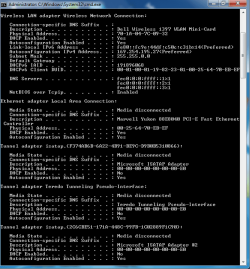
image.png
 
Last edited:

My Computer My Computer

At a glance

Windows 11
OS
Windows 11
Hi PK2,
Sounds more like you game caused the problem.
Revert the DEP settings, hopefully that will give you your internet back.
If that fails try your OLDEST restore point.

You will NOT have to buy W7 again, your comp has a factory restore option, possibly in the Dell program files, or via your Bios.

Im assuming your other problem is a BSOD.
Go Control panel >> device manager >> update your graphics card and Network adapters, and are there any marked with an ! or a small black down arrow or Problem devices.

Roy
 

My Computer My Computer

At a glance

W7 home premium 32bit/W7HP 64bit/w10 tp insid...E5300 dual core3gbNvidia Geforce 7100 Nforce 630i
Computer type
PC/Desktop
Computer Manufacturer/Model Number
medionl/Aspire 6930G/acer x55a
OS
W7 home premium 32bit/W7HP 64bit/w10 tp insider ring
CPU
E5300 dual core
Motherboard
medion MS7366
Memory
3gb
Graphics Card(s)
Nvidia Geforce 7100 Nforce 630i
Monitor(s) Displays
avixc
Internet Speed
n (isp resticted to 72)
Antivirus
mse/pands
Browser
palemoon
Other Info
Belkin Fd7050 n USB using Railink RT2870 drivers, more upto date
Your getting a 169 ip which means the pc isnt getting an ip from the router this normally wrong password or too far away from router. Open a admin cmd prompt then type
netsh advfirewall reset
netsh winsock reset
netsh int ipv4 reset
 

My Computer My Computer

At a glance

win 8 32 bit
Computer type
PC/Desktop
OS
win 8 32 bit
Your getting a 169 ip which means the pc isnt getting an ip from the router this normally wrong password or too far away from router. Open a admin cmd prompt then type
netsh advfirewall reset
netsh winsock reset
netsh int ipv4 reset

I tried that but unfortunately, the Internet still doesn't work on my laptop.
 

My Computer My Computer

At a glance

Windows 11
OS
Windows 11
Can you connect to any free un encrypted wireless?
 

My Computer My Computer

At a glance

win 8 32 bit
Computer type
PC/Desktop
OS
win 8 32 bit
I tried that but the Internet still doesn't work.
 

My Computer My Computer

At a glance

Windows 11
OS
Windows 11
I agree 169 is not right, and no default gateway is listed.

Subnet mask looks wrong too. I think it should be 255.255.255.0

Have you plugged into your router with a cable ?

What happens then ?
 

My Computer My Computer

At a glance

Windows 10 Pro x64Intel Core i7 6700KGSkill TridentZ RGB 16GB 3600 16-16-16-36EVGA GTX 980 Ti SC x2
Computer type
PC/Desktop
Computer Manufacturer/Model Number
Skylake Special #666
OS
Windows 10 Pro x64
CPU
Intel Core i7 6700K
Motherboard
Asus Sabertooth Z170 Mark 1
Memory
GSkill TridentZ RGB 16GB 3600 16-16-16-36
Graphics Card(s)
EVGA GTX 980 Ti SC x2
Sound Card
Realtek High Definition
Monitor(s) Displays
AOC G2460PG
Screen Resolution
1920 x 1080 144Hz
Hard Drives
Samsung 860 Pro 256GB, Seagate Barracuda 4TB x2
PSU
EVGA 1000 P2, EVGA White Custom Braided Cables
Case
Corsair Vengeance C70 Gunmetal Black
Cooling
Corsair H100i v2, Corsair ML120 x2, Thermal Grizzly Kryonaut
Keyboard
Logitech G910 Orion Spectrum
Mouse
Logitech G700s
Internet Speed
Verizon Fios Quantum Gateway 75/75
Antivirus
Windows Defender, Malwarebytes Free 3.8.3
Browser
Chrome
Other Info
Corsair SP120 x4, LG Blu-ray Drive, Durabrand HT-395 100 Watt Dolby Digital Amp, Corsair H2100 Wireless 7.1 Headset
I agree 169 is not right, and no default gateway is listed.

Subnet mask looks wrong too. I think it should be 255.255.255.0

Have you plugged into your router with a cable ?

What happens then ?

I tried plugging the yellow Ethernet cable into my laptop but unfortunately, the Internet still doesn't work. I'm using the NBN just incase you wondered.
 

My Computer My Computer

At a glance

Windows 11
OS
Windows 11
Back
Top