Items don't stay pinned to explorer after reboot

pauls01

New member
Local time
5:59 PM
Messages
9
Hi guys.

I upgraded my Vista Ultimate installation to Windows Seven Ultimate. I am using RTM version 7600.

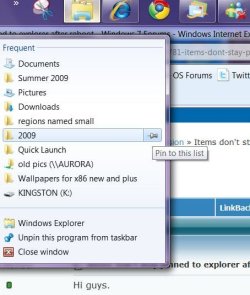
I have tried on several occasions to pin some folders to explorer. The pinning works fine and they will stay there until I reboot the machine, at which point when I right click the Windows Explorer icon on the taskbar, the pins have now disappeared? This is rather annoying as I use a number of different folders and on my old Vista installation I had taskbar shortcuts for each folder.

Any help would be appreciated.

Thanks
Paul
 

My Computer My Computer

At a glance

Windows Seven2GB
Computer Manufacturer/Model Number
HP NC6400
OS
Windows Seven
Memory
2GB
Do you use any programs like CCleaner to automatically clean the junk out of your system? Carefully review any settings in any programs you might use. I know in CCleaner, there is an option to clear jumplists.
 

My Computer My Computer

At a glance

Windows 7 Professional x64Intel i7 2600K OC'd @ 4620 MHz16GB GSkill Sniper 2133 Mhz (4x4GB)EVGA GeForce GTX 480 SuperClocked+
Computer Manufacturer/Model Number
Custom
OS
Windows 7 Professional x64
CPU
Intel i7 2600K OC'd @ 4620 MHz
Motherboard
Asus P8Z68-V Pro
Memory
16GB GSkill Sniper 2133 Mhz (4x4GB)
Graphics Card(s)
EVGA GeForce GTX 480 SuperClocked+
Sound Card
Realtek High Definition Audio
Monitor(s) Displays
2x Acer S273HLbmii 27"
Screen Resolution
2 x 1920x1080
Hard Drives
64GB Crucial M4 SSD

Storage: Hitachi 1TB 5400RPM, Samsung 1.5TB 5400RPM
PSU
Corsair HW Series 750w (modular)
Case
Cooler Master HAF 932 Advanced Blue Edition
Cooling
CM Hyper 212+ CPU cooler, 3x 230mm + 1x 140mm case fans
Keyboard
Logitech MK320 (wireless)
Mouse
Logitech MK320 (wireless)
Internet Speed
30 Mb/s : 2 Mb/s
pin to explorer.JPG
Welcome to SevenForums Paul
Is this what you are seeing when you are pinning to explorer? I have tried to reproduce your problem but have not been able to. Might be a rule for the jump lists to remain pinned somewhere but where? Good luck to you with this and enjoy the Windows 7 ultimate install.
 

My Computer My Computer

At a glance

Windows 7 Ulti. x64AMD Phenom 8450 triple-core 2.10 ghz4GBATI Radion HD 3200
Computer Manufacturer/Model Number
Gateway GT5692
OS
Windows 7 Ulti. x64
CPU
AMD Phenom 8450 triple-core 2.10 ghz
Memory
4GB
Graphics Card(s)
ATI Radion HD 3200
Monitor(s) Displays
Gateway FPD1775W
Screen Resolution
1280x720
Hard Drives
465.6613 Gibibytes
Do you use any programs like CCleaner to automatically clean the junk out of your system? Carefully review any settings in any programs you might use. I know in CCleaner, there is an option to clear jumplists.

This was exactly the problem Jonathan. I was running CCleaner on shutdown every time and it was clearing my jumplists. Thank you very much.
 

My Computer My Computer

At a glance

Windows Seven2GB
Computer Manufacturer/Model Number
HP NC6400
OS
Windows Seven
Memory
2GB
Back
Top