External drive not in Win Explorer after reboot

tkmops

New member
Member
Local time
8:24 AM
Messages
63
Win 10 i7 32GB RAM
After rebooting from a win update, one of my external HD is not showing up in Win Explorer.

I've un-plugged it and back in again...still not showing up, also tried using a different USB port.
My Device Manager shows all my drives(internal and external) as 'working properly'.
Devices and printer shows only 4 external HD(should be 5).
Any suggestions as to what I can try to recover that external HD?
Thanks!
 

My Computer My Computer

Computer type
PC/Desktop
Computer Manufacturer/Model Number
Custom
OS
Win 7 64 bit
CPU
I5
Memory
6GB
Graphics Card(s)
Nvidia
Do you see all drives in Disk Management? Post a screenshot of Disk Management.
 

My Computers My Computers

System One System Two

  • Computer type
    PC/Desktop
    Computer Manufacturer/Model Number
    Custom build
    OS
    Windows 7 Home Premium 64-bits
    CPU
    AMD FX-8350
    Motherboard
    Gigabyte GA-990FXA-UD3 (AM3+)
    Memory
    GSKILL Ripjaw-X PC3 12800 8GB (2x4GB)
    Graphics Card(s)
    ASUS ROG STRIX GTX 1060 6GB
    Sound Card
    Integrated
    Monitor(s) Displays
    Asus VE228H (21.5-in)
    Screen Resolution
    1920x1080 60Hz
    Hard Drives
    SAMSUNG 870 EVO 2.5 Inch SATA SSD (1TB)
    SAMSUNG 870 EVO 2.5 Inch SATA SSD (1TB)
    SAMSUNG 870 EVO 2.5 Inch SATA SSD (1TB)
    PSU
    Corsair RM750x (750 watts)
    Case
    Corsair Carbide Series 200R
    Cooling
    Corsair Hydro Series H60 (CWCH60)
    Keyboard
    Logitech Elite
    Mouse
    Logitech M510 Wireless Mouse
    Internet Speed
    Comcast Gigabit Extra (1200Mbps down / 35Mbps up)
    Antivirus
    Malwarebytes
    Browser
    Firefox, Edge, Chrome
    Other Info
    ASUS DRW-24B1ST DVD-RW (24X) optical drive
    Seagate Expansion Desk (5TB) external SATA/USB HDD
    Comcast XB8 Internet Gateway
  • Computer type
    PC/Desktop
    System Manufacturer/Model Number
    Custom
    OS
    Windows 7 Pro (64-bit)
    CPU
    AMD Phenom II 960T X4
    Motherboard
    ASUS M4N82 Deluxe
    Memory
    Corsair XMS2 DDR2-800 8GB (4x2GB)
    Graphics Card(s)
    ASUS ENGTX560 DCII OC/2DI/1GD5 1GB
    Monitor(s) Displays
    Samsung 930B 19-inch LCD
    Screen Resolution
    1280x1024
    Hard Drives
    Samsung SSD 870 EVO 1000 GB (Windows 10)
    Seagate ST1000DM003 1000 GB (Windows 7)
    PSU
    Antec TruePower (new) TP-650
    Case
    Antec Three Hundred
    Cooling
    AMD stock cooler from FX8350
    Mouse
    Logitech M100
    Internet Speed
    Xfinity Gigabit Extra 1200/35 Mbps
I'm getting 'you do not have access rights to logical disk manager on 'my-name'-PC. How do get those rights?

- - - Updated - - -

I'm getting 'you do not have access rights to logical disk manager on 'my-name'-PC. How do get those rights?
I just found and did this:[FONT=&quot]1.[/FONT][FONT=&quot] Press Windows Key + R.[/FONT][FONT=&quot]2. Type dcomcnfg andhitenter.[/FONT]
[FONT=&quot]3. Right click My computer and select properties.[/FONT]
[FONT=&quot]4. On the Default Properties tab, change the Default Authentication Level to Connect.[/FONT]
[FONT=&quot]5. Restart your computer.
It was already 'connect' [/FONT]


- - - Updated - - -

also tried this Open Run from the Start menu or Apps screen. Type diskmgmt.msc and press Enter same error

- - - Updated - - -

this got the same error also--[FONT=&quot]Start Button > All Apps > Windows Administrative Tools > Computer Management > Disk Management.[/FONT]

- - - Updated - - -

another forum said to go to control panel-user accounts, but didn't say what to do

- - - Updated - - -

Found this:
  1. Run "Component Services".You can either find "Component Services" in the start menu (Windows 10) or open a command prompt and type "dcomcnfg".
  2. Navigate to Console Root > Component Services > Computers > My Computer
  3. Right click "My Computer" and select "Properties".
  4. Select the "COM Security" tab.
  5. Under "Access Permissions" click the [Edit Limits...] button.
  6. Against "ANONYMOUS LOGON" check to allow Remote Access.
  7. Click [OK] twice to save.....was already allow remote access
 

My Computer My Computer

Computer type
PC/Desktop
Computer Manufacturer/Model Number
Custom
OS
Win 7 64 bit
CPU
I5
Memory
6GB
Graphics Card(s)
Nvidia
You should be doing this with an account of type Administrator. If your account is of type Standard user then log into your account of type Administrator.

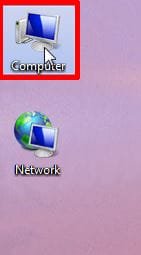
1. I find it useful to have the Computer icon on the desktop.

DM1a.jpg

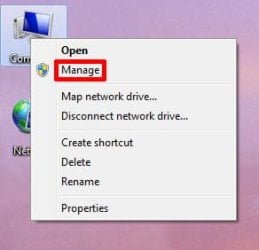
2. Right-click on Computer and select Manage

DM2a.jpg

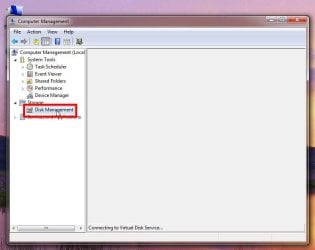
3. Select Disk Management

DM3a.jpg

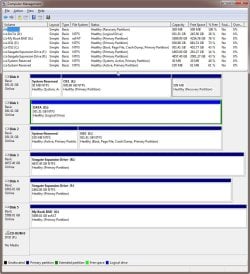
4. Within a minute Disk Management will load.

Note in my computer that Disks 0,1,2 are internal SSDs while Disks 3,4,5 are external HDDs.

DM4.jpg
 

My Computers My Computers

System One System Two

  • Computer type
    PC/Desktop
    Computer Manufacturer/Model Number
    Custom build
    OS
    Windows 7 Home Premium 64-bits
    CPU
    AMD FX-8350
    Motherboard
    Gigabyte GA-990FXA-UD3 (AM3+)
    Memory
    GSKILL Ripjaw-X PC3 12800 8GB (2x4GB)
    Graphics Card(s)
    ASUS ROG STRIX GTX 1060 6GB
    Sound Card
    Integrated
    Monitor(s) Displays
    Asus VE228H (21.5-in)
    Screen Resolution
    1920x1080 60Hz
    Hard Drives
    SAMSUNG 870 EVO 2.5 Inch SATA SSD (1TB)
    SAMSUNG 870 EVO 2.5 Inch SATA SSD (1TB)
    SAMSUNG 870 EVO 2.5 Inch SATA SSD (1TB)
    PSU
    Corsair RM750x (750 watts)
    Case
    Corsair Carbide Series 200R
    Cooling
    Corsair Hydro Series H60 (CWCH60)
    Keyboard
    Logitech Elite
    Mouse
    Logitech M510 Wireless Mouse
    Internet Speed
    Comcast Gigabit Extra (1200Mbps down / 35Mbps up)
    Antivirus
    Malwarebytes
    Browser
    Firefox, Edge, Chrome
    Other Info
    ASUS DRW-24B1ST DVD-RW (24X) optical drive
    Seagate Expansion Desk (5TB) external SATA/USB HDD
    Comcast XB8 Internet Gateway
  • Computer type
    PC/Desktop
    System Manufacturer/Model Number
    Custom
    OS
    Windows 7 Pro (64-bit)
    CPU
    AMD Phenom II 960T X4
    Motherboard
    ASUS M4N82 Deluxe
    Memory
    Corsair XMS2 DDR2-800 8GB (4x2GB)
    Graphics Card(s)
    ASUS ENGTX560 DCII OC/2DI/1GD5 1GB
    Monitor(s) Displays
    Samsung 930B 19-inch LCD
    Screen Resolution
    1280x1024
    Hard Drives
    Samsung SSD 870 EVO 1000 GB (Windows 10)
    Seagate ST1000DM003 1000 GB (Windows 7)
    PSU
    Antec TruePower (new) TP-650
    Case
    Antec Three Hundred
    Cooling
    AMD stock cooler from FX8350
    Mouse
    Logitech M100
    Internet Speed
    Xfinity Gigabit Extra 1200/35 Mbps
Thanks for the instructions. I was able to take the drive to a friends house, it woudn't load on their PC....I guess it's dead.
 

My Computer My Computer

Computer type
PC/Desktop
Computer Manufacturer/Model Number
Custom
OS
Win 7 64 bit
CPU
I5
Memory
6GB
Graphics Card(s)
Nvidia
Back
Top