It's like watching someone move a pile of sand 1 grain at a time.

Zepher

New member
Guru
Gold Member
VIP
Local time
6:58 PM
Messages
2,161
Location
Norfolk, VA
I am in the process of moving 1.8TB of data from 1 USB drive to another USB drive and it is quite slow, averaging almost 30MB/sec.
I am 16 hours in and there are maybe 4-5 hours left.
Old drive is USB2 and new one is USB3 so future transfers from and to the new USB3 drive to any drive other than USB2 will be much faster.
 

My Computer My Computer

At a glance

Windows 7 Ultimate 64bitIntel i7 3770K16GB DDR3 1333 Corsair XMS3XFX HD6950 2GB EyeFinity
Computer Manufacturer/Model Number
HAL-9000
OS
Windows 7 Ultimate 64bit
CPU
Intel i7 3770K
Motherboard
Asus Sabertooth Z77
Memory
16GB DDR3 1333 Corsair XMS3
Graphics Card(s)
XFX HD6950 2GB EyeFinity
Sound Card
Logitech G35 & Sennheiser PC135 & VIA HD
Monitor(s) Displays
23" HP 2310e, 23" Samsung B2230, 21.5" Viewsonic
Screen Resolution
5760x1080
Hard Drives
16TB of Storage
128GB & 256GB Crucial M4 SSD's, 2X 1TB WD Black, 3x 2TB WD, 3x 2TB Samsung F4, 1.5TB Seagate, WD 500GB,
PSU
Antec True Power New 650watt
Case
Cooler Master HAF-932
Cooling
Corsair H60 Hydro Cooler, 3x 230mm Fans, 2x120mm Fan
Keyboard
Logitech G15 and G13
Mouse
Logitech G700 Gaming Mouse
Internet Speed
50/10 Mbit
Other Info
Speakers : Alesis M1 Active Mk2 Studio Monitors , APC RS 1200 UPS, HP 4500DN Color Laser, HP P1006 mono Laser, Kodak 8500 Dye-Sub, Epson 1280 inkjet, Epson Worforce 610 MFC
I think I'd of removed the drives from there enclosures and plugged them directly to the PC SATA ports before attempting to move that ammount of data.
 

My Computer My Computer

At a glance

Windows 11
Computer type
PC/Desktop
OS
Windows 11
They are WD My Book Essentials and 1 is brand new and the other is 8 months or so old. They are a pain to remove from the case and I don't want to void the warranty, otherwise I would have just moved the hard disks between the enclosures and not have to copy anything.
 

My Computer My Computer

At a glance

Windows 7 Ultimate 64bitIntel i7 3770K16GB DDR3 1333 Corsair XMS3XFX HD6950 2GB EyeFinity
Computer Manufacturer/Model Number
HAL-9000
OS
Windows 7 Ultimate 64bit
CPU
Intel i7 3770K
Motherboard
Asus Sabertooth Z77
Memory
16GB DDR3 1333 Corsair XMS3
Graphics Card(s)
XFX HD6950 2GB EyeFinity
Sound Card
Logitech G35 & Sennheiser PC135 & VIA HD
Monitor(s) Displays
23" HP 2310e, 23" Samsung B2230, 21.5" Viewsonic
Screen Resolution
5760x1080
Hard Drives
16TB of Storage
128GB & 256GB Crucial M4 SSD's, 2X 1TB WD Black, 3x 2TB WD, 3x 2TB Samsung F4, 1.5TB Seagate, WD 500GB,
PSU
Antec True Power New 650watt
Case
Cooler Master HAF-932
Cooling
Corsair H60 Hydro Cooler, 3x 230mm Fans, 2x120mm Fan
Keyboard
Logitech G15 and G13
Mouse
Logitech G700 Gaming Mouse
Internet Speed
50/10 Mbit
Other Info
Speakers : Alesis M1 Active Mk2 Studio Monitors , APC RS 1200 UPS, HP 4500DN Color Laser, HP P1006 mono Laser, Kodak 8500 Dye-Sub, Epson 1280 inkjet, Epson Worforce 610 MFC
Old drive is USB2 and new one is USB3 so future transfers from and to the new USB3 drive to any drive other than USB2 will be much faster.
At least that is what you hope for. I've seen many USB3 threads where people are disappointed that their transfers aren't much better than they were before. I've been using eSATA for a while now and I've been very happy with that. About 80-90MB/sec is what I get with my dock.
 

My Computer My Computer

At a glance

Windows 7 Ultimate x64Intel Q9550 2.83Ghz OC'd to 3.40Ghz8GB G.Skill PI DDR2-800, 4-4-4-12 timingsEVGA 1280MB Nvidia GeForce GTX570
Computer Manufacturer/Model Number
Self-Built in July 2009
OS
Windows 7 Ultimate x64
CPU
Intel Q9550 2.83Ghz OC'd to 3.40Ghz
Motherboard
Gigabyte GA-EP45-UD3R rev. 1.1, F12 BIOS
Memory
8GB G.Skill PI DDR2-800, 4-4-4-12 timings
Graphics Card(s)
EVGA 1280MB Nvidia GeForce GTX570
Sound Card
Realtek ALC899A 8 channel onboard audio
Monitor(s) Displays
23" Acer x233H
Screen Resolution
1920x1080
Hard Drives
Intel X25-M 80GB Gen 2 SSD
Western Digital 1TB Caviar Black, 32MB cache. WD1001FALS
PSU
Corsair 620HX modular
Case
Antec P182
Cooling
stock
Keyboard
ABS M1 Mechanical
Mouse
Logitech G9 Laser Mouse
Internet Speed
15/2 cable modem
Other Info
Windows and Linux enthusiast. Logitech G35 Headset.
Yes I have seen some mention of that also.

Interesting I heard from Paragon there may be an issue with windows 7 and the newer usb 3.0 drivers - apparently fine recognising the drives - but speeds aren't what they might be.

I don't know anything more about it than that vague suggestion, and I don't have any usb 3.0 devices myself.

Sounds plausible, though.

I hear Macrium are also having problems with transfer speeds - particularly with WD usb 3 externals - not sure why that is - I think they might all be using the same Renesas drivers.
 

My Computers My Computers

  • At a glance

    7 X64i5 84002x8gb 3200mhz
    Computer type
    PC/Desktop
    OS
    7 X64
    CPU
    i5 8400
    Motherboard
    gigabyte b365m ds3h
    Memory
    2x8gb 3200mhz
    Hard Drives
    various
    PSU
    pure power 11 400w cm
    Case
    Coolermaster
    Cooling
    cryorig m9i
  • At a glance

    7x64g54008gb ddr4 2400
    Computer type
    PC/Desktop
    OS
    7x64
    CPU
    g5400
    Motherboard
    ga b365m ds3h
    Memory
    8gb ddr4 2400
    PSU
    xfx pro 450w
Old drive is USB2 and new one is USB3 so future transfers from and to the new USB3 drive to any drive other than USB2 will be much faster.
At least that is what you hope for. I've seen many USB3 threads where people are disappointed that their transfers aren't much better than they were before. I've been using eSATA for a while now and I've been very happy with that. About 80-90MB/sec is what I get with my dock.
I have a USB3 device that I can plug naked drives into by sitting them in it like bread in a toaster,(2,5 and 3,5 disks) it is very handy as I can use old drives that I no longer want in my PC.
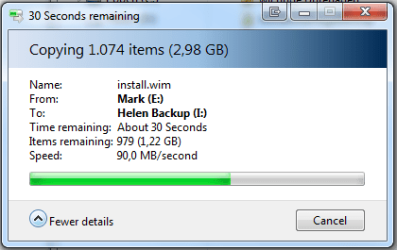
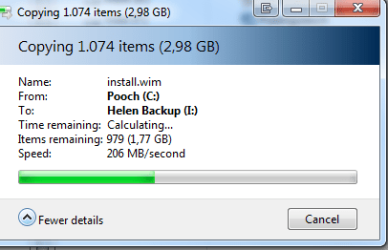
Speeds.......It starts off like a rocket with speeds up from 200 MB/sec but soon slows down to what I would call normal SATA speeds similar to your posted 80-90 MB/sec.
Not what is advertised :( but still a huge improvement over USB2
 

My Computer My Computer

At a glance

Windows 7 Ultimate x64Intel Core i7-2600K16 GB G Skill F3-10666 CL9D-4GBRLATI Radeon HD 6870
Computer Manufacturer/Model Number
Something I threw together
OS
Windows 7 Ultimate x64
CPU
Intel Core i7-2600K
Motherboard
Asus P8P67
Memory
16 GB G Skill F3-10666 CL9D-4GBRL
Graphics Card(s)
ATI Radeon HD 6870
Sound Card
ATI Radeon HDMI / Realtek ALC892
Monitor(s) Displays
2 x 22" standard monitors / LG32LC56v TV to watch films
Screen Resolution
1920 x1080
Hard Drives
2 x OCZ Vertex2 111.79GB
3 x Samsung103SJ
1 x Samsung103UJ
1 x WD3200BEVT
1 x Hitachi5K320-160
PSU
Thermaltake Toughpower Cable Management 750W
Case
Antec 300
Cooling
Noctua NH-U12P SE2 and 5 120mm Case fans
Keyboard
Microsoft Comfort Curve Keyboard 2000
Mouse
Hama M3110 / Logitech M305
Internet Speed
16000
Other Info
I have also used Fedora, Suse, Ubuntu Linux
And all other Windows from 95 to date except ME
I've used USB3 drives in the past on my machine and I've seen over double the write speed of the USB2 drives I have.
I get around 70MB/sec when I copy to this new USB3 drive.
 

My Computer My Computer

At a glance

Windows 7 Ultimate 64bitIntel i7 3770K16GB DDR3 1333 Corsair XMS3XFX HD6950 2GB EyeFinity
Computer Manufacturer/Model Number
HAL-9000
OS
Windows 7 Ultimate 64bit
CPU
Intel i7 3770K
Motherboard
Asus Sabertooth Z77
Memory
16GB DDR3 1333 Corsair XMS3
Graphics Card(s)
XFX HD6950 2GB EyeFinity
Sound Card
Logitech G35 & Sennheiser PC135 & VIA HD
Monitor(s) Displays
23" HP 2310e, 23" Samsung B2230, 21.5" Viewsonic
Screen Resolution
5760x1080
Hard Drives
16TB of Storage
128GB & 256GB Crucial M4 SSD's, 2X 1TB WD Black, 3x 2TB WD, 3x 2TB Samsung F4, 1.5TB Seagate, WD 500GB,
PSU
Antec True Power New 650watt
Case
Cooler Master HAF-932
Cooling
Corsair H60 Hydro Cooler, 3x 230mm Fans, 2x120mm Fan
Keyboard
Logitech G15 and G13
Mouse
Logitech G700 Gaming Mouse
Internet Speed
50/10 Mbit
Other Info
Speakers : Alesis M1 Active Mk2 Studio Monitors , APC RS 1200 UPS, HP 4500DN Color Laser, HP P1006 mono Laser, Kodak 8500 Dye-Sub, Epson 1280 inkjet, Epson Worforce 610 MFC
I have a USB3 device that I can plug naked drives into by sitting them in it like bread in a toaster,(2,5 and 3,5 disks) it is very handy as I can use old drives that I no longer want in my PC.
Speeds.......It starts off like a rocket with speeds up from 200 MB/sec but soon slows down to what I would call normal SATA speeds similar to your posted 80-90 MB/sec.
Not what is advertised :( but still a huge improvement over USB2

I have a Thermaltake BlacX enclosure at home and at work that is USB 2 and eSATA.

Unless you are plugging in SSD drives into your enclosures, the 200MB/sec is bogus as standard mechanical hard drives cannot read and supply data that fast, or write data that fast.

What do you feel is advertised and how fast would you expect it to go? The spec allows for up to 5.0Gbps and it's often said that is 10x faster than 480Mbps which is USB 2.0 spec. This would be about 60MB/sec if there was no overhead and 100% efficiency. So, if you expect USB 3 speeds in the 600MB/sec, then you will be terribly disappointed.

I mean, if your source hard drive in your computer can only do 60MB/sec...then you would be limited to 60MB/sec or slower to your USB device. Unless you are using SSD's in your USB 3 enclosure and as source drives, you are likely going to be physically unable to surpass 100MB/sec.
 

My Computer My Computer

At a glance

Windows 7 Ultimate x64Intel Q9550 2.83Ghz OC'd to 3.40Ghz8GB G.Skill PI DDR2-800, 4-4-4-12 timingsEVGA 1280MB Nvidia GeForce GTX570
Computer Manufacturer/Model Number
Self-Built in July 2009
OS
Windows 7 Ultimate x64
CPU
Intel Q9550 2.83Ghz OC'd to 3.40Ghz
Motherboard
Gigabyte GA-EP45-UD3R rev. 1.1, F12 BIOS
Memory
8GB G.Skill PI DDR2-800, 4-4-4-12 timings
Graphics Card(s)
EVGA 1280MB Nvidia GeForce GTX570
Sound Card
Realtek ALC899A 8 channel onboard audio
Monitor(s) Displays
23" Acer x233H
Screen Resolution
1920x1080
Hard Drives
Intel X25-M 80GB Gen 2 SSD
Western Digital 1TB Caviar Black, 32MB cache. WD1001FALS
PSU
Corsair 620HX modular
Case
Antec P182
Cooling
stock
Keyboard
ABS M1 Mechanical
Mouse
Logitech G9 Laser Mouse
Internet Speed
15/2 cable modem
Other Info
Windows and Linux enthusiast. Logitech G35 Headset.
I have a Thermaltake BlacX enclosure at home and at work that is USB 2 and eSATA.
Mine is called Icy box HDD docking station

Unless you are plugging in SSD drives into your enclosures, the 200MB/sec is bogus as standard mechanical hard drives cannot read and supply data that fast, or write data that fast.

I am quoting speeds shown by windows 7 as to how accurate these speeds are pass I do not know


The back up HDD is a 2.5 laptop drive


What do you feel is advertised and how fast would you expect it to go? The spec allows for up to 5.0Gbps and it's often said that is 10x faster than 480Mbps which is USB 2.0 spec. This would be about 60MB/sec if there was no overhead and 100% efficiency. So, if you expect USB 3 speeds in the 600MB/sec, then you will be terribly disappointed..
Advertised here is up to 10x faster and yes I would like to see speeds that are faster than 60MB/sec but like I said still an improvement over USB2

I mean, if your source hard drive in your computer can only do 60MB/sec...then you would be limited to 60MB/sec or slower to your USB device. Unless you are using SSD's in your USB 3 enclosure and as source drives, you are likely going to be physically unable to surpass 100MB/sec.
you are more than welcome to look at my specs. I don't have a spare ssd for the docking station yet but then as I explained it is for old drives I no longer use in my PC :)
 

Attachments

  • Capture.PNG
    Capture.PNG
    16.3 KB · Views: 75
  • Intel RAID HDD to Hitachi HTS543216L9A300.PNG
    Intel RAID HDD to Hitachi HTS543216L9A300.PNG
    12.8 KB · Views: 657
  • Intel RAID SSD to Hitachi HTS543216L9A300.PNG
    Intel RAID SSD to Hitachi HTS543216L9A300.PNG
    12.3 KB · Views: 526
  • Hitachi HTS543216L9A300 to  Intel RAID HDD.PNG
    Hitachi HTS543216L9A300 to Intel RAID HDD.PNG
    11.8 KB · Views: 636
  • Hitachi HTS543216L9A300 to  Intel RAID SSD.PNG
    Hitachi HTS543216L9A300 to Intel RAID SSD.PNG
    10.5 KB · Views: 644
  • Capture1.PNG
    Capture1.PNG
    9.2 KB · Views: 112
Last edited:

My Computer My Computer

At a glance

Windows 7 Ultimate x64Intel Core i7-2600K16 GB G Skill F3-10666 CL9D-4GBRLATI Radeon HD 6870
Computer Manufacturer/Model Number
Something I threw together
OS
Windows 7 Ultimate x64
CPU
Intel Core i7-2600K
Motherboard
Asus P8P67
Memory
16 GB G Skill F3-10666 CL9D-4GBRL
Graphics Card(s)
ATI Radeon HD 6870
Sound Card
ATI Radeon HDMI / Realtek ALC892
Monitor(s) Displays
2 x 22" standard monitors / LG32LC56v TV to watch films
Screen Resolution
1920 x1080
Hard Drives
2 x OCZ Vertex2 111.79GB
3 x Samsung103SJ
1 x Samsung103UJ
1 x WD3200BEVT
1 x Hitachi5K320-160
PSU
Thermaltake Toughpower Cable Management 750W
Case
Antec 300
Cooling
Noctua NH-U12P SE2 and 5 120mm Case fans
Keyboard
Microsoft Comfort Curve Keyboard 2000
Mouse
Hama M3110 / Logitech M305
Internet Speed
16000
Other Info
I have also used Fedora, Suse, Ubuntu Linux
And all other Windows from 95 to date except ME
I didn't have a lot of time yesterday so I slapped the post up without an explanation for the attachments.
The backup drive I was using was a laptop drive and I chose this as my 3.5 drives are all encrypted which I believe would most probably affect the read and write speeds.

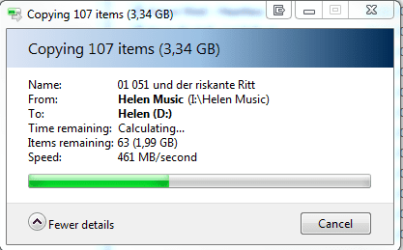
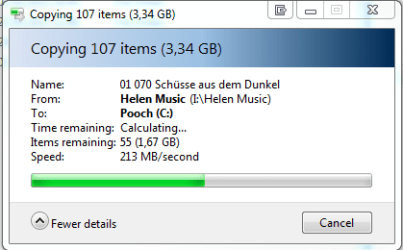
My original statement was that using USB 3, transfer speeds started off very fast and slowed down as the copy proceeded. I came to this info as I originally copied large amounts of data (approx 400GB) to my backup drives. What I didn't try to do was copy smaller amounts. When I made this post I just moved individual folders (as you can see)with just a few Gigabytes and I was amazed at the speeds that were achieved, it went so fast that I hardly had chance to go in menu to open the snipping tool. lol Also these speeds were fairly constant.

PParks I cant argue with you about what is possible speed-wise as I do not know but I do know that these speeds even if not shown correctly by windows were still very very fast!!

One thing that is confusing me is why writing to an Intel RAID with HDD's was so much faster than to the Intel RAID with SSD's I have now repeated this copy more times but it does not make a difference. :confused:
 

My Computer My Computer

At a glance

Windows 7 Ultimate x64Intel Core i7-2600K16 GB G Skill F3-10666 CL9D-4GBRLATI Radeon HD 6870
Computer Manufacturer/Model Number
Something I threw together
OS
Windows 7 Ultimate x64
CPU
Intel Core i7-2600K
Motherboard
Asus P8P67
Memory
16 GB G Skill F3-10666 CL9D-4GBRL
Graphics Card(s)
ATI Radeon HD 6870
Sound Card
ATI Radeon HDMI / Realtek ALC892
Monitor(s) Displays
2 x 22" standard monitors / LG32LC56v TV to watch films
Screen Resolution
1920 x1080
Hard Drives
2 x OCZ Vertex2 111.79GB
3 x Samsung103SJ
1 x Samsung103UJ
1 x WD3200BEVT
1 x Hitachi5K320-160
PSU
Thermaltake Toughpower Cable Management 750W
Case
Antec 300
Cooling
Noctua NH-U12P SE2 and 5 120mm Case fans
Keyboard
Microsoft Comfort Curve Keyboard 2000
Mouse
Hama M3110 / Logitech M305
Internet Speed
16000
Other Info
I have also used Fedora, Suse, Ubuntu Linux
And all other Windows from 95 to date except ME
 

My Computer My Computer

At a glance

Win 7 Pro 64-bitIntel Core i516 GB Dell, 6 GB ToshibaIntel crap on both but Dell also has nVidia G...
Computer type
Laptop
Computer Manufacturer/Model Number
Dell Insprion 7559 next to a Toshiba Portege
OS
Win 7 Pro 64-bit
CPU
Intel Core i5
Motherboard
Intel
Memory
16 GB Dell, 6 GB Toshiba
Graphics Card(s)
Intel crap on both but Dell also has nVidia GeForce GTX960M
Sound Card
RealTek
Monitor(s) Displays
internal and external ACER KA270H 27"
Screen Resolution
1920x1080
Hard Drives
SSD 256 GB plus numerous WD Red or Purple on USB3 docks. Used to buy a lot of Seagate but tossed them the second time I got unrecoverable disc corruption in the midst of use.
Keyboard
Garage Mouse SW and some cheap Amazon China made USB device
Mouse
Garage Mouse and some cheap Amazon China made USB device
Internet Speed
50 Mbps (allegedly, depends on server)
Antivirus
Defender, Malwarebytes Premium and Kaspersky
Browser
IE 11, and Chrome something

My Computer My Computer

At a glance

Windows 7 Ultimate x64Intel Core i7-2600K16 GB G Skill F3-10666 CL9D-4GBRLATI Radeon HD 6870
Computer Manufacturer/Model Number
Something I threw together
OS
Windows 7 Ultimate x64
CPU
Intel Core i7-2600K
Motherboard
Asus P8P67
Memory
16 GB G Skill F3-10666 CL9D-4GBRL
Graphics Card(s)
ATI Radeon HD 6870
Sound Card
ATI Radeon HDMI / Realtek ALC892
Monitor(s) Displays
2 x 22" standard monitors / LG32LC56v TV to watch films
Screen Resolution
1920 x1080
Hard Drives
2 x OCZ Vertex2 111.79GB
3 x Samsung103SJ
1 x Samsung103UJ
1 x WD3200BEVT
1 x Hitachi5K320-160
PSU
Thermaltake Toughpower Cable Management 750W
Case
Antec 300
Cooling
Noctua NH-U12P SE2 and 5 120mm Case fans
Keyboard
Microsoft Comfort Curve Keyboard 2000
Mouse
Hama M3110 / Logitech M305
Internet Speed
16000
Other Info
I have also used Fedora, Suse, Ubuntu Linux
And all other Windows from 95 to date except ME
Back
Top