iTunes 9.0.1.8 freezes on iPod Nano g3 connect

Adrian:

Where is the iPod driver found? Apple Mobile devices? If it is an Appple Driver to I remove iTunes and reload again? Remember that I did this after doing a Clean install of Windows 7 Home.

G
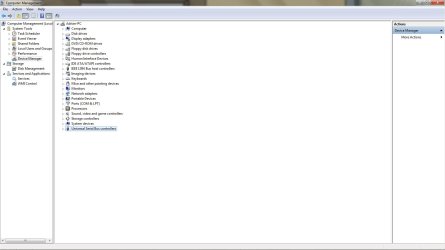
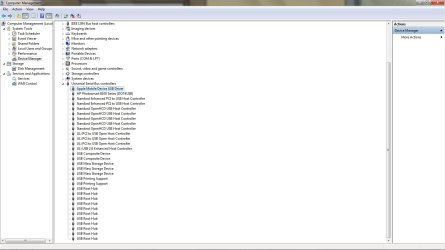
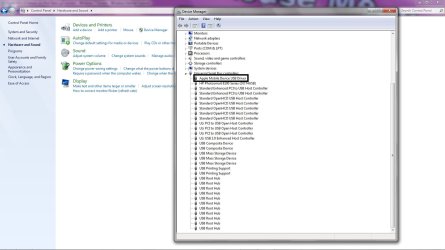
Hi Gregg, when the ipod is connected to your system you should be able to hear 2 distinct sounds, the first sound is the generic usb driver seeing the ipod as a external drive as you have identified. Then the second sound is the actual "APPLE MOBILE DEVICE USB DRIVER" that kicks in and now will recognise the ipod. I want to set up some screenshots for you.
The first is the actual device manager, the second will show you the apple mobile device.
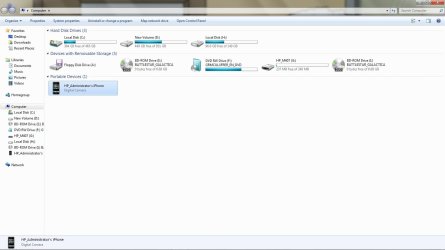
Here they are.
 

Attachments

  • device_mgr.jpg
    device_mgr.jpg
    61.9 KB · Views: 150
  • Apple_Driver.jpg
    Apple_Driver.jpg
    93.5 KB · Views: 59
  • apple.jpg
    apple.jpg
    112.5 KB · Views: 97
  • My_PC.jpg
    My_PC.jpg
    72.3 KB · Views: 57

My Computer My Computer

At a glance

Windows 7 7600 1 X64AMD PHENOM II X 550 PROCESSOR 3.1 ghzCorsair 4 gig ddr 3ati radeon 3300
Computer Manufacturer/Model Number
Custom Build
OS
Windows 7 7600 1 X64
CPU
AMD PHENOM II X 550 PROCESSOR 3.1 ghz
Motherboard
ASUS M4A78-TE
Memory
Corsair 4 gig ddr 3
Graphics Card(s)
ati radeon 3300
Sound Card
ati hd
Monitor(s) Displays
syncmaster 2033sw
Screen Resolution
1600X900 60 hz refresh
Hard Drives
twin_seagates SATA's 1 TB & 500 Gig, hitachi_slimline 160 gig
PSU
antec_550 watt
Case
cooler master GLite
Cooling
stock_heat sink
Internet Speed
20mbs up/ 1.5mbs down
Other Info
favorite child "stewie"
favorite dog "brian"
My Diagnostic Log

Attached is my diagnostic log.
I want you to disable autosync and connect your ipod, then launch itunes and then run the diagnostic.
Here is my log with screenshots
Microsoft Windows 7 x64 Ultimate Edition (Build 7600)
System manufacturer System Product Name
iTunes 9.0.2.25
QuickTime 7.6.4
FairPlay 1.5.23
Apple Application Support 1.0.1
iPod Updater Library 9.0d11
CD Driver 2.2.0.1
CD Driver DLL 2.1.1.1
Apple Mobile Device 2.6.0.32
Apple Mobile Device Driver 1.45.0.0
Bonjour 1.0.6.2 (118.5)
iTunes Serial Number 08DD4CEEB2BB6E0B
Current user is not an administrator.
The current local date and time is 2009-11-09 16:52:05.
iTunes is not running in safe mode.
Video Display Information
ATI Technologies Inc., ATI Radeon HD 3300 Graphics
 
**** External Plug-ins Information ****
No external plug-ins installed.
Genius ID: 4e3066b6b87b71d49235bd0b27223ca7
The drive F: Slimtype eSAU208 2 Rev ML05 is a USB 2 device.
**** Network Connectivity Tests ****
Network Adapter Information
Adapter Name: {4A438CA0-B47E-47E0-9E7A-AB1AE2A672C6}
Description: Atheros AR8121/AR8113/AR8114 PCI-E Ethernet Controller(NDIS6.20)
IP Address: 192.168.1.100
Subnet Mask: 255.255.255.0
Default Gateway: 192.168.1.1
DHCP Enabled: Yes
DHCP Server: 192.168.1.1
Lease Obtained: Mon Nov 09 08:42:54 2009
Lease Expires: Tue Nov 10 08:42:54 2009
DNS Servers: 65.32.5.111
65.32.5.111
65.32.5.112
Active Connection: LAN Connection
Connected: Yes
Online: Yes
Using Modem: No
Using LAN: Yes
Using Proxy: No
SSL 3.0 Support: Enabled
TLS 1.0 Support: Enabled
Firewall Information
Windows Firewall is on.
iTunes is enabled in Windows Firewall.
Connection attempt to Apple web site was successful.
Connection attempt to iTunes Store was successful.
Secure connection attempt to iTunes Store was successful.
Secure connection attempt to iPhone activation server was successful.
Last successful store access was 2009-11-09 16:46:39.
 
**** CD/DVD Drive Tests ****
LowerFilters: AnyDVD (6.5.9.5),
UpperFilters: GEARAspiWDM (2.2.0.1),
I: ELBY CLONEDRIVE, Rev 1.4
Drive is empty.
 
 
**** iPod/iPhone Connectivity Tests ****
iPodService 9.0.2.25 is currently running.
iTunesHelper is currently not running.
Apple Mobile Device service 2.50.39.0 is currently running.
Universal Serial Bus Controllers:
Standard Enhanced PCI to USB Host Controller. Device is working properly.
Standard OpenHCD USB Host Controller. Device is working properly.
ULi PCI to USB Open Host Controller. Device is working properly.
ULi USB 2.0 Enhanced Host Controller. Device is working properly.
FireWire (IEEE 1394) Host Controllers:
VIA 1394 OHCI Compliant Host Controller. Device is working properly.
Connected Device Information:
HP_Administrator’s iPhone, iPhone 3G running firmware version 3.1.2
Serial Number: 83833XP6Y7H
 
**** iPhone/iPod Touch Sync Tests ****
Sync tests completed successfully.

 

Attachments

  • diagnostic.jpg
    diagnostic.jpg
    205.3 KB · Views: 77
  • itune_device.jpg
    itune_device.jpg
    210.3 KB · Views: 92
  • ipod_test.jpg
    ipod_test.jpg
    200.3 KB · Views: 69

My Computer My Computer

At a glance

Windows 7 7600 1 X64AMD PHENOM II X 550 PROCESSOR 3.1 ghzCorsair 4 gig ddr 3ati radeon 3300
Computer Manufacturer/Model Number
Custom Build
OS
Windows 7 7600 1 X64
CPU
AMD PHENOM II X 550 PROCESSOR 3.1 ghz
Motherboard
ASUS M4A78-TE
Memory
Corsair 4 gig ddr 3
Graphics Card(s)
ati radeon 3300
Sound Card
ati hd
Monitor(s) Displays
syncmaster 2033sw
Screen Resolution
1600X900 60 hz refresh
Hard Drives
twin_seagates SATA's 1 TB & 500 Gig, hitachi_slimline 160 gig
PSU
antec_550 watt
Case
cooler master GLite
Cooling
stock_heat sink
Internet Speed
20mbs up/ 1.5mbs down
Other Info
favorite child "stewie"
favorite dog "brian"
This is happening to me also. After installing Windows 7 64b, the sync of Ipod
freezes after a couple of songs transfers (normally, errror code 0xE8000065). Tried everything imaginable: Itunes reinstall, execute with compability to VIsta, energy safe mode off to USB ports/hubs, cable change, restore Ipod. I have a Acer Aspire M3641, lastest ITunes version, latest software on Ipod. Now my external drive also freezes
in the middle of a backup even if I'm not using a usb hub. Please Microsoft, Apple, Intel, whoever, WAKE UP !!! This is now a major problem. Please see Intel, Apple, Microsoft probe iPhone-Windows sync bug and Getting error 0xE8000065 when sync’ing? | Talk iPhone - iPhone News Blog and Forums and many more articles and claims. Aparently, a hardware problem of EHCI Usb's + Nvidia (and others) chipset triggered by instaling Win7...

Also, You encounter problems when you move data over USB from a Windows 7 or Windows Server 2008 R2-based computer that has an NVIDIA USB EHCI chipset and at least 4GB of RAM
 
Last edited by a moderator:

My Computer My Computer

At a glance

Windows 7
Computer Manufacturer/Model Number
Acer Aspire M3641
OS
Windows 7
Back
Top