iTunes 9.0 Compatability Issue

tkenney65

New member
Local time
4:43 PM
Messages
19
I recently installed iTunes 9.0 and it does work, but before it loads I am getting a message indicating iTunes.exe is configured to run in Compatibility Mode for a previous version of windows. The check box for compatability mode on the itunes.exe file properties isn't checked?

Again, it does run, but the message is annoying.


Any ideas?
 

My Computer

Computer Manufacturer/Model Number
Dell XPS 630i
OS
Windows 7
CPU
E8500 O/C @ 4.0ghz
Memory
4gb Corsair Dominator
Graphics Card(s)
nVidia GeForce 8800GT
Monitor(s) Displays
HP2207
Screen Resolution
1680x1050
Hard Drives
1Tb Seagate
Try completely removing it and reinstalling, because I have it running on mine with no problems.
 

My Computer

OS
Win 7 Ultimate x64
CPU
Intel i7 950 OC'd @ 4.0Ghz (SpeedStep ON)
Motherboard
ASUS P6X58D-E BIOS 0303
Memory
3x2GB Patriot Extreme Viper II Sector 7 DDR3 @ 1600mhz
Graphics Card(s)
ATI MSI 5870 900mhz/1300mhz
Sound Card
Onboard Realtek ALC889
Monitor(s) Displays
2 X 24" BenQ G2412HD
Screen Resolution
1920x1080p
Hard Drives
Intel X25-M 80 GB (SSD)
W.D. Caviar Black 1TB (SATA)
Seagate Barricuda 1TB (SATA)
Seagate Barricuda 80GB (SATA)
PSU
Corsair AX850
Case
Antec 1200
Cooling
Lots and Lots of Air!
Keyboard
Razer Lycosa
Mouse
Microsoft Sidewinder
Internet Speed
25Mbps/1Mbps
I recently installed iTunes 9.0 and it does work, but before it loads I am getting a message indicating iTunes.exe is configured to run in Compatibility Mode for a previous version of windows. The check box for compatability mode on the itunes.exe file properties isn't checked?

Again, it does run, but the message is annoying.


Any ideas?
What ver. of windows are you operating? X64 or 86?
What ver. of ITunes did you download and attempt to install?
If you had a previous ver. of ITunes running chances are you will need to perform a complete un-install of the following files:
  • Bonjour
  • Apple Mobile support
  • ITunes
  • Quicktime
  • ITunes updater
Anything Apple related will need to go.
Let us know the first 2 questions and then we can proceed.
 

My Computer

Computer Manufacturer/Model Number
Custom Build
OS
Windows 7 7600 1 X64
CPU
AMD PHENOM II X 550 PROCESSOR 3.1 ghz
Motherboard
ASUS M4A78-TE
Memory
Corsair 4 gig ddr 3
Graphics Card(s)
ati radeon 3300
Sound Card
ati hd
Monitor(s) Displays
syncmaster 2033sw
Screen Resolution
1600X900 60 hz refresh
Hard Drives
twin_seagates SATA's 1 TB & 500 Gig, hitachi_slimline 160 gig
PSU
antec_550 watt
Case
cooler master GLite
Cooling
stock_heat sink
Internet Speed
20mbs up/ 1.5mbs down
Other Info
favorite child "stewie"
favorite dog "brian"
I recently installed iTunes 9.0 and it does work, but before it loads I am getting a message indicating iTunes.exe is configured to run in Compatibility Mode for a previous version of windows. The check box for compatability mode on the itunes.exe file properties isn't checked?

Again, it does run, but the message is annoying.


Any ideas?

TK

did you upgrade from a previous OS? Did you install itunes in compatibility mode?

ken
 

My Computer

Computer Manufacturer/Model Number
HP Pavillion dv-7 1005 Tx
OS
Win 8 Release candidate 8400
CPU
[email protected]
Memory
4 gigs
Graphics Card(s)
Nvidia 9600M
Sound Card
HD built-in
Monitor(s) Displays
17" Wxga
Screen Resolution
1440x900
Cooling
none
Internet Speed
45Mb down 5Mb up
My Win 7.0 install was not an upgrade but a fresh install. I am running iTunes v9.0 (x64). I may have installed it in compatability mode but am not sure. I did have a hard time trying to install it. It took 2 or 3 attempts to uninstall then reinstall before it would load.
 

My Computer

Computer Manufacturer/Model Number
Dell XPS 630i
OS
Windows 7
CPU
E8500 O/C @ 4.0ghz
Memory
4gb Corsair Dominator
Graphics Card(s)
nVidia GeForce 8800GT
Monitor(s) Displays
HP2207
Screen Resolution
1680x1050
Hard Drives
1Tb Seagate
TK

This is completely out of left field, but try checking the compat box, save, then uncheck and save. Stranger things have happened. I dooubt it but.....

ken
 

My Computer

Computer Manufacturer/Model Number
HP Pavillion dv-7 1005 Tx
OS
Win 8 Release candidate 8400
CPU
[email protected]
Memory
4 gigs
Graphics Card(s)
Nvidia 9600M
Sound Card
HD built-in
Monitor(s) Displays
17" Wxga
Screen Resolution
1440x900
Cooling
none
Internet Speed
45Mb down 5Mb up
I tried it but that didn't work. I have uninstalled and then reinstalled 2 times, including Bonjour, Quicitime etc as recommend above but no luck
 

My Computer

Computer Manufacturer/Model Number
Dell XPS 630i
OS
Windows 7
CPU
E8500 O/C @ 4.0ghz
Memory
4gb Corsair Dominator
Graphics Card(s)
nVidia GeForce 8800GT
Monitor(s) Displays
HP2207
Screen Resolution
1680x1050
Hard Drives
1Tb Seagate
I tried it but that didn't work. I have uninstalled and then reinstalled 2 times, including Bonjour, Quicitime etc as recommend above but no luck

TK

Is anything listed in event viewer (type event viewer in search)go to the windows logs, application tab. Look for errors (red "X" in left hand column) that have Itunes listed and let us know the event ID and source.

thanks

ken
 
Last edited:

My Computer

Computer Manufacturer/Model Number
HP Pavillion dv-7 1005 Tx
OS
Win 8 Release candidate 8400
CPU
[email protected]
Memory
4 gigs
Graphics Card(s)
Nvidia 9600M
Sound Card
HD built-in
Monitor(s) Displays
17" Wxga
Screen Resolution
1440x900
Cooling
none
Internet Speed
45Mb down 5Mb up
Ken - I am in device manager but am not seeing where to access the Windows logs?
 

My Computer

Computer Manufacturer/Model Number
Dell XPS 630i
OS
Windows 7
CPU
E8500 O/C @ 4.0ghz
Memory
4gb Corsair Dominator
Graphics Card(s)
nVidia GeForce 8800GT
Monitor(s) Displays
HP2207
Screen Resolution
1680x1050
Hard Drives
1Tb Seagate
Ken - I am in device manager but am not seeing where to access the Windows logs?

Im really sorry. I thought event viewer and said device manager. type event viewer instead

thanks

ken
 

My Computer

Computer Manufacturer/Model Number
HP Pavillion dv-7 1005 Tx
OS
Win 8 Release candidate 8400
CPU
[email protected]
Memory
4 gigs
Graphics Card(s)
Nvidia 9600M
Sound Card
HD built-in
Monitor(s) Displays
17" Wxga
Screen Resolution
1440x900
Cooling
none
Internet Speed
45Mb down 5Mb up
Got it.....

Here is the only thing that appears to closely reference iTunes:

Source = iPod Service/
Eventid = 0

"The description for Event ID 0 from source iPod Service cannot be found. Either the component that raises this event is not installed on your local computer or the installation is corrupted. You can install or repair the component on the local computer.

If the event originated on another computer, the display information had to be saved with the event.

The following information was included with the event:

Service started"


This is listed repeatedly
 

My Computer

Computer Manufacturer/Model Number
Dell XPS 630i
OS
Windows 7
CPU
E8500 O/C @ 4.0ghz
Memory
4gb Corsair Dominator
Graphics Card(s)
nVidia GeForce 8800GT
Monitor(s) Displays
HP2207
Screen Resolution
1680x1050
Hard Drives
1Tb Seagate
TK

ipod service isn't needed to run itunes, just to sync with a player. you can go into task manager and see if it running

ken
 

My Computer

Computer Manufacturer/Model Number
HP Pavillion dv-7 1005 Tx
OS
Win 8 Release candidate 8400
CPU
[email protected]
Memory
4 gigs
Graphics Card(s)
Nvidia 9600M
Sound Card
HD built-in
Monitor(s) Displays
17" Wxga
Screen Resolution
1440x900
Cooling
none
Internet Speed
45Mb down 5Mb up
OK....no other references in the Win logs/Apps about iTunes
 

My Computer

Computer Manufacturer/Model Number
Dell XPS 630i
OS
Windows 7
CPU
E8500 O/C @ 4.0ghz
Memory
4gb Corsair Dominator
Graphics Card(s)
nVidia GeForce 8800GT
Monitor(s) Displays
HP2207
Screen Resolution
1680x1050
Hard Drives
1Tb Seagate
ITunes

Ok, Kenney you need to uninstall the following, I suggest using "Windows Install Cleanup".
  • ITunes
  • Quicktime
  • Applemobile Device
  • Apple Application Support
  • Bonjour
  • Apple Software updater
Anything named Apple-uninstall it!
Next, reboot your system.
Go to the Apple Web site and d/l the latest ITunes for 64 bit, it will be v.9.0.1.8 which was released a couple of days ago. Install it to a folder or desktop.
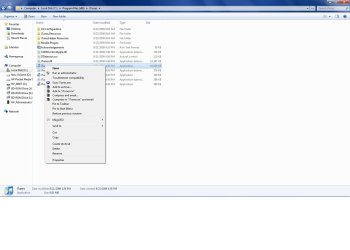
Once you have it put your mouse on the ITunes app and right click on it and the drop down menu will show you "Run as administrator" left click on that and that should give you a clean install.
Let us know if this works.
Regards,
Adrian
 

Attachments

  • ITune_Admin.jpg
    ITune_Admin.jpg
    85.5 KB · Views: 50

My Computer

Computer Manufacturer/Model Number
Custom Build
OS
Windows 7 7600 1 X64
CPU
AMD PHENOM II X 550 PROCESSOR 3.1 ghz
Motherboard
ASUS M4A78-TE
Memory
Corsair 4 gig ddr 3
Graphics Card(s)
ati radeon 3300
Sound Card
ati hd
Monitor(s) Displays
syncmaster 2033sw
Screen Resolution
1600X900 60 hz refresh
Hard Drives
twin_seagates SATA's 1 TB & 500 Gig, hitachi_slimline 160 gig
PSU
antec_550 watt
Case
cooler master GLite
Cooling
stock_heat sink
Internet Speed
20mbs up/ 1.5mbs down
Other Info
favorite child "stewie"
favorite dog "brian"
Thanks to all for their help on this. turns out I somehow fried my registry, causing issues with other s/w as well. As a result I ended up restoring to a prior archive....reinstalled iTunes 9.0 and all is well!!!


Tim
 

My Computer

Computer Manufacturer/Model Number
Dell XPS 630i
OS
Windows 7
CPU
E8500 O/C @ 4.0ghz
Memory
4gb Corsair Dominator
Graphics Card(s)
nVidia GeForce 8800GT
Monitor(s) Displays
HP2207
Screen Resolution
1680x1050
Hard Drives
1Tb Seagate
Back
Top