Itunes - icon won't maximize

hurkis

New member
Local time
2:15 PM
Messages
15
Location
Ottawa, Ontario, Canada
Hi.

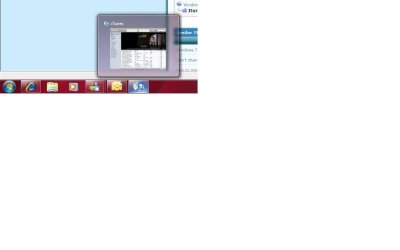
This has been working well up until I installed the 2 new security updates. I am no longer able to maximize the itunes icon in the toolbar. I can maximize all other taskbar buttons but not that one. I have even deinstalled Itunes and reinstalled.

Any suggestions or should I restore to an earlier date ?
 

My Computer

Computer Manufacturer/Model Number
Dell
OS
Windows 7
CPU
INTEL(R) CORE(tm)2 QUAD CPU Q9450 @2.66GHz
Motherboard
acpi x86
Sound Card
Creative SB X-Fi
Monitor(s) Displays
Dell 2408WFP(Digital) and NEC LCD1850E
Hard Drives
Hitachi HDS721010KLA330
Keyboard
HID-keyboard - DELL
Mouse
HID-Compliant mouse
Internet Speed
Cable - High Speed
Hi.

This has been working well up until I installed the 2 new security updates. I am no longer able to maximize the itunes icon in the toolbar. I can maximize all other taskbar buttons but not that one. I have even deinstalled Itunes and reinstalled.

Any suggestions or should I restore to an earlier date ?


Hi hurkis and welcome to sevenforums

What security updates did you install? May want to un-install them. Could we also get some info abt your system

Thanks

Ken
 

My Computer

Computer Manufacturer/Model Number
HP Pavillion dv-7 1005 Tx
OS
Win 8 Release candidate 8400
CPU
[email protected]
Memory
4 gigs
Graphics Card(s)
Nvidia 9600M
Sound Card
HD built-in
Monitor(s) Displays
17" Wxga
Screen Resolution
1440x900
Cooling
none
Internet Speed
45Mb down 5Mb up
These two were installed today:
Cumulative Security Update for Internet Explorer 8 for Windows 7 Release Candidate (KB972260)

Security Update for Microsoft Visual C++ 2005 Service Pack 1 Redistributable Package (KB973923)

This one was installed yesterday...

Definition Update for Windows Defender - KB915597 (Definition 1.63.422.0)


ITunes was working correctly and it looks like it still is, but I cannot maximize the window.

My system is a Dell XPS 420 x32 bit (my system info is in my profile).

Thanks

Mike
 

My Computer

Computer Manufacturer/Model Number
Dell
OS
Windows 7
CPU
INTEL(R) CORE(tm)2 QUAD CPU Q9450 @2.66GHz
Motherboard
acpi x86
Sound Card
Creative SB X-Fi
Monitor(s) Displays
Dell 2408WFP(Digital) and NEC LCD1850E
Hard Drives
Hitachi HDS721010KLA330
Keyboard
HID-keyboard - DELL
Mouse
HID-Compliant mouse
Internet Speed
Cable - High Speed
Nice computer. I have one also. I downloaded the same updates w no prob and wouldn't know how to recreate your problem

when was your last back up from?

Ken
 

My Computer

Computer Manufacturer/Model Number
HP Pavillion dv-7 1005 Tx
OS
Win 8 Release candidate 8400
CPU
[email protected]
Memory
4 gigs
Graphics Card(s)
Nvidia 9600M
Sound Card
HD built-in
Monitor(s) Displays
17" Wxga
Screen Resolution
1440x900
Cooling
none
Internet Speed
45Mb down 5Mb up
If you mean my restore point, I can pretty much go back every day for 1 month.


Mike
 

My Computer

Computer Manufacturer/Model Number
Dell
OS
Windows 7
CPU
INTEL(R) CORE(tm)2 QUAD CPU Q9450 @2.66GHz
Motherboard
acpi x86
Sound Card
Creative SB X-Fi
Monitor(s) Displays
Dell 2408WFP(Digital) and NEC LCD1850E
Hard Drives
Hitachi HDS721010KLA330
Keyboard
HID-keyboard - DELL
Mouse
HID-Compliant mouse
Internet Speed
Cable - High Speed
probably easier to go back to when you didnt have the problem. How long ago was it? do you have data from then to now that you need to keep?

Ken
 

My Computer

Computer Manufacturer/Model Number
HP Pavillion dv-7 1005 Tx
OS
Win 8 Release candidate 8400
CPU
[email protected]
Memory
4 gigs
Graphics Card(s)
Nvidia 9600M
Sound Card
HD built-in
Monitor(s) Displays
17" Wxga
Screen Resolution
1440x900
Cooling
none
Internet Speed
45Mb down 5Mb up
The problem occurred in the last 1-2 days. I had been using ITunes for a long time and it has been working well since I upgraded to Windows 7 for the last month...

I'll try restoring back to an earlier date..

Thanks

Mike
 

My Computer

Computer Manufacturer/Model Number
Dell
OS
Windows 7
CPU
INTEL(R) CORE(tm)2 QUAD CPU Q9450 @2.66GHz
Motherboard
acpi x86
Sound Card
Creative SB X-Fi
Monitor(s) Displays
Dell 2408WFP(Digital) and NEC LCD1850E
Hard Drives
Hitachi HDS721010KLA330
Keyboard
HID-keyboard - DELL
Mouse
HID-Compliant mouse
Internet Speed
Cable - High Speed
Let us know how it works. It would annoy me as well

Ken
 

My Computer

Computer Manufacturer/Model Number
HP Pavillion dv-7 1005 Tx
OS
Win 8 Release candidate 8400
CPU
[email protected]
Memory
4 gigs
Graphics Card(s)
Nvidia 9600M
Sound Card
HD built-in
Monitor(s) Displays
17" Wxga
Screen Resolution
1440x900
Cooling
none
Internet Speed
45Mb down 5Mb up
Sure thing...
 

My Computer

Computer Manufacturer/Model Number
Dell
OS
Windows 7
CPU
INTEL(R) CORE(tm)2 QUAD CPU Q9450 @2.66GHz
Motherboard
acpi x86
Sound Card
Creative SB X-Fi
Monitor(s) Displays
Dell 2408WFP(Digital) and NEC LCD1850E
Hard Drives
Hitachi HDS721010KLA330
Keyboard
HID-keyboard - DELL
Mouse
HID-Compliant mouse
Internet Speed
Cable - High Speed
Hi.

I restored from 4 days ago, and no change... I then restored about 10 days ago... no change...

Any suggestions ?
 

My Computer

Computer Manufacturer/Model Number
Dell
OS
Windows 7
CPU
INTEL(R) CORE(tm)2 QUAD CPU Q9450 @2.66GHz
Motherboard
acpi x86
Sound Card
Creative SB X-Fi
Monitor(s) Displays
Dell 2408WFP(Digital) and NEC LCD1850E
Hard Drives
Hitachi HDS721010KLA330
Keyboard
HID-keyboard - DELL
Mouse
HID-Compliant mouse
Internet Speed
Cable - High Speed
Hi.

I restored from 4 days ago, and no change... I then restored about 10 days ago... no change...

Any suggestions ?


did you remove the 3 updates?

Ken
 

My Computer

Computer Manufacturer/Model Number
HP Pavillion dv-7 1005 Tx
OS
Win 8 Release candidate 8400
CPU
[email protected]
Memory
4 gigs
Graphics Card(s)
Nvidia 9600M
Sound Card
HD built-in
Monitor(s) Displays
17" Wxga
Screen Resolution
1440x900
Cooling
none
Internet Speed
45Mb down 5Mb up
Yes...
 

My Computer

Computer Manufacturer/Model Number
Dell
OS
Windows 7
CPU
INTEL(R) CORE(tm)2 QUAD CPU Q9450 @2.66GHz
Motherboard
acpi x86
Sound Card
Creative SB X-Fi
Monitor(s) Displays
Dell 2408WFP(Digital) and NEC LCD1850E
Hard Drives
Hitachi HDS721010KLA330
Keyboard
HID-keyboard - DELL
Mouse
HID-Compliant mouse
Internet Speed
Cable - High Speed
?Uninstall iTunes and reinstall it?
 

My Computer

Computer Manufacturer/Model Number
Home built (x64), Lenovo x61s Tablet, Samsung Netbook
OS
Win7 x64 + x86
CPU
Intel i7 920, other Intel chips, and the Atom in the netbook
Motherboard
Asus P6T Deluxe
Memory
12 gB; 4 gB Lenovo; 1 gB Samsung netbook
Graphics Card(s)
ATI 4870
Sound Card
Yes, I have one of these
Monitor(s) Displays
32" Sharp Aquos TV
Screen Resolution
800x600 - I have vision issues
Hard Drives
4 - 150 gB Velociraptors in RAID 5
Promise controller
PSU
1000 watt (can't recall the brand)
Case
Antec 300
Cooling
Big honking cooler that was rated highly at Toms Hardware
Keyboard
Microsoft Natural
Mouse
Logitech Trackman
Internet Speed
Cable
Other Info
GeekSquad UPS
CyberPower UPS
DLink DNS-323 NAS (2 tB)
Netgear wireless router as an access point
Netgear wired router FSV-318
Home network consists of
4 desktop computers (2 Vista, 2 Win7)
1 netbook (Win7)
4 laptop computers (XP, 2-Vista, Win7)
Wii and XBox 360
Yes, several times... When I put my cursor over the icon I can see the ITunes screen with all my songs listed.. my ipod sync's... but I just can't get the application up on the screen....
 

My Computer

Computer Manufacturer/Model Number
Dell
OS
Windows 7
CPU
INTEL(R) CORE(tm)2 QUAD CPU Q9450 @2.66GHz
Motherboard
acpi x86
Sound Card
Creative SB X-Fi
Monitor(s) Displays
Dell 2408WFP(Digital) and NEC LCD1850E
Hard Drives
Hitachi HDS721010KLA330
Keyboard
HID-keyboard - DELL
Mouse
HID-Compliant mouse
Internet Speed
Cable - High Speed
Yes, several times... When I put my cursor over the icon I can see the ITunes screen with all my songs listed.. my ipod sync's... but I just can't get the application up on the screen....

wait "up on the screen or maximized"?

Ken
 

My Computer

Computer Manufacturer/Model Number
HP Pavillion dv-7 1005 Tx
OS
Win 8 Release candidate 8400
CPU
[email protected]
Memory
4 gigs
Graphics Card(s)
Nvidia 9600M
Sound Card
HD built-in
Monitor(s) Displays
17" Wxga
Screen Resolution
1440x900
Cooling
none
Internet Speed
45Mb down 5Mb up
To me both are the same thing... I cannot maximize the image onto the screen (or put it up on the screen) anymore.
 

My Computer

Computer Manufacturer/Model Number
Dell
OS
Windows 7
CPU
INTEL(R) CORE(tm)2 QUAD CPU Q9450 @2.66GHz
Motherboard
acpi x86
Sound Card
Creative SB X-Fi
Monitor(s) Displays
Dell 2408WFP(Digital) and NEC LCD1850E
Hard Drives
Hitachi HDS721010KLA330
Keyboard
HID-keyboard - DELL
Mouse
HID-Compliant mouse
Internet Speed
Cable - High Speed
hurkis

If you cant see the app at all thats not a maximized problem. If you can see it and click on a song (or whatever) but cant make it fill your screen, thats a maximized problem. So which is it?

Ken
 

My Computer

Computer Manufacturer/Model Number
HP Pavillion dv-7 1005 Tx
OS
Win 8 Release candidate 8400
CPU
[email protected]
Memory
4 gigs
Graphics Card(s)
Nvidia 9600M
Sound Card
HD built-in
Monitor(s) Displays
17" Wxga
Screen Resolution
1440x900
Cooling
none
Internet Speed
45Mb down 5Mb up
Here is a pic of what I see
 

Attachments

  • itunes.jpg
    itunes.jpg
    20.3 KB · Views: 108

My Computer

Computer Manufacturer/Model Number
Dell
OS
Windows 7
CPU
INTEL(R) CORE(tm)2 QUAD CPU Q9450 @2.66GHz
Motherboard
acpi x86
Sound Card
Creative SB X-Fi
Monitor(s) Displays
Dell 2408WFP(Digital) and NEC LCD1850E
Hard Drives
Hitachi HDS721010KLA330
Keyboard
HID-keyboard - DELL
Mouse
HID-Compliant mouse
Internet Speed
Cable - High Speed

My Computer

Computer Manufacturer/Model Number
HP Pavillion dv-7 1005 Tx
OS
Win 8 Release candidate 8400
CPU
[email protected]
Memory
4 gigs
Graphics Card(s)
Nvidia 9600M
Sound Card
HD built-in
Monitor(s) Displays
17" Wxga
Screen Resolution
1440x900
Cooling
none
Internet Speed
45Mb down 5Mb up
Your first comment.... I can't get the app to open onto the screen, as you can see by the pic, I can place my curser over the icon on the taskbar and see the little image. That is all I can see. (i can see in the little picture, my songs etc) I can't put the little image onto the screen so that I can work with the application.

Hopefully the pic I posted better explains my problem.


Thanks

Mike
 

My Computer

Computer Manufacturer/Model Number
Dell
OS
Windows 7
CPU
INTEL(R) CORE(tm)2 QUAD CPU Q9450 @2.66GHz
Motherboard
acpi x86
Sound Card
Creative SB X-Fi
Monitor(s) Displays
Dell 2408WFP(Digital) and NEC LCD1850E
Hard Drives
Hitachi HDS721010KLA330
Keyboard
HID-keyboard - DELL
Mouse
HID-Compliant mouse
Internet Speed
Cable - High Speed
Back
Top