iTunes icon

ozzy441

New member
Member
Local time
10:17 PM
Messages
31
Location
London, UK
Hey guys,

So, it seems when I right-click on the taskbar icon for iTunes, then right-click on the application name, it is an .exe and not a shortcut like other programs. The problem here being that I want to change the icon showing on the taskbar when iTunes is running, and there is no 'customisation' tab, as there usually is for the shortcuts. Any ideas?
 

My Computer

Computer Manufacturer/Model Number
Custom Build
OS
Windows 7 Ultimate 64bit
CPU
Intel Core i5 2500k @ 3.3GHz (soon to change)
Motherboard
ASUS P8Z 68-V LX
Memory
8GB 1333MHz DDR3 (Generic)
Graphics Card(s)
MSI Nvidia GTX 550 Ti 1024MB GDDR5
Monitor(s) Displays
Bush TV
Screen Resolution
1920x1080
Hard Drives
OCZ Agility 3 60GB SSD
Seagate Barracuda Sata 3 500GB HDD
PSU
EZCOOL Ambience 80+ 700W
Case
Coolermaster 430 Elite
Cooling
Air
Keyboard
Tesco Multimedia Keyboard
Mouse
Technika wireless mouse

My Computer

Computer type
PC/Desktop
Computer Manufacturer/Model Number
Airbot 2.0
OS
Windows 7 Ultimate x64 SP1
CPU
Core i7 920 (D0) @ 4Ghz, *26c idle *65c full load on air
Motherboard
Asus P6X58D Premium - Sata 6Gb/s - USB 3.0
Memory
12GB DDR3 Corsair Dominator -CMD12GX3M6A1600C8 at 1600MHz
Graphics Card(s)
Zotac Geforce GTX 770
Sound Card
ASUS Xonar D2X
Monitor(s) Displays
1 LG 24" Flatron W2453V-PF 1 Samsung 24" P2450H both 2ms RT
Screen Resolution
1920x1080@60hz
Hard Drives
1 Samsung 250GB 840 Evo SSD
1 OCZ Vertex2 180GB SSD
1 TB Samsung Spinpoint F1 7200RPM 32MB cache
2 500GB WD Caviar Blacks 7200RPM 32MB cache (WD5001AALS)

Pioneer DVD Burner DVR-S18M
PSU
Corsair HX1000W
Case
Cooler Master HAF 932
Cooling
Case Fans *3 230mm, *1 140mm/CPU - *Tuniq Tower 120 Extreme
Keyboard
Logitech Wireless MK700
Mouse
Logitech Wireless MK700
Internet Speed
DL 15 Mbps UL 0.98 Mbps
Antivirus
None
Browser
Firefox Nightly
Other Info
Processor-7.7 *RAM- 7.9 *Graphics-7.9 *Gaming Graphics- 7.9 *SSD- 7.8 W.E.I final score= 7.7
*Phone- LG Nexus 5
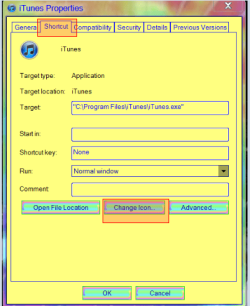
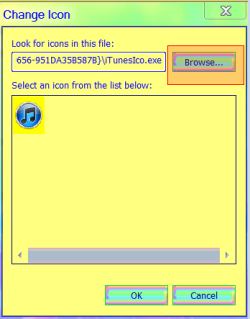
Do the same thing but go to the Shortcut tab & look for the Change icon button hit it & Browse to your icon (screenshots)
Jerry
 

Attachments

  • 333.png
    333.png
    18.9 KB · Views: 5
  • 444.png
    444.png
    10.5 KB · Views: 3

My Computer

Computer type
Laptop
Computer Manufacturer/Model Number
Sager NP9170
OS
Win 7 Pro x64 / Win 10 Pro
CPU
Intel(R) Core(TM) i7-3630QM CPU @ 2.40GHz
Motherboard
CLEVO P170EM
Memory
12 GB
Graphics Card(s)
(1) Intel(R) HD Graphics 4000 (2) NVIDIA GeForce GTX 675M
Sound Card
(1) Realtek High Definition Audio (2) Intel(R) Display Aud
Monitor(s) Displays
17.3
Screen Resolution
1920x1080
Hard Drives
(1) Samsung 860 EVO 500GB(OS) (1) Samsung 860 EVO 500GB(Data)
Keyboard
Backlite
Antivirus
MSE, Malwarebytes Pro
Browser
Firefox
Other Info
DESKTOP: Custom-built.
OS: Win 10 Pro x64.
CASE: Rosewill R5.
CPU: Intel I5 4670K CPU @ 3.40GHz.
CPU COOLER: Cool Master Hyper 212 EVO.
MOTHERBOARD: Asus Z87-A.
MEMORY: Kingston HyperX 2x4 GB.
GPU: Nvidia Geforce 650 TI.
PSU: Corsair TX750.
DRIVES: (1) Samsung 840 120 GB SSD (2) Western Digital blue 500 GB 7200 RPM.
@Airbot, I know I could do that, but it would only work if the shortcut was pinned, I don't want it pinned.
@Bongo, there is no shortcut tab.
 

My Computer

Computer Manufacturer/Model Number
Custom Build
OS
Windows 7 Ultimate 64bit
CPU
Intel Core i5 2500k @ 3.3GHz (soon to change)
Motherboard
ASUS P8Z 68-V LX
Memory
8GB 1333MHz DDR3 (Generic)
Graphics Card(s)
MSI Nvidia GTX 550 Ti 1024MB GDDR5
Monitor(s) Displays
Bush TV
Screen Resolution
1920x1080
Hard Drives
OCZ Agility 3 60GB SSD
Seagate Barracuda Sata 3 500GB HDD
PSU
EZCOOL Ambience 80+ 700W
Case
Coolermaster 430 Elite
Cooling
Air
Keyboard
Tesco Multimedia Keyboard
Mouse
Technika wireless mouse
This is a guess
You will need to go to
C:\Program Files
Or
C:\Program Files (86)
& look for itunes folder & try to change the icons there
Jerry
 

My Computer

Computer type
Laptop
Computer Manufacturer/Model Number
Sager NP9170
OS
Win 7 Pro x64 / Win 10 Pro
CPU
Intel(R) Core(TM) i7-3630QM CPU @ 2.40GHz
Motherboard
CLEVO P170EM
Memory
12 GB
Graphics Card(s)
(1) Intel(R) HD Graphics 4000 (2) NVIDIA GeForce GTX 675M
Sound Card
(1) Realtek High Definition Audio (2) Intel(R) Display Aud
Monitor(s) Displays
17.3
Screen Resolution
1920x1080
Hard Drives
(1) Samsung 860 EVO 500GB(OS) (1) Samsung 860 EVO 500GB(Data)
Keyboard
Backlite
Antivirus
MSE, Malwarebytes Pro
Browser
Firefox
Other Info
DESKTOP: Custom-built.
OS: Win 10 Pro x64.
CASE: Rosewill R5.
CPU: Intel I5 4670K CPU @ 3.40GHz.
CPU COOLER: Cool Master Hyper 212 EVO.
MOTHERBOARD: Asus Z87-A.
MEMORY: Kingston HyperX 2x4 GB.
GPU: Nvidia Geforce 650 TI.
PSU: Corsair TX750.
DRIVES: (1) Samsung 840 120 GB SSD (2) Western Digital blue 500 GB 7200 RPM.
Okay, what do I change in there? Bear in mind as I have done for every other application I run reguarly, I only want to change the taskbar icon, not the actual application icon.
 

My Computer

Computer Manufacturer/Model Number
Custom Build
OS
Windows 7 Ultimate 64bit
CPU
Intel Core i5 2500k @ 3.3GHz (soon to change)
Motherboard
ASUS P8Z 68-V LX
Memory
8GB 1333MHz DDR3 (Generic)
Graphics Card(s)
MSI Nvidia GTX 550 Ti 1024MB GDDR5
Monitor(s) Displays
Bush TV
Screen Resolution
1920x1080
Hard Drives
OCZ Agility 3 60GB SSD
Seagate Barracuda Sata 3 500GB HDD
PSU
EZCOOL Ambience 80+ 700W
Case
Coolermaster 430 Elite
Cooling
Air
Keyboard
Tesco Multimedia Keyboard
Mouse
Technika wireless mouse
Okay, what do I change in there? Bear in mind as I have done for every other application I run reguarly, I only want to change the taskbar icon, not the actual application icon.
I guess you cannot do that . Change in one place will affect in the entire system .
 

My Computer

Computer type
PC/Desktop
Computer Manufacturer/Model Number
Self Assembled
OS
Microsoft Windows 10 Pro Insider Preview 64-bit
CPU
Intel(R) Core(TM) i3-4130 CPU @ 3.40GHz
Motherboard
Gigabyte Technology Co., Ltd. B85M-D3H
Memory
Corsair Vengence 4GB x2 (8.00GB Dual-Channel DDR3 @ 798MHz)
Graphics Card(s)
2047MB GeForce GTS 450 (ZOTAC International)
Sound Card
Onboard (Realtek High Definition Audio)
Monitor(s) Displays
LG Flatron E2040T
Screen Resolution
1600x900
Hard Drives
Western Digital 1 TB
Seagate 500 GB
PSU
Corsair VS550
Case
Cooler Master K380
Cooling
Cooler Master Seidon 120V Plus
Keyboard
Logitech MK260r
Mouse
Logitech MK260r
Internet Speed
PMPL Broadband
Antivirus
Windows Defender + MBAM
Browser
Firefox
Other Info
Dell Studio 15" Laptop
This is a guess
You will need to go to
C:\Program Files
Or
C:\Program Files (86)
& look for itunes folder & try to change the icons there
Jerry


Think I already mentioned that. :p


I don't think you could have the icon be different when it shows itunes on the taskbar running, and not change the shortcut icon to the program itself. All or not.
 

My Computer

Computer type
PC/Desktop
Computer Manufacturer/Model Number
Airbot 2.0
OS
Windows 7 Ultimate x64 SP1
CPU
Core i7 920 (D0) @ 4Ghz, *26c idle *65c full load on air
Motherboard
Asus P6X58D Premium - Sata 6Gb/s - USB 3.0
Memory
12GB DDR3 Corsair Dominator -CMD12GX3M6A1600C8 at 1600MHz
Graphics Card(s)
Zotac Geforce GTX 770
Sound Card
ASUS Xonar D2X
Monitor(s) Displays
1 LG 24" Flatron W2453V-PF 1 Samsung 24" P2450H both 2ms RT
Screen Resolution
1920x1080@60hz
Hard Drives
1 Samsung 250GB 840 Evo SSD
1 OCZ Vertex2 180GB SSD
1 TB Samsung Spinpoint F1 7200RPM 32MB cache
2 500GB WD Caviar Blacks 7200RPM 32MB cache (WD5001AALS)

Pioneer DVD Burner DVR-S18M
PSU
Corsair HX1000W
Case
Cooler Master HAF 932
Cooling
Case Fans *3 230mm, *1 140mm/CPU - *Tuniq Tower 120 Extreme
Keyboard
Logitech Wireless MK700
Mouse
Logitech Wireless MK700
Internet Speed
DL 15 Mbps UL 0.98 Mbps
Antivirus
None
Browser
Firefox Nightly
Other Info
Processor-7.7 *RAM- 7.9 *Graphics-7.9 *Gaming Graphics- 7.9 *SSD- 7.8 W.E.I final score= 7.7
*Phone- LG Nexus 5
Well that's odd, because I can do it with Chrome, Firefox, Explorer... just not iTunes. The way it looks like it works it uses the start menu shortcuts for the taskbar applications. e.g, when I run Firefox, Chrome, uTorrent etc..., the path for the item shown in the taskbar is C:\Users\~\AppData\Roaming\Microsoft\Windows\Start Menu\Programs\Accessories when unpinned, but C:\Users\~\AppData\Roaming\Microsoft\Internet Explorer\Quick Launch\User Pinned\TaskBar when pinned. So, when unpinned, if the icon of the shortcut in the start menu is changed, so is the ont which shows up on the taskbar.

When iTunes is pinned, it also reads info from C:\Users\~\AppData\Roaming\Microsoft\Internet Explorer\Quick Launch\User Pinned\TaskBar, however, when it is unpinned it comes from C:\Program Files (x86)\iTunes. Seems odd to me that it would work in one way for one program, and a totally different way for another.
 

My Computer

Computer Manufacturer/Model Number
Custom Build
OS
Windows 7 Ultimate 64bit
CPU
Intel Core i5 2500k @ 3.3GHz (soon to change)
Motherboard
ASUS P8Z 68-V LX
Memory
8GB 1333MHz DDR3 (Generic)
Graphics Card(s)
MSI Nvidia GTX 550 Ti 1024MB GDDR5
Monitor(s) Displays
Bush TV
Screen Resolution
1920x1080
Hard Drives
OCZ Agility 3 60GB SSD
Seagate Barracuda Sata 3 500GB HDD
PSU
EZCOOL Ambience 80+ 700W
Case
Coolermaster 430 Elite
Cooling
Air
Keyboard
Tesco Multimedia Keyboard
Mouse
Technika wireless mouse
Back
Top