
You are using an out of date browser. It may not display this or other websites correctly.
You should upgrade or use an alternative browser.
You should upgrade or use an alternative browser.
Jaangle vs Winamp
- Thread starter TWardy
- Start date

Jaangle, never herd about it before, but between this two I'll say Winamp.
Also I suggest you to check AIMP 2.
Also I suggest you to check AIMP 2.
My Computer
- Computer type
- PC/Desktop
- Computer Manufacturer/Model Number
- Custom Build
- OS
- Windows 10 Pro x64
- CPU
- Intel Core i5 4440 @Stock
- Motherboard
- Gigabyte Z97 D3H
- Memory
- 4 x 4GB HyperX Fury DDR3
- Graphics Card(s)
- Gigabyte GTX 1050Ti O4G
- Sound Card
- Integrated
- Monitor(s) Displays
- Dell P2417H
- Screen Resolution
- 1920 x 1080
- Hard Drives
- Samsung EVO 850 120GB / Toshiba DT01ACA050 1TB 7200prm 32MB
- PSU
- Riotoro Onyx 750W
- Case
- NZXT H500 Black-Red
- Cooling
- Stock CPU + NZXT 120mm + 2x120mm red fans
- Keyboard
- Modecom Volcano Lanparty
- Mouse
- Asus ROG Gladius / DeepCool E-Pad Plus
- Internet Speed
- DOCSIS 50/3 Mbit
- Browser
- Google Chrome
- Other Info
- Asus K55VJ(i5 3210M, GT635M / 2GB, 8GB DDR3, 500GB HDD)

Infinite
Closed as requested
- Local time
- 1:53 AM
- Messages
- 958
Well personally I would go for WinAMP since I have never heard of Jaangle. For General Music, I use VLC Media Player, For my iPhone I use MediaMonkey or Foobar2000. For Music Editing I use Audacity.
My Computer
- Computer type
- PC/Desktop
- Computer Manufacturer/Model Number
- Novatech iRush Pro
- OS
- Windows 7 Ultimate SP1 - 64 Bit
- CPU
- Intel Core i5 2500k
- Motherboard
- Foxconn H67M-S/H67M-V/H67
- Memory
- 2x4GB DDR3 1333Hz
- Graphics Card(s)
- Ati Radeon 6770
- Sound Card
- None
- Monitor(s) Displays
- Samsung S22B150
- Screen Resolution
- 1920x1080
- Hard Drives
- 2x500GB
- PSU
- 500W
- Cooling
- Fan
- Keyboard
- HP KU0316
- Mouse
- Wireless Logitech M185
- Internet Speed
- 20MB/s
- Antivirus
- Avast Free
- Browser
- Google Chrome
- Other Info
- Logitech M185 Mouse
KU-M316 Keyboard

People, why are you shoving opinions if you don't actually have one? xD
Jaangle is much more easier to use and is a much lighter resource than Winamp which, on the other hand, supports much more formats, generally has a better default UI and, at the cost of a bit more RAM, offers more services than Jaangle.
Naturally, I would recommend Jaangle for its ease of use and simplicity, which especially comes in handy if you don't use your media player for "everything", from CD ripping to MP3 burning and other crap.
Jaangle is much more easier to use and is a much lighter resource than Winamp which, on the other hand, supports much more formats, generally has a better default UI and, at the cost of a bit more RAM, offers more services than Jaangle.
Naturally, I would recommend Jaangle for its ease of use and simplicity, which especially comes in handy if you don't use your media player for "everything", from CD ripping to MP3 burning and other crap.
My Computer
- Computer type
- Laptop
- Computer Manufacturer/Model Number
- Custom
- OS
- Windows 7 Home Premium x64
- CPU
- Intel Core i5 2500K
- Motherboard
- MSI MS-7750
- Memory
- 8GB DDR3
- Graphics Card(s)
- nVidia GeForce GTX650 Ti BOOST
- Sound Card
- Realtek
- Monitor(s) Displays
- 21' Philips
- Screen Resolution
- Full HD
- Hard Drives
- 1TB
- PSU
- 500W

I'm not sure what you mean. People had opinions and they expressed them.....the very same thing you did yourself. *shrugs* When a person asks a question with no right answer...all you are going to get in return is opinions.People, why are you shoving opinions if you don't actually have one? xD
That being said, to the OP, download them both and try them out. Throw MediaMonkey (my choice) in there and see which you like best. ALl we can do is give opinions...in the end, you'll have to decide.
My Computer
- OS
- Windows 7 Ultimate x64 SP1
- CPU
- Intel Core i7-2600
- Motherboard
- Gigabyte GA-P67A-UD3P-B3
- Memory
- 12 GB Patriot Extreme DDR3-1333
- Graphics Card(s)
- Nvidia GTX 470
- Monitor(s) Displays
- Dell UltraSharp 2209WA
- Hard Drives
- OCZ Agility3 240 GB, WD5001AALS, WD7501AALS
- PSU
- OCZ ModStream 700W
- Case
- CoolerMaster HAF 912 Advanced
- Cooling
- CoolerMaster Hyper 212 Plus
Since it was I who (on another thread) suggested Jaangle because of the mention of "an extensive music collection", I myself use both Winamp (as an all-around music player which is my default Windows player program for all music formats) as well as Jaangle (when I'm browsing through my own extensive music collection and feel the desire to be using Jaangle's GUI and search functions and player functions and art display functions and organization functions, etc., etc..That being said, to the OP, download them both and try them out.
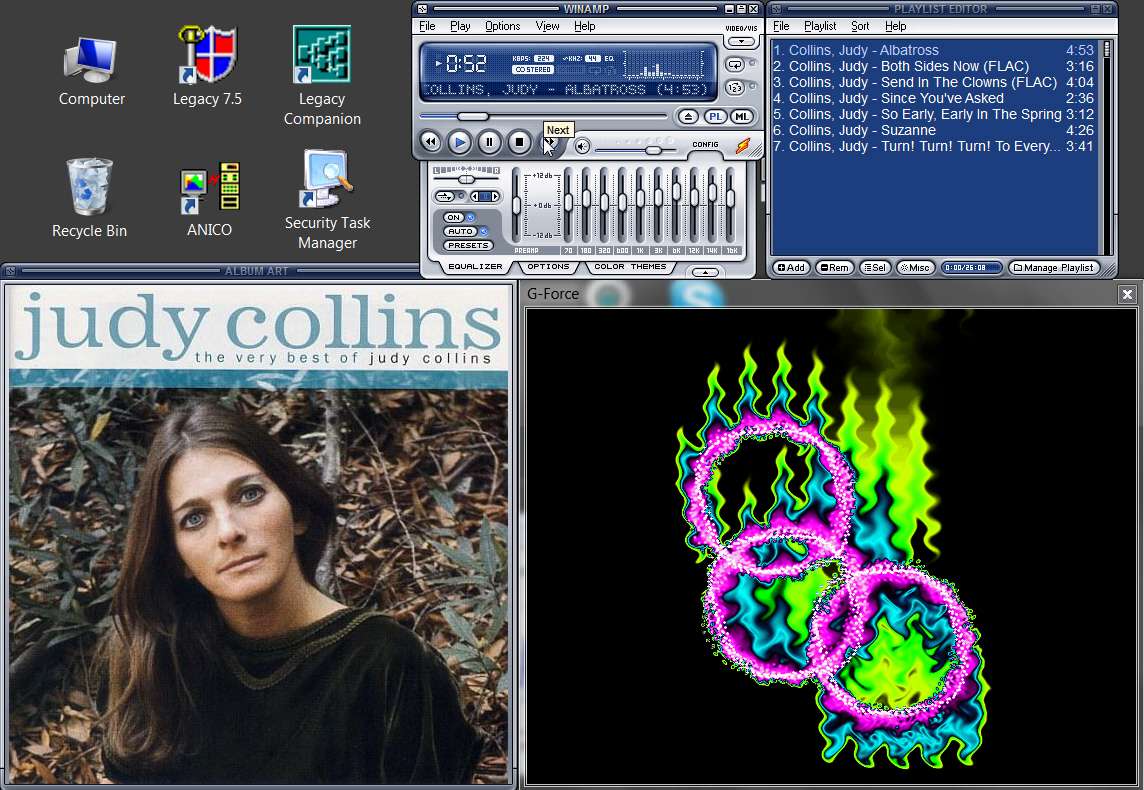
You don't have to use only one. You can use both. In fact you can even launch Winamp from Jaangle (as an external player) if you want to, but there's normally no need to since Jaangle plays the same MP3, FLAC, etc. that Winamp can play from most music file collections. The only reason you might really want to do this is for Winamp's visualization plugins (e.g. I use G-Force Platinum), so sometimes I want to SEE my music as well as LISTEN to my music. Hence -> Winamp for playing plus visualization.
Nothing personal, but this is exactly what makes for horse racing. I myself can't stand MediaMonkdy and would NOT suggest it.Throw MediaMonkey (my choice) in there...
Here's some Jaangle examples:
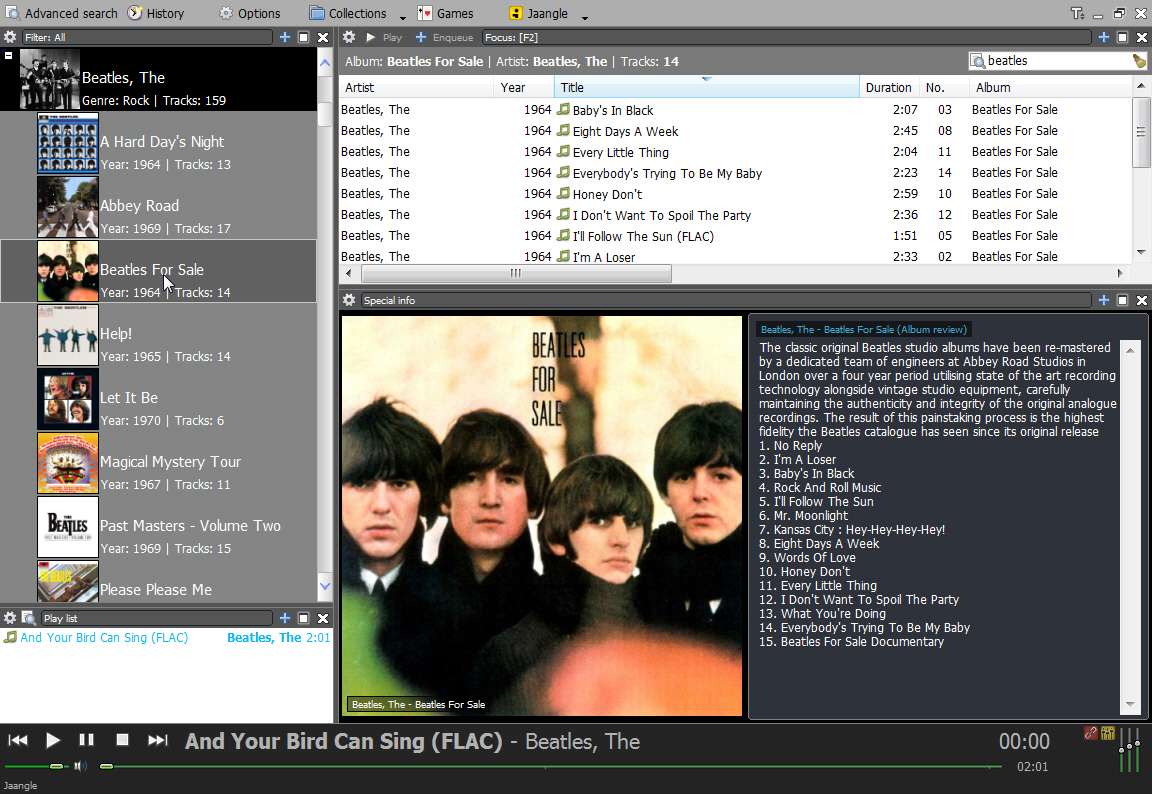
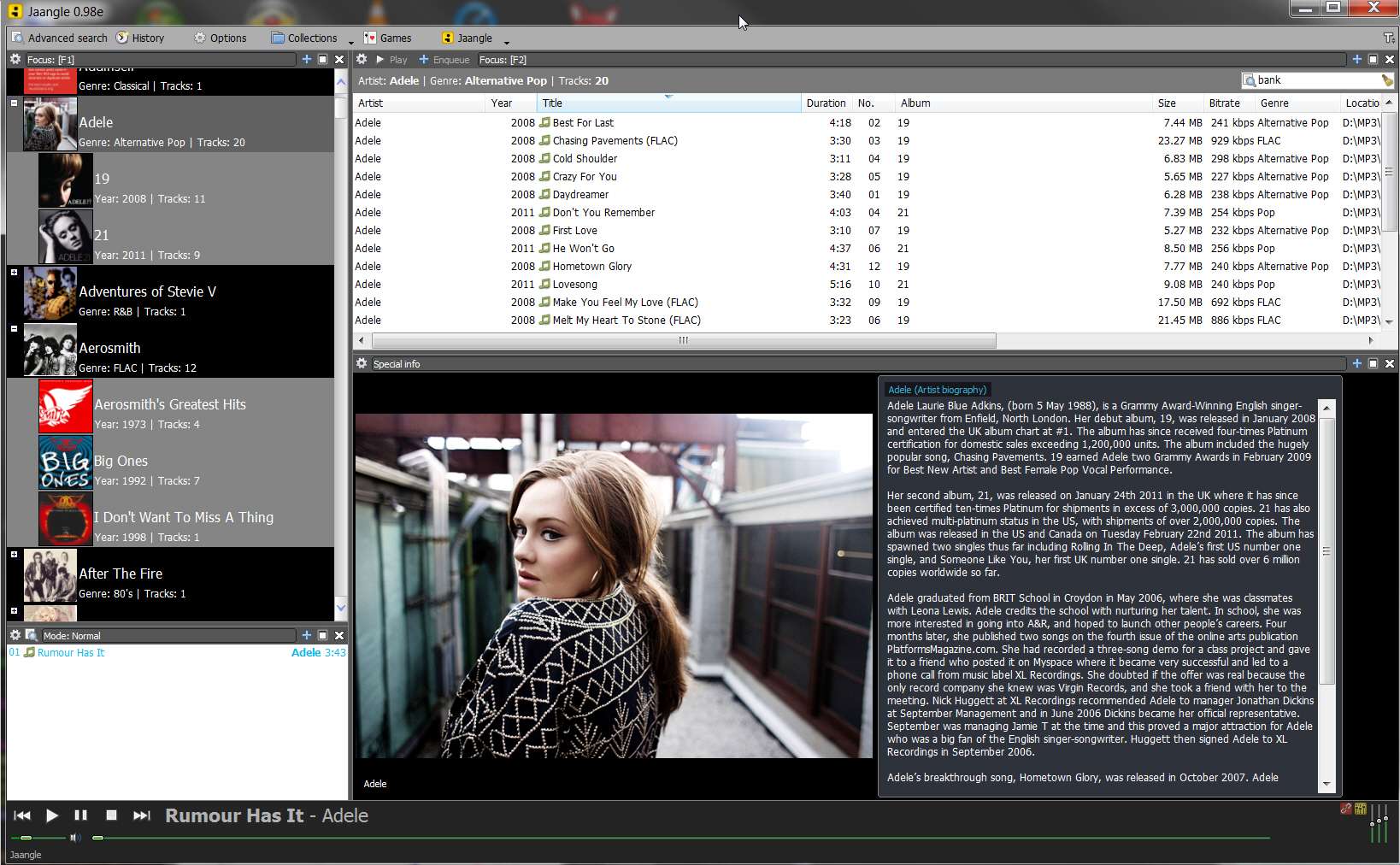
And here's Winamp:
My Computer
- Computer type
- PC/Desktop
- Computer Manufacturer/Model Number
- Home-built, two systems (1) and (2)
- OS
- Windows 7 Pro x64 (1), Win7 Pro X64 (2)
- CPU
- i5-3350p 3.1Ghz/6MB-cache (1); E8400 3.0Ghz/6MB-cache (2)
- Motherboard
- ASUS P8Z77-V Pro (1); ASUS P5Q3 (2)
- Memory
- 8GB PC3-12800 DDR3 (1); 4GB PC3-10600 DDR3 (2)
- Graphics Card(s)
- ATI HD7750 (1), (see TV cards); ATI R7 250 (2)
- Sound Card
- Realtek ALC892 HD Audio (1); Realtek ALC1200 HD Audio (2)
- Monitor(s) Displays
- Eizo HD2441W LCD, Eizo S2433W (1); Eizo 24" S2433W (2)
- Screen Resolution
- 1920x1200, 1920x1200 (1); 1920x1200 (2)
- Hard Drives
- (1) 1TB SATA-II (7200RPM), 2x2TB SATA-III (7200RPM), 250GB SATA-III (10000RPM) for OS; 2x2TB external USB 3.0
(2) 320GB SATA-II (7200RPM), 750GB SATA-II (7200RPM), 150GB SATA-II (10000RPM) for OS; 2TB external USB 3.0
- PSU
- Nesteq ECS-6001 600W (1); Nesteq ECS-5001 500W (2)
- Case
- Acousti-Case 360 (1) and (2)
- Cooling
- Noctua NH-U12P SE2 for CPU, 2x120mm case fans (1) and (2)
- Keyboard
- IBM PS/2 (1) and (2)
- Mouse
- Logitech MX Revolution wireless (1); Microsoft wired (2)
- Internet Speed
- 100mbps down / 10mbps up
- Antivirus
- Microsoft Security Essentials; Malwarebyte Anti-Malware Pro
- Browser
- Firefox
- Other Info
- Ceton InfiniTV 4-tuner cablecard-enabled TV card as well as Hauppauge HVR-2250 OTA/ATSC 2-tuner TV card in (1), running under Win7 WMC

WinAmp for the win!
My Computer
- Computer Manufacturer/Model Number
- Acer 4730Z
- OS
- Windows 7 Ultimate Edition, 64 Bit Build 7600
- CPU
- Intel Pentium Dual Core
- Motherboard
- Aspire 4730Z (uPGA-478)
- Memory
- 2.00 GB Dual-Channel DDR2 @ 332MHz (5-5-5-15)
- Graphics Card(s)
- Mobile Intel(R) 4 Series Express Chipset Family
- Sound Card
- High Definition Audio Device
- Monitor(s) Displays
- Generic PnP Monitor (1280x800@60Hz)
- Screen Resolution
- 1280x800 @60 Hz
- Hard Drives
- 156GB Hitachi Hitachi HTS542516K9SA00 ATA Device (SATA)
I'm not sure what you mean. People had opinions and they expressed them.....the very same thing you did yourself. *shrugs* When a person asks a question with no right answer...all you are going to get in return is opinions.People, why are you shoving opinions if you don't actually have one? xD
I was merely asking the two people who chose Winamp not even knowing what Jaangle is. That is certainly no way to help someone. I had an acquaintance ask me a similar question regarding a piece of software I never used before, and the first thing I did is download the thing to try it out instead of just taking the easy way and "stuffing" my answer with familiar things. If the OP wanted to ask a different kind of a question, they certainly wouldn't post the thread "Jaangle VS Winamp"
But I digress, and agree with dsperber. I never tried to use Jaangle alongside another media player, so I'm curious about any possible file association/album art display problems (in W. Explorer), but indeed, you're certainly welcome to try or use both.
My Computer
- Computer type
- Laptop
- Computer Manufacturer/Model Number
- Custom
- OS
- Windows 7 Home Premium x64
- CPU
- Intel Core i5 2500K
- Motherboard
- MSI MS-7750
- Memory
- 8GB DDR3
- Graphics Card(s)
- nVidia GeForce GTX650 Ti BOOST
- Sound Card
- Realtek
- Monitor(s) Displays
- 21' Philips
- Screen Resolution
- Full HD
- Hard Drives
- 1TB
- PSU
- 500W
As I said, Jaangle is simply a "media player/organizer". I do not have any music file types associated with it for Windows, since I have Winamp installed as my default music player for all music types.I never tried to use Jaangle alongside another media player, so I'm curious about any possible file association/album art display problems (in W. Explorer), but indeed, you're certainly welcome to try or use both.
So, Winamp icon shows for music files in Explorer and any other Explorer-like programs (e.g. Free Commander), double-click on them and Winamp launches, etc. Jaangle is not at all involved in Windows defaults (for me, anyway).
To use Jaangle I simply open it, and then use it. If I want to play music with Winamp while being in Jaangle I simply right-click on the selected music files and hover the mouse over "Advanced" and then click on "Play (external player)" from the flyout sub-menu. Otherwise I just play the selected music files within Jaangle itself, which is perfectly acceptable to me.
As far as album art in Windows Explorer, I do NOT have any "music library" definitions. Don't use Windows Explorer... I use Jaangle. All of my high-quality 500x500 album art is present as "cover.jpg" files in the album folders (my collection is organized \Music\Artist\Album), and this is understood perfectly both by (a) Winamp, which displays these images in its Album Art window when any music file in that folder is played, and (b) Jaangle, which discovers the presence of these "cover.jpg" images during the analysis of the "music collections" (i.e. folders) I've defined. So when an album is selected in Jaangle, this same 500x500 high-quality "cover.jpg" album art is presented.
The exact same \Music\Artist\Album structure, including "cover.jpg" in album folders, is also duplicated onto my Cowon J3 portable music player. Again, the high-quality 500x500 "cover.jpg" is presented on the J3's screen (resized by the J3 to 272x272).
My Computer
- Computer type
- PC/Desktop
- Computer Manufacturer/Model Number
- Home-built, two systems (1) and (2)
- OS
- Windows 7 Pro x64 (1), Win7 Pro X64 (2)
- CPU
- i5-3350p 3.1Ghz/6MB-cache (1); E8400 3.0Ghz/6MB-cache (2)
- Motherboard
- ASUS P8Z77-V Pro (1); ASUS P5Q3 (2)
- Memory
- 8GB PC3-12800 DDR3 (1); 4GB PC3-10600 DDR3 (2)
- Graphics Card(s)
- ATI HD7750 (1), (see TV cards); ATI R7 250 (2)
- Sound Card
- Realtek ALC892 HD Audio (1); Realtek ALC1200 HD Audio (2)
- Monitor(s) Displays
- Eizo HD2441W LCD, Eizo S2433W (1); Eizo 24" S2433W (2)
- Screen Resolution
- 1920x1200, 1920x1200 (1); 1920x1200 (2)
- Hard Drives
- (1) 1TB SATA-II (7200RPM), 2x2TB SATA-III (7200RPM), 250GB SATA-III (10000RPM) for OS; 2x2TB external USB 3.0
(2) 320GB SATA-II (7200RPM), 750GB SATA-II (7200RPM), 150GB SATA-II (10000RPM) for OS; 2TB external USB 3.0
- PSU
- Nesteq ECS-6001 600W (1); Nesteq ECS-5001 500W (2)
- Case
- Acousti-Case 360 (1) and (2)
- Cooling
- Noctua NH-U12P SE2 for CPU, 2x120mm case fans (1) and (2)
- Keyboard
- IBM PS/2 (1) and (2)
- Mouse
- Logitech MX Revolution wireless (1); Microsoft wired (2)
- Internet Speed
- 100mbps down / 10mbps up
- Antivirus
- Microsoft Security Essentials; Malwarebyte Anti-Malware Pro
- Browser
- Firefox
- Other Info
- Ceton InfiniTV 4-tuner cablecard-enabled TV card as well as Hauppauge HVR-2250 OTA/ATSC 2-tuner TV card in (1), running under Win7 WMC

i like winamp ,i keep it simple and do not use the winamp library . i open my music folder and select an album to play, it opens with winamp by default .
it sits nicely on my menu bar in firefox when im online ,which is most of the time.
its skinnable to make it look better than the default player skin
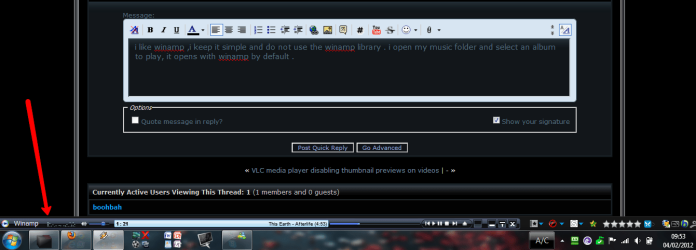
it sits nicely on my menu bar in firefox when im online ,which is most of the time.
its skinnable to make it look better than the default player skin
My Computer
- Computer Manufacturer/Model Number
- Hewlett packard/p6512uk
- OS
- Microsoft Windows 7 Home Premium 64-bit 7600
- CPU
- IIx4 amd athelon 635 processor
- Motherboard
- FOXCONN 2AA9
- Memory
- 2x2gb
- Graphics Card(s)
- ati radeon HD 5450
- Sound Card
- (1) Realtek High Definition Audio (2) AMD High Definition
- Monitor(s) Displays
- samsung lcd tv 32"
- Screen Resolution
- 1360x 768
- Hard Drives
- (1) WDC WD10 01FAES-60Z2A0 SATA Disk Device (2) Maxtor OneTouch USB Device (3) ST310003 33AS USB Device (4) WD My Book 1111 USB Device
- PSU
- ?
- Cooling
- air!
- Keyboard
- wireless hp
- Mouse
- wireless Hp,optical
- Internet Speed
- 1.10mb/s
- Antivirus
- MSE
- Browser
- Firefox
Jaangle also has a lovely minimized mini-player form, that you can drag to wherever on the screen you want.
And if you hover the mouse over the "currently playing" area, there is a flyout which provides lots of neat information from both tag metadata as well as from the collection.
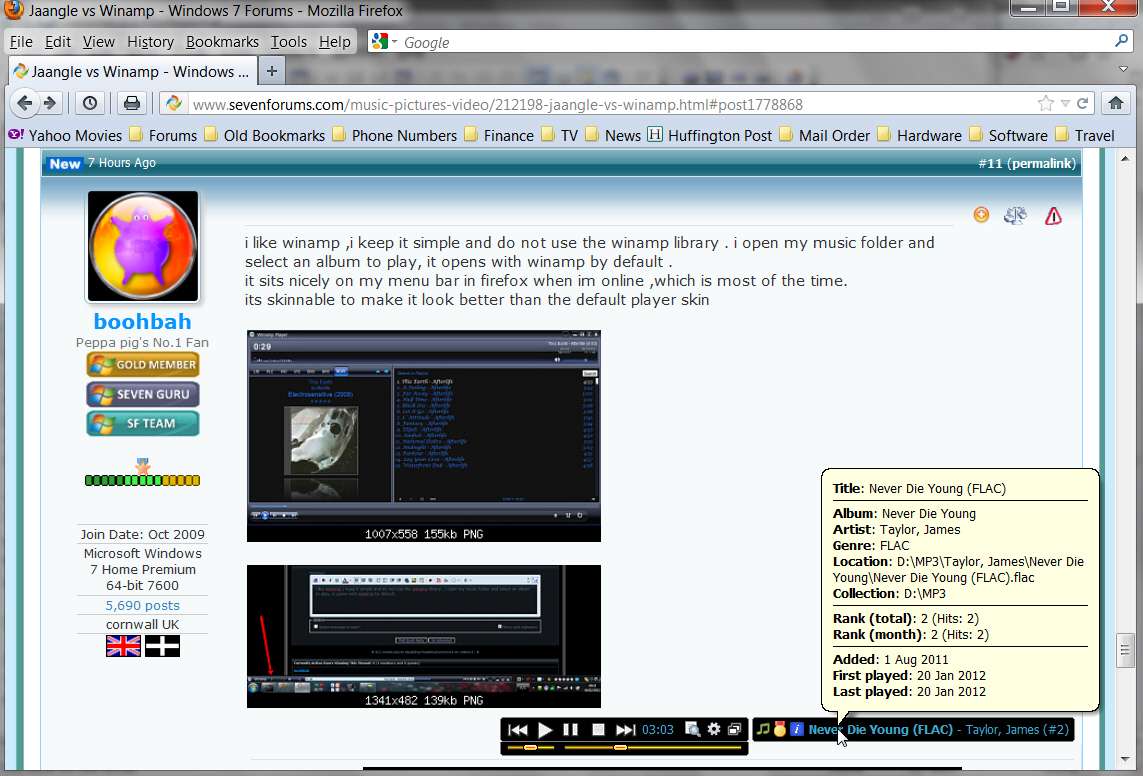
And if you hover the mouse over the "currently playing" area, there is a flyout which provides lots of neat information from both tag metadata as well as from the collection.
My Computer
- Computer type
- PC/Desktop
- Computer Manufacturer/Model Number
- Home-built, two systems (1) and (2)
- OS
- Windows 7 Pro x64 (1), Win7 Pro X64 (2)
- CPU
- i5-3350p 3.1Ghz/6MB-cache (1); E8400 3.0Ghz/6MB-cache (2)
- Motherboard
- ASUS P8Z77-V Pro (1); ASUS P5Q3 (2)
- Memory
- 8GB PC3-12800 DDR3 (1); 4GB PC3-10600 DDR3 (2)
- Graphics Card(s)
- ATI HD7750 (1), (see TV cards); ATI R7 250 (2)
- Sound Card
- Realtek ALC892 HD Audio (1); Realtek ALC1200 HD Audio (2)
- Monitor(s) Displays
- Eizo HD2441W LCD, Eizo S2433W (1); Eizo 24" S2433W (2)
- Screen Resolution
- 1920x1200, 1920x1200 (1); 1920x1200 (2)
- Hard Drives
- (1) 1TB SATA-II (7200RPM), 2x2TB SATA-III (7200RPM), 250GB SATA-III (10000RPM) for OS; 2x2TB external USB 3.0
(2) 320GB SATA-II (7200RPM), 750GB SATA-II (7200RPM), 150GB SATA-II (10000RPM) for OS; 2TB external USB 3.0
- PSU
- Nesteq ECS-6001 600W (1); Nesteq ECS-5001 500W (2)
- Case
- Acousti-Case 360 (1) and (2)
- Cooling
- Noctua NH-U12P SE2 for CPU, 2x120mm case fans (1) and (2)
- Keyboard
- IBM PS/2 (1) and (2)
- Mouse
- Logitech MX Revolution wireless (1); Microsoft wired (2)
- Internet Speed
- 100mbps down / 10mbps up
- Antivirus
- Microsoft Security Essentials; Malwarebyte Anti-Malware Pro
- Browser
- Firefox
- Other Info
- Ceton InfiniTV 4-tuner cablecard-enabled TV card as well as Hauppauge HVR-2250 OTA/ATSC 2-tuner TV card in (1), running under Win7 WMC

If Jaangle can do Milkdrop vis then I'll give it a go, I really like Foobar2000 it has all I need and does support milkdrop. Plus Foobar's tag editing and renaming is a real bonus.
My Computer
- Computer type
- PC/Desktop
- Computer Manufacturer/Model Number
- Self Built
- OS
- Windows 7 Home Premium (64 bit)
- CPU
- Intel I5 2500K 3.3Ghz Stock
- Motherboard
- Asus P8H 61-M LE USB 3
- Memory
- 8Gig Kingston DDRIII HyperX Blue 1333 Mhz
- Graphics Card(s)
- AMD Sapphire 7870 2GB
- Sound Card
- Creative Fatality Pro
- Monitor(s) Displays
- 27" BENQ LED
- Screen Resolution
- 1920X1080
- Hard Drives
- 1 x OCZ Agility 3 120GB SSD
1 x Seagate 250GB
1 x Western Digital 1000GB
1 x HP 500GB
- PSU
- 700W Coolermaster Stealth Pro etc
- Case
- Coolermaster Scout
- Cooling
- Some fans
- Keyboard
- Some Logitech type.
- Mouse
- Logitech MX518
- Internet Speed
- Wireless 8mb
- Other Info
- Canon Scanner
Epson Printer
Nikon DSLR 3000
Wacom Tablet
There's no support for visualizations in Jaangle.If Jaangle can do Milkdrop vis then I'll give it a go, I really like Foobar2000 it has all I need and does support milkdrop.
Well Jaangle certainly does have "Properties" on music files (i.e. the ability to edit tag data, rename the file, etc.) but it's fairly weak in this regard and does not maintain both ID3v1 and ID3v2 tags simultaneously, as one would hope.Plus Foobar's tag editing and renaming is a real bonus.
But I am not using Jaangle to be a tag editor. That's what MP3Tag or other dedicated tag editor program is guaranteed to do far better.
I am using Jaangle to be a music collection organizer/player/jukebox, which also presents album art, photos, bios, reviews, track lists, etc., and supports simple/sophisticated search, creates M3U external playlists if I want, etc. And at this, it is superb.
My Computer
- Computer type
- PC/Desktop
- Computer Manufacturer/Model Number
- Home-built, two systems (1) and (2)
- OS
- Windows 7 Pro x64 (1), Win7 Pro X64 (2)
- CPU
- i5-3350p 3.1Ghz/6MB-cache (1); E8400 3.0Ghz/6MB-cache (2)
- Motherboard
- ASUS P8Z77-V Pro (1); ASUS P5Q3 (2)
- Memory
- 8GB PC3-12800 DDR3 (1); 4GB PC3-10600 DDR3 (2)
- Graphics Card(s)
- ATI HD7750 (1), (see TV cards); ATI R7 250 (2)
- Sound Card
- Realtek ALC892 HD Audio (1); Realtek ALC1200 HD Audio (2)
- Monitor(s) Displays
- Eizo HD2441W LCD, Eizo S2433W (1); Eizo 24" S2433W (2)
- Screen Resolution
- 1920x1200, 1920x1200 (1); 1920x1200 (2)
- Hard Drives
- (1) 1TB SATA-II (7200RPM), 2x2TB SATA-III (7200RPM), 250GB SATA-III (10000RPM) for OS; 2x2TB external USB 3.0
(2) 320GB SATA-II (7200RPM), 750GB SATA-II (7200RPM), 150GB SATA-II (10000RPM) for OS; 2TB external USB 3.0
- PSU
- Nesteq ECS-6001 600W (1); Nesteq ECS-5001 500W (2)
- Case
- Acousti-Case 360 (1) and (2)
- Cooling
- Noctua NH-U12P SE2 for CPU, 2x120mm case fans (1) and (2)
- Keyboard
- IBM PS/2 (1) and (2)
- Mouse
- Logitech MX Revolution wireless (1); Microsoft wired (2)
- Internet Speed
- 100mbps down / 10mbps up
- Antivirus
- Microsoft Security Essentials; Malwarebyte Anti-Malware Pro
- Browser
- Firefox
- Other Info
- Ceton InfiniTV 4-tuner cablecard-enabled TV card as well as Hauppauge HVR-2250 OTA/ATSC 2-tuner TV card in (1), running under Win7 WMC

Should one really give an opinion about something one doesn't know anything about? I had never heard of Jaangle till a few minutes back so I have no opinion about it. It may be even better than WinAmp for all I know.
But having used WinAmp for over 15 years, I can vouch that it is an excellent program. I recently read on the Net that WinAmp is also giving there immediately earlier full version for free.
But having used WinAmp for over 15 years, I can vouch that it is an excellent program. I recently read on the Net that WinAmp is also giving there immediately earlier full version for free.
I'm not sure what you mean. People had opinions and they expressed them.....the very same thing you did yourself. *shrugs* When a person asks a question with no right answer...all you are going to get in return is opinions.People, why are you shoving opinions if you don't actually have one? xD
That being said, to the OP, download them both and try them out. Throw MediaMonkey (my choice) in there and see which you like best. ALl we can do is give opinions...in the end, you'll have to decide.
My Computer
- Computer Manufacturer/Model Number
- Custom Built
- OS
- Windows 7 Pro with SP1 32bit
- Motherboard
- Intel D845GVS1 X86-based PC
- Memory
- 2 gigs of RAM
- Graphics Card(s)
- Intel(R) 82845G/GL/GE/PE/GV Graphics Controller
- Sound Card
- Realtek AC'97 Audio
- Monitor(s) Displays
- Samsung SyncMaster 931BF Black 19" LCD Monitor
- Screen Resolution
- 1280X960
- Hard Drives
- 1. SAMSUNG SP0822N ATA Device ~ 80 GigaBytes
2. Seagate FreeAgent Go USB Device ~ 500 GigaBytes
- Keyboard
- COMPAQ Standard PS/2 Keyboard
- Mouse
- iBall Laser Precise Speedster
- Internet Speed
- 4 mb/sec
The "standard" version of Winamp has all the music playing capabilities you could want. It's always been free.I recently read on the Net that WinAmp is also giving there immediately earlier full version for free.
I, myself, don't need or want any of the "Pro" features and haven't paid anything for Winamp for 15 years.
My Computer
- Computer type
- PC/Desktop
- Computer Manufacturer/Model Number
- Home-built, two systems (1) and (2)
- OS
- Windows 7 Pro x64 (1), Win7 Pro X64 (2)
- CPU
- i5-3350p 3.1Ghz/6MB-cache (1); E8400 3.0Ghz/6MB-cache (2)
- Motherboard
- ASUS P8Z77-V Pro (1); ASUS P5Q3 (2)
- Memory
- 8GB PC3-12800 DDR3 (1); 4GB PC3-10600 DDR3 (2)
- Graphics Card(s)
- ATI HD7750 (1), (see TV cards); ATI R7 250 (2)
- Sound Card
- Realtek ALC892 HD Audio (1); Realtek ALC1200 HD Audio (2)
- Monitor(s) Displays
- Eizo HD2441W LCD, Eizo S2433W (1); Eizo 24" S2433W (2)
- Screen Resolution
- 1920x1200, 1920x1200 (1); 1920x1200 (2)
- Hard Drives
- (1) 1TB SATA-II (7200RPM), 2x2TB SATA-III (7200RPM), 250GB SATA-III (10000RPM) for OS; 2x2TB external USB 3.0
(2) 320GB SATA-II (7200RPM), 750GB SATA-II (7200RPM), 150GB SATA-II (10000RPM) for OS; 2TB external USB 3.0
- PSU
- Nesteq ECS-6001 600W (1); Nesteq ECS-5001 500W (2)
- Case
- Acousti-Case 360 (1) and (2)
- Cooling
- Noctua NH-U12P SE2 for CPU, 2x120mm case fans (1) and (2)
- Keyboard
- IBM PS/2 (1) and (2)
- Mouse
- Logitech MX Revolution wireless (1); Microsoft wired (2)
- Internet Speed
- 100mbps down / 10mbps up
- Antivirus
- Microsoft Security Essentials; Malwarebyte Anti-Malware Pro
- Browser
- Firefox
- Other Info
- Ceton InfiniTV 4-tuner cablecard-enabled TV card as well as Hauppauge HVR-2250 OTA/ATSC 2-tuner TV card in (1), running under Win7 WMC