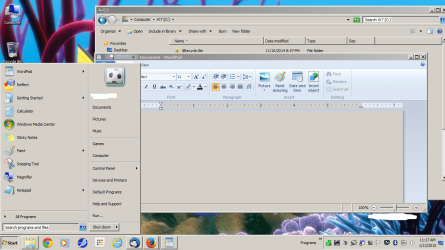
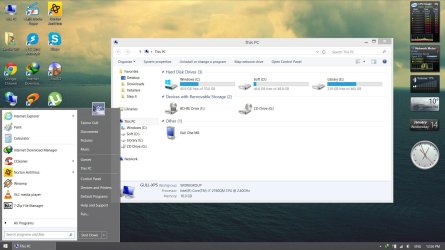
I can't type anything in the start button and search locally only by default
My Computer
At a glance
Win-7-Pro64bit 7-H-Prem-64biti7-5930K 2nd i9-9940x both water blocked VRM'...Trident-z 3200C14 2nd Trident-z 3600C16EVGA 1080ti ftw3 2nd Titan Xp both water blocked
Computer type
PC/Desktop
Computer Manufacturer/Model Number
Custom assembled by me :}
OS
Win-7-Pro64bit 7-H-Prem-64bit
CPU
i7-5930K 2nd i9-9940x both water blocked VRM's too
2nd ASUS X299 Apex/Intel i9-9940x with Custom water loop/7H-Prem-x64/Corsair 450D case/Ram Trident-z 3600C16 4x8gb / Samsung970Evo plus 500gb SSD/Dual ssd EZ swap evo/PSU EVGA SuperNova 1200w-P2 80+Platinum/GPU Titan Xp /8-ML-140 on push-pull on 2-280GTX rads
As in W7 position cursor anywhere on desktop and then simply hold down CTRL and scroll the mouse scroll wheel - Icon sizes will change. Works in W8 / W8.1 too. (Desktop Icons I assume you mean).
Remember also that W10 is still technically pre-BETA software so some bugs will / maybe still exist-- what I am saying is that to all intents and purposes it's almost zero change for a W7 user to use W10 but going to W8.1 especially for a typical office workplace is much more complex.
Remember also that as hardware improves the OS can be made to run much faster - it can use new CPU commands that don't exist in earlier processors.
W10 boots ridiculously fast compared with W7 even with all the debug features Ms obviously has in the preview.
My view on all this is if the upgrade is a reasonable price then it's worth doing - keep W7 as a VM for running the odd program that doesn't work.
There's no reason if you LIKE W7 (and who hated it --very few I think) to keep running it but there's nothing wrong too in at least LOOKING at a new OS and trying out new features. Run it in a VM if you don't want to risk hosing up your current system - or simply take a decent image backup.
I can understand why XP is still around - quite a lot of legacy hardware and software won't even run on W7 but I haven't found anything at home that I run on W7 that doesn't work on W10.
Cheers
jimbo
My Computer
At a glance
Linux CENTOS 7 / various Windows OS'es and se...Intel i7 Intel i58GB, 16GBOn Motherboard
Computer type
PC/Desktop
Computer Manufacturer/Model Number
Custom built, several laptops HP/ASUS
OS
Linux CENTOS 7 / various Windows OS'es and servers
Some basic messed up things are still same in 10 i guess.
-Group by Type thing they messed up in 8.1. Now all the devices gets mixed up like crazy in This PC.
-Including all the folders in This PC. another mess. no need for them there. Also makes navigation pane full of useless stuff
-Detail pane: i feel explorer incomplete without it On. And moving it from bottom to right side was the most stupid idea. It's nothing but a headache now. while at bottom it was one of the best things about Vista/7.
-Ribbon interface: If expanded, takes up lot of explorer space. And if minimized, you 'll need more clicks compared to 7 to get the job done.
-That so called Metro Menu/Apps. Why Legacy Desktop users would want that mess on their computer? Each have their own favourite legacy apps for every thing. Why would they want full screen app which also requires to login and stuff. 7 is dedicated desktop OS without any of useless stuff.
Then there is removal of gadgets/Aero and stuff.
They think suddenly everybody is using Surface Pro for everything.
You can totally REMOVE the Metro stuff from the menu - you never even have to see metro on W10 -- however if you DO have a touch laptop / device being able to use Touch is very nice for some scenarios - especially say when you are giving a power point demo in front of a decent sized audience for example.
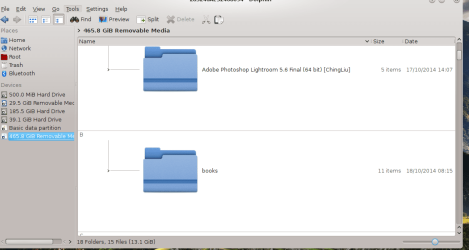
For folder display any decent Linux file browser beats any Windows file explorer hands down - for example I find this type of display really good (and the icons DO expand as you move the slider too). (Dolphin file browser with KDE desktop)
I'd wait and see though before condemning W10 -- it IMO will be fine at release time. W7 really takes an AGE to boot compared with it !!!
Screenshot of a DECENT file browser
Cheers
jimbo
Attachments
snapshot3.png
50.8 KB
· Views: 5
snapshot4.png
37.9 KB
· Views: 4
My Computer
At a glance
Linux CENTOS 7 / various Windows OS'es and se...Intel i7 Intel i58GB, 16GBOn Motherboard
Computer type
PC/Desktop
Computer Manufacturer/Model Number
Custom built, several laptops HP/ASUS
OS
Linux CENTOS 7 / various Windows OS'es and servers
You just said a mouthful, friend! Even if it only was an aggregate of all updates to date (excluding Bing and Silverlight), it would be extremely welcome.
Samsung 128GB 840 Pro SSD (1),
Samsung 4TB 850 EVO SSDs (4)
Samsung 4TB 850 EVO SSDs (16) external backup drives used in 2.5" hot swap bays in the computer.
PSU
Corsair HX750w
Case
Antec Two Hundred v2 (modified)
Cooling
Cooler Master GeminII S524 120mm (fan replaced with a 140mm)
Jimbo you keep referring to boot times ?
I have not seen any difference in speed of startup or boot my friend that is not always a case to refer to
7 is quite fast for myself and anyone that knows how to keep unnecessary startup items from creating startup folders
And have switched to ssd's
7 starts blazing fast for me so there is No difference in timing.
Some of us have gone a very long time Rejecting Bing desktop search for a darn good reason,
It has Zero practical sense as a default search on the start menu.
Cheers.
My Computer
At a glance
Win-7-Pro64bit 7-H-Prem-64biti7-5930K 2nd i9-9940x both water blocked VRM'...Trident-z 3200C14 2nd Trident-z 3600C16EVGA 1080ti ftw3 2nd Titan Xp both water blocked
Computer type
PC/Desktop
Computer Manufacturer/Model Number
Custom assembled by me :}
OS
Win-7-Pro64bit 7-H-Prem-64bit
CPU
i7-5930K 2nd i9-9940x both water blocked VRM's too
2nd ASUS X299 Apex/Intel i9-9940x with Custom water loop/7H-Prem-x64/Corsair 450D case/Ram Trident-z 3600C16 4x8gb / Samsung970Evo plus 500gb SSD/Dual ssd EZ swap evo/PSU EVGA SuperNova 1200w-P2 80+Platinum/GPU Titan Xp /8-ML-140 on push-pull on 2-280GTX rads
Not sure how people set up their computers but apart from a smaller Menu (W7 menu takes up a ridiculous amount of space on a large monitor) and different background colour there's almost no difference in my desktop layout between W10 and W7 - other than the touch keyboard I have enabled in W10.
A lot of the gripes like Bing and Ms accounts instead of Local accounts are probably because people haven't done a basic R.T.F.M and have just pressed Next, Next etc without looking at what they were doing.
I HATED Gadgets and AERO is simply eye candy which probably will be bought back at the next release.
I really don't like the HUGE W7 start menu --it's fine on a small laptop or monitor but gets quite frankly REDICULOUS when viewed on a 50 inch screen !!!.
W10's menu at least is re-sizeable so it doesn't look so ridiculous on a large monitor. You can also delete all those Metr apps on the right side of the menu too if you want a "classic Text" looking menu.
My point is that corporations will upgrade - and to skip W8 is a a good idea - going to W10 is the best route for them. Most of their users will simply have no problem in using the computer just like they've always done.
I really use the Storage spaces feature a lot too -- not available on W7. I have large multi-media libraries and being able to span them across many DIFFERENT SIZE volumes (unlike RAID) gives me far more flexibility too --- I'm not sure how you would manage say a 3 TB Video data base on W7 unless you had large HDD's -- and even then what happens when the disk is full. With storage spaces you just dynamically add another one so your DB can be several HUNDRED TB in size if you want it that large.
By all means keep using W7 - but while it will get security updates for a while forget any nice new features from being added - and that includes hardware too.
Anyway I've said my piece on this -- I'm absolutely NOT against W7 - was one of the best OS'es ever produced - but time moves on. The way I use computers now is so totally different to how I used them when W7 was first released - I probably couldn't have even imagined back then the things I can do now - and having a decent common platform IMO is also a great idea.
Cheers
jimbo
My Computer
At a glance
Linux CENTOS 7 / various Windows OS'es and se...Intel i7 Intel i58GB, 16GBOn Motherboard
Computer type
PC/Desktop
Computer Manufacturer/Model Number
Custom built, several laptops HP/ASUS
OS
Linux CENTOS 7 / various Windows OS'es and servers
Are you basing boot time for windows 10 in the virtual machine because that would not be accurate. I have tested out windows 10 preview. Windows 10 was installed in the 2nd primary partition. Nope, it didn't boot-up faster on my system.
Windows 7 Operating system doesn't brick hard drives.
Here is one thing windows 10 preview can't do exactly that windows 10 preview can't do is this type of gray theme. (I assume windows 8 & 8.1 can't do this either but I never used those systems except for a brief moment).
Attachments
ch1.png
105.9 KB
· Views: 5
My Computer
At a glance
W10 32 bit, XUbuntu 18.xx 64 bitIntel(R) Celeron(R) CPU G1620T @ 2.40GHz, 240...4GBIntel HD graphics
Computer type
PC/Desktop
Computer Manufacturer/Model Number
Dell All in one Inspiron 2020
OS
W10 32 bit, XUbuntu 18.xx 64 bit
CPU
Intel(R) Celeron(R) CPU G1620T @ 2.40GHz, 2400 Mhz
Motherboard
Dell
Memory
4GB
Graphics Card(s)
Intel HD graphics
Sound Card
High Definition Audio Device
Monitor(s) Displays
20 inch Screen
Screen Resolution
W7=1280 x 720 & Linux Mint Xfce=1360 x 768
Hard Drives
500 GB hard drive
Keyboard
Usb
Mouse
Usb
Internet Speed
High-Speed
Antivirus
MSE
Browser
Main Browser Firefox
Other Info
I have done a clean install of Windows 7 using Dell re-installation disk (Dell sent me one). I also use Free Macrium reflect backup and restore.
The fact that ANY NON EMBEDDED OS (such as Linux / Windows FOR DESKTOPS / Windows / Apple Tablets) can Brick a hard drive is quite frankly so utterly absurd as to be not worth commenting upon - unless you downloaded from a Torrent --then you get what you deserve.
Anyway W10 isn't perfect yet --it's STILL Pre-beta and boot up times aren't a mega issue.
The whole point of my answers was to say that going to W10 for most users - especially in a workplace is no big deal (or won't be when the final is released) -- pre Beta software will always have some defects in it - but remarkably few from what I've seen.
A few glitches are to be expected.
But again the whole idea of a desktop OS bricking a HDD shows that you are just mouthing somebody else's posts and you totally haven't a clue how a DESKTOP OS like Windows works.
Android is quite different due to the nature of the OS being written to a phone ROM. Windows isn't written to a ROM but boots totally FROM AN SSD / HDD. To Brick an HDD you have to get into the Microcode of the Disk controller -- which Windows doesn't do. Embedded OS'es are a different matter entirely but even then it's usually possible to re-flash the ROM.
Look at things like Windows to Go which boots TOTALLY from an external HDD even if there's no HDD in the laptop or it's broken. (BTW Windows to Go doesn't exist in W7 !!). Absolutely no messing about with BIOS / HDD controller's ROM etc. Forget about Windows type OS'es bricking HDD's.
Anyway I'm out of this thread - use W7 for as long as you like - nothing to stop you - but you'll miss out on new software and techniques and if you work in anything to do with computers you'll be stuck more and more in the old Legacy support rather than get involved in nice new interesting development work.
Cheers
jimbo
My Computer
At a glance
Linux CENTOS 7 / various Windows OS'es and se...Intel i7 Intel i58GB, 16GBOn Motherboard
Computer type
PC/Desktop
Computer Manufacturer/Model Number
Custom built, several laptops HP/ASUS
OS
Linux CENTOS 7 / various Windows OS'es and servers
You never even have to SEE metro if you don't want to. You will have to remove the right hand part of the W10 menu (not difficult and easily done). Remember also that W10 isn't in Final yet so things might change on the configuration issue.
Cheers
jimbo
Attachments
w10.png
1.6 MB
· Views: 1
My Computer
At a glance
Linux CENTOS 7 / various Windows OS'es and se...Intel i7 Intel i58GB, 16GBOn Motherboard
Computer type
PC/Desktop
Computer Manufacturer/Model Number
Custom built, several laptops HP/ASUS
OS
Linux CENTOS 7 / various Windows OS'es and servers
I doubt that's what Archie is talking about,
And removing the right side is lame it needs to be customizable = Text only if that's what people want,
If Microsoft would stop all of this mobile and touch screen crap for a desktop this would not be happening.
My Computer
At a glance
Win-7-Pro64bit 7-H-Prem-64biti7-5930K 2nd i9-9940x both water blocked VRM'...Trident-z 3200C14 2nd Trident-z 3600C16EVGA 1080ti ftw3 2nd Titan Xp both water blocked
Computer type
PC/Desktop
Computer Manufacturer/Model Number
Custom assembled by me :}
OS
Win-7-Pro64bit 7-H-Prem-64bit
CPU
i7-5930K 2nd i9-9940x both water blocked VRM's too
2nd ASUS X299 Apex/Intel i9-9940x with Custom water loop/7H-Prem-x64/Corsair 450D case/Ram Trident-z 3600C16 4x8gb / Samsung970Evo plus 500gb SSD/Dual ssd EZ swap evo/PSU EVGA SuperNova 1200w-P2 80+Platinum/GPU Titan Xp /8-ML-140 on push-pull on 2-280GTX rads
That will loss a full functional start menu. Metro in start menu is not the biggest deal, but the taksbar/start menu/explorer window designs are as dumb as 8 in 10.
My Computer
At a glance
Microsoft Windows 10 Pro Insider Preview 64-bitIntel(R) Core(TM) i3-4130 CPU @ 3.40GHzCorsair Vengence 4GB x2 (8.00GB Dual-Channel ...2047MB GeForce GTS 450 (ZOTAC International)
Taskbar is fine in W10 -- go back a few posts in the thread as I've added a pic of W10 start (desktop) menu - Taskbar works exactly as in W7 and you can have the same custom toolbars too if you want.
Metro probably will be settable at install time to either include or not depending on the type of device / environment you want to use but it's only a few clicks to remove those menu entries.
Cheers
jimbo
My Computer
At a glance
Linux CENTOS 7 / various Windows OS'es and se...Intel i7 Intel i58GB, 16GBOn Motherboard
Computer type
PC/Desktop
Computer Manufacturer/Model Number
Custom built, several laptops HP/ASUS
OS
Linux CENTOS 7 / various Windows OS'es and servers
There is a whole story (Not just postings) that windows 10 preview did seem to brick a certain brand of hard drives. We are not sure if it is really brick or if windows 10 preview somehow did a partition overlap causing it to seem bricked. We also don't know if a image restore fixed that issue. There is so many ways a hard disk can seem bricked when it is not. One example even with windows 7 if somehow an active partition get changed or disabled, it will cause a boot error and you have to select or active a partition using the repair or install disk. That actually happened to me when I was using windows 10 preview.
You said
I challenge a lot of W7 users to tell me what they CAN'T do in W10 that they CAN do in W7 (apart possibly from some really old legacy programs).
Actually it was a motherboard issue not hdd issue
hdd was just the object put to sleep
My Computer
At a glance
Win-7-Pro64bit 7-H-Prem-64biti7-5930K 2nd i9-9940x both water blocked VRM'...Trident-z 3200C14 2nd Trident-z 3600C16EVGA 1080ti ftw3 2nd Titan Xp both water blocked
Computer type
PC/Desktop
Computer Manufacturer/Model Number
Custom assembled by me :}
OS
Win-7-Pro64bit 7-H-Prem-64bit
CPU
i7-5930K 2nd i9-9940x both water blocked VRM's too
2nd ASUS X299 Apex/Intel i9-9940x with Custom water loop/7H-Prem-x64/Corsair 450D case/Ram Trident-z 3600C16 4x8gb / Samsung970Evo plus 500gb SSD/Dual ssd EZ swap evo/PSU EVGA SuperNova 1200w-P2 80+Platinum/GPU Titan Xp /8-ML-140 on push-pull on 2-280GTX rads
You never even have to SEE metro if you don't want to. You will have to remove the right hand part of the W10 menu (not difficult and easily done). Remember also that W10 isn't in Final yet so things might change on the configuration issue.
W8 could be customised to LOOK like W7 but operating it was quite different - intuitively you could do the same thing on W7 and W8 and you'd get different results. W8.1 was slightly better but W10 can operate about 99.9% identically to how you worked on W7.
Remember here this W10 preview is aimed primarily at WORKPLACE Desktop users rather than home users / hobbyists who might have a lot of very different hardware to stuff usually found in Offices. The Consumer preview will certainly be a bit or maybe a lot different and the final release will definitely have some features we haven't even thought about yet including different installation options such as Mobile, Desktop or "Hybrid" (combined).
I'm saying for those that want to upgrade and use new features for example the Storage Spaces I've mentioned before can do so much easier by skipping W8/8.1 entirely and trying W10.
W7 is fine for those that like it - but remember now it's not going to get anything new added apart from security fixes - which if you are happy with your hardware etc - fine.
I used W7 for a few years - but I'm quite happy playing with the new stuff and unlike W8 I think Ms has actually rectified a lot of the complaints.
As far as Gadgets are concerned -- decent RE-SIZEABLE dynamically updating dockable floating SENSIBLE Metro apps could actually replace these quite nicely - I wouldn't mind for example a Borderless updating stock tracker for example which can be moved and re-sized at will.
Note though these must be BORDERLESS for the best desktop effects. Re-sizeable is also necessary - a lot of people now have several monitors including some very large ones which wasn't the case when W7 first appeared.
If you actually reflect what Gadgets do - they are essentially a pre-cursor of what decent Metro apps could be -- OK there aren't any decent ones yet but that's up to the next lot of developers to produce some instead of the rather pathetic lot from Ms we've seen so far.
Anyway that REALLY is it from me on this thread.
Cheers
jimbo
My Computer
At a glance
Linux CENTOS 7 / various Windows OS'es and se...Intel i7 Intel i58GB, 16GBOn Motherboard
Computer type
PC/Desktop
Computer Manufacturer/Model Number
Custom built, several laptops HP/ASUS
OS
Linux CENTOS 7 / various Windows OS'es and servers